BLOG about IBM Rhapsody. Contains technical information as well as more private travel stories.

Tag: Automotive (Page 1 of 2)

Automotive Day 2025 in Munich – And Yes, I Have VIP Tickets to Give Away!

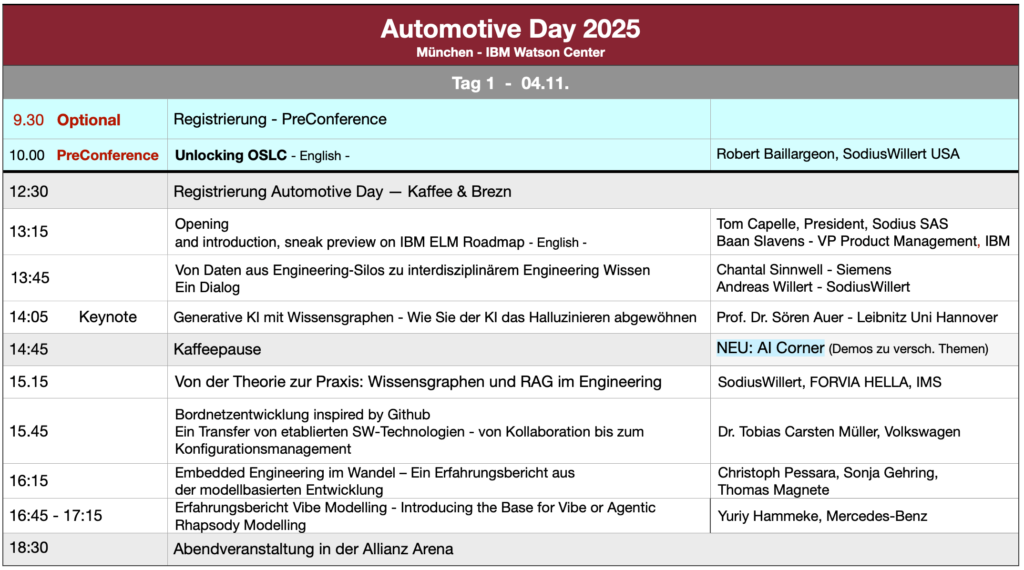
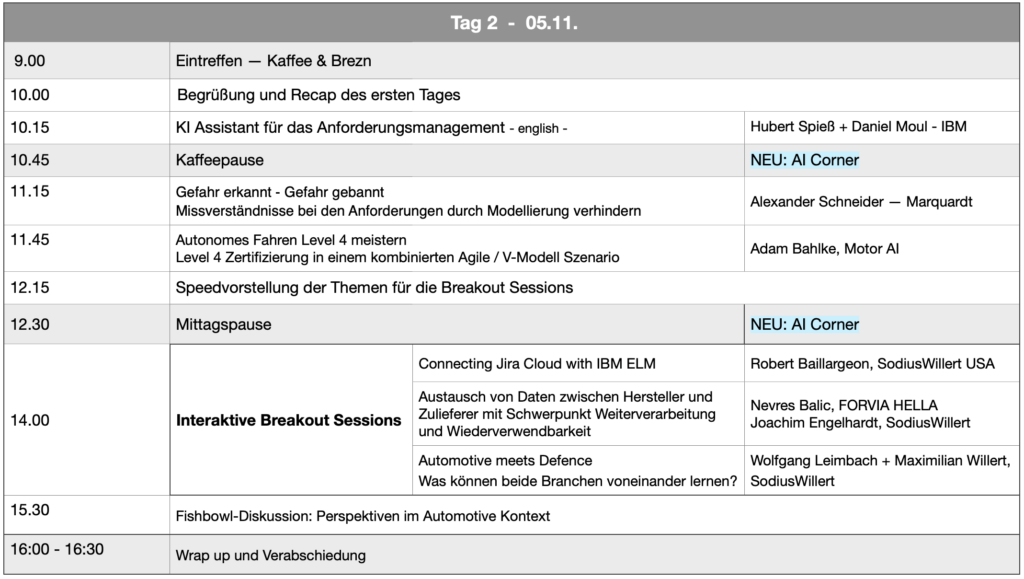
So here we are again. November 4-5, 2025. Munich. The IBM Watson Center. And yes, before you ask: it’s that impressive glass building on Mies-van-der-Rohe-Straße, not some random hotel conference room. Think less “generic conference center” and more “wow, they actually built this.” With a stunning view on the Alps included.

The Automotive Day is back, and this time with something I’m genuinely excited about: AI that might actually be useful instead of just being AI for the sake of having AI buzzwords on a slide deck.

Why Am I Writing About This?

Fair question. Look, I’ve been to enough conferences to know the difference between “we organized some presentations and called it a day” and events where people actually want to be there. The Automotive Day falls firmly in the second category.

This year’s lineup? Professor Sören Auer doing a keynote on “Generative AI with Knowledge Graphs.” Now, I know what you’re thinking: “Oh great, another AI keynote.” But hear me out—this is about making AI work with actual engineering knowledge, not just spitting out random code that looks plausible but breaks everything.

The Good Stuff: Real Projects, Real People

Here’s what I’m looking forward to: experience reports from people actually doing the work. Volkswagen, Thomas Magnete, Marquardt, and MotorAI are all presenting. These aren’t theoretical talks—these are “here’s what we tried, here’s what broke, here’s what actually worked” sessions.

And we managed to get Baan Slavens, VP Product Management at IBM, to talk about the ELM Tools roadmap. If you’re working with IBM Engineering Lifecycle Management tools (and if you’re reading this blog, chances are you do), this is your chance to hear what’s coming and—more importantly—ask questions directly.

OSLC: Finally, Someone Explains It Properly

There’s a whole session on OSLC (Open Services for Lifecycle Collaboration). I know, I know, it sounds like one of those standards that IT departments get excited about while the rest of us just want our tools to talk to each other without breaking.

But this session actually covers the practical stuff: integration, authentication, reporting, and how to manage OSLC at scale. They’re even building a simple “link loader” during the session to show how it actually works. Actual demonstrations > PowerPoint slides every single time.

The Breakout Sessions

Here’s what makes the Automotive Day different from just sitting in a room listening to presentations: the Breakout Sessions. These are where you actually get to talk, share your experiences, and—this is important—complain about things that don’t work.

Every year, participants tell me the real value isn’t just the scheduled presentations. It’s the conversations during coffee breaks, the “oh, you’re dealing with that too?” moments, and finding out you’re not the only one struggling with that one particular ISO 26262 requirement that makes no sense.

Two new topics this year that I’m particularly curious about (but won’t spoil here—you’ll have to come see for yourself).

The Practical Details

Dates: November 4-5, 2025
Location: IBM Watson Center Munich, Mies-van-der-Rohe-Straße 6, 80807 München
Hotel Recommendation: Motel One München-Parkstadt Schwabing (walking distance, basically)

Pricing:

  • Early Bird (until August 18): €199 + VAT
  • Regular Price (from August 19): €269 + VAT

German language conference, by the way. If your German is rusty, don’t worry—half the technical terms are in English anyway, and everyone switches to English when needed.

And Here’s the Part You Actually Scrolled Down For: VIP Tickets

I have some VIP tickets to give away. How do you get one? Simple: send me an email. First come, first serve. That’s it. No complicated application process, no essay about why you deserve it, just… send an email.

The tickets are limited (obviously), so if you’re interested, don’t wait until the last minute thinking “oh, I’ll do that tomorrow.” Tomorrow never comes. Trust me, I know this from personal experience with my own to-do lists.

Should You Come?

If you’re working in automotive systems or software engineering, dealing with ASPICE, AUTOSAR, ISO 26262, or any of those other acronyms that make our lives interesting, then yes.

If you want to hear from people who are actually implementing this stuff instead of consultants who only know it in theory, then yes.

If you want to network with people who understand why you care about the difference between a component and a module, and who won’t look at you funny when you start complaining about tool integration issues, then definitely yes.

What Participants Said Before

Just so you know I’m not making up how useful this event is, here’s what people said about previous Automotive Days:

“It was a very interesting event, can gladly be longer!”

“Very helpful and informative!!!”

“Top event, great atmosphere, excellent talks and presentations”

“It was fantastic. Great location, very good presentations and high-caliber conversations”

“Informative presentations, good networking opportunities. Looking beyond the horizon into the domains of mechanics and electronics”

Final Thoughts

Look, I get it. November. Another conference. More travel. But if you’re going to spend two days at an automotive engineering event, this is the one worth attending.

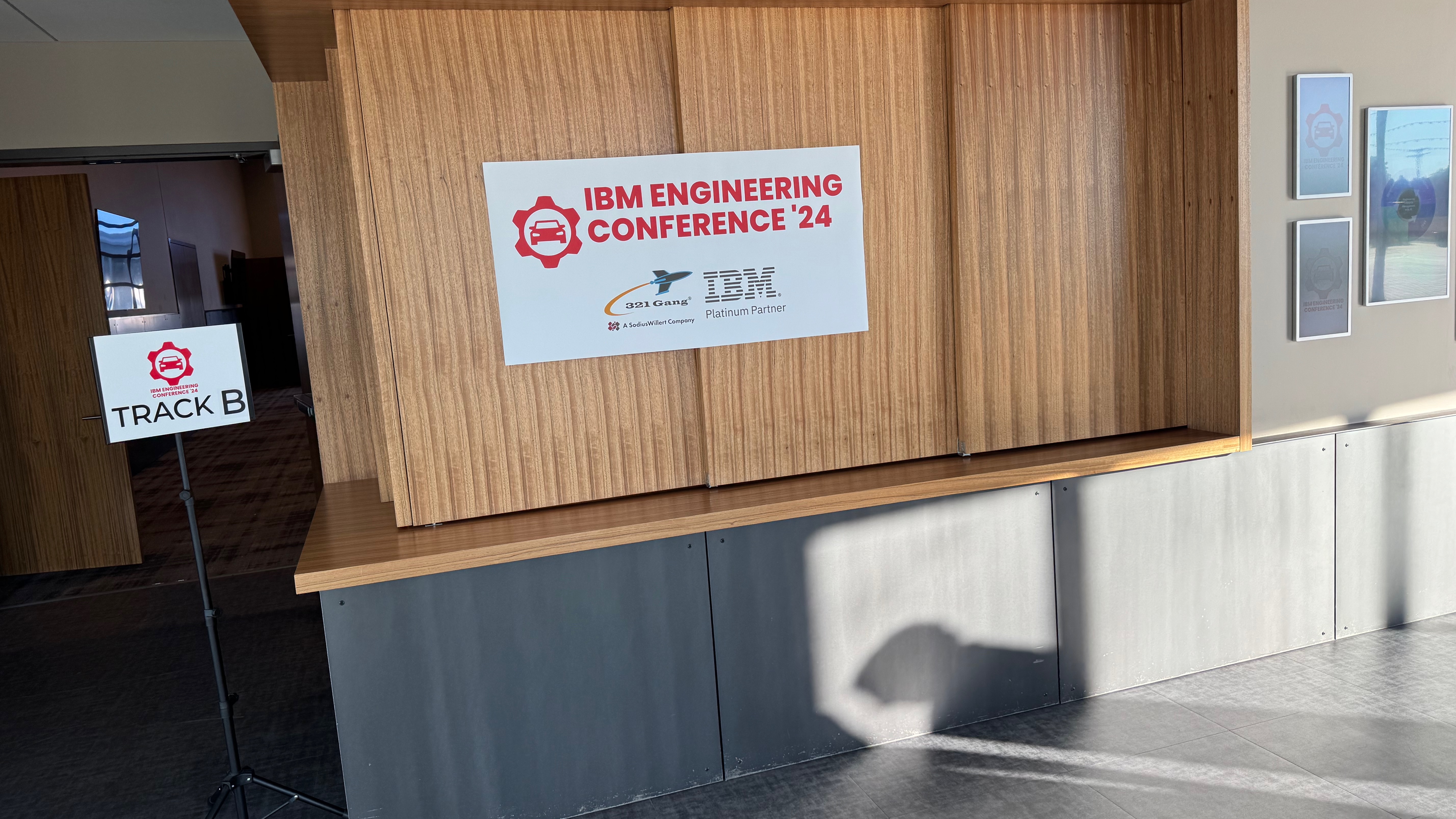
Want to see what it was like last year? Check out the 2024 program booklet or watch the video retrospective.

And seriously, if you want a VIP ticket: email me now. Don’t bookmark this page thinking you’ll remember later. You won’t. None of us do.

See you in Munich!

Register here: https://www.sodiuswillert.com/de/events/automotive-day


P.S. The IBM Watson Center has great views from the upper floors. Just saying. Worth showing up early to check it out.

P.P.S. If you’re flying in, Munich airport is well-connected. The city center is about 40 minutes by train. Much better than… well, Las Vegas. (See my other posts if you want to know how I feel about Vegas…)
Detroit Rhapsody Rock Units

Introduction

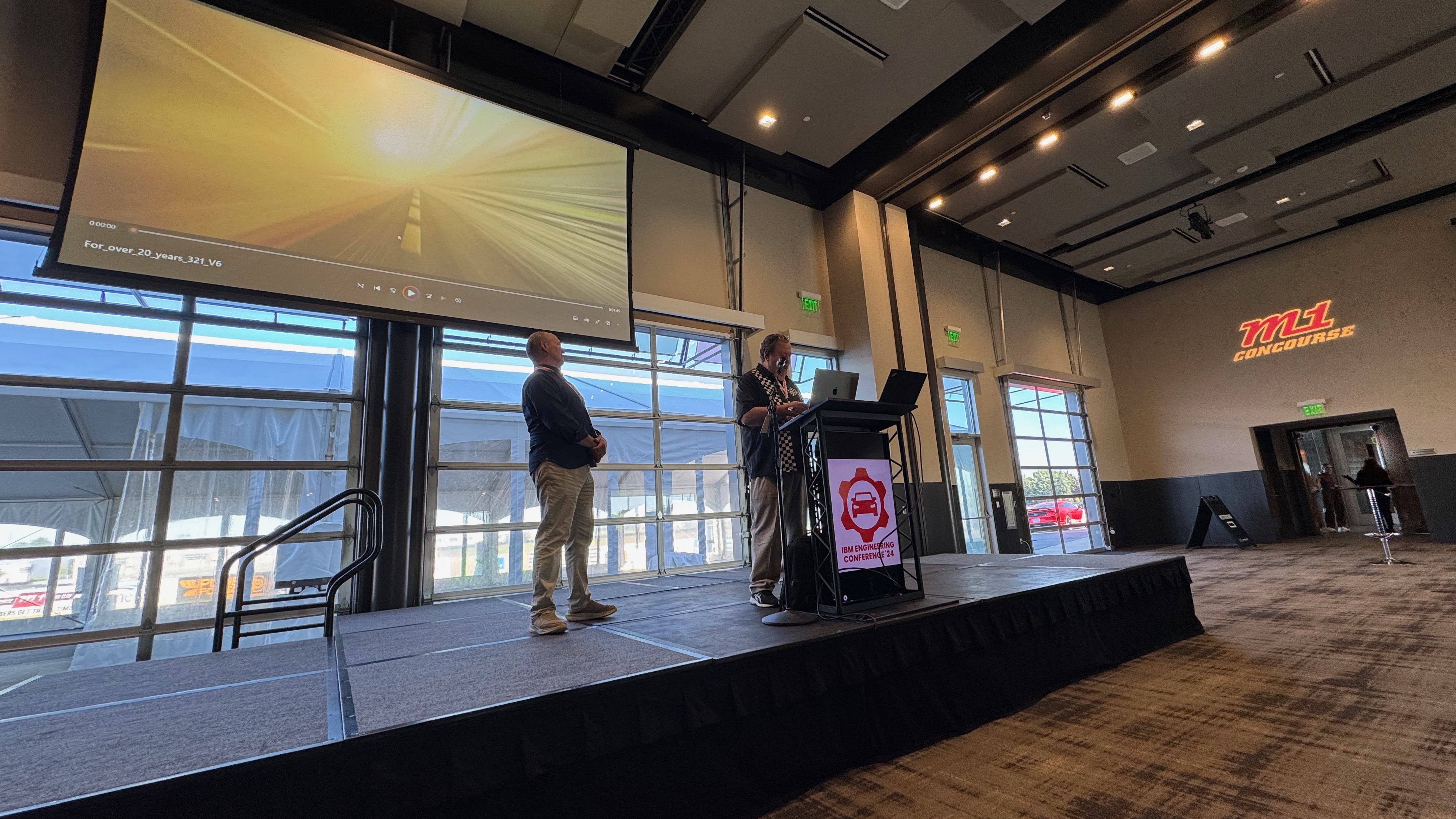
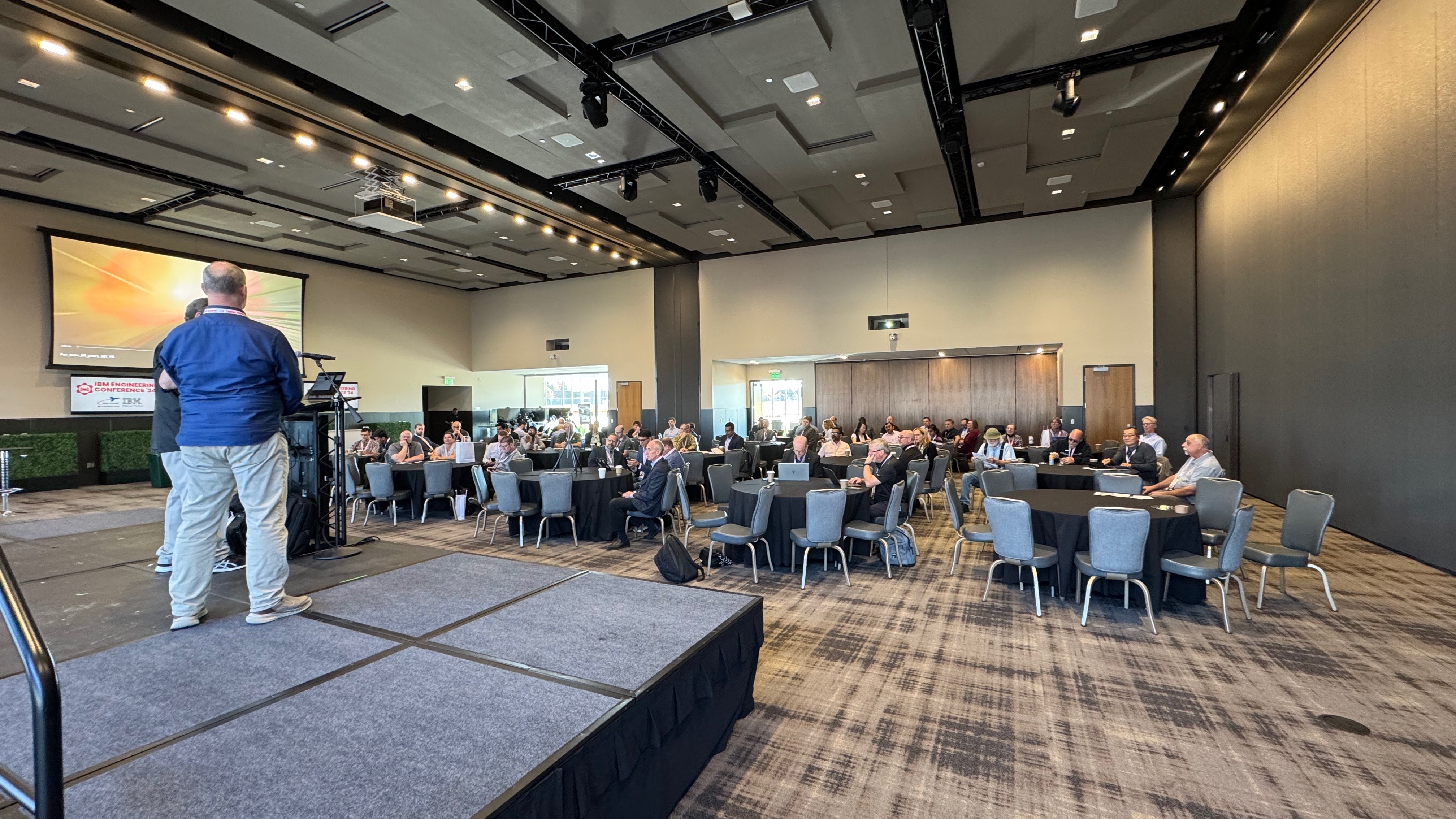
For our US Automotive Day I flew to Detroit again! I really like Detroit, it’s way better than its reputation!
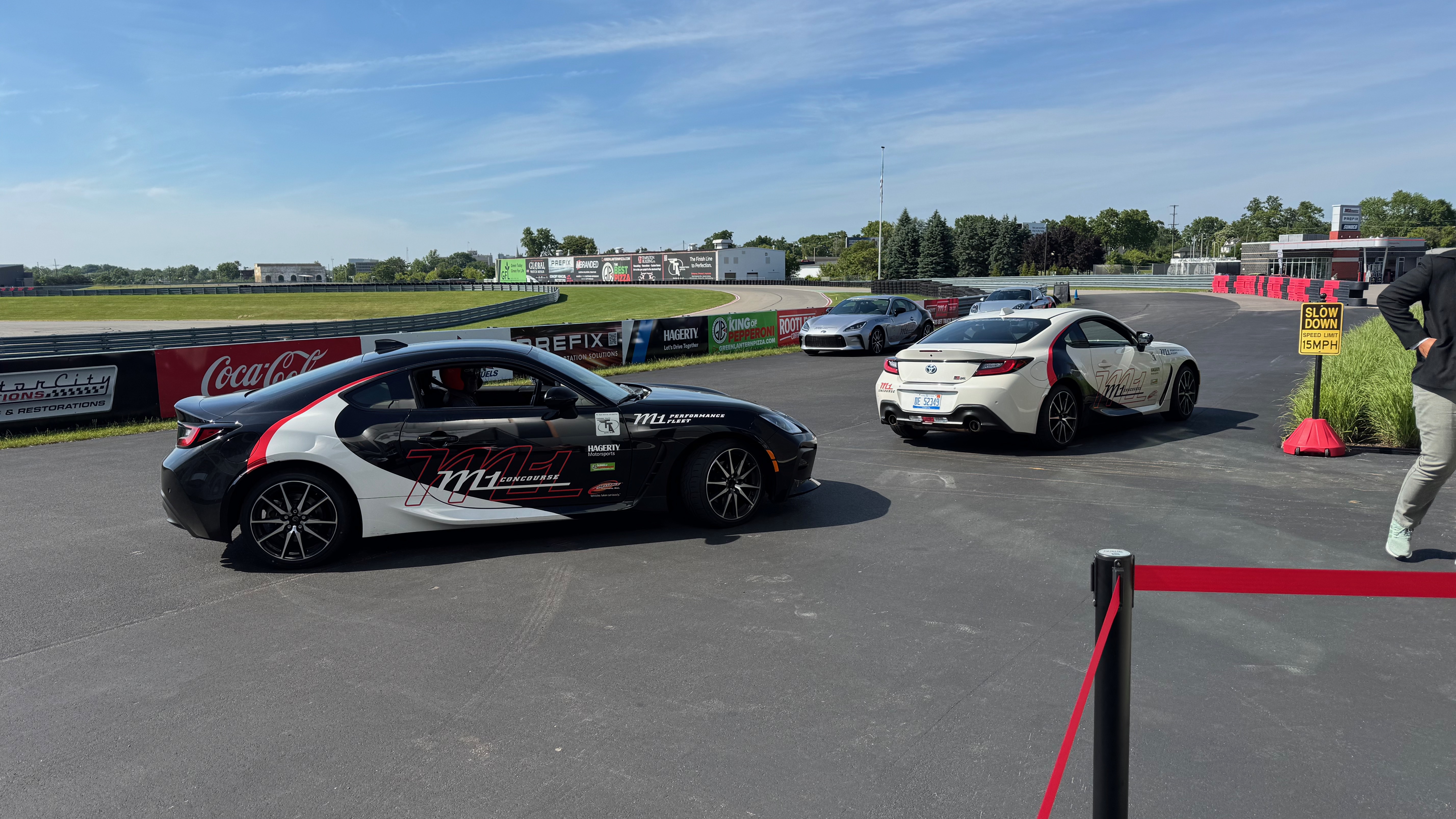
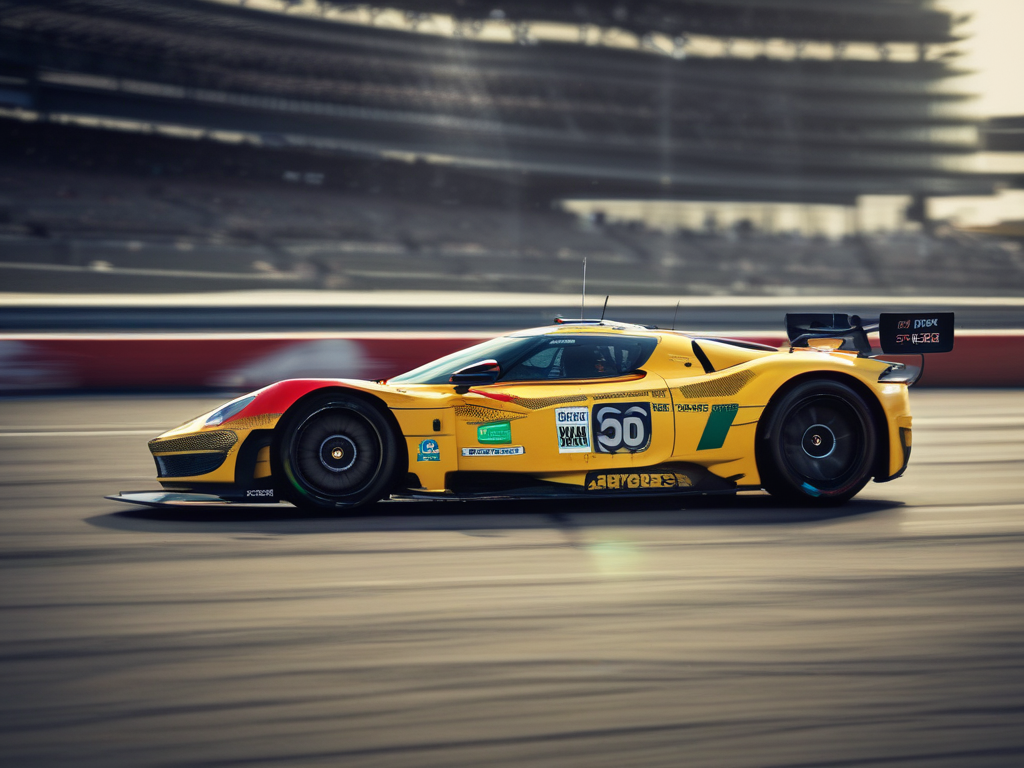
We organized a day after the German Automotive Day example. Our Marketing Guru, Tom Hollowell, discovered a racing track. It offered a great conference place and a race track where we were driven around.
No we were not allowed to take the wheel, unfortunately, but we were chauffeured by 2 professional racing drivers.
It was pretty awesome. We had just enough rides for everybody. Luckily, not everybody had enough nerves to go in a fast car around the track.
So I went twice… Loved it…

Rhapsody Units

There are still people asking what “Units” are in Rhapsody. And it is easy: it is the smallest “Unit” you can store in CM separately. Default units are:

  • Model
  • Package
  • Component

Units are easily ( if you have good eyes, that is… ) recognizable by the small icon decorator in the lower left corner. The decorator is either Grey (saved) or Red ( not saved). This indicates that Rhapsody will store that “unit” in a separate file. It allows it to be stored separately in a CM (That is mostly file-based). By right-clicking on a “non-Unit” element in Rhapsody, you can select “Create Unit.” This will give you the opportunity to store a Unit in its own file. The property General::Model::DiagramIsSavedUnit causes all diagrams to be saved in a separate file. In the same Subject::Metaclass, you can also find properties like BlockIsSavedUnit, ClassIsSavedUnit, and ComponentFileIsSavedUnit. There are also properties like ComponentIsSavedUnit (Default on), FileIsSavedUnit, and FolderIsSavedUnit. You will find ObjectIsSavedUnit and PackageIsSavedUnit (Default on) too. With these, you can control what is a Unit and what not.

The file extensions are: (add an “x” for the post 8.3 file format)

ElementOld < 8.3New > 8.3
Model.rpy.rpyx
Package/Profile.sbs.sbsx
Component.cmp.cmpx
Object Model Diagram.omd.omdx
Sequence Diagram.msc.mscx
Use-Case Diagram.ucd.ucdx
Structure Diagram.std.stdx
Deployment Diagram.dpd.dpdx
Collaboration Diagram.clb.clbx
Panel Diagram.pld.pldx
Timing Diagram.tmd.tmdx
Class/Object.cls.clsx
Did I miss one????????x


Ann Arbor

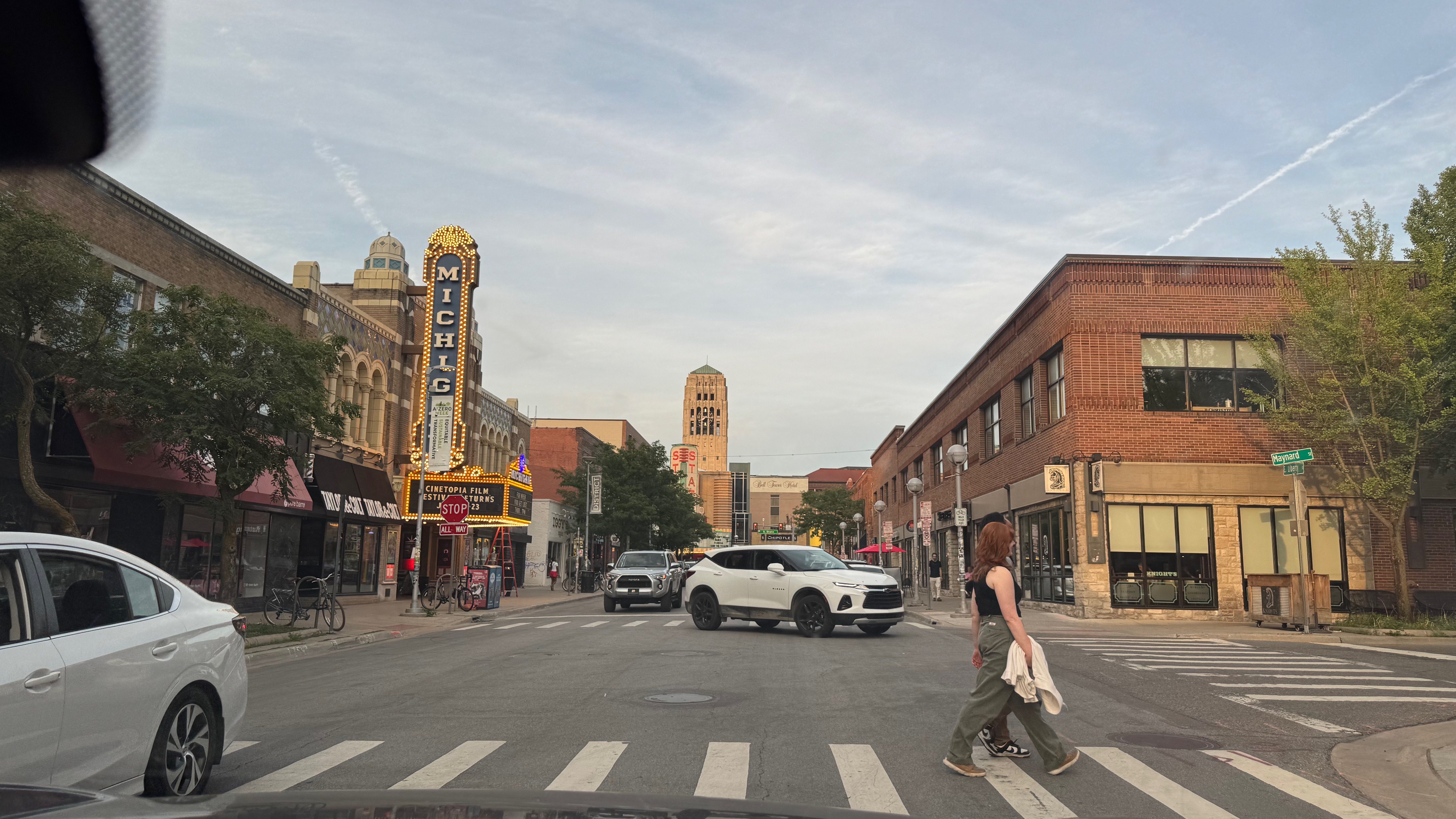
After the event I was invited by Tom and Carol to a dinner in Ann Arbor. A beautiful place, we drove around after dinner. (Thanks again! It was great!) Tom always posts sunsets on FaceBook… unbeatable.

Have fun modeling with Rhapsody

Walter van der Heiden ( walter@sodiuswillert.com )

Rhapsody vs Preevision

Introduction

When developing systems or software for an Automotive environment you cannot avoid using AUTOSAR. This is the standard for exchanging information between involved parties inside Automotive projects, can be an OEM requesting a TIERx to do the development of a certain ECU or small companies doing parts of software applications that will run on that ECU.
AUTOSAR also defines a standard software layer (BSW or in Adaptive ARA) that helps you developing on different microcontrollers without really knowing all details.
Then there is the Operating system, which on the Classic Platform is almost completely statically defined and generated out of the information in your AUTOSAR model. Also called RTE.
There are several companies where you can purchase tools to help you creating applications and generate the stuff that you need to make a complete production ready application.
They are from companies like Vector, Elektrobit, dSpace, Dassault but also from Siemens (former Mentor). We used to use ArcCore but they have been purchased by Vector and integrated in their tools now.
The problem with most of these tools is that they are looking at things from the “low-level” side. There is a lot of detailing necessary before you can work with these tools and that certainly is not helpful when you only want to create an overview of the blocks you are going to implement.
You can use Visio or a cheap UML tool for that, this will not give you the benefits you want since they are solutions that will not allow you to incorporate that information in a dynamic way in your AUTOSAR model.
There are also tools from previous named companies that try to overcome this disadvantage but these tools still work in a proprietary world, not with an open standard like UML or SysML

Why UML (or SysML)?

These are standards. And standards that were developed quite a while ago with many people that have knowledge of them. Standards that are taught on universities.
The UML was made out of lots of other smaller pieces of standards that were already available, hence the “Unified” in the name. It was made especially for handling the growing complexity of software projects. Source code (generation) played a role, of course, but the emphasise was on the handling of complexity. This was done with different diagram types for different aspects of the system to be developed. Every person that is involved in the project can enter information and extract information from the UML model and the exact right level without being disturbed by information that is not relevant for that person.

Rhapsody AUTOSAR profile

Rhapsody has, for quite a while now, an AUTOSAR profile. This allows Rhapsody to read in and write ARXML files. They are then stored in a Rhapsody Model so they can be edited on an AUTOSAR level. Rhapsody can even convert information between AUTOSAR versions!!
All AUTOSAR Elements are implemented and can be edited. This is not always the most comfortable way, some things are better done by using an AUTOSAR dedicated tool like Vector’s DaVinci for instance.
For use with the Code Generation from Rhapsody we also have an “AUTOSAR lite” profile

Rhapsody Rulezzz!

So, how do we do that with Rhapsody then?
Rhapsody is a UML tool that exists since 1996. It also does SysML (Because that is a UML profile, although that will change in the SysML 2.0 release).
But that is not all, the tool is part of the IBM Engineering Tools and can exchange information with DOORS, DNG and many other tools via OSLC on the Jazz platform.So your requirements from DOORS or DNG can be seen and linked inside Rhapsody. The same platform also allows you to use widespread external tools like Jira from Atlassian or even link to your production using WindChill from PTC.
And as already said above: Rhapsody can read ARXML files and exchange them with all other AUTOSAR enabled tools. You can even use MATLAB Simulink models linked to Rhapsody models.
This all enables you many different views on your application or system but still have these views synchronized (or even linked when they use OSLC)

Doing the Magic: M2M

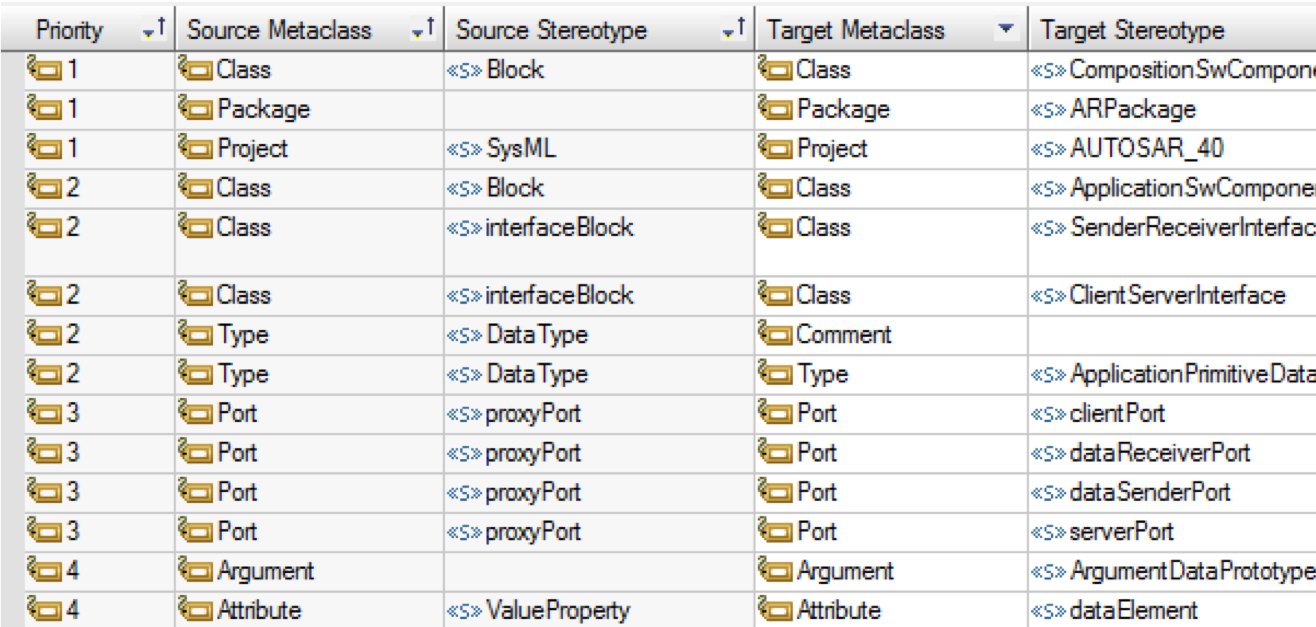
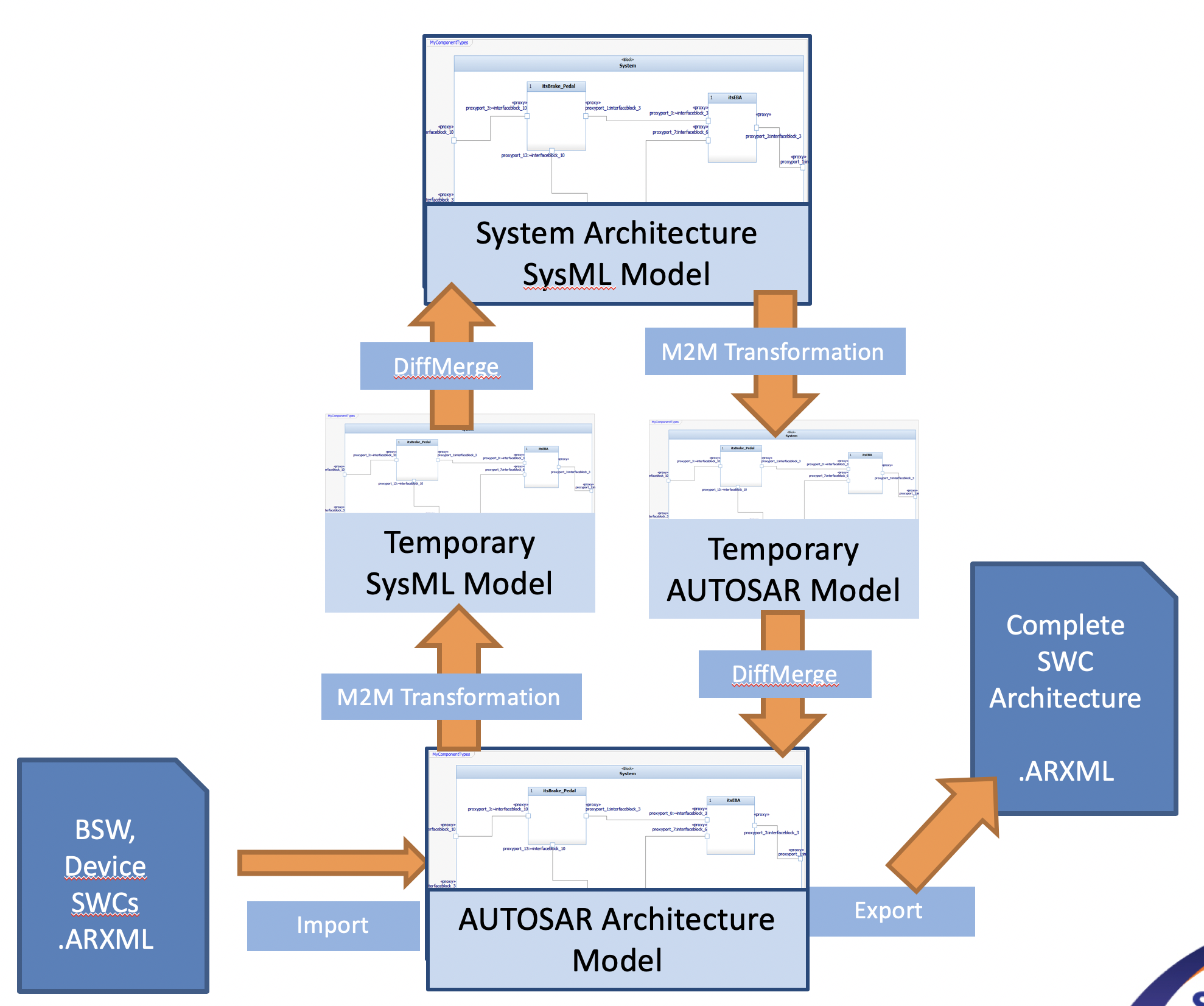
Of course Linking informations is ALWAYS better than synching information, sometimes linking is just not possible. For that we have M2M (Model to Model) that can convert Rhapsody models with different profiles. It is rule-based, you create rules like:

When a certain element of MetaClass “SourceMetaClass” and a stereotype “SourceStereoType” is found
Then see if certain conditions “Conditions” apply
If that is the case, convert the element to an element of MetaClass “TargetMetaClass” with stereotype “TargetStereoType”. If there is a linked operation “Operation” then execute that.
All Rules have a sequence number, lower numbers will be executed first and exclude higher sequence rules.

After applying the rules, the resulting model must be merged back using (built-in) DiffMerge. This ensures that changes can be made to single model elements without redoing the whole model.

This allows a very sophisticated way of maintaining different views to the same information.

Happy Modeling with Rhapsody

Walter van der Heiden (wvdheiden@sodiuswillert.com)

AUTOSAR

Introduction

AUTOSAR is the standard created to support software development in automotive environments.
Why is there a special standard for that? Is software for cars special?
No, the software itself is not, it’s just plain ‘C’ (lately also ‘C++’) But the circumstances are different.
Are there special Tools for that? Yes there are. Wouldn’t it be nice to just use the normal Development Tools? YES Of Course!
Willert has all these tools and the add-ons necessary to use them in an AUTOSAR environment!

Differences

  • Timing is critical, in more than one way.
    There is the timing in the software itself, which is still critical although CPU performance increased severely last years. This is partly because most software in cars is “polled”. Due to the fact that there are algorithms in cars where developers use Simulink (and code generation in TargetLink and/or Embedded Code) that is “control loop software”, so does stuff every 10 milliseconds.
    That is OK, it works but your software is ALWAYS doing “something”. And while different paths through your code are taken (with different execution times) this is difficult to manage.
    Then there is the timing in the release of cars. That is different than most projects…. A cars introduction and production is planned years ahead and there is NO DELAY possible. Period. You can easier shift the timing of a solar eclipse that the intro of a car. So software development cycles must be predictable (they aren’t but they must be….)
  • Cooperation not only between colleagues but worldwide between multiple companies.
    Yes. Cars are defined by OEM’s, parts are made by Tier 1,2,3 etc by companies that have developers everywhere over the world.
    The environment supports exchanging information on bits and bytes and, for all, the possibility to exchange pieces of software built by one company for other pieces. AUTOSAR (ARXML) makes this possible.

How can Rhapsody help?

That is not too difficult. Rhapsody has the AUTOSAR Profile. This allows you to read-in ARXML files and make them visible, graphically, in Rhapsody.

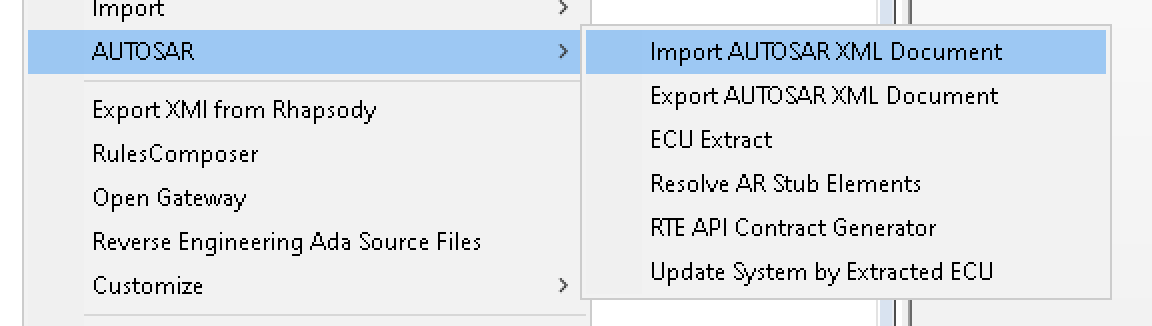
AUTOSAR Menu


You can also edit the AUTOSAR model in Rhapsody. Or even create it there and export what you’ve made to an ARXML file that can be read by an AUTOSAR Authoring Tool like e.g. DaVinci.

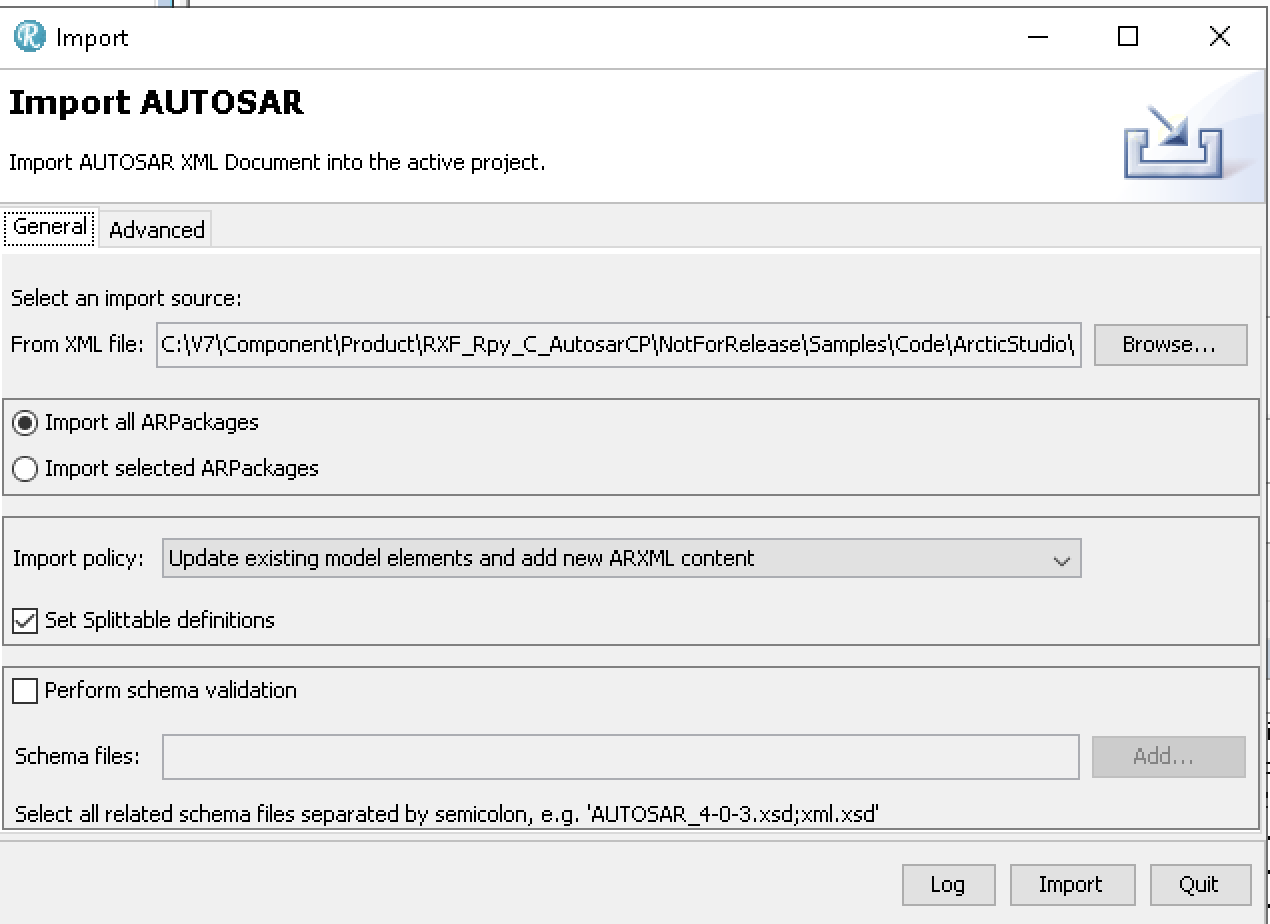
AUTOSAR Importer

Here you can import any ARXML file. Rhapsody will import it (Remember: Use the 64Bit version to import, 32Bit is way too slow)

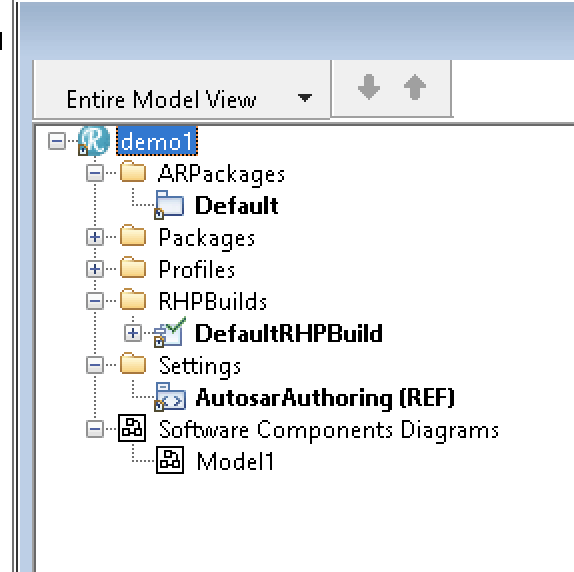
Rhapsody AUTOSAR model

Another possibility to fill your AUTOSAR model is by using plain SysML or UML with the simplified AUTOSAR profile. This gives you stereotypes for the most used AUTOSAR elements. The M2M Tool will then synchronize your 2 views, the AUTOSAR view and the SysML/UML View.

M2M Workflow

In this way your models will always be up-to-date, wherever you make your changes.
The second step to use Rhapsody is then to generate code that can directly be used inside your AUTOSAR environment!

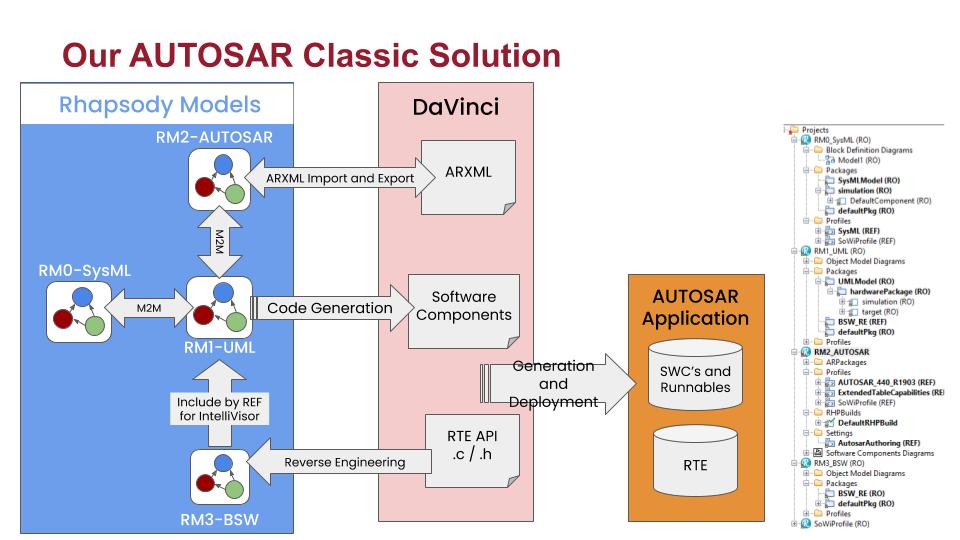
This picture shows the workflow. Mixing this with other tools like Simulink (even with co-simulation) is no problem!

The AUTOSAR Workflow

Reverse Engineering

This allows you to use the code from your AUTOSAR Tool (Basic Software and other RTE functions) in your Rhapsody state-machines or functions.
In contrast to the previous Rhapsody Workflow (RIMBO and then link your Rhapsody App in the AUTOSAR code) this is the much easier way: Just use a few stereotypes and you can use the Rhapsody Code you already know (If you’ve used Rhapsody for non-Automotive environments) in an AUTOSAR environment.

Contact me if you need more information. I can arrange an evaluation version!

Happy driving with Rhapsody!

Walter van der Heiden (wvdheiden@sodiuswillert.com)

Model Transformation

Introduction

What?!? No travel? Well… yes. too much travel. Hence the low posting frequency. Apart from moving with my family from our old house (that was sold and where we had to leave in 3 weeks) to a temporary vacation home that is not even large enough to house the family of 4 (well, 5 with the dog) let alone has enough place for all our stuff.
So most of it is stored at the moving company and will be brought to our new home when it’s finished (Planning date is December 13. But we all know what planning dates mean, do we….)

Luckily there was (and will be) much traveling in the last weeks and the coming months. I already visited Munich, for our MESCONF, Paris (just for flying to Schiphol), Bückeburg (For work, and we are also moving there), Köln (Cologne) and Zürich.

In the next weeks I’ll be traveling to Bückeburg (Office), Paris, Nantes, Berlin, Possibly Detroit, Ft Myers, Boston, Sindelfingen (ESE), Munich and more.

Transforming your Models

But that is not what I wanted to talk about. There is a more technical topic that needs attention.
Everybody knows (or should know) that we are no longer Willert but SodiusWillert and that we are awesome in connecting engineering data in the widest form possible.
Connecting Jira to IBM via OSLC, connecting the world of ALM to PLM by linking PTC Windchill to IBM with OSLC but also transforming your UML (or even SysML) model to code in C or C++.
One of the questions we receive is that to connect, sync or convert models into other models.

AUTOSAR

One of the models a lot of our customers use is AUTOSAR. That is a standard used in Automotive and contains a standard data format for exchanging information between tools. It is called ARXML (AUTOSAR XML) and is very complex. With ARXML you can exchange very detailed information about the software you make for car ECU’s. You have to use it if you want to create a run-time system for your ECU (RTE – Run-Time Environment) but also to use the Basic Software for your ECU.
But AUTOSAR also defines a model structure that can be used to define your ECU Architecture. Rhapsody can do that, you just load the AUTOSAR profile and you can model AUTOSAR. (Made by SodiusWillert)

Now this modeling structure has some similarities with SysML (Also uses Blocks and Ports etc) but that is, unfortunately, not really the same. AUTOSAR was, at the start, set up to improve cooperation between different automotive companies but somehow this path was left some time ago. IMHO opinion it is needlessly complex and tries to cover all possible ways to do something instead of limiting the users to the bare necessities and introduce an abstraction that would make life easier.
This is where the problems start when you want to use SysML to do architecture modeling, there is no defined path from SysML to AUTOSAR.

Different soup: M2M

That’s how this is called in German: everybody is boiling their own soup. That leads to the fact that there is no single correct solution but a tailor-made solution for every user.
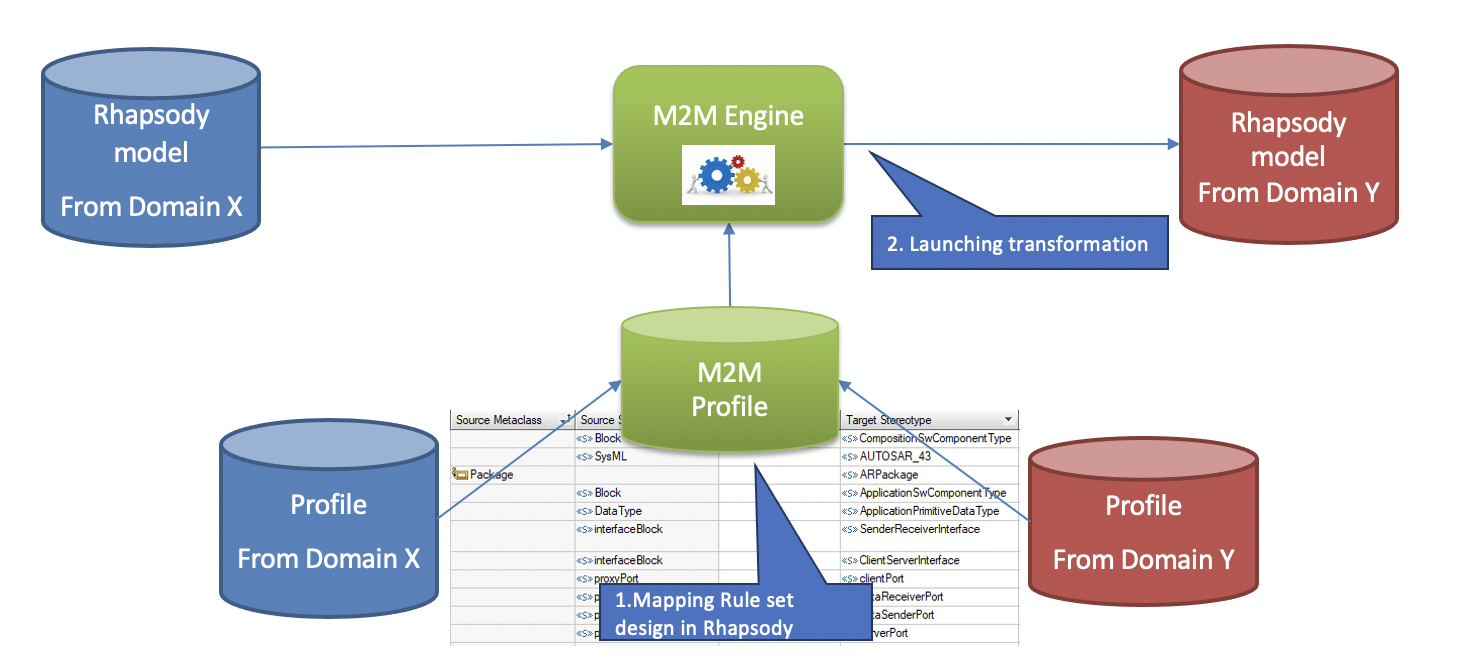
That is where the SodiusWillert M2M comes in. Louis Talvande from SodiusWillert designed this tool to do a model transformation based on rules that the user can define himself.
These rules are part of your Rhapsody model so you can easily select your model elements.

Example of Transformation Rules

When started M2M will transform your current model to another model using the rules you have defined.

More than just transformation

Sometimes (or actually mostly….) just mapping one element to another just isn’t enough. That’s why M2M allows you to not only map single elements to multiple elements but also 1:n or n:1 or n:n.
You can also define conditions in your mapping rules that can decide if a transformation should be made.
And if that is not enough, you can also define scripts (Javascript) comfortably inside your Rhapsody model, to post-process your elements. The complete Rhapsody Java API is to your disposal there.

Merging

Of course, transforming a model is cool. But what if you make changes to the original model? Of course you can always throw away your target model and transform again but what if you also have made changes to the target model?
Rhapsody comes with DiffMerge built-in. Since you are using all standard Rhapsody elements Diffmerge works out-of-the-box.

Features of the M2M Tool

  • Transforms Rhapsody models into Rhapsody models
  • Flexible (user modifiable) transformation rules
  • Transformation can be launched via commandline
  • Portable mapping rules, so you can upgrade from e.g AUTOSAR 4.22 to AUTOSAR 4.31
  • Merging capability with DiffMerge
  • 1:1, 1:n, n:1 and n:n mappings
  • post-processing very easily possible
    • conditional mapping
    • creating new elements using the JAVA API

Just contact me or Louis if you want to learn more about M2M

Well… that’s it for today! Have fun transforming with Rhapsody

Walter van der Heiden ( wvdheiden@willert.de )
Louis Talvande ( ltalvande@sodius.com )

Paris, Pense!

Salut!

Just back from Munich I was one day at home to switch my suitcase and get prepared for the next trip. This time a bit longer and further away but the start was in Paris.

I had to go to France anyway so I combined the visit with a visit to the Louvre. No not the museum, IBM organized the IBM Think! Conference there.

This was a cool conference, the only problem is that everybody spoke French and all the presentations (but one) were in French.

My French is not as sophisticatedly my German and English, unfortunately… but I managed. There were 2 presentations with fast and unclear speaking people where I really struggled to understand what they were telling, but most was understandable.

The one presentation that was in English was also the coolest (by far…) :

INFRASTRUCTURES ET PERFORMANCES
Aston Martin Red Bull Racing – Brian Jones, Head of Software Development

I think that at least 2/3 of the audience left the room, because it was in English…. Their bad because Brian had a cool story to tell about using big data in formula 1 to achieve an advantage on the competition. Very very interesting, thanks Brian!

At night there was time left to visit the Mondial, the Paris Auto Salon. A nice view on the new cars of today and new technology, very cool!

AUTOSAR

This was a nice “bridge” to the subject of today. The use of Rhapsody in an Automotive environment. We at Sodius and Willert are working very hard at creating solutions that will support automotive engineers to do their complex jobs as good and right as possible.

That is not easy, many OEMs and TIERx companies have very well defined processes and always a high degree of time pressure that makes it difficult for them to change anything in their daily work.

As Henry Ford already said: If I had asked my customers what they wanted they would have said: “A faster horse”. So you can ask your customer (and you should surely do that!) but you have to define your own way at least partly and then convince customers that your way is the better way.

Since using Rhapsody with Code Generation will already change a lot in the daily routine of everybody but certainly in that of the automotive engineer who already has defined run-time systems (that mostly use periodic tasks) The Rhapsody generated code assumes a preemptive OS that allows you to send and receive events and react to them if they appear, and sleep when there is nothing to do. This is a fundamentally different approach than the MatLab approach that even uses “polled” state machines.

This kind of programming is also much closer to the human way of thinking. Many people consider a polling, or synchronous, system to be more deterministic than an asynchronous system. It is not, asynchronous systems are much more scalable and run without collision much longer than synchronous systems. They also fit better in Object Oriented Designs.

Many Automotive systems are only doable when using synchronous systems. All Control Loops work way better and simpler when you do them in Simulink. But there are lots of systems that are asynchronous. Think about everything that is under direct user control, indicator, power windows, HVAC control panel etc. There is lots of asynchronous stuff in a car.

The more complex systems in cars use both synchronous and asynchronous components. The easiest and nearest way to solve them is by using MatLab. Now that tool really helps you to do the synchronous stuff and it also can do asynchronous stuff with no real penalty. So that prevents people from using UML for creating code in an automotive environment.

Now MatLab and its friends will not really help you to gain understanding and reducing of the complexity in new systems. UML/SysML will, they allow you to setup an understandable architecture. But the real benefit will come from using it to program the asynchronous parts of the application and use the code generation.

The funny thing is that most people do not want the code that is generated from a UML tool like Rhapsody but have no objection against code from a MatLab Simulink model.
It took me a while to figure out why but I think I understand that now. Simulink, used by a Systems Engineer generates just a bit of code that is the exact representation of the algorithm. Writing the code for that would be difficult, the formulas are mathematical things that everybody hates to remember and understand. To generate the code actually relieves you from a lot of extra knowledge.
Generating code from UML is not that easy, you need a lot of extra knowledge to apply that. So people do generally not like to use it.

Another big difference with MatLab is that Simulink Code is mostly used in continuous algorithms, the code is incomprehensible but the diagram is easy to understand. UML (and certainly Rhapsody) excel in discrete algorithms. There the diagrams are also relatively light to understand, as is the code, but the code needs some extra stuff around it to work. That is where people stop using it, it is just not straight forward.

So this is the big dilemma of the Sodius Willert developers, but I think we have some pretty good solutions to use mixed UML/Simulink/AUTOSAR environments. We have a very minimal framework that is easily to use inside an SWC, per ECU we only need one Framework, it can handle multiple instances. You can also import and export ARXML to be converted in stereotyped UML/SysML elements. We will present some solutions on several congresses in the next months.

We have experience in using UML in AUTOSAR environments, we have ASPICE experts on board, certainly in environments where certification is an issue (ASIL C or D) we have expertise and matching tools. And we can train you in using them!

SECollab

A nice opportunity to introduce the Sodius/Willert Tool SECollab (Systems Engineering Collaboration). This helps System Engineers to control all data that they use in their development process, they can make links to achieve traceability, use it for reviews (You don’t even need a license for the original tool to do that!) and derive documents for certification purposes.

SECollab is a server based solution, clients use Web Access, so no tiresome installation issues, just login on the website and access all information available (to you, of course!)

Take a look at it, if you like it, contact me for a demo!

Happy modeling with Rhapsody (and SECollab!)

Walter van der Heiden (wvdheiden@willert.de)

Yes we CAN! (part 1)

Introduction

What are we going to build? A CAN implementation. How? Well…. I’m not sure myself. I will just start and write down my experiences along the way. For sure we will use our standard Board for that, the Keil LPC1768 board and we will, in parallel, implement on a PC using a USB-CAN connection. We will use Rhapsody in ‘C’ for that. C++ would be too easy…. (It’s not… but Johannes is already working on that and I don’t want to interfere with that. )

What are we exactly going to build? Years ago I did build two small apps, a master and a slave app that were exchanging info via CAN. On the Master Board you could operate the Potentiometer and the values were send to the slave board where an LED was regulated.

This is the first step we are going to build. I would like to build a different app, namely one that can log CAN messages to a PC. That would involve a PC program as well to interpret the CAN messages and display them. I’m not sure how to do that but I think we will get ideas when we start using CAN.

Preparations

First let us do some model preparation. For the first steps we need 4 Rhapsody models and, of course, the IDE projects as well.

The Rhapsody projects need to be prepared, a lot of things can be done by using profiles but unfortunately not everything. Global properties must be set in every model. (There are tricks around that, I will spend a future BLOG entry to that tricks, I promise! )

So we create the following projects:

  • lpc17xx
    The CAN driver for the Keil board, mostly already there in CMSIS packs.
  • PC_sim
    The CAN driver for the PC, not sure how (yet) but let’s prepare for it.
  • master
    Communicates via CAN to the slave that will receive commands and executes them.
  • slave
    Gets commands from the master and executes them.

The best way to work with these models is to load them all in Rhapsody. This can be done by creating a Project List with “File”, “Insert project”.

The following profiles must be loaded:

  • Rpy_C_CMSIS_Keil5_ARM_MCB1700_TD_Profile (only Master, Slave & lpc17xx)
  • Rpy_C_Win_VS13_PC_TD_Profile (only Master, Slave & PC_sim
  • WST_Types, this implies some global properties to be set:

    General::Model::CommonTypes must be set to: WST_Types
    General::Model::DefaultType must be set to WST_Types::uint32_t
    *EDIT* – Not necessary anymore! Although the properties are “Model-level”, you can still set them in a profile. The Code Generation is done from the Component/Configuration and will therefore use the properties. Very cool. Not sure why the selection box of attributes and variables show the types but, hey, let’s not look a given horse in its mouth….

  • WSTProfile
  • WST_CG_Profile

It is convenient to include all profiles in a separate project in the beginning, you will have to change stuff often, it is better to have everything within reach.

Here is the profile that you can load to have C99 types AUTOMATICALLY! WST_Types

Set the following global properties to make working with Rhapsody easier:

  • Browser::Settings::ShowOrder to YES
    Lets you re-order elements in the Rhapsody browser.

  • Browser::Settings::ShowPredefinedPackage to NO
    Removes the Predefined Types Packages from the browser

  • Browser::Settings::ShowSourceArtifacts to YES
    Displays source-artifacts. Since we also set the Roundtripscheme to “advanced” there should be no source-artifacts.

Workflow

The idea is that we put all hardware dependant stuff in the lpc17xx and in the pc_sim models, we include these into the master and slave models to make the last ones completely hardware independent. When all is ready we start preparing the models for the implementation.

Structure:

  • CAN
    • Model
      • LPC17XX
      • Master
      • Slave
      • PCsim
      • profiles
    • Code
      • LPC17XX
      • Master
        • LPC17XX
        • PCsim
      • Slave
        • LPC17XX
        • PCsim
      • PCsim

This is a good working structure, maybe we do some fine-tuning later on.

LPC17xx Model

This will include the implementation of the hardware drivers for the MCB1700 Board. It needs some packages to store the work we do. We do reverse engineering to achieve most of that.

The next is the project where we store the generated code.

Keil Projects

In Keil we can also create a Project Space/Workspace to handle multiple projects. First create the projects themselves, Keil will not let you create an empty workspace…

First we create the empty project for the LPC17XX, select the correct CPU (NXP lpc1768) If this does not show up, you first have to install the pack from NXP. After you have done that, select the packs we need, RTOS and CAN. Don’t Worry! We can always select other packs when we need them!  You do not have to click all ticks right away…

We can copy these projects to the Master and Slave directory once we are happy with them. Or we wait until we are done, that’s probably better.


PCsim Model

This is the model that contains the same as the lpc17xx model but then runnable on a PC as simulation. It is important to have something that can run on a PC to make testing much easier.

The next is the project where the generated source code is stored and compiled.

Visual Studio 2013 Project

A Microsoft Visual Studio Project. I still use 2013, that is also supported “out-of-the-box” by Rhapsody, we also have a 2015 Adapter.


Master Model

The model that contains the Master Model, the model that serves as a master in the CAN network.

Slave Model

The Rhapsody model that acts as slave. There are also projects for the source code for both ARM and PC.


CAN we?

I’m not going to write a lot about CAN itself. There are enough pages on the web that explain what it is, that it was invented by Bosch, how the priority works etc. Try Wikipedia and you will as smart as you need to be for this in minutes.

How can we model a CAN communication? Well that is not too difficult (I think) but we should ask ourselves: What do we really want to model?
I think we should use as much driver technology that is already there. On the Keil Boards that is easy: the CMSIS Packs give us a lot. We need to include it in our model somehow and then build intelligence above it.


Prepare the LPC17xx model

We will use Rhapsody Reverse Engineering to prepare it. Since we only use the outcome of this we can do reverse engineering without any other preparation (RE changes a lot to your model and your Component/Configuration, since we do not build anything here we just leave it)
We first prepare the LPC17xx Keil Project to have the sources there for RE.

  • Open your Keil project
  • Open the Pack Installer
  • First install all packs needed ( Left Window, Boards, MCB1700 )
  • Then install Examples (Select MCB1700 in left window, then right window will show you CAN Example (amongst others)
  • You can find the Sources (or actually the includes) to use for Reverse Engineering in:
    • <Keil Install Dir>\ARM\PACK\ARM\CMSIS\<latest version>\CMSIS\Driver\Include\
  • Open the LPC17xx Rhapsody Model (In Rhapsody in ‘C’ please, will not work the same in ‘C++’.
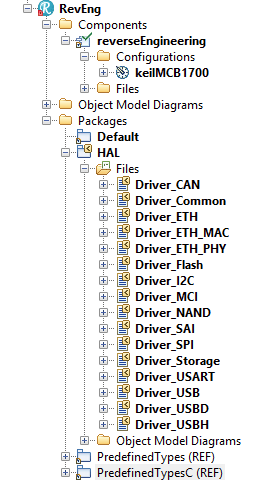
  • Rename the Component to “reverseEngineering” and the Configuration to “keilMCB1700”
  • Start “Tools”, “Reverse Engineering”
    • In the first screen select “model driven”, “logical modeling”
    • In the second screen enter the path for the include files, then select all files. (We only need CAN but why not create a complete model right away, costs nothing and might be convenient later on)
    • In the third screen, leave the top 2 fields (“ordinary model elements” and “replace existing packages” but change the 3rd to “single top level package”and name it “HAL”
    • The fourth screen is OK, press “Finish” to perform RE. The result will look like the picture on the right.
      • Screen Shot 2018-07-16 at 14.21.32

Now we can use this model in the other models to have a CAN driver included.

Just do an “Add to Model” in both the Master and the Slave Model and include the “HAL.sbs” file there (As a (REF) of course )

When you have done that you can select all HAL functions with the INtellivisor ( Use “select” )

In the next part we are going to implement a simple CAN send and receive function that just sends and receives generated messages.

from there on we are going to implement things like:

  • publisher subscriber, so you can subscribe to a certain kind of  CAN Messages with a callback function and that will program the CAN Acceptance Filter (if there is one)
  • define messages for sending a value and receiving the value.


That’s it, the rest follows soon in part 2!

Happy modeling with Rhapsody if you CAN!

Walter van der Heiden ( wvdheiden@willert.de)


PS

I just used a picture of Obama because he used the “Yes we Can” slogan in the 2008 elections and I found that a nice wordplay. Please do not assume i meant anything political with it, I never want to discuss anything even remotely political in this BLOG,
I do not want anything else than just technical discussions here.
I use other platforms to express my personal opinions.

W.

Pearl Jam

It’s a tough job but somebody’s got to do it…

Sometimes life is good, sometimes life is awesome. I had a busy week, hence the limited BLOG entries, but during this week I had time to travel to 020 (That’s how I call the city that became our capital by a “capital” mistake see: 020 and 8.3.1)
Then why go there? Well there is a place called Ziggodome where lots of concerts take place, On Wednesday it was the time of Pearl Jam, one of the bands I love.
Their first album “10” was one I played over and over and I still do that.

When I saw they were performing in the Netherlands I was sitting behind my computer at the start of the sale to get tickets. Unfortunately I could only get 2 tickets… Better than nothing I thought…

Unfortunately I also noticed that I had visitors from the US in that week that I could not shift. So I was already thinking of selling my tickets but when I told my guests that they all shouted: “Can you get more tickets”? Yes I can… 😉

So I traveled from the office in Bückeburg to “Nul Twintig” together with my American friends. A nice drive, about 350 kilometers. We ate a burger at the Burger B*tch (Not kidding, that is the real name, just google it) drank a beer and attended the awesome concert. Life is good.

What does this all have to do with Rhapsody? Nothing directly… but my friends are also Rhapsody and modeling people. Not only that, there were 2 Automotive Spice experts and another AUTOSAR expert. So we used all traveling time very useful with some interesting discussions on how to do ASpice with Rhapsody, how to import and export Rhapsody UML information to and from ARXML, how to do a model transformation from SysML to AUTOSAR and back with traceability links. We only stopped discussion when Eddie Vedder was singing. That was just too good. Love Rhapsody but I also love Pearl Jam.

So. Happy modeling with Rhapsody. one is Alive in Even Flow….

Walter van der Heiden ( wvdheiden@willert.de )

Modeling with AUTOSAR

Introduction

This is a small excerpt of my presentation at the IBM IoT CE Conference in Munich from may 14-16. A very nice conference, if you were not there: you missed out!

The Challenge

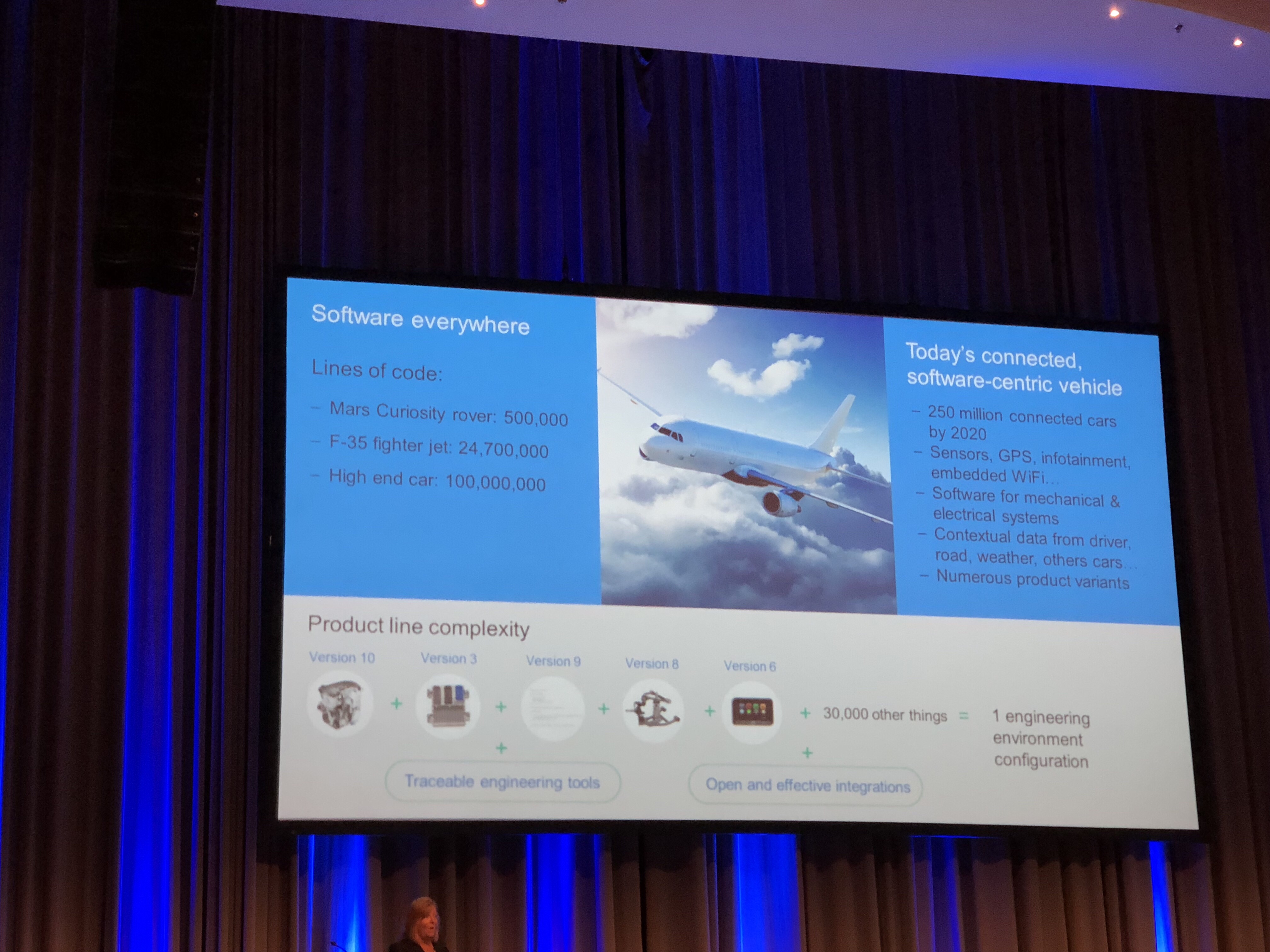
I might have said it before, cars are the most complex thing people build. Even more complex than planes. I “borrowed” a slide from Debby Edwards Keynote from the conference. That clearly shows it.

The F35 (JSF) plane has about 25 million lines of code, a modern high-end car 100 million. OK, there are trade-offs, like do you add multi-media systems or is a passenger plane more complex but the general idea is just: making cars is an immensely complex process. But look at a random big city during rush-hour and you see: The Automotive Industry still manages to make cars that work with a remarkable reliability.
Not always, we all know examples from cars that have huge electronic problems (I can tell some stories about that myself…)

No why is a car more complex than a plane? Well, part of the complexity is self-inflicted. Compare this:

  • Car > 1.000.000 pcs < EUR 100.000,-
  • Plane < 1.000 pcs. > EUR 100.000.000,-

this says it all, cars are mass products that are cheap (relatively to planes…) and planes are almost built-to-order products that are expensive.
A plane manufacturer does not bother the price of a micro-controller, they have a small number of certified ones that they choose from. If it costs EUR 2,50 or EUR 2,80 does not really bother him.
Now the car manufacturer is interested. If they can use a CPU that costs only EUR 0,10 less than another one for a device that is in a car (or even multiple times in a car) than the calculation looks different. 1.000.000,- * EUR 0,10 is already EUR 100.000,-
So mostly they choose small Microcontroller that barely fulfill the needs of their developers, adding to the complexity.

Mastering complexity: Process

autospice.gifOne of the things you can do to master complexity, certainly if you are not changing the tool environment.
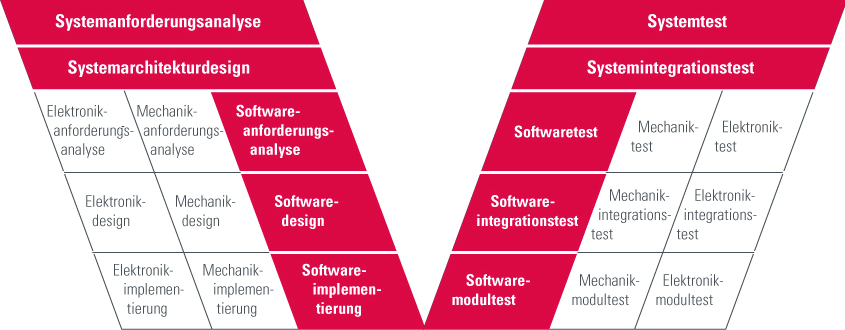


The Automotive industry has a process, Automotive Spice or short A-Spice. A thorough and already more than 10 years old process that is a big help in mastering complexity. Of course A-Spice does more than just helping to master complexity, but that is not in my focus now.

The process helps you to define what needs to be done in what stage of the development. So every item is defined and there is a definition of what should be in there. This helps engineers to gather information and present it in the right way to their colleagues so the development information is always up-to-date.
This process can be followed by hand, of course, but this is so error-prone that I strongly advise to use tools. We discuss later what tools and how.

automotive.png

Also mastering Complexity: Abstraction

The way to master complexity is the use of patterns (or abstraction). Abstraction can be explained by looking at this bunch of matches. If you need to count them, sorted like that, it is not that easy. So you sort them in groups, that makes it much easier to count. That is abstraction, you just follow the pattern and it makes it much easier. The disadvantage of this is: space/time drawbacks. You see that the matches take up more space if they are close together then when they are sorted.

csm_721435599Fuenf_Streichhoelzer_5780056202_6af0698c2e_o_129adc9027.jpg

the same applies for patterns in software, they help you solve complex things but also at a price. The fact that the pattern is universally applicable creates overhead.

Not mastering Complexity: AUTOSAR

csm_AUTOSAR_01_c35041dc46The Automotive industry created AUTOSAR with a couple of goals in their minds. They wanted to make it easier to switch suppliers by letting them use a standard interface, they wanted to have multiple suppliers that develop applications on a single controller without having to know each other and be able to slip applications over multiple ECU’s without redesigning the complete application.
The extra data in AUTOSAR applications is stored in XML files called ARXML. This can be parsed and imported and tools can in that way exchange information in a standard way. That sounds fantastic but in praxis the advantages are limited, no one wants to share more information that absolutely necessary with others from a competitive standpoint.

AUTOSAR uses abstraction, they have standard software layers (Basic Software) that implements a lot of basic stuff. This will solve some pain but also introduces new complexity, the Basic Software layers are not easy to use.

AUTOSAR uses a Run-Time Environment that is derived from OSEK, the OS is very static and generated from ARXML. Although it sounds cool to just generate separate pieces of code that will be executed “somehow” this is not aiding to understandability.

You cannot create an easy to understand architecture that explains how your software is built-up and how it generally works. It basically adds a lot of abstraction overhead for a non-effective abstraction, it is measured that the use of AUTOSAR will almost double the memory needed compared to non-AUTOSAR solutions!

The conclusion is that AUTOSAR is not designed to lessen the complexity, on the contrary, it adds to the complexity. Experts estimate the complexity of AUTOSAR about 10 times that of SysML.

Certainly mastering Complexity: UML/SysML

UML and its sibling SysML were created to master complexity. The graphical way to model using different diagrams that help the developer concentrate on different aspects of development without being distracted by other stuff.

UML is used to make software, SysML is a UML profile that uses some of the UML diagrams, sometimes in a different way (The same elements but they have a different meaning) and adds some new diagrams. It is used to make systems.

Many Automotive customers that want to start using modeling ask for SysML, since they make systems, not just software. Now there are a few disadvantages to that, it is harder to make just software from SysML, so you probably do stuff 2 times or you have to write helpers that do intelligent conversion/linking between your SysML and UML model.
The funny thing is that most people who ask for SysML, in the end only create software. So they would have been OK by using UML.

One of the nicer aspects of the UML is that it is set-up to be flexible and configurable. A good example is SysML, this is actually a UML profile. the same thing for the AUTOSAR profile, it changes the way the UML looks and feels by just loading a profile.

UML Tools help you in creating links between several development elements. In that way you can create traceability that helps you find back your stuff (and the reasons why you solved it that way) and is a must for certifications in safety-related applications.
The standard graphical UML helps you define and understand your architecture.

Helping to master Complexity: Tools

As already said, following a process with just pen and paper is not doable. Luckily there are enough tools around to help you in the development of your applications.

Most tools more or less use their elbows towards other tools to conquer as much space in the V-Model as possible. They all want to be used for everything. They all claim to have solutions for the complete process from requirements to acceptance test.

My advice: Don’t buy that!

Most tools have a specific area where they are good, or even “The Best”, on other area’s they shine a lot less and you could use much better tools.
Now it is understandable that you want as less tool switches as possible during development. Every time you are confronted with information that needs to be synchronized or linked. This needs to be solved good.

You may need AUTOSAR Tools to generate RTE and to have access to Basic Software and or stacks.
You may need Simulink (with Embedded Coder or Targetlink) to generate code for pi or pid control loops
You may need a UML Tool like Rhapsody to have your architecture defined, use statemachines to describe behavior and much more

There are lots of tools available but you should be using a combination of the tools that fits your needs and can be combined with each other.

The Master: Single source of truth

Or “How to avoid having multiple captains on one ship”. All Tools manage information. Sometimes information from different tools must be linked. Then you must use some synchronization (like IBM Rhapsody Gateway or the Willert RequirementXChanger) to keep the information synchronized AUTOMATICALLY! In that way you create a so-called “Single Source of Truth”, only one tool can be the master of a specific type of information. You have to define in your process definition which tool that is and how its done.

Be the Master: use Rhapsody with AUTOSAR

Method 1: Model AUTOSAR

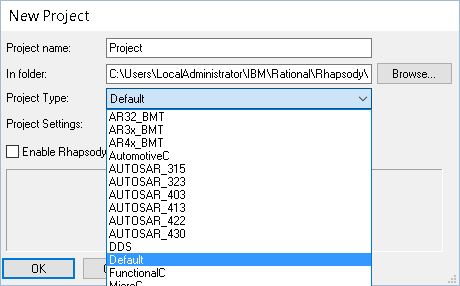
New Project.JPG

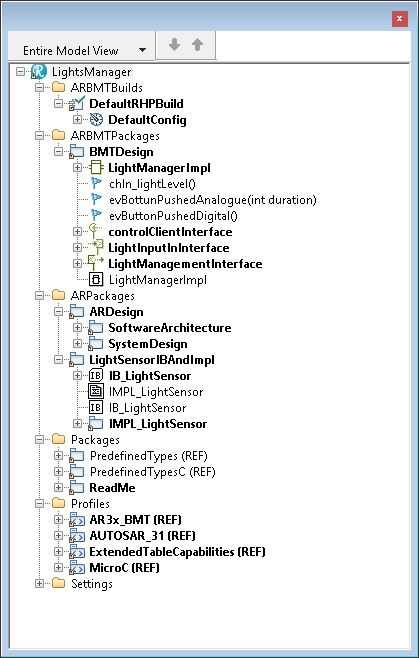
This is the “full-fledged” way. You load one of the AUTOSAR profiles in Rhapsody. This changes the look and feel of Rhapsody to be an AUTOSAR modeling tool. The good-old UML elements are all disappeared and only AUTOSAR Items are available.autosar project

You can now use AUTOSAR diagrams (Block diagram etc) and model that. You can export your model into an ARXML file that you can use for other tools and for the RTE Generation.

If you want to use “plain” rhapsody state-charts you first have to add a so-called “RIMBO”, connect the interfaces and then you can use “normal” rhapsody.

This is the way IBM recommends.
Since 8.3 you can safely use the 64-Bit version, in AUTOSAR: Do that! It will be slow otherwise.
You can combine 64 and 32 if you have an older version, import/export with the 64-bit, do the rest as 32-bit.

Method 2: Transform AUTOSAR and model UML

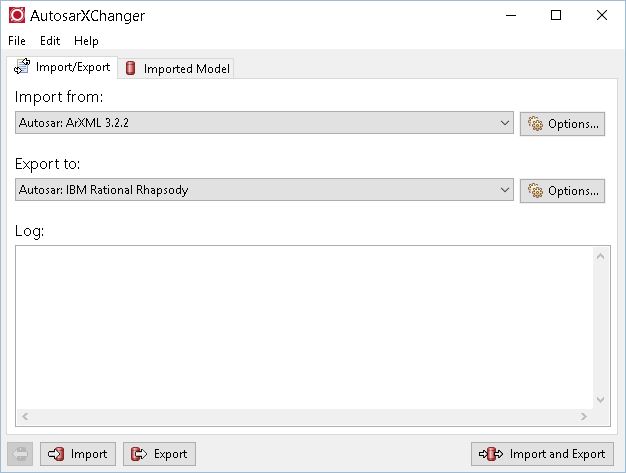
This is the “Willert” method. For the AUTOSAR stuff you use an AUTOSAR authoring tool. Then you export the ARXML from there and import that into Rhapsody using the AUTOSARXChanger. The result is a UML model with”converted” AUTOSAR elements. They are, however, normal UML elements with stereotypes.

autosarxchanger.JPG

Willert is working on other ways to use Rhapsody in an Automotive environment. We will have an exporter that can export UML models (with the correct stereotypes) to ARXML files.

Keyless Master

An example how this works.

Keyless Master: Marquardt Case.


OK, that’s it! Happy modeling/mastering/driving!

Walter van der Heiden (wvdheiden@willert.de)


AUTOSAR in Noordwijk

Introduction

Lately a lot of automotive companies reach out to us for help with their development. Mostly their problem is that in spite of all the (expensive!) tools they use, they still have trouble getting all development done correctly, in-time and thoroughly tested.
I understand that, you can use several AUTOSAR Tools, you can use Simulink or ASCET or TargetLink or whatever, most of these tools do not solve your problems with, amongst others, complexity, timing and architecture.

With AUTOSAR you are able to develop very distributed. That is a big advantage but at the same time also the main problem with it.

Using AUTOSAR does not automatically mean you are using modeling, also modeling does not equal modeling. Using Simulink is completely different from using Rhapsody or another UML modeling tool.

This week I was in Noordwijk together with Clemens to define and implement some of our AUTOSAR/Rhapsody solutions.

How hard can it be?

As the famous Jeremy Clarkson always says when he and his former Top gear, now the Grand Tour, mates are doing something that is nearly impossible: “How hard can it be”.
I can tell you one thing: making software for cars is hard. Very hard.
In my opinion, cars are the most complex thing people build. Not planes or rockets ( The expression, “It’s not rocket science” should actually be: “it’s not automotive software”, IMHO )
Parts of that complexity stems from the fact that the Automotive sector suffers from a drastic price policy. If their purchase department can purchase a CPU that is €0,20 cheaper, they will do that, regardless of the fact that this can skyrocket the effort of building software. Well maybe it’s not that drastic but this is closer than what the Aerospace people do, they only use certified CPU’s. What they cost is pretty irrelevant, you never notice it on the price of a plane and they will only build a limited number of planes, not millions like car ECUs.
Other reasons for complexity is the environment of a car. Planes can fly and therefore already solve the problem of having millions of moving obstacles on their path. Air Control tell the plane where to go, how fast and how high. Makes things much more easy.
So the reason is this complexity, that will only be more now we are implementing autonomous driving.

UML or SysML?

The solution “du Jour” for this is now to use System Engineering or SysML (System Modeling Language) Is this better than UML? That is not a statement that you can make. It depends on what you are doing. I noticed lately that most people ask for SysML but they almost all end up with making software anyway, not systems. That does not mean that you should not use SysML but there are things in SysML that are different. Plus that you have “yet another Tool” and “yet another language” to learn.
So if you can be sure that no-one from any other department than the software guys will use SysML: choose UML. You can also mix SysML and UML (Even for Software development, we are embedded so in the end we always do some systems engineering as well.) The disadvantage is that you often have to do things double. Or put effort in model transformation or intelligent “helpers” that convert and link your model elements. (e.g. like the Harmony profile does)
But OK… since the UML has (still) not reached the critical mass in users, I gladly accept SysML (Which is nothing more than a UML profile) as the UML savior.

Multiple captains on one ship

That’s one of the problems with the multi-tool approach. It is generally a good idea to use the right tool for the right task. Unfortunately all tools think that they are capable of doing everything, which they are most definitely not. It’s like having 2 or more captains on a ship shouting contradictory commands.
The only way to use multiple tools where you have development information that is used in different tools is when you:

  • use automatic synchronisation.
  • use a tool that help you connect the information
  • use a very rigorous process that tells you where the information is created, kept, supplemented and changed.
  • Automate as much as possible

AUTOMOTIVE Spice

There is, luckily a process that you can use for development. This is a big help in defining your artefacts and how to store and process them.
Not really easy to implement but hey: we do complex stuff, this is never going to be easy. I could write a book about this but I won’t. Not here. You can read all about Aspice here.

Rhapsody can do AUTOSAR, can’t it?

Exactly. It can. You can load an AUTOSAR profile (Most AUTOSAR Versions are available) and then you can import and export ARXML files. You are no longer using UML, you use AUTOSAR. And you can model it, draw diagrams, make connections add AUTOSAR artefacts. You can even use UML State-machines you first have to create a so-called RIMBO (Rhapsody Implementation Block) and connect that to all AUTOSAR connectors.

You have to consider a few things. The ARXML import/export is using Java and uses a lot of memory. It turns out that Rhapsody 64-Bit is really much faster when importing or exporting ARXML. If you use Rhapsody 8.3 you’re OK, you can use the 64-Bit. For older versions you can still install the 64-Bit version just for import and export and do the modeling in the 32-Bit version.

If this is the solution, I want my problem back

This is not always the most optimal solution. In my opinion people want to use a UML/SysML tool because they want to use UML/SysML. And that is what you can do. The Willert Automotive Profile for Rhapsody delivers you the possibility to implement other use-cases with Rhapsody. You can use Rhapsody to:

  • implement functionality that uses state-machines and/or Activity diagrams with Code generation. The Automotive RXF is small and fast and will be called in your system in the form of 2 runnables. The names are imported from an ARXML file that you create with another AUTOSAR tool like ArcCore or so.
  • You can also model your AUTOSAR application in UML in Rhapsody, the stereotyped model elements can then be exported as ARXML and used in other AUTOSAR tools.
  • We have defined a base model that includes many Automotive modeling examples, that shows a lot of modeling best-practices and already some very useful helpers.

There are some limitations to using this, not everything is possible (yet). We are working on automatically generating code for communication between runnables (Sender/Receiver ports) You can do this by hand now, however.

OK, we also walked on the beach, drank a few beers in a beach club but we worked very hard on the Willert Modeling for Automotive Solution! In one of my next BLOG entries I will take you through a complete automotive example.

Happy modeling with Rhapsody!

Walter van der Heiden (wvdheiden@willert.de)


« Older posts

© 2026 Rhapsody TechBlog

Theme by Anders NorenUp ↑