BLOG about IBM Rhapsody. Contains technical information as well as more private travel stories.

Tag: Code Generation (Page 1 of 4)

🚀 Implementing DDS in IBM Rhapsody: Real-Time Systems Engineering for the Future

As embedded and distributed systems become increasingly complex, ensuring reliable, real-time communication is no longer optional—it’s essential. That’s where the integration of Data Distribution Service (DDS) into IBM Rhapsody changes the game.

At SodiusWillert, we’re enabling teams to build smarter, more connected systems by combining DDS with model-based systems engineering (MBSE). Here’s a breakdown of what DDS is, how it works with Rhapsody, and why it’s a major win for industries like aerospace, automotive, defense, and industrial IoT.


🧠 What is DDS?

Data Distribution Service (DDS) is a middleware standard defined by the Object Management Group (OMG), designed for scalable, real-time, and reliable data exchange in distributed systems. It uses a publish-subscribe communication model—perfect for:

  • Autonomous vehicles
  • Aerospace and defense systems
  • Industrial automation
  • Internet of Things (IoT) and cyber-physical systems

Key features of DDS:

  • ⚡ Low latency and deterministic communication
  • 🔁 Decentralized architecture (no single point of failure)
  • ✅ Built-in Quality of Service (QoS) management for reliability

💡 Why Combine DDS with IBM Rhapsody?

IBM Rhapsody is a powerful MBSE tool for designing and simulating embedded systems. Integrating DDS into Rhapsody brings multiple benefits:

1. Real-Time Simulation & Execution

Model systems in SysML or UML and simulate live DDS-based communication within Rhapsody. Perfect for systems where timing and data flow are critical.

2. Seamless Distributed Design

Define DDS publishers and subscribers directly in your Rhapsody models. Automatically generate DDS-compatible code for distributed execution.

3. Earlier Testing & Validation

Simulate DDS networks inside Rhapsody before deployment to reduce integration risk—vital for mission-critical domains.

4. Industry Standards Support

DDS is a core part of frameworks like AUTOSAR, ROS 2, and FACE. With DDS integration, Rhapsody projects stay compliant and future-proof.


🔧 How It Works

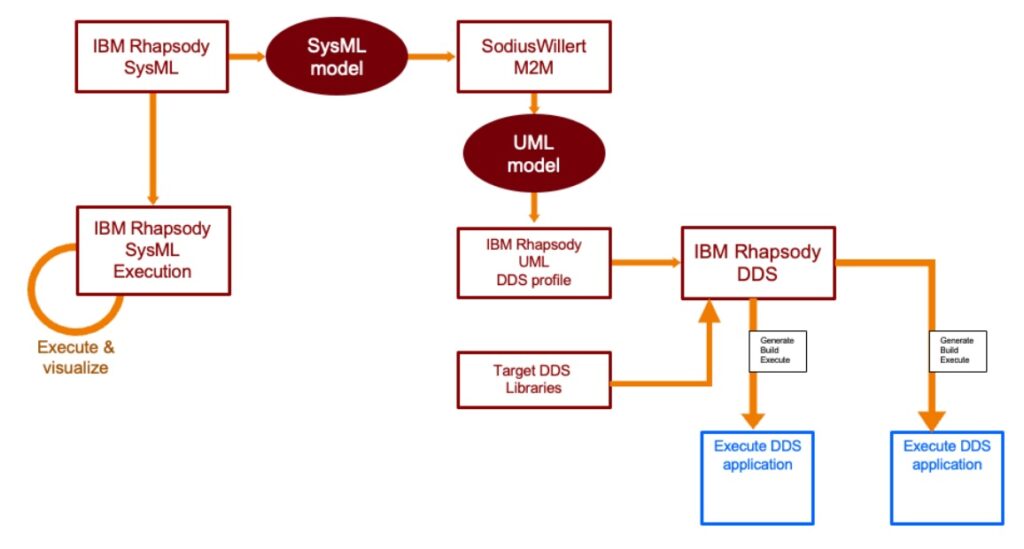
Using the SodiusWillert DDS integration for IBM Rhapsody, here’s how the workflow looks:

  1. Model your architecture in SysML or UML using IBM Rhapsody
  2. Use SodiusWillert M2M to transform SysML to UML
  3. Apply the DDS profile in Rhapsody
  4. Generate DDS-compliant source code
  5. Integrate with your target DDS libraries
  6. Build and execute your DDS applications
  7. Visualize results directly in Rhapsody

This approach enables a full MBSE cycle from modeling to real-time distributed execution.


🌍 Real-World Benefits

Whether you’re building autonomous vehicles, avionics systems, or industrial control software, DDS in Rhapsody provides:

  • 📉 Reduced development risk
  • 🧪 Testing before hardware is available
  • 🔁 Faster development cycles
  • 🛡️ Improved system robustness and reliability

🔎 Learn More

Want to dive deeper into DDS modeling with IBM Rhapsody? Need help setting up your DDS development environment?

👉 Contact us at SodiusWillert for a demo or expert advice.


Based on insights from a recent LinkedIn post by SodiusWillert Deutschland, this article highlights our commitment to advancing model-based engineering with real-time communication support.

Happy Distributing with Rhapsody!!

Walter van der Heiden email://walter@sodiuswillert.com

Using MatLab Simulink with Rhapsody

Back in Nantes

Since we are together with Sodius I have my regular visits to Nantes. Luckily! I really like Nantes and of course my colleagues in Nantes. Always big fun and great to see beautiful Nantes.

Simulink

People still use Simulink; I’m always surprised that nobody objects to the fact that it generates code; people use it without thinking. When it’s Rhapsody, millions of objections pop up against Code Generation. Probably, it is because Simulink is used by all kinds of engineers and Rhapsody by Software Engineers who feel attacked in their honor by Rhapsody (That does an excellent job generating code,..)

Now, with the Automotive Extension, there is another way to integrate the two tools: ARXML. That’s a “lightweight” integration; it doesn’t add much. The real benefit comes from co-simulation, and that’s what Andy does in his video. AFAIK that still works (I do not own a Simulink license, I cannot try it)

Resources

Now, I could be explaining here how it works but other people have done that already, way better than I can.

Andy’s (old) video. Explains it really good.

Justin Dyer IBM explaining. A tiny bit newer than Andy’s video.

Frank Braun’s video. Great explanation!

IBM TechXChange Lab (Also by Andy, you need an IBM ID for that)

TechXChange

Coincidently I answered a question on TechXChange, about this, it seems the Library for CygWin is broken:

OK. Not so easy but it works:

Add to your configuration in the “Settings” Tab under: “Link Switches”:
"<<UserShare>>/LangCpp/lib/cygwinsimulinkintegrationapplx64.a"

(Replace the <<UserShare>> with the path to your UserShare directory.)

Then you need to build the Simulink library, the following files need to be placed:

– In the directory <<Share>>\LangCpp\SimulinkIntegration the file cygwinsimulinkintegration.mak

– In the directory <<Share>>\LangCpp\ the file cygwinbuild.mak

Then call “Code” and “Build the Framework” from the menu. there is 1 warning, you can ignore that.

You can also edit sitec++.prp and add the Cygwin makefilecontent with the changed linker statement. But this works too.

So. That’s it for today! Happy simulinking with Rhapsody!

Walter van der Heiden walter@sodiuswillert.com

AUTOSAR

Introduction

AUTOSAR is the standard created to support software development in automotive environments.
Why is there a special standard for that? Is software for cars special?
No, the software itself is not, it’s just plain ‘C’ (lately also ‘C++’) But the circumstances are different.
Are there special Tools for that? Yes there are. Wouldn’t it be nice to just use the normal Development Tools? YES Of Course!
Willert has all these tools and the add-ons necessary to use them in an AUTOSAR environment!

Differences

  • Timing is critical, in more than one way.
    There is the timing in the software itself, which is still critical although CPU performance increased severely last years. This is partly because most software in cars is “polled”. Due to the fact that there are algorithms in cars where developers use Simulink (and code generation in TargetLink and/or Embedded Code) that is “control loop software”, so does stuff every 10 milliseconds.
    That is OK, it works but your software is ALWAYS doing “something”. And while different paths through your code are taken (with different execution times) this is difficult to manage.
    Then there is the timing in the release of cars. That is different than most projects…. A cars introduction and production is planned years ahead and there is NO DELAY possible. Period. You can easier shift the timing of a solar eclipse that the intro of a car. So software development cycles must be predictable (they aren’t but they must be….)
  • Cooperation not only between colleagues but worldwide between multiple companies.
    Yes. Cars are defined by OEM’s, parts are made by Tier 1,2,3 etc by companies that have developers everywhere over the world.
    The environment supports exchanging information on bits and bytes and, for all, the possibility to exchange pieces of software built by one company for other pieces. AUTOSAR (ARXML) makes this possible.

How can Rhapsody help?

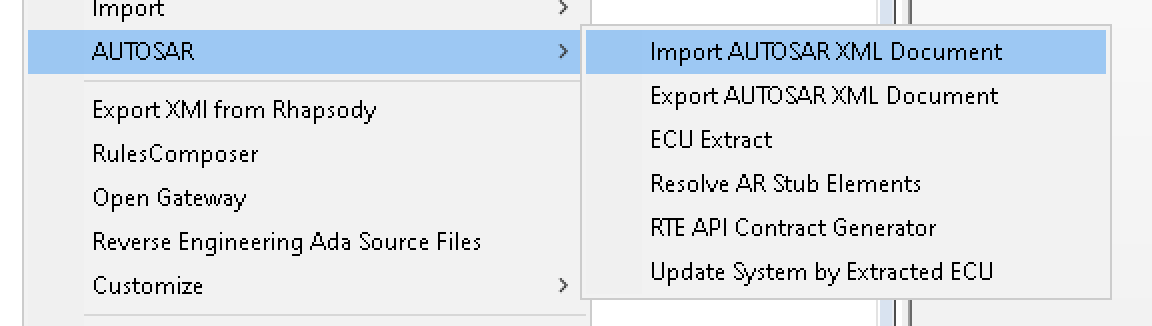
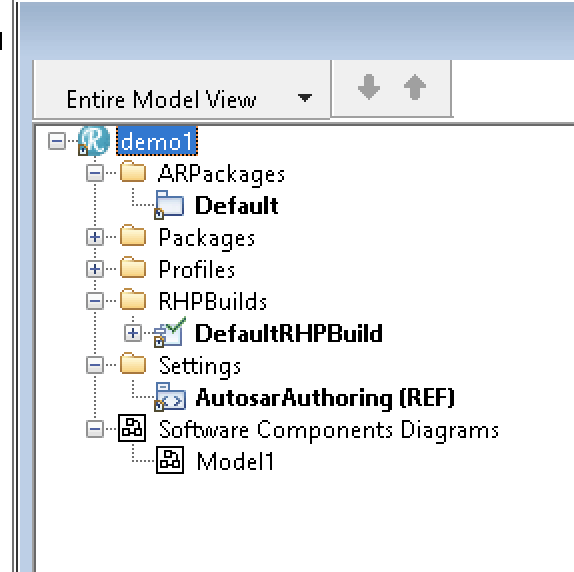
That is not too difficult. Rhapsody has the AUTOSAR Profile. This allows you to read-in ARXML files and make them visible, graphically, in Rhapsody.

AUTOSAR Menu


You can also edit the AUTOSAR model in Rhapsody. Or even create it there and export what you’ve made to an ARXML file that can be read by an AUTOSAR Authoring Tool like e.g. DaVinci.

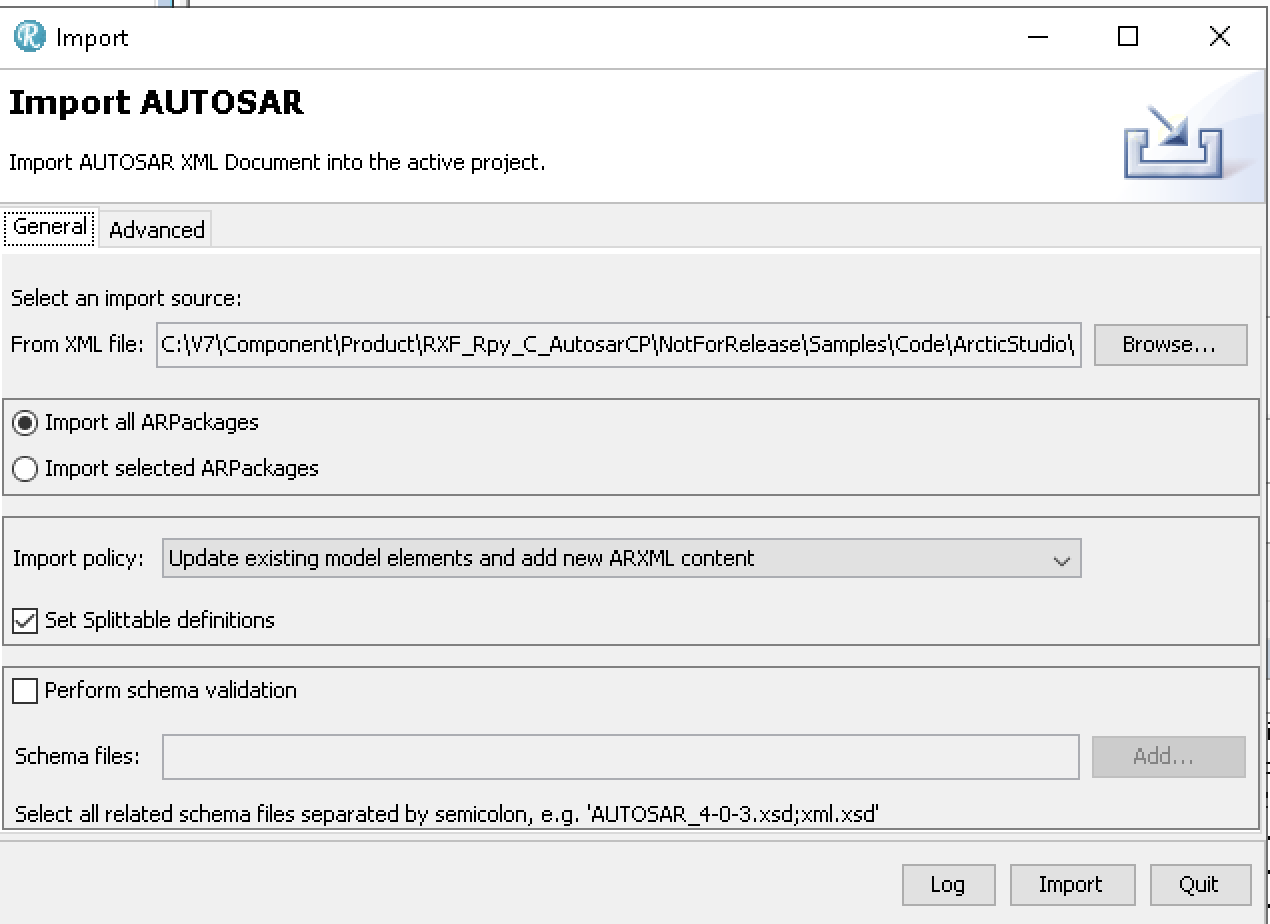
AUTOSAR Importer

Here you can import any ARXML file. Rhapsody will import it (Remember: Use the 64Bit version to import, 32Bit is way too slow)

Rhapsody AUTOSAR model

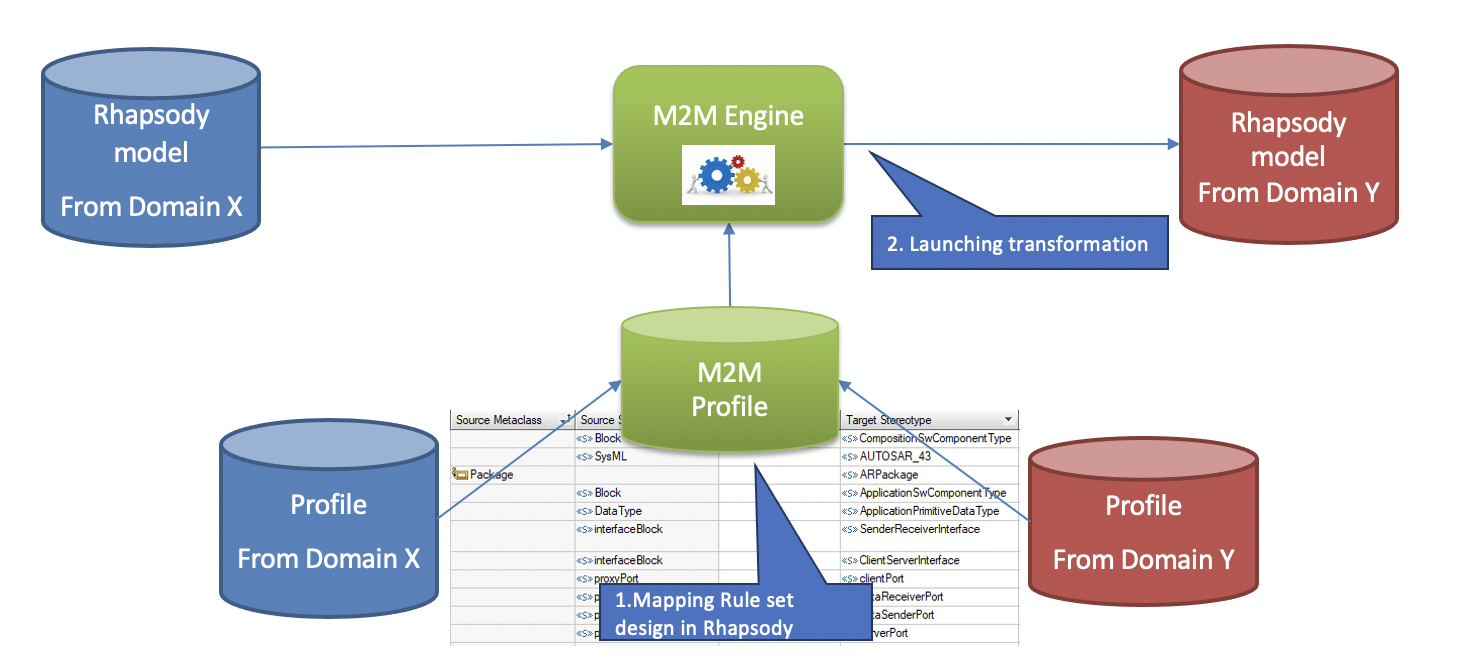
Another possibility to fill your AUTOSAR model is by using plain SysML or UML with the simplified AUTOSAR profile. This gives you stereotypes for the most used AUTOSAR elements. The M2M Tool will then synchronize your 2 views, the AUTOSAR view and the SysML/UML View.

M2M Workflow

In this way your models will always be up-to-date, wherever you make your changes.
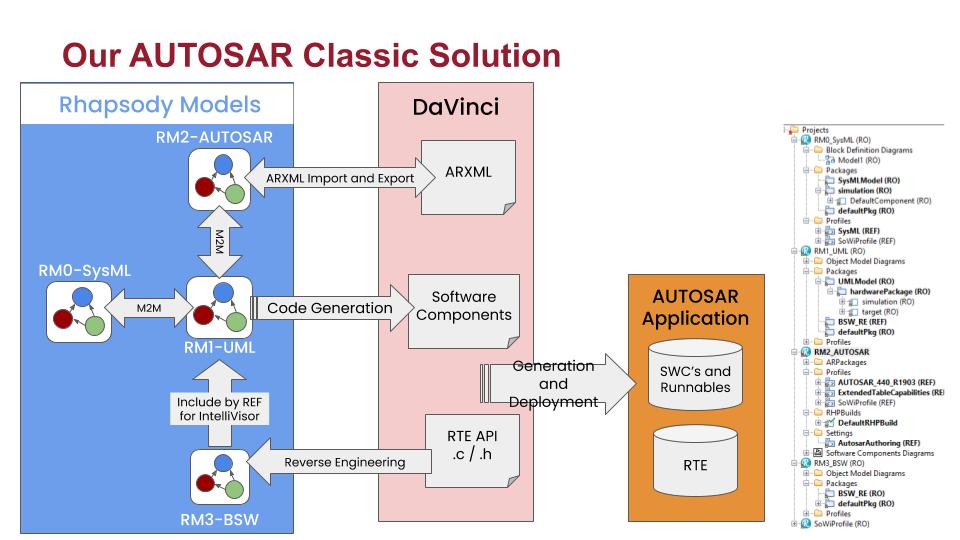
The second step to use Rhapsody is then to generate code that can directly be used inside your AUTOSAR environment!

This picture shows the workflow. Mixing this with other tools like Simulink (even with co-simulation) is no problem!

The AUTOSAR Workflow

Reverse Engineering

This allows you to use the code from your AUTOSAR Tool (Basic Software and other RTE functions) in your Rhapsody state-machines or functions.
In contrast to the previous Rhapsody Workflow (RIMBO and then link your Rhapsody App in the AUTOSAR code) this is the much easier way: Just use a few stereotypes and you can use the Rhapsody Code you already know (If you’ve used Rhapsody for non-Automotive environments) in an AUTOSAR environment.

Contact me if you need more information. I can arrange an evaluation version!

Happy driving with Rhapsody!

Walter van der Heiden (wvdheiden@sodiuswillert.com)

Code generation

Introduction

I am a heavy FaceBook user. ( I know, I know….) One of the things FaceBook does is some kind of daily report with things that you posted exactly x years back.
I used to really like that but in this COVID times these now start to annoy me because they remind me of the travelling times I had before.
I am now officially no longer the “Travelling Modeler” but the “Stay at Home Modeler”…
Well, it is what it is. Since 2 weeks I am not even allowed to travel to the office anymore since Germany does not want to have Dutch people without being tested or quarantined.

Now I assumed my life would be a lot less stressful but nothing is more untrue, I’m now clicking myself from online meeting to online meeting with Zoom via Webex, Skype and Teams back to my own desktop.
When there is time at night, the family takes up that time. Don’t get me wrong, I love that and it’s fantastic but there is hardly time left to write a BLOG. Like I used to have in Airport Lounges and Hotel Rooms.

So I just have to take that time otherwise and I hope I will succeed in giving you the Rhapsody info you need from my home.
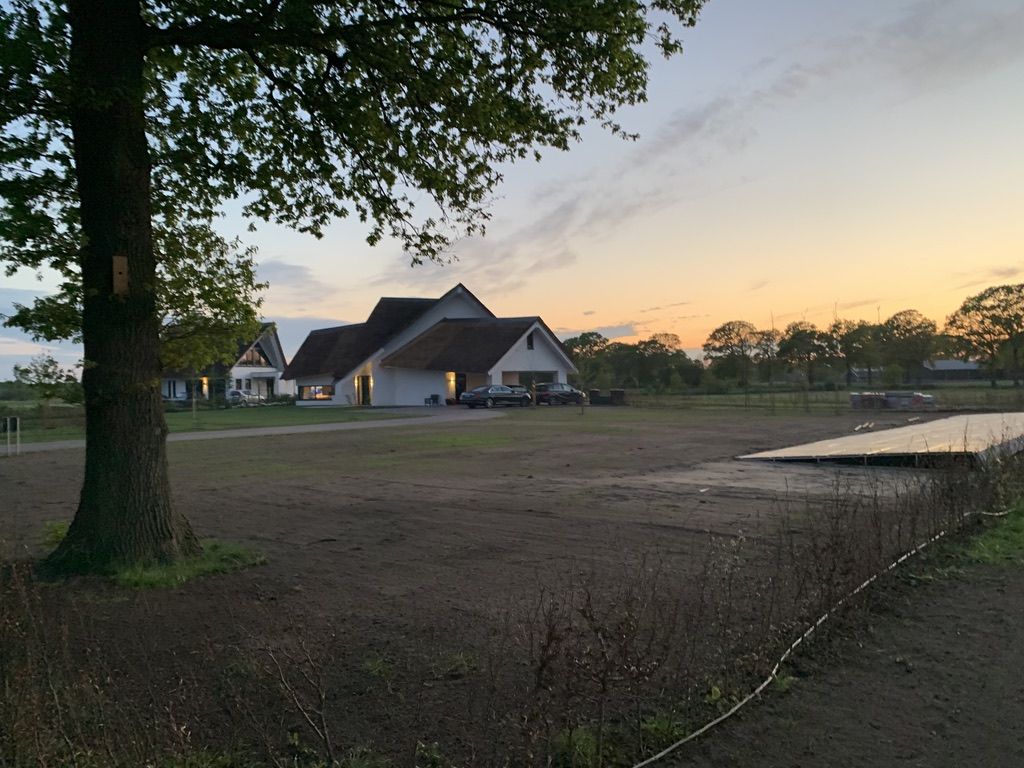
The main picture of this post is the view from my living room. Could be worse I think.

Conspiracy Theory

They’ve always been there but in the Netherlands it’s a hot item nowadays: Conspiracy Theories about everything but now more than ever about COVID. I am not going to discuss that here, that is where I have FaceBook for, but I want to discuss one work related “Conspiracy Theory”: People are denying Code generation. This is where I want to stand up and convince people.

Because this hits me, time after time. Why on earth would you want to use UML and SysML to just draw pictures and then write software by hand if your tool can generate the code for you???

The sad thing about people believing in Conspiracy Theories is that it is extremely hard to convince them otherwise. They always have arguments “out of the blue” mostly lacking any truth or “conveniently” bending truths.

Same with the “Anti-CGers”. All their arguments have been wiped away years ago but they keep popping up.

  • Code Generation makes code too slow/big/unreadable
    Not true. In fact, our Code generator makes smaller code than the average developer does. Certainly when projects get either large or old or both. We all have seen “old” code that is no longer understandable. certainly if the developer is a fan of “It was hard to write, it should be hard to read”.
    Generated code is also faster and perfectly readable. in fact, the consistent structure of the code makes that you can read ALL code. Also the stuff your colleagues have written. The fact that you can make changes to your state-machine and the whole code is written new, from the ground up, instead of decorated with all sorts of work-arounds is saving valuable development and testing time.
  • creating a model that is suitable for Code Generation takes longer than simply write the code.
    Not even closely true. When using Code generation from a UML model you have to create a correct model anyway. Otherwise your model is something that only you can understand. UML and SysML have a very precise semantic, if you don’t follow that,your code has nothing to do with your model.
  • Generated Code can not be certified.
    On the contrary: Certifiers love the consistency and, for all, the traceability of generated code. Yes, traceability. Automatically generated if you create the links from the requirements to your model, the code generator automatically inserts the requirements numbers and text in your code. Without an error. Since testing can be done from the model (but also in the generated code) automatically, setting up that for a certification is easy. I know, I’ve done it. Multiple times.
  • Code generators are expensive.
    Well that depends on what your perception on “expensive” is. But for less than 5k you have a UML Tool that generates code in ‘C’, ‘C++’ or ‘JAVA”, including highly optimized framework and debugger. Including a full year of support. By me. Or my colleagues. I think that is a great deal.

In times where we have less social contact between the developers of projects, using a good structured code is becoming even more important. Cooperating is hard enough, let’s cooperate on model level so the communication is much clearer. Let the Code Generator do the hard work.

The truth is that for many die-hard ‘C’ and even ‘C++’ programmers it is hard to leave their “guru-status” behind and use a code-generator that writes better, smaller, faster and more readable code.
But like with COVID: it is what it is. You will not become a “lesser Guru” by letting a code generator do the largest (and mostly boring) part of your job.
Even the best code generator needs a smart human being to operate it the right way: you.

So! Happy code generating (at home!) with Rhapsody!

Walter van der Heiden (wvdheiden@sodiuswillert.com)

Stay Home

Introduction

I don’t want to say much about Corona, Lockdown, Virus, COVID-19, Social Distancing and related subjects, there are enough other places where you can read enough about that topic. I was personally quite busy with all kinds of things (moving to a new house but also not traveling…) so it took me a while to get back writing.

Rhapsody 9.0

Yes!It is there! the long awaited Rhapsody 9.0. To be precise… the name is no longer “IBM Rational Rhapsody” but “IBM Engineering Systems Design Rhapsody”. Whatever….

Here is a brief summary of important changes:

  • Windows 10 AppLocker Compliance
    The “Share” folder has been split up into “UserShare” which resides in the Rhapsody data folder and “Share” which is now in the (usually read-only) Rhapsody program files folder. You will find property files like SiteC++.prp in the “UserShare” folder now, while e.g. profiles and settings delivered with Rhapsody are in the Share folder.
  • Framework Compilation
    Rhapsody standard frameworks like the „oxf” do not come as ready-to-use libraries anymore. They are built when needed or via menu entry “Code” => “Build Framework“.
  • Dropped „Save As .rpy“ Support
    Attention: this is the first Rhapsody version that does not support to save in old Rhapsody format (.rpy) anymore.
  • Support for property help that comes with profiles
    For example our latest C++ RXF uses this mechanism and makes it possible to see properties for the RXF in Rhapsody including the context sensitive help.
  • MinGW Environment Support
  • IBM Product Renaming
    In most places „old product names“ have been adapted to match the IBM Engineering Lifecycle Management family product names.
  • Under-the-Hood Improvements
    There are important improvements internally, which are not directly visible to the customer. The toolchain used for Rhapsody development has been upgraded, also libraries Rhapsody relies on are updated. This is a big step that will be the prerequisite for future Rhapsody improvements, especially regarding the user interface.
  • And of course: Bugfixes
    Several problems reported by our customers and others have been addressed in that release, for details see IBM’s fix list.

Customers using the Embedded UML Studio (and a so-called ASL-license) can use our Download Portal to access Rhapsody 9.0: x86/x64.

Customers working with the RXF can check the support announcement for the RXF with Rhapsody 9.0 to see how they can easily upgrade.

RXF for C++ 7.11

And that’s not it…

We have just released the new version 7.11 of the Real-time eXecution Framework (RXF) for efficient UML code generation.
Those are the most important news:

  • Dynamic Memory Usage for Events
    The RXF usually works with statically pre-allocated memory blocks for optimal and deterministic memory management of UML events (asynchronous messages). With the new version it is also possible to explicitly allow the usage of dynamic memory allocation from the heap, if matching  static memory pools are not available or full. By default, it still uses statically allocated memory pools.
     
  • RXF Property Perspective and RXF Property Help in Rhapsody
    When using the RXF stereotype, you automatically get a „Willert RXF“ property perspective to see all relevant properties for framework configuration in a well organized way. You can select it instead of „All“/„Overridden“/etc. in the properties tab drop down list. Actually this came with an earlier version already, but since Rhapsody 9.0 and with the latest RXF release it is even more useful, as you can see the property description now right inside Rhapsody just like for any standard Rhapsody property (see screenshot above).
     
  • ActiveClassTable
    It is now easier to keep an overview of all the threads (active classes) configured in your model:
     
  • No Setup required, Relative Paths used
    There is no need to install a framework to a specific absolute directory anymore. You may move the RXF folder to another location. As long as the RXF profile is referenced correctly from your UML model, all tool paths will work. This also allows easier configuration management and maintenance of future project specific RXF updates using externals on your SCM. For details read the HTML documentation under Technology => Configuration-Management.
     
  • MISRA Improvements and a Bugfix
    Most MISRA improvements have already found it’s way into earlier RXF releases, but still some minors could be improved. And a bug was fixed where timeout handling could be unprotected when using critical sections instead of mutexes.

Our C++ RXF is generic, it means you do not need to select a specific environment when you download it, but it contains components for different RTOSes, targets etc, so you can
make the selection when you deploy your model into an IDE. Here is a list of what is contained:


RTOS

  • CMSIS (based on Keil-RTX)
  • CMSIS2
  • FreeRTOS
  • embOS
  • Linux
  • OORTX (our non-preemptive, highly efficient runtime system)
  • COORTX (non-preemptive, called periodically by your legacy software)
  • QNXNeutrino
  • ucOSII
  • Windows


Target Hardware

  • Any ARM Cortex via CMSIS layer
  • AURIX TriCore (HighTec)
  • Any target abstraction supported by an RTOS listed above
  • PC (Windows, Linux)

Compiler

There are no compiler dependencies. Any C++98 (ISO/IEC 14882:1998) compatible compiler shall work. On our continuous integration build server the following compilers are always tested:

  • Keil ARM V5
  • Keil ARM V6
  • Linux gcc
  • ARM Cross-gcc
  • Visual Studio 2017

IDE (Deployer Exporters)

  • Keil μVision 5
  • IAR Embedded Workbench 8
  • Green Hills Multi
  • Microsoft Visual Studio 2015/2017/2019
  • Directory Exporter, covering Eclipse based IDEs and makefile centric builds like:
  • TI’s Code Composer Studio
  • NXP’s CodeWarrior
  • Tasking VX
  • gnu make
  • CMAKE
  • SCons

Do you need something else to support your environment? Just contact us and we can give details about how it can be supported.

RXF V6 Patch for Rhapsody 9.0 Compatibility Available

Also customers of the RXF V6 can use it with Rhapsody 9.0, please read our support announcement for the RXF with Rhapsody 9.0.

Exciting News for our RXF C Customers

We expect to release a version 7 for the C language in the next months with huge improvements. It will also be generic (no dedicated release for each tool and target combination required anymore), will not require a Setup and will have a completely new and optimized approach for ports and interfaces code generation in C! We will keep you up to date.

That’s it! Happy modeling with Rhapsody!

Walter van der Heiden ( wvdheiden@sodiuswillert.com )

Paris Code Generation.

Introduction

Lately I do a lot of my travel to France or via France. Of course we are now, as SodiusWillert, located in Bückeburg but also in Nantes (and in Detroit)
But that is not all France… I prefer flying by KLM and that comes automatically with Air France and the occasional stop-over in Paris CdG.
Not my favorite airport as my regular readers know.
But sometimes the flight is just more convenient or just cheaper via CdG.

Not this time, I actually had to be in Paris. Closer to Orly than to CdG so I decided to fly there. The KLM-Air France “El Cheapo” airline “Transavia” flies to Orly and it was really quite cheap. The reason for that became clear when I was sitting in the train to Schiphol: I received a text message that my flight was cancelled. 15 Minutes later an email arrived with my options:

  • fly on another day
  • fly to a different place
  • ask my money back.

neither of these options was what I wanted, so I called the Transavia Hotline. After 15 minutes of waiting (“It will come in time” – Billy Preston and Syreeta on repeat…) the call was answered and the train entered a tunnel… so after 15 more minutes I was again in contact.
“We are currently busy checking all passengers out”, “please call back in half an hour” she said. After some pressure she promised to call me back as soon as she knew more. Apparently she is not much smarter because she still hasn’t called me.

I already expected that and started calling after 15 minutes. The next call center person was not able to do anything for me, she said. I had to do that in Schiphol at the rebook desk in terminal 2.
In the meantime I arrived and went to the desk. I already figured out there were 2 flights with KLM-Air France to Paris. One in 45 minutes (do-able since I had only carry-on luggage) and one on 21:30 in the evening.

To cut a long story short, I had to visit 2 more desks to finally buy a new ticket (€ 600) to Paris because nobody could rebook my flight. Of course I had the late flight, missed the early one due to the slow response and the lack of information. And I was at CdG so the Uber took an hour instead of 10 minutes. Thanks Transavia!

Code Generation

But I arrived in Paris and had to speak the next day about Code Generation. I got the usual questions like:

  • “Why Code generation”
    because it’s the only way. Everywhere you look companies are already very low on staff, programming takes longer and longer, offshore programmers do not really help since we have to increase the effort for specification. Having code generated from a good spec dramatically decreases the time needed to deliver good quality software.
  • If that is so then why doesn’t everybody uses CG?
    We started selling Rhapsody with CG about 20 years ago. At that time there was no other tools that had CG. So sales people from all competitors would claim that CG was something nobody needed. A really annoying statement that is still haunting us (
  • We can just start by drawing pictures and then when we have learned UML we can try CG..
    Sounds like a cool idea. But it isn’t. think 25-30 years back. The time where ‘C’ came up. People were all using assembler and considered ‘C’ as being difficult, ‘C’-compilers were “eating memory” and everybody thought that this ‘C’ thing would go over because it wasn’t useful. Maybe only for documentation (Sounds familiar?)
    Now if you are using ‘C’ to document your code and you’d be programming assembler, what is the chance that you have learned ‘C’ after a few months? I can tell you: zero.
    You learn ‘C’ by developing in it and observe the compiler telling you what you did wrong. And after that the debugging of your programming. Then you learn ‘C’.
    Same thing with UML. You will learn that when you’ve seen and debugged the code. Not by just drawing pictures.
  • But UML is better for documentation isn’t it?
    Depends. As said before, just using UML without checking if you have done it right only increases the work you spend. Don’t forget that UML is a language with a lot of redundancy in it. You have to do a lot of work to create seamless documentation. Then why not generate code from it?

So what does a good UML Code generator needs?

We have tried to create an external code generator before (For EA, maybe you remember) This was not very successful, partly because there was no real integration.
Also many people thought they could take their existing models and then generate code from them, which is, of course, never going to work since you can do a lot in a UML Tool that does not make sense for Code Generation.
You can generate code from the following Diagrams:

  • Class Diagrams
    – Classes -> .cpp/.h (or .c/.h)
    – pointers or embedded classes for relations,
    – code for ports
  • State Diagrams
    – State machine that is connected to a class. All instantiated objects have this state-machine
  • Activity Diagrams
    – code for a Class, you can use a limited version to describe code for functions
  • Sequence Diagrams/Interaction Overview Diagrams
    – Lifelines are classes (Instances but they have to be classes first)
    – messages are events or operations. In theory it would be possible to generate behavior from Interaction Overview Diagrams.
  • Object Diagrams
    – Objects are Objects/instances
    – Links are assignments of object pointers to attributes
  • Package/Profile Diagrams
    – packages can have code, they need to bring the “glue” code for instantiating and connecting objects. Profiles influence the generated code.
  • Composite Structure Diagram
    – instantiates objects and connects them
  • Component Diagram
    – knows the relation of Components and could generate “make” files that links the correct components

No code is generated from:

  • Usecase Diagrams
    – Oh how we would love that, don’t we 😉 No, is not really possible. I would rather write something that generates code directly from requirements….
  • Deployment Diagrams
    – Not really feasible
  • Communication Diagram
    – Possible but who would want that?
  • Timing Diagrams
    – That is also possible but we haven’t worked that one out yet.

So we established that one of the important things for Code Generation is the integration with the UML Tool.
This needs to guide you with the model so that code can be generated from it.
Also we need to directly show the generated code in a window in the tool. Feedback is the most important thing.
Roundtrip and reverse engineering are very important. We need to able to change the code outside of the tool in “our favorite editor”. Also we must be able to use legacy code in an easy way.

  • Generated Code must be understandable by developers
  • it must be efficient in code size and in run-time behavior
    • at least as optimised as hand-written code
    • must satisfy timing requirements.
  • it must fulfil safety aspects if used in safety-critical systems.
    • code must be compliant with standards like MISRA
  • The generated code must be abstracted from RTOS/CPU and Compiler (The framework will do that)
  • it should not be unnecessarily dependent on other stuff

Up till today, there is still only one tool that does this way better than all others and that is Rhapsody. More than 20 years old and still going strong.

So. That’s it, have fun generating code with Rhapsody!

Walter van der Heiden wvdheiden@willert.de


Check, check, modelcheck….

Introduction

Lots of times I get questions about model checks in Rhapsody. First of all if Rhapsody does model checks, the short answer here is: yes.
The longer answer is that Rhapsody does not check much, just if there are no errors in the model that prevent code generation.
You can start model check by hand (Menu: “Tools”, “Check Model”, “<<Configuration Name>>”. This will start a better Model Checker.
Does that check your complete model? Short answer: Yes. Long answer: Not exactly….
It does some checks like if you have added a description to your model elements and if you have changed the default names (Class_01, etc) But nothing more.
If you want more thorough checks you have to provide them yourself. This is not as bad as it sounds, the UML is a language, it is very difficult to check if somebody is using it in the wrong way.
If you want to check something you first have to define your model guide lines. How do you want to model. Then you can define how you want to check that.

Java API

Rhapsody has a Java API that allows you to (almost) completely control Rhapsody from extern.
You can use that to check the model, convert model elements, generate code and much more.
For check model you need to extend the model check interface and implement checks. Via the API you can walk through the model selecting elements based on type/name/position in the Browser Tree. You can access all information from the model and even change it when you like.
Same thing for Code Generation, you can, of course, walk the model and generate your own code but you can also instruct Rhapsody to call your Java functions when Rhapsody is ready generating code. We call that the Simplifier, Rhapsody will first take your model and generate a simplified model You can make that visible by setting: CPP_CG::Configuration::ShowCgSimplifiedModelPackage to TRUE.

Oh no… not Eclipse….

Yes… this works with Eclipse. Eclipse and I have a difficult relationship… We don’t like each other. It is getting better last years… but still not as easy as other IDEs.
You just create an Eclipse Java Project and you go to the properties of your project. Open the Java Build Path tab, then in Libraries open “Add External JARs”, now select the Rhapsody.jar file in “Share/JavaApi” . That’s all… should work now.

The Check

First Create a project (e.g. CustomChecksHelper). You can then create a class (e.g. CheckPlugin) that needs an entry point function:
RhpPluginInit (IRPApplication rpApp)
that will be called by Rhapsody. You can then instantiate all checks that you have made, all the classes that do checks have to extend RPExternalCheck and have to override the
check( IRPModelElement elem, IRPCollection failElem)
function.

Helper

Rhapsody uses “Helper” files to pre-load plugins. That makes them faster and immediately available. Therefor create a file under Share\Helpers with .hep as extension. The syntax of that file is quite cryptic, I always have to try 3 times before it works… Beware if you already have helpers then the numbers change.

[Helpers]
numberOfElements=1
name1=Checks_Plugin
isPlugin1=1
RhpVersion1=8.4
JavaMainClass1=com.telelogic.helpers.CheckPlugin
JavaClassPath1=$(OMROOT)\Helpers\CustomChecksHelper.jar

OK. That’s it! Have fun checking with Rhapsody!

Walter van der Heiden ( wvdheiden@willert.de )

Dauwpop & using Rhapsody code in a library

Traveling Modelers also need vacation once and a while. So last week I had that! And enjoyed it at home. The only thing I did was visiting a Music Festival. But that was on walking distance from my home. It’s called “Dauwpop” which means “Dew Pop”, dew as the stuff that makes the grass wet in the morning and Pop after Popmusic.
It is called that way because in the Netherlands we have a tradition on Ascension Day: “Dauwtrappen”. That is to step on the morning dew. And that is what happens. On that day, mostly young people, go out very early and walk or ride bikes. They do that while taking drinks and stop regularly to drink something.

The festival also starts in the morning although not that early… My main reason for going was that M<Ali Jazz (from Faithless) would be there with a DJ session. But he cancelled last minute. Bad luck, but I still went there with my 2 sons and we had a great day.

A customer asked us a question via support this week. They wanted to use Rhapsody code in a library. The main code was made in Qt (pronounced “cute”) but they wanted to use Rhapsody for the control logic.

So the code must be compiled and then linked into a library.

That, unfortunately, is not it, some more must be done to get it working.

In the general Tab of a Rhapsody Component there are three selections, “Executable”, “Library” and “Other”. There is only one choice possible here. Both the OXF and the RXF use that to generate different code.

When you only use non-active and non-reactive classes and initialize everything dynamically, you don’t have to do anything. You can then just include the correct .h files where you want to use Rhapsody generated classes. But if you do use static objects you have to call the InitRelations() function that is generated, And if you use state-charts and/or activity diagrams you have to initialize and start the framework.

When “Executable” is selected, Rhapsody will generate your main function (Or a function that is directly called by main, depending on the OS you use) In case of a “Library”, a function is generated to start the framework and to initialize the objects in your model. This is true for both RXF and OXF. (In some RXF Versions this was not totally implemented…. take the generated file for the EXE and use that for the LIB… that’ll work.)

The best way to learn how to do this is to start with a simple model first. Create 2 Components with <Name>_LIB and <Name>_EXE, select “Executable” and “Library” respectively and generate code. I always use beyond compare to compare two directories but there are enough other good working compare tools.

Then create 2 classes (“A” and “B”), connect them using an association, create a third class with a structure diagram to instantiate the other 2 (Don’t forget to create an instance of that class !!) now give them a small state-machine (or activity diagram) and make one of them active.

Again, generate code and see the differences. I made life simple for you…. I made the model and saved it (In Rhapsody 8.1.5, old but probably useable by everybody)

Happy Modeling with Rhapsody

Walter van der Heiden (wvdheiden@sodiuswillert.com)

Back in Motown, continue the adapter

Introduction

The next part of the trip was to Detroit, aka Motown. There were some customer visits planned and some internal training for a new colleague.

57817841614__6087F444-1266-44A6-810C-5F4A53BF0CB7
The flight was OK and everything went smooth. I picked up my rental car and then after typing in stuff for a long time the lady from Hertz told me that she could not find my car in the system…. I said, well that’s cool, I just take it and then I don’t have to take it back…
Nice try but she wasn’t going to do that. But she was nice, asked me politely to bring the car back and then pick another. Any other… So I ended up with a cool Infinity Q50. With 400 HP… cool…

IMG_0587

The rest of the trip was without incidents… except for some flooding. But I only saw that on the TV. Haven’t had any trouble with it.

IMG_0589

Back to work II

So from the MakeFileContent property there are some things you have to adapt.

What when it doesn’t work?

If you re-read the  model and you get an error message then…. you did something wrong 😉
Debugging is not so difficult. In Rhapsody go to the features of your model and open the “Makefilecontent” property. This will show you exactly to where it could be read…
When the make doesn’t work, try removing (or temporary) switch of the “echo off” with a rem before it. Also you can edit the makefile that is generated, copy the “cc” line and put an echo in it. Then you can see what happens.


Build the new Framework

Now the framework also needs to be built. This can be done from the Rhapsody Menu (“Code”, “Build the Framework”) This is only visible if you can rebuild the framework i.e. when the following property is set:

CPP_CG::QNXv7NeutrinoMomentics::buildFrameworkCommand
"$OMROOT/etc/Executer.exe" "\"\"$OMROOT\"\etc\qnxv7cwmake.bat 
qnxv7cwbuild.mak build \"CPU=$CPU\" \"CPU_SUFFIX=$CPU_SUFFIX\" \"

This should contain the call to the batchfile (and makefile) that builds the framework. The same paths and changes you’ve made to the makefile content should be applied to all the makefiles that you can find in the batchfile, they are in the OXF, OMCOM, TOM, AOM and WebComponents directories. You actually only need the OXF but do the rest (that is only needed for animation) anyway.

TARGETS= oxflibs omcomlib tomlib aomlibs  webcomponentslib

CPU=aarch64
CPU_SUFFIX=le
MAKE=make CPU=$(CPU) CPU_SUFFIX=$(CPU_SUFFIX)  all 

all: $(TARGETS)

oxflibs:
$(MAKE)  -C oxf -f QNXv7CWoxf.mak CFG=oxf
$(MAKE)  -C oxf -f QNXv7CWoxf.mak CFG=oxfinst

omcomlib:
$(MAKE)  -C omcom -f QNXv7CWomcom.mak CFG=omcomappl

tomlib:
$(MAKE) -C tom -f QNXv7CWtom.mak CFG=tomtrace
$(MAKE) -C tom -f QNXv7CWtom.mak CFG=tomtraceRiC

aomlibs:
$(MAKE)  -C aom -f QNXv7CWaom.mak CFG=aomtrace
$(MAKE)  -C aom -f QNXv7CWaom.mak CFG=aomanim 

webcomponentslib:
$(MAKE)  -C WebComponents -f QNXv7CWWebComponents.mak CFG=WebComponents
This is the content of the batch file, all calls have already been edited to the new environment.
Then in all makefiles set the correct include paths and compiler calls: (This is my example, adapt to your own paths)
ADDED_CPP_FLAGS = $(CPU_FLAG) $(DEFAULT_CPP_FLAGS) 
 -I$(QNX_TARGET)/usr/include/c++/5.4.0 
 -I$(QNX_TARGET)/usr/include/c++/5.4.0/aarch64-unknown-nto-qnx7.0.0 
 -I$(QNX_TARGET)/usr/include -DOM_STL -I.. 
 -I../osconfig/QNX -D_MSL_NO_VECTOR_BOOL -DUSE_IOSTREAM 
  $(RHAP_FLAGS)
That should be it.
The menu recommendation for today is the poutine… (In HopCat in Royal Oak in Detroit they have a “Wladimir Poutine” on the menu. It is not healthy (and looks awful) but tastes very very good.
57859282305__6C1A0295-6104-4B96-941A-E3F784C4F2EE
OK, Happy modeling with Rhapsody
Walter van der Heiden (wvdheiden@willert.de)


USA and Adding support for compilers

Introduction

I receive a lot of questions from people who want to generate and compile code from Rhapsody using another compiler than the ones that are in the standard installation.
Since IBM is delivering some pre-adapted frameworks but does not officially supports them it is the users responsibility to do some adaptation work.
My usual answer is: switch to the RXF. Is smaller, faster and more comfortable since we took the command-line out of the workflow.
But sometimes this is not the answer. Adapting an OXF to a new RTOS is a bit difficult but using another compiler is not that hard.
Unfortunately the documentation to do this is very scarce and not really clear. So here is a (hopefully) better guideline to do that.

USA

Last weeks I was quite busy (and in another time-zone…) Yes back in the US! Again, Florida and Michigan.
In Florida I, of course, visited my friend in Fort Myers and then went to Orlando for the IBM IoT Exchange. I had a presentation there together with Ed Grinberg from Depuy, Boston. I made the movie using my iPhone so the quality is a bit less than professional…

I was also interviewed together with Tom Capelle by the great guys of Quick Bytes, Graeme & Ryan. We spoke about the Sodius-Willert Merger.

Back to Work….

OK.. How do you create an adapter for another compiler. We assume you use C++ and want to adapt the QNX adapter to a newer version.

  1. Never change the original files of the framework. Always make copies and create your own adapter.
  2. When you have changed property files: re-read the model to update the properties in your model.
  3. Use a decent editor to edit files. I recommend notepad++, is free and awesome.
  4. The instructions are for C++, just replace C++ with C and that will work as well.
  5. Either install all tools in the same directory on ALL workstations of everybody in the project or use environment variables to align all differences. (First solution is preferred)
  6. A property file (Only the factory, factory<lang>, site and site<lang> files, not your own!) must have an extra “end” on a newline. Also escape all quotes (“) and backslashes (\)

How does it work?

If you generate code in Rhapsody, a makefile is also generated. When you press build, Rhapsody will call your makefile using an available make for that environment. How does Rhapsody knows what to call? It’s all in the properties, mate!
So assume you’ve selected

The Share Directory

This directory contains all the secrets to Frameworks. The following subdirectories are interesting:

  • etc
    contains files that must be added to the build process and the makefiles for the frameworks itself. Also contains the batch files that Rhapsody calls when building applications.
  • Lang<Language> (C, Cpp, Java, Ada)
    This contains the source-code from the framework
  • MakeTmpl
    Contains files added to the make process.
  • Profiles
    The profiles that can be loaded (The RXF is completely adapted using profiles)
  • Properties
    Contains all property files. This is where Site,prp and Site<language>.prp are located. Also the Factory.prp and the Factory<language>.prp are here. NEVER NEVER NEVER edit these!!!!

There are more directories but these are the interesting ones when making an Adapter.

Step 1, edit the sitec++.prp

So in Share\properties you’ll find siteC++.prp that is usually empty unless you have already added something. We have to add only one (1) property that we can copy from the factoryC++.prp file (Open that factoryC++.prp.  search for environment and copy the line. Add that to your siteC++.prp file)

Subject CPP_CG
  Metaclass Configuration
    Property Environment Enum      
        "MSVC,MSVCDLL,MSVCStandardLibrary,VxWorks,
         VxWorks6diab,VxWorks6gnu,VxWorks6diab_RTP,
         VxWorks6gnu_RTP,Solaris2,Cygwin,MicrosoftWinCE600,
         OseSfk,Linux,Solaris2GNU,QNXNeutrinoGCC, 
         QNXNeutrinoMomentics,NucleusPLUS-PPC,
         WorkbenchManaged,WorkbenchManaged653,
         WorkbenchManaged_RTP" "MSVC"
  end
end

end

This is the “standard”. Now I recommend deleting all the environments that you will never use to make stuff more readable. Then add your own environment, in our case we will call it QNXv7Momentics. We want all changes for our environment in a separate file, that makes it easier to exchange the new adapter with others. This file can be included in the siteC++.prp file with the “Include” statement. The content of the siteC++.prp is something as follows:

Include "QNXv7Momentics.prp"
Subject CPP_CG
  Metaclass Configuration
    Property Environment Enum      
 "MSVC,MSVCDLL,Cygwin, QNXv7Momentics, QNXNeutrinoMomentics," "MSVC"
  end
end

end

Now copy the donor environment (QNXNeutrinoMomentics) to a new file QNXv7Momentics.prp in the Properties directory. (Same procedure, open factoryC++.prp and search for “QNXNeutrinoMomentics”). You have to add the Subject, that is CPP_CG. (Properties always have a Subject and a Metaclass but you can group them in a prp file) Don’t forget the “end” statements!

Edit the properties

Now it is time to edit. You probably have to edit more but that goes beyond the scope of this BLOG. I will describe the most important ones (here you can see the escaping of the backslash and the quotes, don’t forget that!!):

Property InvokeMake String "\"$OMROOT/etc/Executer.exe\" 
\"\\\"\\\"$OMROOT\\\"\\etc\\qnxv7cwmake.bat 
$makefile $maketarget \\\" \""

Here you fill in the name of your batchfile that compiles the Rhapsody generated code. You have to create that file later (In the “Share\etc” directory)
This file contains the commands to call the make command in your environment. Now it is time to figure out how the make command of your environment works.

@echo off
if "%2"=="" set target=all
if "%2"=="build" set target=all
if "%2"=="rebuild" set target=clean all
if "%2"=="clean" set target=clean

set QNXROOT=<The root of your QNX Install>
set MAKEFLAGS=-I%QNXROOT%/target/qnx7/usr/include 
          -I%QNXROOT%/target/qnx7/usr/include/c++/5.4.0
set QNX_TARGET=%QNXROOT%/target/qnx7
set QNX_HOST=%QNXROOT%/host/win64/x86_64
set QCC_CONF_PATH=%QNX_HOST%/etc/qcc
set LD_LIBRARY_PATH=%QNXROOT%/target/qnx7/lib
set PATH=%QNXROOT%/host/win64/x86_64/usr/bin;%PATH%

make -s %target% -f %1 %3 %4 %5 %6 %7 %8 %9

This is the example for my installation, fill in the correct paths for your environment.

More Properties

The following properties determine what you give the compiler. OmFileCPPCompileSwitches is what you fill in the “Settings” Tab of your Rhapsody component.

Property CPPCompileCommand MultiLine 
" @echo Compiling $OMFileImpPath
$(CREATE_OBJ_DIR)
@$(CC) $OMFileCPPCompileSwitches -o $OMFileObjPath $OMFileImpPath
"

Property CompileSwitches MultiLine "-lang-c++ -I. 
  -I$OMDefaultSpecificationDirectory -I$(OMROOT) -I$(OMROOT)/LangCpp 
  -I$(OMROOT)/LangCpp/oxf $(INST_FLAGS) $(INCLUDE_PATH) 
  $(INST_INCLUDES) -DUSE_IOSTREAM -DOM_USE_NOTHROW_GEN 
  $OMCPPCompileCommandSet -c "
Property CCCompileCommandString ""
Property CPPCompileDebug String "-g"
Property CPPCompileRelease String "-O"
Property LinkSwitches String "-Bstatic"
Property LinkDebug String "-g"
Property LinkRelease String "-O"

The next step is to create the makefile. This is generated from Rhapsody. There is a template for the makefile with “magic” macros that expand to the information inside the Rhapsody model.

Property MakefileContent MultiLine "
**** Lots of Stuff ****
"

If your environment is close to the donor environment then you do not have to change much here. Otherwise it is possible that you have to go to all the lines and decide if that is still correct.

So… the rest will be in the next episode

Happy Modeling with Rhapsody

Walter van der Heiden (wvdheiden@willert.de)

« Older posts

© 2026 Rhapsody TechBlog

Theme by Anders NorenUp ↑