BLOG about IBM Rhapsody. Contains technical information as well as more private travel stories.

Tag: SysML (Page 1 of 2)

From the Depths to the Heights: Rhapsody SE and the Grand Canyon

Every year in January I go to Phoenix (Scottsdale actually), for the yearly 321-Gang kick-off. Like last year, I took Jannie with me (i have a truckload of KLM miles to spend), and although I had to work, we had some free time to see some things. So we decided to go to the Grand Canyon. Yes, that’s quite a drive, but I like driving, certainly in the USA. Very relaxed there.

I’ve been at the Grand Canyon before—many years ago on a road trip from Minneapolis to Las Vegas. But that’s a story for another time.

The drive from Phoenix was nice enough—20°C and sunny (and no, I don’t use FreeDumb Units). But once we got up to the South Rim? Different story entirely. Way, way colder. Like, “why didn’t I pack better clothes for this” cold.

[Photo: Grand Canyon winter view - those layered rock formations]

Jannie was smart enough to bring proper winter gear. Me? Not so much. But hey, the views were worth the frozen fingers.

A Canyon of Perspective
(and Frozen Fingers)

Standing there at the rim, trying to take decent photos while my fingers slowly turned into ice cubes, watching the layers of geological history unfold in the winter light, I couldn’t help but think about layers of a different kind—the architectural layers we’ve been building in the new IBM Rhapsody Systems Engineering (Rhapsody SE).

The Grand Canyon has this way of putting things into perspective, doesn’t it? There I was, looking down at rock formations that took millions of years to create, thinking about how we systems engineers are always trying to manage complexity and time in our own projects. The Vishnu Schist at the bottom? That’s like our foundational architecture. The Kaibab Limestone at the top? Well, that’s probably the user interface everyone actually sees and judges us by.

But here’s where it gets interesting (and where my mind inevitably wandered back to work, because apparently I can’t help myself even at one of the world’s natural wonders)—the Grand Canyon makes all those layers visible. You can see the relationships, the dependencies, the way each layer built upon the previous one. And that’s exactly what we’ve been trying to achieve with systems engineering for… well, forever.

Enter Rhapsody SE
(From the Outside Looking In)

Which brings me to the real reason I’m writing this post. Now, full disclosure—I’m still an “old fashioned” Rhapsody Classic guy. Haven’t made the jump to Rhapsody SE yet. But I’ve been reading about it, talking to people who have tried it, and honestly? It sounds like someone finally listened to what we systems engineers actually needed.

[Screenshot placeholder: Rhapsody SE web interface - if someone can send me one!]

What’s Different This Time?

First off, it’s web-based. No more “Can you install this on my machine?” or “The license server is down again” conversations. You just… open a browser. Revolutionary, right? Well, for our industry, it kind of is.

But here’s the thing that really caught my attention: SysML V2 support. Finally! I mean, we’ve all been waiting for this for what feels like forever. It’s supposed to be like moving from a horse-drawn carriage to a Tesla. Sure, both get you there, but one makes the journey significantly more pleasant and efficient.

[Photo: Me looking cold but happy at the Grand Canyon - because why not?]

Of course, I’m still stuck in Classic Rhapsody land for now. But a guy can dream, right?

The Collaboration Game-Changer

Standing at Hopi Point (thankfully they had a heated visitor center), watching tourists from around the world gather to see the same incredible view despite the cold, it struck me how good collaboration really needs that shared perspective—that common view of what you’re all working on. That’s what Rhapsody SE is supposed to be all about.

In Classic Rhapsody, collaboration often feels like playing telephone. You work on your part of the model, export it, someone else imports it, merge conflicts happen, and suddenly you’re in a three-hour meeting trying to figure out why the state machine doesn’t match the interface definition anymore.

Sound familiar? Yeah, thought so.

From what I’m hearing, Rhapsody SE is supposed to change this. Everyone’s looking at the same “canyon”—the same live model, the same data, the same current state of the architecture. No more version conflicts, no more “Well, in my version…” discussions.

At least, that’s the promise. I’ll believe it when I see it, but I’m cautiously optimistic.

[Screenshot placeholder: Rhapsody SE collaborative interface showing real-time updates - anyone?]

Real-Time Everything

The Grand Canyon was carved by the Colorado River over millions of years, but today’s business environment doesn’t give us millions of years to get our systems right. We need real-time everything: real-time collaboration, real-time updates, real-time validation.

SysML V2 and other data and workflow APIs enable model-based integrations with downstream domains as cross-domain digital threads, boosting productivity and accelerating system engineering processes. This is the kind of integration we’ve been promising stakeholders for years. Finally, we can actually deliver on it.

The View from Here

As I walked the Rim Trail that day, moving from viewpoint to viewpoint, each offering a slightly different perspective on the same magnificent canyon, I realized that’s what good systems engineering is about—providing multiple perspectives on the same system, helping stakeholders understand the relationships and dependencies that aren’t immediately obvious.

Rhapsody SE feels like it’s finally giving us the tools to create those multiple perspectives without having to maintain separate models or worry about consistency. The solution supports systems of all sizes, from small projects to large enterprises, by providing layers of abstraction to manage different levels of detail and keep models clear and manageable.

The Verdict (From Someone Who Hasn’t Used It Yet)

Will Rhapsody SE solve all our systems engineering problems? Probably not. (Nothing ever does, really.) Will it make some of our daily frustrations disappear? Maybe. And after using Classic Rhapsody for over a decade, I’m willing to be hopeful.

The Grand Canyon took millions of years to become what it is today, and it’s still changing. Our systems engineering practices are evolving too, just a bit faster. Rhapsody SE sounds like it might be a significant step in the right direction—a tool that finally acknowledges that systems engineering is inherently collaborative and that maybe, just maybe, we should make that collaboration as seamless as possible.

Plus, it’s web-based. Did I mention it’s web-based? Because after years of Classic Rhapsody license server issues, that alone makes me want to try it.

Now I just need to convince management to let me play with it…

[Photo: Final Grand Canyon shot - the vastness that puts everything in perspective]

P.S. – If you’re ever at the Grand Canyon in winter, pack warm clothes. Trust me on this one. And yes, Hermit’s Rest still has the best coffee and least crowded viewpoint, even in January.


What are your thoughts on the evolution of systems engineering tools? Have you tried Rhapsody SE yet? Let me know in the comments below.
Rhapsody to Cameo: Save Time and Effort.

Introduction

So… you are a Rhapsody user. Always have been, always will be. Like me, I also have a love/hate relationship with it. More love but there are times when I think: “Rhapsody??? really???”

But suppose you work somewhere in a place where people want to force you to use MagicDraw (Cameo). Not a bad tool, definitely not, but no Rhapsody. Because in spite of all it’s peculiarities, it’s a brilliant tool. And then there’s Code Generation.

Your protest is futile: You have no choice. You have to. But… What to do with all your old models? Make them again? Use XMI (Spoiler alert: doesn’t work very well)

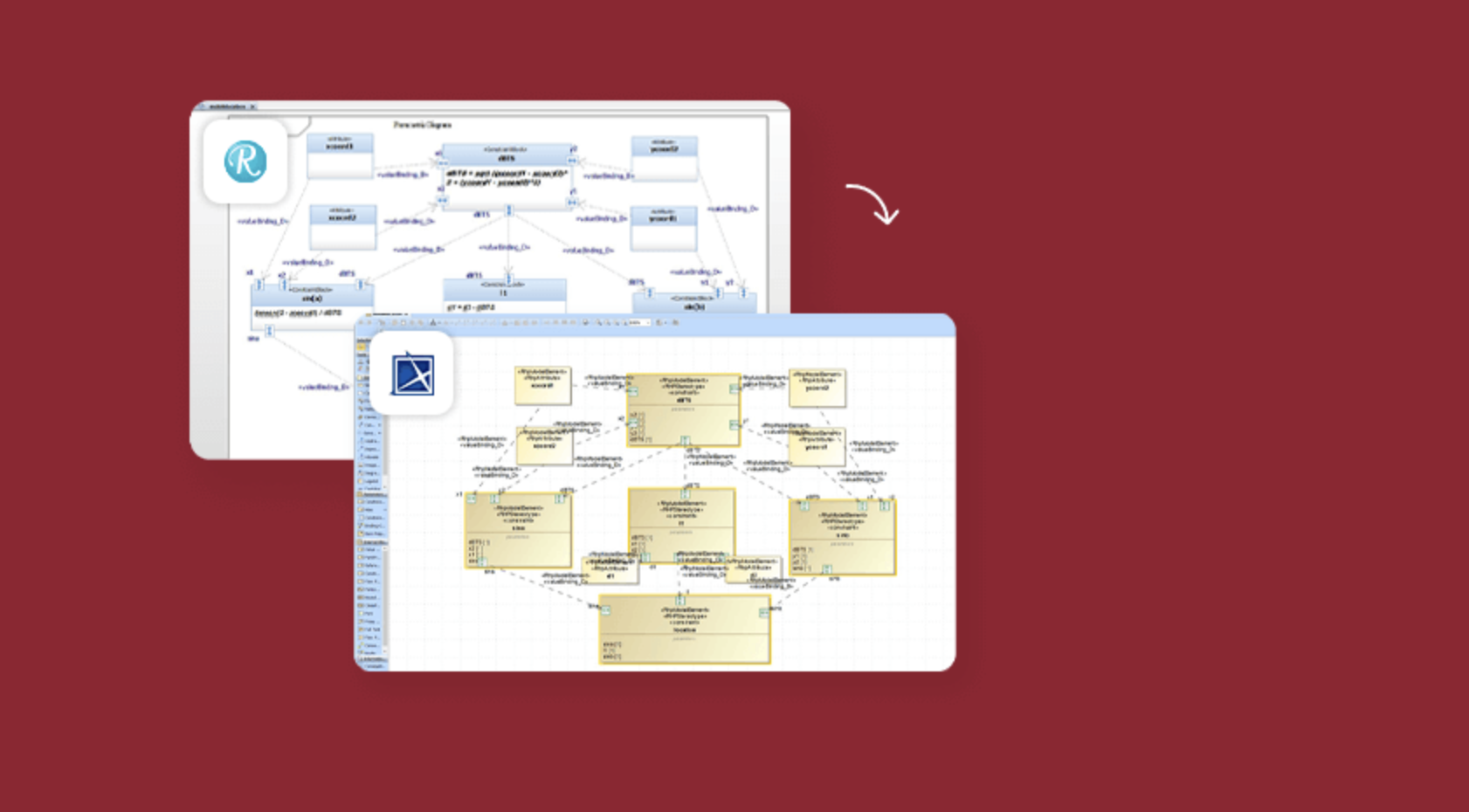
That’s only one use-case for a product we call “Publisher.” A tool that can take Rhapsody Models and save them as perfect Cameo models. Or the other way around. Or from System Architect. Or RSA. Or even Enterprise Architect!

Another use-case is that the US Defense Ministry demands models to be in Cameo format. In that case, you want a converter that 1:1 copies your Rhapsody Project to Cameo. Or saves it as a Cameo Model.

Wait! There’s more: If you really like Cameo (and who doesn’t!) then you can use it for Systems Engineering and then use the Rhapsody CG to do Software Engineering.

So as you will understand: SodiusWillert has that. A perfect way to save your valuable models in another format with the certainty that no information is lost in the process.

Vegas. Really??

Yep. It seems all large events are in Vegas nowadays. Also the Siemens Realize live I had to visit. My regular readers know how I think about Las Vegas, read this BLOG entry if you don’t.

But the Siemens conference was great, it was in the Mandalay Bay, which is a bit less bad IMHO. We had a booth there and it was quite successful, I think.
My personal highlight was the Keynote by Tony Hemmelgarn, CEO of Siemens DI SW. He spoke about the advantages of MBSE and mentioned Rhapsody in a very nice and loving way. I cannot remember an IBM event where I heard anybody speak in such a way about modeling (Except for me, of course! 😉 )

The best news was, however, that next years event will be in Detroit. And the European version in Amsterdam. Less travel. Also, only 6 hours of time difference and not 9. The latter is a real burden on the communication with home, there’s just not enough time overlap left. And the times that you are both awake, there is the fact that the times don’t sync. One always is doing something when the other has time to call and vice versa.

We spent some time walking around. I must confess that this “Sphere” was pretty impressive.

Back to the Publisher

First of all: here you can read all about it and… Try Before You Buy!

Convert systems models from IBM Rhapsody to Cameo Systems Modeler and Cameo MagicDraw with one click. Our Publisher for Rhapsody supports the conversion of modeling formats like SysML, UML, and UPDM and all model diagrams, elements, structure, and hierarchy. Convert large systems models fully automated with full support for diagrams, logging of model transformation action and configurable diagram layouts.

Save time manually cleaning up your target model by leveraging user-configurable settings and display styling in the conversion. Publisher for Rhapsody provides two configuration files that allow teams to control and consistently apply their defined methods and styling.

Publisher for Rhapsody implements model checking to identify, log, and report inconsistencies in the source model, then converts UML, UPDM, or SysML elements​ such as hierarchy, diagrams, and relationships to ensure 100% compatibility in Cameo Systems Modeler. For UPDM elements, it also converts Architecture Description, Packages, and Viewpoints.

The Publisher does the complete model. All model elements, also all diagrams! It keeps your diagrams in the same shape so you will recognize them in the blink of an eye! It even check-ups your models before converting them, we don’t want “garbage in, garbage out!”

Even roundtripping is supported. So if you want to exchange models that will be changed in both tools: All possible!

That’s it for today. Feel free to contact me if you have any questions;

Happy Modeling with (either Cameo or ) Rhapsody.

Walter van der Heiden walter@sodiuswillert.com

M2M Magic

Introduction

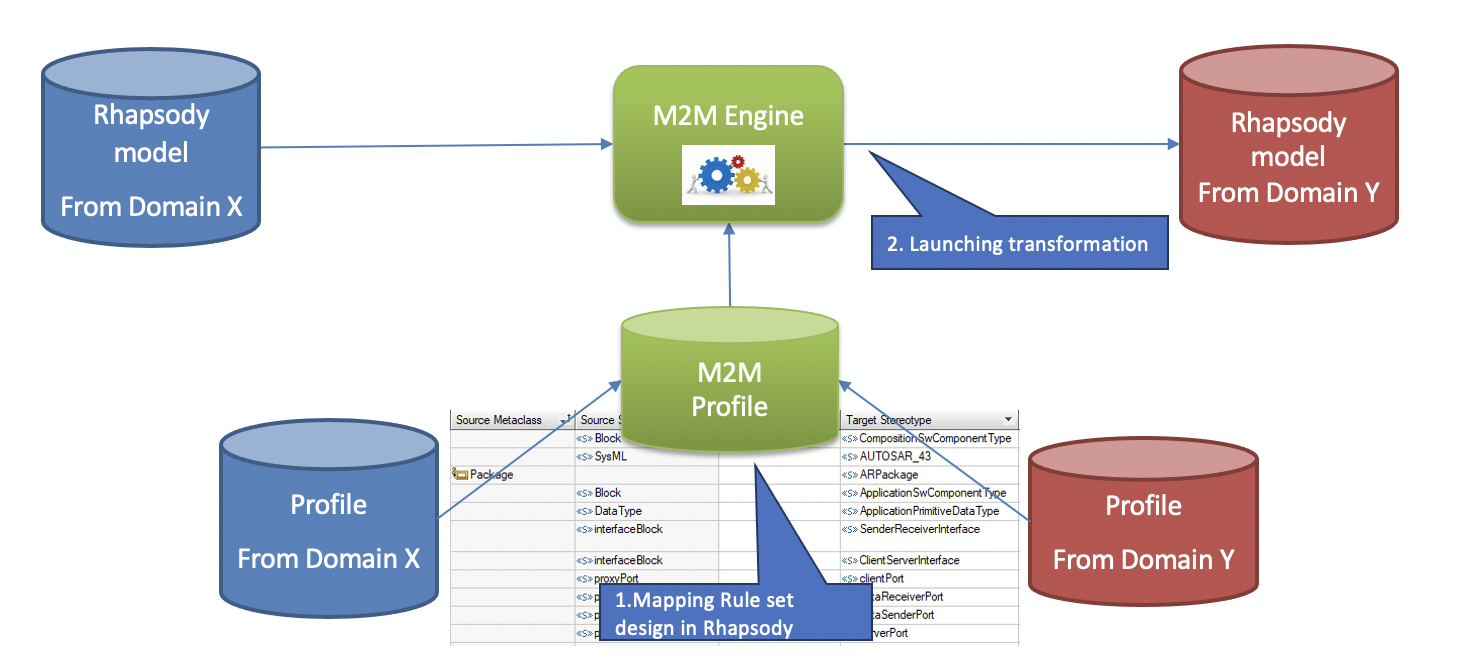
M2M is a product from SodiusWillert that helps you to save large amounts of time. It converts Rhapsody models made with certain profiles to other profiles. For example, taking a SysML model and convert that to an AUTOSAR model.

How does it work?


It is not really magic… actually you do your own magic. M2M uses a ruleset to define what elements are moved to which other elements, for instance: take a SysML Block and transform it to an AUTOSAR Block.
Now that would be an easy one. You can also make it more complicated. E.g.: You can define that a SysML Block with stereotype “SWC” will be converted into an AUTOSAR SWC.

That is already more interesting. But it doesn’t stop there. The rules allow you to define multiple elements to convert to one element or one element to convert to multiple elements (1:1, 1:m, n:1, m:n)
But then the fun really starts because you can also add functions (written in JavaScript) to do pre-conversion checks (“Do I want this specific element to convert?”) or post-processor actions (:e.g. “Rename this element” or “Create other elements on other places”)

You only sync once?!?

This opens a lot of possibilities to transfer model element between models from different profiles. Using M2M in combination with DiffMerge opens even more possibilities.
This helps you in keeping different models up-to-date, no matter where you make changes.
So you can have multiple different views on your System under Development, a Systems Engineering view, an AUTOSAR view, a Software View and maybe even a source-code view of the used BSW (Basic SoftWare) all of them subject to changes but all of them in sync thanks to M2M.

Put the power where you need it.

Some models have certain possibilities that others don’t have and vice-versa.
This means that you should model in the profile that offers you what you need.
SysML is perfect to model requirements and use-cases and link them, the AUTOSAR model gives you feel insights in all parts of your software and the UML model has a bit of both (and state machines…)
M2M allows you to add your own information exactly where it fits best.

I want to have this!!

That is cool. Contact me to get an evaluation version and an evaluation license.

Rhapsody vs Preevision

Introduction

When developing systems or software for an Automotive environment you cannot avoid using AUTOSAR. This is the standard for exchanging information between involved parties inside Automotive projects, can be an OEM requesting a TIERx to do the development of a certain ECU or small companies doing parts of software applications that will run on that ECU.
AUTOSAR also defines a standard software layer (BSW or in Adaptive ARA) that helps you developing on different microcontrollers without really knowing all details.
Then there is the Operating system, which on the Classic Platform is almost completely statically defined and generated out of the information in your AUTOSAR model. Also called RTE.
There are several companies where you can purchase tools to help you creating applications and generate the stuff that you need to make a complete production ready application.
They are from companies like Vector, Elektrobit, dSpace, Dassault but also from Siemens (former Mentor). We used to use ArcCore but they have been purchased by Vector and integrated in their tools now.
The problem with most of these tools is that they are looking at things from the “low-level” side. There is a lot of detailing necessary before you can work with these tools and that certainly is not helpful when you only want to create an overview of the blocks you are going to implement.
You can use Visio or a cheap UML tool for that, this will not give you the benefits you want since they are solutions that will not allow you to incorporate that information in a dynamic way in your AUTOSAR model.
There are also tools from previous named companies that try to overcome this disadvantage but these tools still work in a proprietary world, not with an open standard like UML or SysML

Why UML (or SysML)?

These are standards. And standards that were developed quite a while ago with many people that have knowledge of them. Standards that are taught on universities.
The UML was made out of lots of other smaller pieces of standards that were already available, hence the “Unified” in the name. It was made especially for handling the growing complexity of software projects. Source code (generation) played a role, of course, but the emphasise was on the handling of complexity. This was done with different diagram types for different aspects of the system to be developed. Every person that is involved in the project can enter information and extract information from the UML model and the exact right level without being disturbed by information that is not relevant for that person.

Rhapsody AUTOSAR profile

Rhapsody has, for quite a while now, an AUTOSAR profile. This allows Rhapsody to read in and write ARXML files. They are then stored in a Rhapsody Model so they can be edited on an AUTOSAR level. Rhapsody can even convert information between AUTOSAR versions!!
All AUTOSAR Elements are implemented and can be edited. This is not always the most comfortable way, some things are better done by using an AUTOSAR dedicated tool like Vector’s DaVinci for instance.
For use with the Code Generation from Rhapsody we also have an “AUTOSAR lite” profile

Rhapsody Rulezzz!

So, how do we do that with Rhapsody then?
Rhapsody is a UML tool that exists since 1996. It also does SysML (Because that is a UML profile, although that will change in the SysML 2.0 release).
But that is not all, the tool is part of the IBM Engineering Tools and can exchange information with DOORS, DNG and many other tools via OSLC on the Jazz platform.So your requirements from DOORS or DNG can be seen and linked inside Rhapsody. The same platform also allows you to use widespread external tools like Jira from Atlassian or even link to your production using WindChill from PTC.
And as already said above: Rhapsody can read ARXML files and exchange them with all other AUTOSAR enabled tools. You can even use MATLAB Simulink models linked to Rhapsody models.
This all enables you many different views on your application or system but still have these views synchronized (or even linked when they use OSLC)

Doing the Magic: M2M

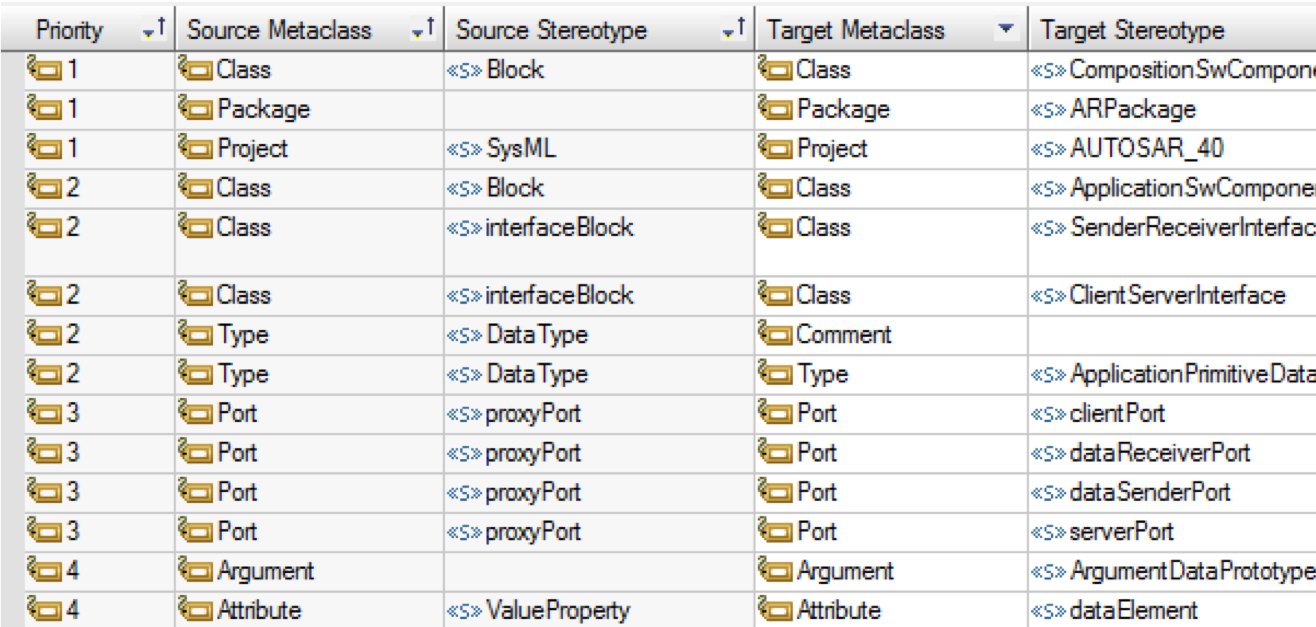
Of course Linking informations is ALWAYS better than synching information, sometimes linking is just not possible. For that we have M2M (Model to Model) that can convert Rhapsody models with different profiles. It is rule-based, you create rules like:

When a certain element of MetaClass “SourceMetaClass” and a stereotype “SourceStereoType” is found
Then see if certain conditions “Conditions” apply
If that is the case, convert the element to an element of MetaClass “TargetMetaClass” with stereotype “TargetStereoType”. If there is a linked operation “Operation” then execute that.
All Rules have a sequence number, lower numbers will be executed first and exclude higher sequence rules.

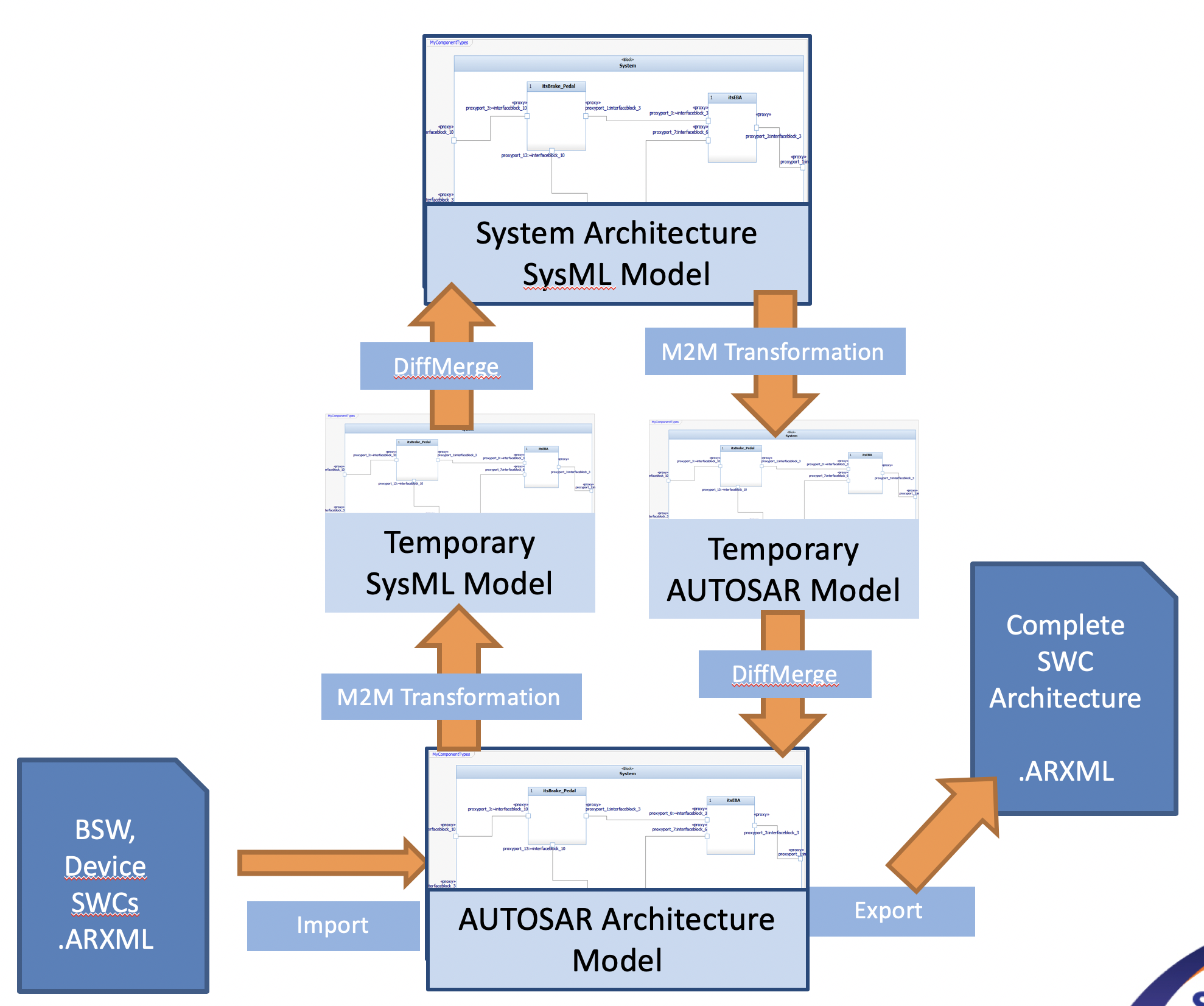
After applying the rules, the resulting model must be merged back using (built-in) DiffMerge. This ensures that changes can be made to single model elements without redoing the whole model.

This allows a very sophisticated way of maintaining different views to the same information.

Happy Modeling with Rhapsody

Walter van der Heiden (wvdheiden@sodiuswillert.com)

AUTOSAR

Introduction

AUTOSAR is the standard created to support software development in automotive environments.
Why is there a special standard for that? Is software for cars special?
No, the software itself is not, it’s just plain ‘C’ (lately also ‘C++’) But the circumstances are different.
Are there special Tools for that? Yes there are. Wouldn’t it be nice to just use the normal Development Tools? YES Of Course!
Willert has all these tools and the add-ons necessary to use them in an AUTOSAR environment!

Differences

  • Timing is critical, in more than one way.
    There is the timing in the software itself, which is still critical although CPU performance increased severely last years. This is partly because most software in cars is “polled”. Due to the fact that there are algorithms in cars where developers use Simulink (and code generation in TargetLink and/or Embedded Code) that is “control loop software”, so does stuff every 10 milliseconds.
    That is OK, it works but your software is ALWAYS doing “something”. And while different paths through your code are taken (with different execution times) this is difficult to manage.
    Then there is the timing in the release of cars. That is different than most projects…. A cars introduction and production is planned years ahead and there is NO DELAY possible. Period. You can easier shift the timing of a solar eclipse that the intro of a car. So software development cycles must be predictable (they aren’t but they must be….)
  • Cooperation not only between colleagues but worldwide between multiple companies.
    Yes. Cars are defined by OEM’s, parts are made by Tier 1,2,3 etc by companies that have developers everywhere over the world.
    The environment supports exchanging information on bits and bytes and, for all, the possibility to exchange pieces of software built by one company for other pieces. AUTOSAR (ARXML) makes this possible.

How can Rhapsody help?

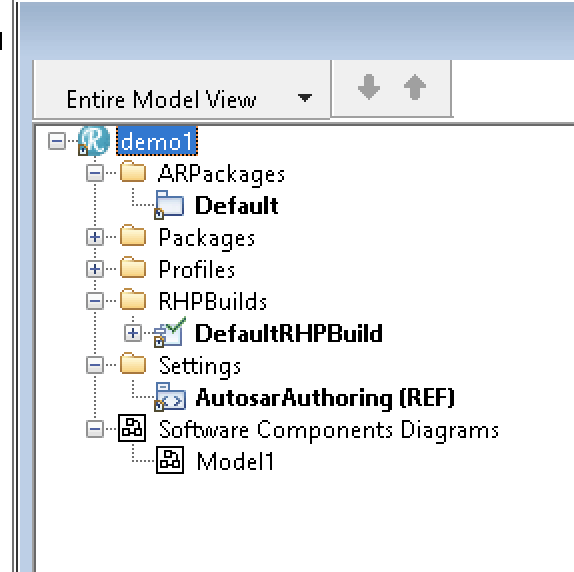
That is not too difficult. Rhapsody has the AUTOSAR Profile. This allows you to read-in ARXML files and make them visible, graphically, in Rhapsody.

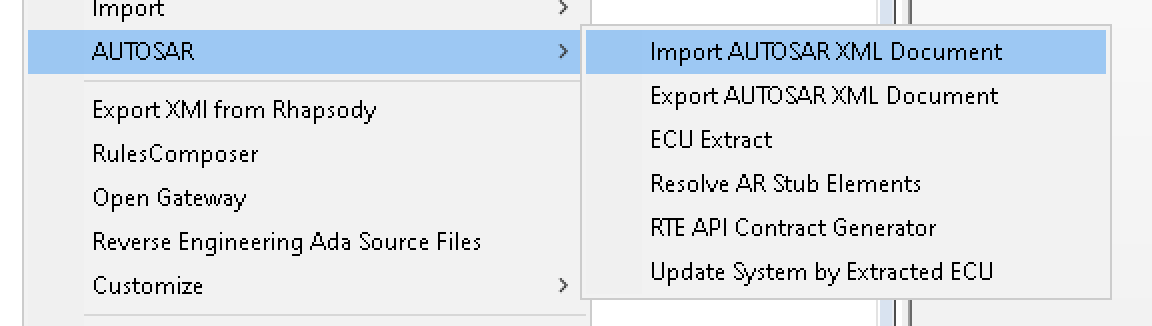
AUTOSAR Menu


You can also edit the AUTOSAR model in Rhapsody. Or even create it there and export what you’ve made to an ARXML file that can be read by an AUTOSAR Authoring Tool like e.g. DaVinci.

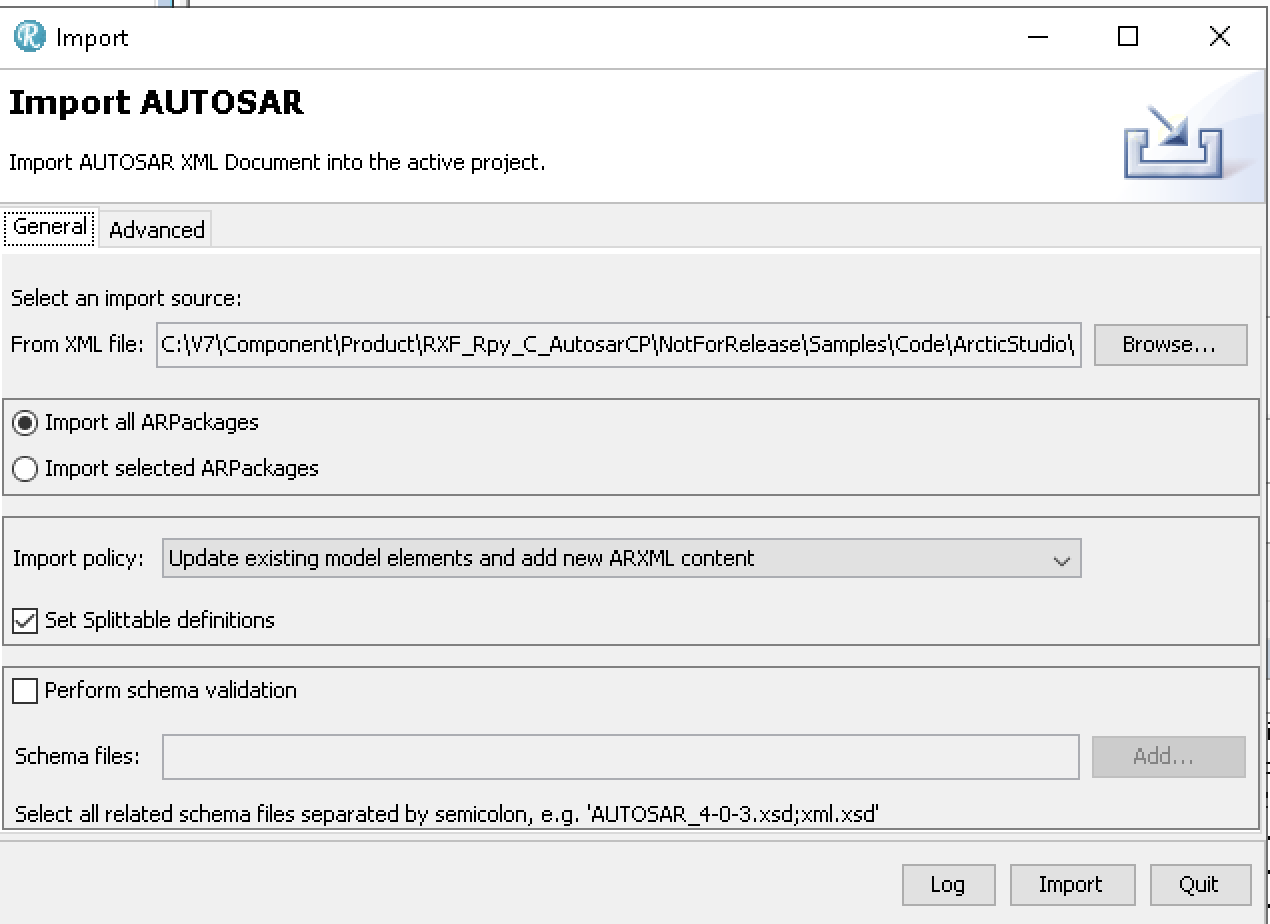
AUTOSAR Importer

Here you can import any ARXML file. Rhapsody will import it (Remember: Use the 64Bit version to import, 32Bit is way too slow)

Rhapsody AUTOSAR model

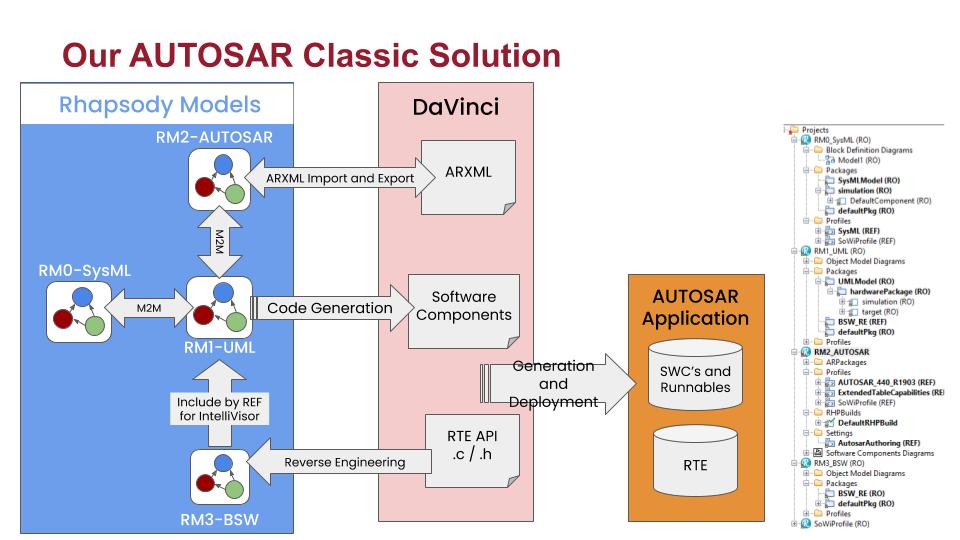
Another possibility to fill your AUTOSAR model is by using plain SysML or UML with the simplified AUTOSAR profile. This gives you stereotypes for the most used AUTOSAR elements. The M2M Tool will then synchronize your 2 views, the AUTOSAR view and the SysML/UML View.

M2M Workflow

In this way your models will always be up-to-date, wherever you make your changes.
The second step to use Rhapsody is then to generate code that can directly be used inside your AUTOSAR environment!

This picture shows the workflow. Mixing this with other tools like Simulink (even with co-simulation) is no problem!

The AUTOSAR Workflow

Reverse Engineering

This allows you to use the code from your AUTOSAR Tool (Basic Software and other RTE functions) in your Rhapsody state-machines or functions.
In contrast to the previous Rhapsody Workflow (RIMBO and then link your Rhapsody App in the AUTOSAR code) this is the much easier way: Just use a few stereotypes and you can use the Rhapsody Code you already know (If you’ve used Rhapsody for non-Automotive environments) in an AUTOSAR environment.

Contact me if you need more information. I can arrange an evaluation version!

Happy driving with Rhapsody!

Walter van der Heiden (wvdheiden@sodiuswillert.com)

And now for something completely different….

Prologue

Hi All! It’s been a while since I wrote. Not much travelling these days, I was in Germany in the office last week and in Stuttgart (by car) but only briefly.
Work however continues and is even more than usual.
So not much time to write BLOG entries. Soon my first vacation in 3 years (too busy building a house…) will start. I promise to write some new stuff then…

XSD

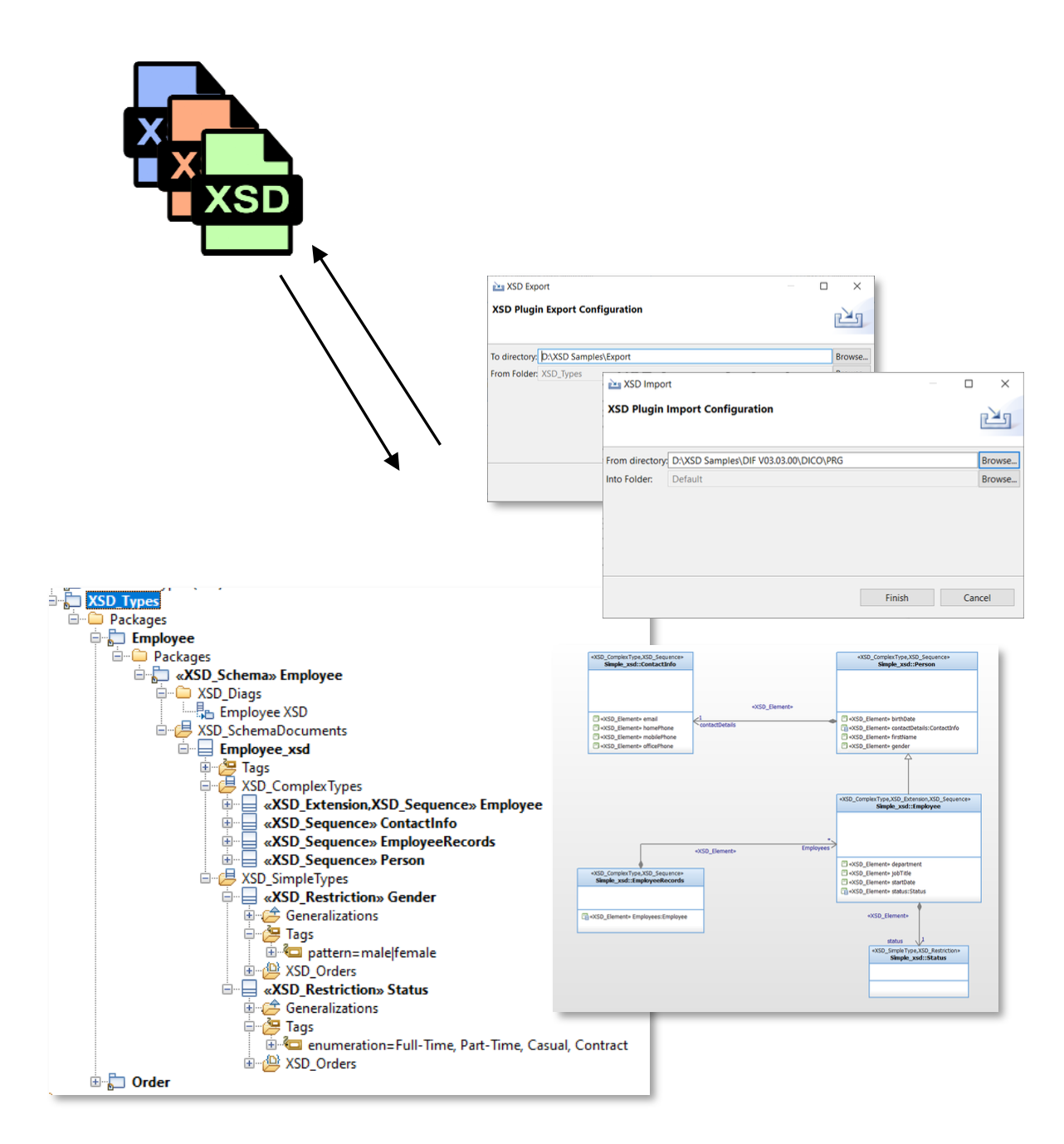
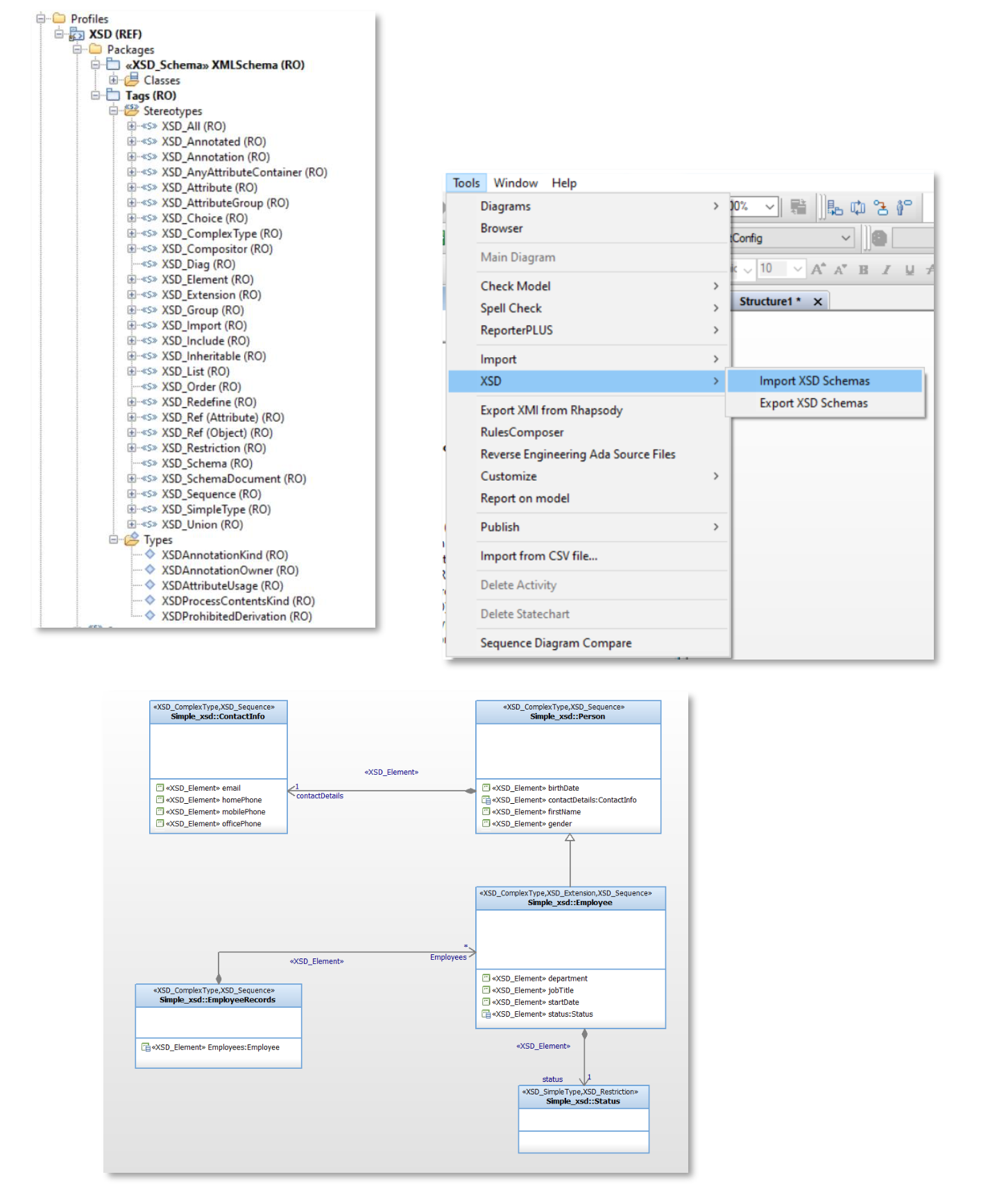
This time I want to speak about something unexpected that you can do with Rhapsody: XSD (XML Schema Definition) import/export and editing with Rhapsody.
This is an add-on Tool (of course from SodiusWillert!!) That helps you deal with the normally textual and tiresome XSD files in a nice graphical way.

I added some of the pictures and explanations from our presentation, you can download the presentation here:

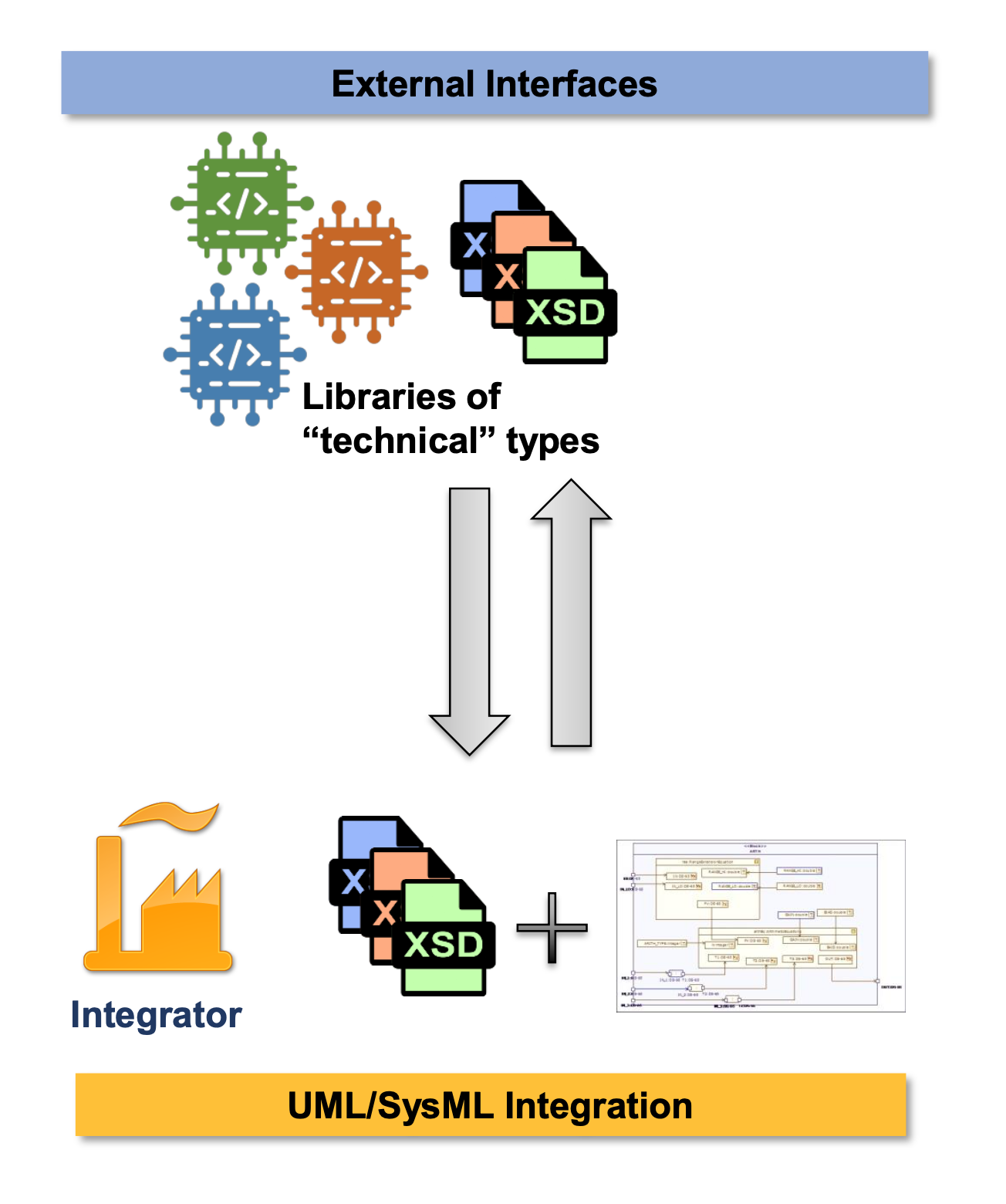
  • During design, the data exchanged throughout external interfaces of a system are described by a set of technical XSD files.
  • They have to be integrated in the UML/SysML models and types linked with the model.

Rhapsody XSD – Key Features

  • Integrate XSD types in Rhapsody
    • Import XSD files in Rhapsody
  • Make XSD Types understandable in Rhapsody
    • Simple concepts but enough expressivity
    • Complete XSD Profile and Diagram Support
  • Use Rhapsody as an XSD editor
    • XSD Previewer
    • Export XSD Rhapsody to XSD Files

If this is interesting for you, please contact me!

Happy XSD-ing with Rhapsody!

Walter van der Heiden (wvdheiden@sodiuswillert.com)

Model Transformation

Introduction

What?!? No travel? Well… yes. too much travel. Hence the low posting frequency. Apart from moving with my family from our old house (that was sold and where we had to leave in 3 weeks) to a temporary vacation home that is not even large enough to house the family of 4 (well, 5 with the dog) let alone has enough place for all our stuff.
So most of it is stored at the moving company and will be brought to our new home when it’s finished (Planning date is December 13. But we all know what planning dates mean, do we….)

Luckily there was (and will be) much traveling in the last weeks and the coming months. I already visited Munich, for our MESCONF, Paris (just for flying to Schiphol), Bückeburg (For work, and we are also moving there), Köln (Cologne) and Zürich.

In the next weeks I’ll be traveling to Bückeburg (Office), Paris, Nantes, Berlin, Possibly Detroit, Ft Myers, Boston, Sindelfingen (ESE), Munich and more.

Transforming your Models

But that is not what I wanted to talk about. There is a more technical topic that needs attention.
Everybody knows (or should know) that we are no longer Willert but SodiusWillert and that we are awesome in connecting engineering data in the widest form possible.
Connecting Jira to IBM via OSLC, connecting the world of ALM to PLM by linking PTC Windchill to IBM with OSLC but also transforming your UML (or even SysML) model to code in C or C++.
One of the questions we receive is that to connect, sync or convert models into other models.

AUTOSAR

One of the models a lot of our customers use is AUTOSAR. That is a standard used in Automotive and contains a standard data format for exchanging information between tools. It is called ARXML (AUTOSAR XML) and is very complex. With ARXML you can exchange very detailed information about the software you make for car ECU’s. You have to use it if you want to create a run-time system for your ECU (RTE – Run-Time Environment) but also to use the Basic Software for your ECU.
But AUTOSAR also defines a model structure that can be used to define your ECU Architecture. Rhapsody can do that, you just load the AUTOSAR profile and you can model AUTOSAR. (Made by SodiusWillert)

Now this modeling structure has some similarities with SysML (Also uses Blocks and Ports etc) but that is, unfortunately, not really the same. AUTOSAR was, at the start, set up to improve cooperation between different automotive companies but somehow this path was left some time ago. IMHO opinion it is needlessly complex and tries to cover all possible ways to do something instead of limiting the users to the bare necessities and introduce an abstraction that would make life easier.
This is where the problems start when you want to use SysML to do architecture modeling, there is no defined path from SysML to AUTOSAR.

Different soup: M2M

That’s how this is called in German: everybody is boiling their own soup. That leads to the fact that there is no single correct solution but a tailor-made solution for every user.
That is where the SodiusWillert M2M comes in. Louis Talvande from SodiusWillert designed this tool to do a model transformation based on rules that the user can define himself.
These rules are part of your Rhapsody model so you can easily select your model elements.

Example of Transformation Rules

When started M2M will transform your current model to another model using the rules you have defined.

More than just transformation

Sometimes (or actually mostly….) just mapping one element to another just isn’t enough. That’s why M2M allows you to not only map single elements to multiple elements but also 1:n or n:1 or n:n.
You can also define conditions in your mapping rules that can decide if a transformation should be made.
And if that is not enough, you can also define scripts (Javascript) comfortably inside your Rhapsody model, to post-process your elements. The complete Rhapsody Java API is to your disposal there.

Merging

Of course, transforming a model is cool. But what if you make changes to the original model? Of course you can always throw away your target model and transform again but what if you also have made changes to the target model?
Rhapsody comes with DiffMerge built-in. Since you are using all standard Rhapsody elements Diffmerge works out-of-the-box.

Features of the M2M Tool

  • Transforms Rhapsody models into Rhapsody models
  • Flexible (user modifiable) transformation rules
  • Transformation can be launched via commandline
  • Portable mapping rules, so you can upgrade from e.g AUTOSAR 4.22 to AUTOSAR 4.31
  • Merging capability with DiffMerge
  • 1:1, 1:n, n:1 and n:n mappings
  • post-processing very easily possible
    • conditional mapping
    • creating new elements using the JAVA API

Just contact me or Louis if you want to learn more about M2M

Well… that’s it for today! Have fun transforming with Rhapsody

Walter van der Heiden ( wvdheiden@willert.de )
Louis Talvande ( ltalvande@sodius.com )

Pearl Jam

It’s a tough job but somebody’s got to do it…

Sometimes life is good, sometimes life is awesome. I had a busy week, hence the limited BLOG entries, but during this week I had time to travel to 020 (That’s how I call the city that became our capital by a “capital” mistake see: 020 and 8.3.1)
Then why go there? Well there is a place called Ziggodome where lots of concerts take place, On Wednesday it was the time of Pearl Jam, one of the bands I love.
Their first album “10” was one I played over and over and I still do that.

When I saw they were performing in the Netherlands I was sitting behind my computer at the start of the sale to get tickets. Unfortunately I could only get 2 tickets… Better than nothing I thought…

Unfortunately I also noticed that I had visitors from the US in that week that I could not shift. So I was already thinking of selling my tickets but when I told my guests that they all shouted: “Can you get more tickets”? Yes I can… 😉

So I traveled from the office in Bückeburg to “Nul Twintig” together with my American friends. A nice drive, about 350 kilometers. We ate a burger at the Burger B*tch (Not kidding, that is the real name, just google it) drank a beer and attended the awesome concert. Life is good.

What does this all have to do with Rhapsody? Nothing directly… but my friends are also Rhapsody and modeling people. Not only that, there were 2 Automotive Spice experts and another AUTOSAR expert. So we used all traveling time very useful with some interesting discussions on how to do ASpice with Rhapsody, how to import and export Rhapsody UML information to and from ARXML, how to do a model transformation from SysML to AUTOSAR and back with traceability links. We only stopped discussion when Eddie Vedder was singing. That was just too good. Love Rhapsody but I also love Pearl Jam.

So. Happy modeling with Rhapsody. one is Alive in Even Flow….

Walter van der Heiden ( wvdheiden@willert.de )

Modeling with AUTOSAR

Introduction

This is a small excerpt of my presentation at the IBM IoT CE Conference in Munich from may 14-16. A very nice conference, if you were not there: you missed out!

The Challenge

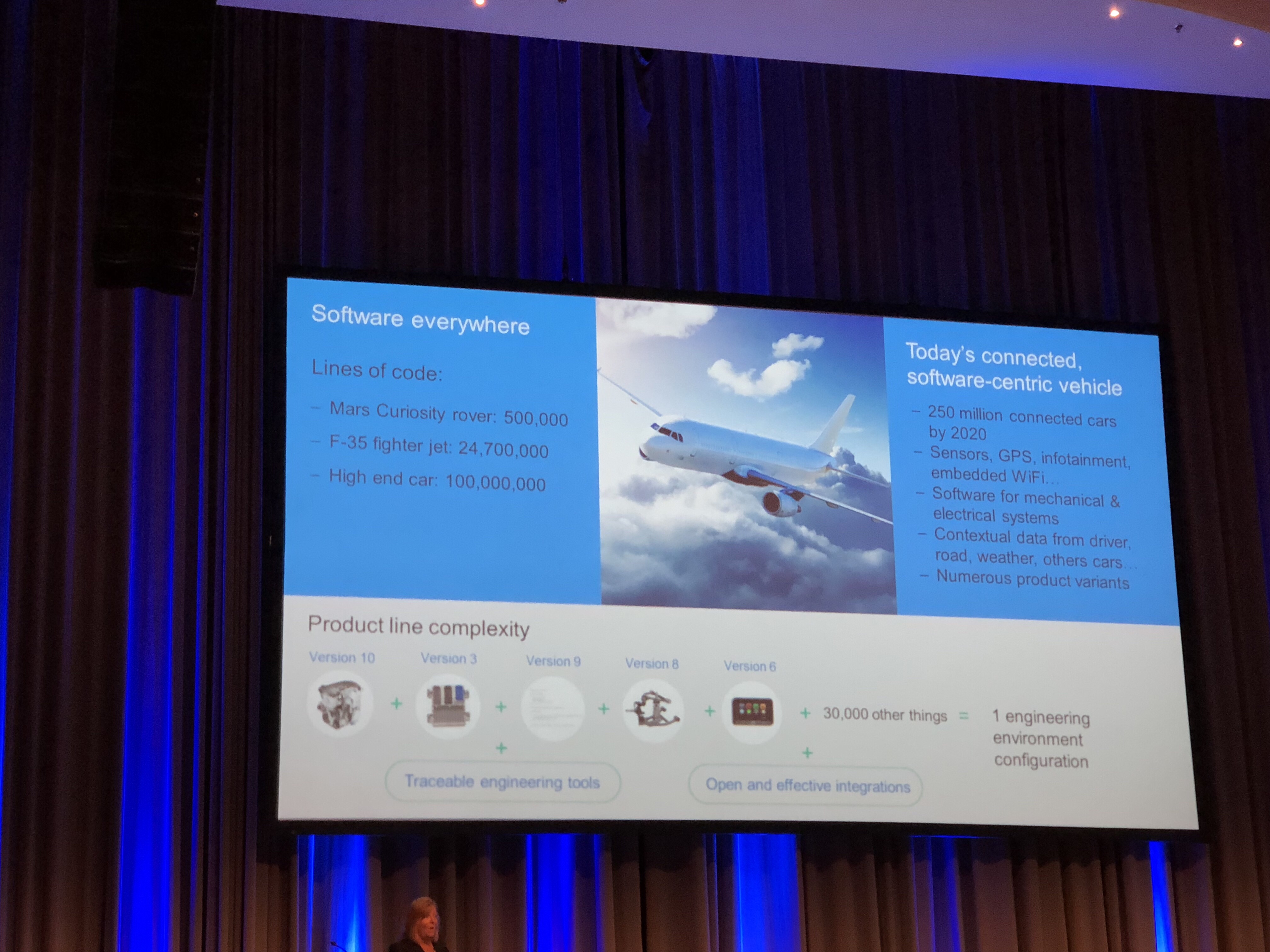
I might have said it before, cars are the most complex thing people build. Even more complex than planes. I “borrowed” a slide from Debby Edwards Keynote from the conference. That clearly shows it.

The F35 (JSF) plane has about 25 million lines of code, a modern high-end car 100 million. OK, there are trade-offs, like do you add multi-media systems or is a passenger plane more complex but the general idea is just: making cars is an immensely complex process. But look at a random big city during rush-hour and you see: The Automotive Industry still manages to make cars that work with a remarkable reliability.
Not always, we all know examples from cars that have huge electronic problems (I can tell some stories about that myself…)

No why is a car more complex than a plane? Well, part of the complexity is self-inflicted. Compare this:

  • Car > 1.000.000 pcs < EUR 100.000,-
  • Plane < 1.000 pcs. > EUR 100.000.000,-

this says it all, cars are mass products that are cheap (relatively to planes…) and planes are almost built-to-order products that are expensive.
A plane manufacturer does not bother the price of a micro-controller, they have a small number of certified ones that they choose from. If it costs EUR 2,50 or EUR 2,80 does not really bother him.
Now the car manufacturer is interested. If they can use a CPU that costs only EUR 0,10 less than another one for a device that is in a car (or even multiple times in a car) than the calculation looks different. 1.000.000,- * EUR 0,10 is already EUR 100.000,-
So mostly they choose small Microcontroller that barely fulfill the needs of their developers, adding to the complexity.

Mastering complexity: Process

autospice.gifOne of the things you can do to master complexity, certainly if you are not changing the tool environment.
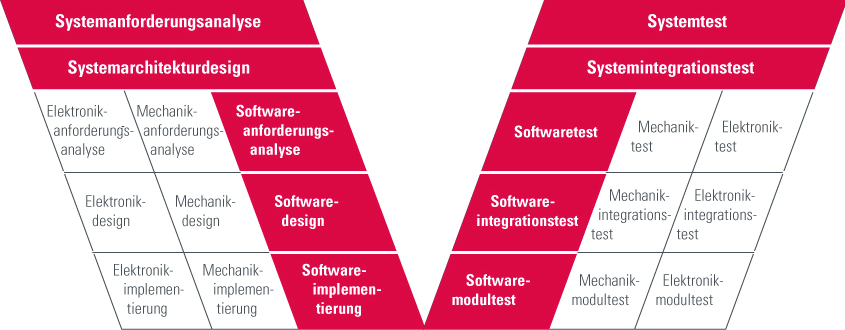


The Automotive industry has a process, Automotive Spice or short A-Spice. A thorough and already more than 10 years old process that is a big help in mastering complexity. Of course A-Spice does more than just helping to master complexity, but that is not in my focus now.

The process helps you to define what needs to be done in what stage of the development. So every item is defined and there is a definition of what should be in there. This helps engineers to gather information and present it in the right way to their colleagues so the development information is always up-to-date.
This process can be followed by hand, of course, but this is so error-prone that I strongly advise to use tools. We discuss later what tools and how.

automotive.png

Also mastering Complexity: Abstraction

The way to master complexity is the use of patterns (or abstraction). Abstraction can be explained by looking at this bunch of matches. If you need to count them, sorted like that, it is not that easy. So you sort them in groups, that makes it much easier to count. That is abstraction, you just follow the pattern and it makes it much easier. The disadvantage of this is: space/time drawbacks. You see that the matches take up more space if they are close together then when they are sorted.

csm_721435599Fuenf_Streichhoelzer_5780056202_6af0698c2e_o_129adc9027.jpg

the same applies for patterns in software, they help you solve complex things but also at a price. The fact that the pattern is universally applicable creates overhead.

Not mastering Complexity: AUTOSAR

csm_AUTOSAR_01_c35041dc46The Automotive industry created AUTOSAR with a couple of goals in their minds. They wanted to make it easier to switch suppliers by letting them use a standard interface, they wanted to have multiple suppliers that develop applications on a single controller without having to know each other and be able to slip applications over multiple ECU’s without redesigning the complete application.
The extra data in AUTOSAR applications is stored in XML files called ARXML. This can be parsed and imported and tools can in that way exchange information in a standard way. That sounds fantastic but in praxis the advantages are limited, no one wants to share more information that absolutely necessary with others from a competitive standpoint.

AUTOSAR uses abstraction, they have standard software layers (Basic Software) that implements a lot of basic stuff. This will solve some pain but also introduces new complexity, the Basic Software layers are not easy to use.

AUTOSAR uses a Run-Time Environment that is derived from OSEK, the OS is very static and generated from ARXML. Although it sounds cool to just generate separate pieces of code that will be executed “somehow” this is not aiding to understandability.

You cannot create an easy to understand architecture that explains how your software is built-up and how it generally works. It basically adds a lot of abstraction overhead for a non-effective abstraction, it is measured that the use of AUTOSAR will almost double the memory needed compared to non-AUTOSAR solutions!

The conclusion is that AUTOSAR is not designed to lessen the complexity, on the contrary, it adds to the complexity. Experts estimate the complexity of AUTOSAR about 10 times that of SysML.

Certainly mastering Complexity: UML/SysML

UML and its sibling SysML were created to master complexity. The graphical way to model using different diagrams that help the developer concentrate on different aspects of development without being distracted by other stuff.

UML is used to make software, SysML is a UML profile that uses some of the UML diagrams, sometimes in a different way (The same elements but they have a different meaning) and adds some new diagrams. It is used to make systems.

Many Automotive customers that want to start using modeling ask for SysML, since they make systems, not just software. Now there are a few disadvantages to that, it is harder to make just software from SysML, so you probably do stuff 2 times or you have to write helpers that do intelligent conversion/linking between your SysML and UML model.
The funny thing is that most people who ask for SysML, in the end only create software. So they would have been OK by using UML.

One of the nicer aspects of the UML is that it is set-up to be flexible and configurable. A good example is SysML, this is actually a UML profile. the same thing for the AUTOSAR profile, it changes the way the UML looks and feels by just loading a profile.

UML Tools help you in creating links between several development elements. In that way you can create traceability that helps you find back your stuff (and the reasons why you solved it that way) and is a must for certifications in safety-related applications.
The standard graphical UML helps you define and understand your architecture.

Helping to master Complexity: Tools

As already said, following a process with just pen and paper is not doable. Luckily there are enough tools around to help you in the development of your applications.

Most tools more or less use their elbows towards other tools to conquer as much space in the V-Model as possible. They all want to be used for everything. They all claim to have solutions for the complete process from requirements to acceptance test.

My advice: Don’t buy that!

Most tools have a specific area where they are good, or even “The Best”, on other area’s they shine a lot less and you could use much better tools.
Now it is understandable that you want as less tool switches as possible during development. Every time you are confronted with information that needs to be synchronized or linked. This needs to be solved good.

You may need AUTOSAR Tools to generate RTE and to have access to Basic Software and or stacks.
You may need Simulink (with Embedded Coder or Targetlink) to generate code for pi or pid control loops
You may need a UML Tool like Rhapsody to have your architecture defined, use statemachines to describe behavior and much more

There are lots of tools available but you should be using a combination of the tools that fits your needs and can be combined with each other.

The Master: Single source of truth

Or “How to avoid having multiple captains on one ship”. All Tools manage information. Sometimes information from different tools must be linked. Then you must use some synchronization (like IBM Rhapsody Gateway or the Willert RequirementXChanger) to keep the information synchronized AUTOMATICALLY! In that way you create a so-called “Single Source of Truth”, only one tool can be the master of a specific type of information. You have to define in your process definition which tool that is and how its done.

Be the Master: use Rhapsody with AUTOSAR

Method 1: Model AUTOSAR

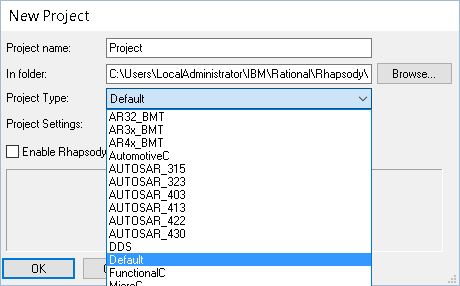
New Project.JPG

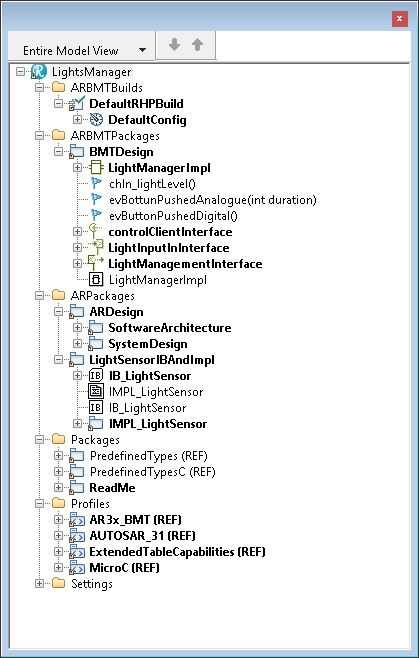
This is the “full-fledged” way. You load one of the AUTOSAR profiles in Rhapsody. This changes the look and feel of Rhapsody to be an AUTOSAR modeling tool. The good-old UML elements are all disappeared and only AUTOSAR Items are available.autosar project

You can now use AUTOSAR diagrams (Block diagram etc) and model that. You can export your model into an ARXML file that you can use for other tools and for the RTE Generation.

If you want to use “plain” rhapsody state-charts you first have to add a so-called “RIMBO”, connect the interfaces and then you can use “normal” rhapsody.

This is the way IBM recommends.
Since 8.3 you can safely use the 64-Bit version, in AUTOSAR: Do that! It will be slow otherwise.
You can combine 64 and 32 if you have an older version, import/export with the 64-bit, do the rest as 32-bit.

Method 2: Transform AUTOSAR and model UML

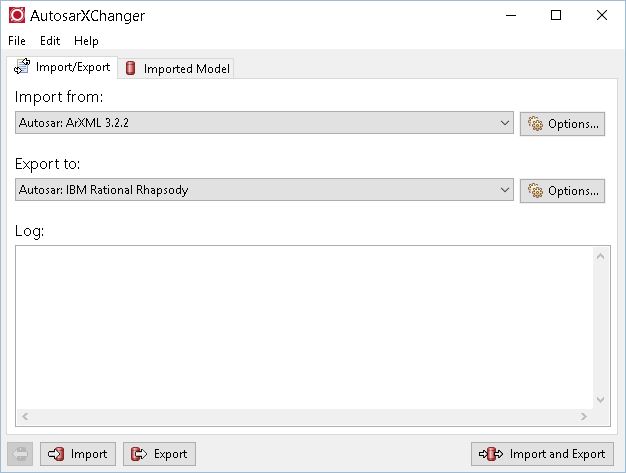
This is the “Willert” method. For the AUTOSAR stuff you use an AUTOSAR authoring tool. Then you export the ARXML from there and import that into Rhapsody using the AUTOSARXChanger. The result is a UML model with”converted” AUTOSAR elements. They are, however, normal UML elements with stereotypes.

autosarxchanger.JPG

Willert is working on other ways to use Rhapsody in an Automotive environment. We will have an exporter that can export UML models (with the correct stereotypes) to ARXML files.

Keyless Master

An example how this works.

Keyless Master: Marquardt Case.


OK, that’s it! Happy modeling/mastering/driving!

Walter van der Heiden (wvdheiden@willert.de)


AUTOSAR in Noordwijk

Introduction

Lately a lot of automotive companies reach out to us for help with their development. Mostly their problem is that in spite of all the (expensive!) tools they use, they still have trouble getting all development done correctly, in-time and thoroughly tested.
I understand that, you can use several AUTOSAR Tools, you can use Simulink or ASCET or TargetLink or whatever, most of these tools do not solve your problems with, amongst others, complexity, timing and architecture.

With AUTOSAR you are able to develop very distributed. That is a big advantage but at the same time also the main problem with it.

Using AUTOSAR does not automatically mean you are using modeling, also modeling does not equal modeling. Using Simulink is completely different from using Rhapsody or another UML modeling tool.

This week I was in Noordwijk together with Clemens to define and implement some of our AUTOSAR/Rhapsody solutions.

How hard can it be?

As the famous Jeremy Clarkson always says when he and his former Top gear, now the Grand Tour, mates are doing something that is nearly impossible: “How hard can it be”.
I can tell you one thing: making software for cars is hard. Very hard.
In my opinion, cars are the most complex thing people build. Not planes or rockets ( The expression, “It’s not rocket science” should actually be: “it’s not automotive software”, IMHO )
Parts of that complexity stems from the fact that the Automotive sector suffers from a drastic price policy. If their purchase department can purchase a CPU that is €0,20 cheaper, they will do that, regardless of the fact that this can skyrocket the effort of building software. Well maybe it’s not that drastic but this is closer than what the Aerospace people do, they only use certified CPU’s. What they cost is pretty irrelevant, you never notice it on the price of a plane and they will only build a limited number of planes, not millions like car ECUs.
Other reasons for complexity is the environment of a car. Planes can fly and therefore already solve the problem of having millions of moving obstacles on their path. Air Control tell the plane where to go, how fast and how high. Makes things much more easy.
So the reason is this complexity, that will only be more now we are implementing autonomous driving.

UML or SysML?

The solution “du Jour” for this is now to use System Engineering or SysML (System Modeling Language) Is this better than UML? That is not a statement that you can make. It depends on what you are doing. I noticed lately that most people ask for SysML but they almost all end up with making software anyway, not systems. That does not mean that you should not use SysML but there are things in SysML that are different. Plus that you have “yet another Tool” and “yet another language” to learn.
So if you can be sure that no-one from any other department than the software guys will use SysML: choose UML. You can also mix SysML and UML (Even for Software development, we are embedded so in the end we always do some systems engineering as well.) The disadvantage is that you often have to do things double. Or put effort in model transformation or intelligent “helpers” that convert and link your model elements. (e.g. like the Harmony profile does)
But OK… since the UML has (still) not reached the critical mass in users, I gladly accept SysML (Which is nothing more than a UML profile) as the UML savior.

Multiple captains on one ship

That’s one of the problems with the multi-tool approach. It is generally a good idea to use the right tool for the right task. Unfortunately all tools think that they are capable of doing everything, which they are most definitely not. It’s like having 2 or more captains on a ship shouting contradictory commands.
The only way to use multiple tools where you have development information that is used in different tools is when you:

  • use automatic synchronisation.
  • use a tool that help you connect the information
  • use a very rigorous process that tells you where the information is created, kept, supplemented and changed.
  • Automate as much as possible

AUTOMOTIVE Spice

There is, luckily a process that you can use for development. This is a big help in defining your artefacts and how to store and process them.
Not really easy to implement but hey: we do complex stuff, this is never going to be easy. I could write a book about this but I won’t. Not here. You can read all about Aspice here.

Rhapsody can do AUTOSAR, can’t it?

Exactly. It can. You can load an AUTOSAR profile (Most AUTOSAR Versions are available) and then you can import and export ARXML files. You are no longer using UML, you use AUTOSAR. And you can model it, draw diagrams, make connections add AUTOSAR artefacts. You can even use UML State-machines you first have to create a so-called RIMBO (Rhapsody Implementation Block) and connect that to all AUTOSAR connectors.

You have to consider a few things. The ARXML import/export is using Java and uses a lot of memory. It turns out that Rhapsody 64-Bit is really much faster when importing or exporting ARXML. If you use Rhapsody 8.3 you’re OK, you can use the 64-Bit. For older versions you can still install the 64-Bit version just for import and export and do the modeling in the 32-Bit version.

If this is the solution, I want my problem back

This is not always the most optimal solution. In my opinion people want to use a UML/SysML tool because they want to use UML/SysML. And that is what you can do. The Willert Automotive Profile for Rhapsody delivers you the possibility to implement other use-cases with Rhapsody. You can use Rhapsody to:

  • implement functionality that uses state-machines and/or Activity diagrams with Code generation. The Automotive RXF is small and fast and will be called in your system in the form of 2 runnables. The names are imported from an ARXML file that you create with another AUTOSAR tool like ArcCore or so.
  • You can also model your AUTOSAR application in UML in Rhapsody, the stereotyped model elements can then be exported as ARXML and used in other AUTOSAR tools.
  • We have defined a base model that includes many Automotive modeling examples, that shows a lot of modeling best-practices and already some very useful helpers.

There are some limitations to using this, not everything is possible (yet). We are working on automatically generating code for communication between runnables (Sender/Receiver ports) You can do this by hand now, however.

OK, we also walked on the beach, drank a few beers in a beach club but we worked very hard on the Willert Modeling for Automotive Solution! In one of my next BLOG entries I will take you through a complete automotive example.

Happy modeling with Rhapsody!

Walter van der Heiden (wvdheiden@willert.de)


« Older posts

© 2026 Rhapsody TechBlog

Theme by Anders NorenUp ↑