BLOG about IBM Rhapsody. Contains technical information as well as more private travel stories.

Tag: Real-Time (Page 2 of 2)

Task, Process, Thread

Introduction

On the way back from the US I decided to write something about a question that I received multiple times.

What is a task in Rhapsody? Or equivalent questions using different words but are all about the same topic: task, process, thread.
You can use Wikipedia to read about it, I did too and it will help you, but I will give you my interpretation. which is not necessarily the correct one but I can live with it.

The main difference between a process and a thread is the memory space. threads share the same space, processes have their own memory space. A task can be both, it just indicates that something is running independent from other tasks.

So what is an active class in Rhapsody? That is not specified in particular but for most frameworks it is a thread. “Normal” Rhapsody code runs in the same memory space, it has to, if you send an event to another object, you need to know the “me-Pointer” of that object, which, inevitably has to be in the same memory space.

Hmm so it is not possible to use processes as Rhapsody “tasks”? Oh that is possible but you need a different framework. And a not so easy framework, It is called “distributed Framework” or short”DOX”. The adaptation to an operating system is much trickier in such a system since there is a lot of difference between the methods of inter process communication. You basically have to “register” all tasks and create a function that can communicate between tasks using shared memory or whatever mechanism your OS offers you.

Sending an event means that you have to serialize the event (and, if there, its parameters) then store it in shared memory, notify the OS. Then the OS in its turn will provide it to the receiver that receives it, unserializes it and put it back in the structure.

Solutions

There are other ways to still use Processes when writing an Application in Rhapsody.

  1. You can, as described above, implement a different Framework and use the available interprocess communication. The advantaged is that the Rhapsody model can be kept unaware of that and is still portable to other environments.
  2. On some CPU’s (for instance ARM Cortex) you can use memory protection in a special way. In that way you can use the same memory space but only allow certain functions access to certain memory ranges. This is a proprietary solution, not portable but since the hardware will check everything, safe and small.
  3. The last way is to use a normal framework, create processes when you have an active class and then implement the shared memory in a class that has all communication addresses “Pre-compiled” You can take an instance of that class in each process. You cannot send events since the message queues are in different memory spaces so you have to communicate differently.
    There is no real difference between a single app with multiple processes at multiple apps. You might as well create a component for every process and include the communication in each and every one.

So. Hope this helps. Happy Modeling with Rhapsody!

Walter van der Heiden ( wvdheiden@willert.de)

If it ain’t broke, don’t fix it….

Introduction

I’m not a fan of updates. A few years ago I always switched off my automatic updates. On a Mac that was possible and would hardly have other consequences.
Unfortunately, this is not the case anymore. Modern development methods like DevOps, Agile, Continuous Engineering and I_don’t_know_how_it_is_called are forcing you to keep your system up-to-date. Either Apps don’t work with the latest OS or an App requires a certain minimum version of the OS.
Many systems do not even allow you to wait with updates, even my beloved Mac starts whining and will update without asking.
Walter Quote #2: If it aint broke: Don’t fix it!

Rhapsody

The same applies to Rhapsody. Newer versions will have improvements, bug fixes and sometimes new options or features. Since 8.1.3, IBM will at least deliver so-called iFixes that enclose bug fixes for the most serious bugs. (Check our download portal or the IBM website to download the iFix for you Rhapsody version. You only need to install the highest number, it will contain all previous iFixes for that version.
Here is a list with all versions (and Build numbers) since 8.0.
8.2.1

9810341

5 june 2017

Rhapsody Version Build Number Release date
8.3.1

9835533

24 june 2018
8.3

9831308

4 dec 2017
8.2

9803403

1 dec 2016
8.1.5

9728113

25 april 2016
8.1.4

9641846

14 dec 2015
8.1.3

9499822

26 june 2015
8.1.2.1

9278208

20 feb 2015
8.1.2

8254044

5 dec 2014
8.1.1

8200000

5 sep 2014
8.1

8169320

2 jun 2014
8.0.6

7155987

28 feb 2014
8.0.5

7139044

5 dec 2013
8.0.4

6118532

3 sep 2013
8.0.3

6107223

14 jun 2013
8.0.2

5093211

21 mar 2013
8.0.1

5074847

27 nov 2012
8.0.0.1

5071232

8 nov 2012
8.0

5066837

21 sep 2012

De-install the old one?

You don’t have to. You can install multiple versions of Rhapsody in parallel. A few things to consider:

  • Install in the same way as the previous version (Same directory structure)
  • The last installed version is the default version that will start when you double-click a .rpy file.

Models

You don’t have to do anything to update your models. But…. As soon as you save a model it is updated and cannot be opened with older versions of Rhapsody anymore. (Not always, sometimes 2 consecutive versions use the same database version.)
You can, however, use “Save As” to save the model in an older version. You can do that 2 versions back. So not too much.
Here is a list with the Rhapsody Versions and how they can be “saved” back.

Rhapsody Version „Save As“
8.3 8.2.1, 8.2
8.2.1 8.2, 8.1.5
8.2 8.1.5, 8.1.3
8.1.5 8.1.3, 8.1.1
8.1.4 8.1.3, 8.1.1
8.1.3 8.1.1, 8.0.6
8.1.2 8.1.1, 8.0.6
8.1.1 8.0.6, 8.0.4
8.1.0 8.0.6, 8.0.4
8.0.6 8.0.4, 8.0.2
8.0.5 8.0.4, 8.0.2
8.0.4 8.0.2, 7.6.1
8.0.3 8.0.2, 7.6.1
8.0.2 7.6.1, 7.5.3
8.0.1 7.6.1, 7.5.3
8.0 7.6.1, 7.5.3
7.6.1 7.5.3, 7.4

Of course a new version of Rhapsody can have changes in Code Generation. Best is to install a new version, start the old version, generate code, start the new version, load the model, generate code (In a different directory!!) and compare the code. If it is the same, you’re good. If different, first compile, you might still be good. But if it doesn’t work, try to understand the consequences of the changed code.

You will have some “Settings” files in your browser that are named “CGCompatibilityPreX.Y”. These files include the changed properties.

RXF

You MUST re-install the RXF and then during install tell the RXF the right directory for the new version of Rhapsody. (It will usually detect it automatically)
You can load the older models if you do not install the RXF but it will not work.

Eclipse

If you use Eclipse you have to either re-install the Eclipse plugin (first de-install the old one and then re-install the new one!)
If you want to use 2 versions then you will have to install Eclipse twice (I have not found any other way to do it…) and install the Eclipse Plugins/Workflow for the newer Rhapsody version in the second Eclipse.

ReqXChanger

Easy to forget… If you use the ReqXChanger, you have chosen the rhapsody.jar that matches the Rhapsody Version you use to sync your requirements with.
You have to edit the configuration to allow for ReqXChanger to use the new version of Rhapsody!

Happy Upgrading (and modeling) with Rhapsody

Walter van der Heiden (wvdheiden@willert.de)

Memory Management in the RXF

Introduction

Many users have asked me how they handle Memory Management when they use the Willert RXF as Framework.

There are 3 types of memory usage in C/C++:

  • Compile time (or static)
    this means that you declare something and the compiler/linker will take care of locating and allocating memory for it. (e.g. char MyArr[20]; will declare a 20 character array)
    You can find variables like this in the linker map file.
  • Heap
    This is what malloc uses and what many RTOSes use when allocating memory for their structures.You cannot find it in the map file specifically, you will find the heap size there. But the variables that use it are located in run-time.
  • Stack
    The most dangerous one… local variables are located on the stack as are function calls. compilers and or RTOSes offer stack check routines but they can be not reliable. Mostly they work with a standard pattern that is written on the stack (0xAA or 0x55) and compare that after each function call.

The RXF uses its own memory management. If you select the <<RXF Component>> stereotype for your current component and generate code for it, there will be „malloc()“ statements in the generated code.
But… this does not call malloc. Instead these calls are mapped (using a macro in WSTmodelling.h) to a function called WST_MEM_getMemory().

This function uses predefined and pre-allocated memory blocks. This shifts the use from heap to compile time.Why are they there and why do we not use malloc?

Easy. We do not use malloc for two main reasons:

  • Memory de-fragmentation
  • Malloc is non-reentrant.

Using our own memory allocation routines solve both problems. Our routines are protected using semaphores and because we only have pre-defined sizes, fragmentation cannot occur. How does this work?

There are a couple of properties that define size and number of these predefined blocks. Here we can define the exact size (in bytes) of each block type.There are 5 different block types:

– Tiny, Small, Medium, Large and Huge

The properties where you can define the number of blocks and the size are called:

- C_CG::Configuration::WSTTinyBufferSize - C_CG::Configuration::WSTInitialTinyBuffers

- C_CG::Configuration::WSTSmallBufferSize - C_CG::Configuration::WSTInitialSmallBuffers

- C_CG::Configuration::WSTMediumBufferSize - C_CG::Configuration::WSTInitialMediumBuffers

- C_CG::Configuration::WSTLargeBufferSize - C_CG::Configuration::WSTInitialLargeBuffers

- C_CG::Configuration::WSTHugeBufferSize - C_CG::Configuration::WSTInitialHugeBuffers

Setting the number of a certain type of blocks to 0 will remove every bit of code used for that specific block type.

NOTE!: make block sizes sequential increasing. So Tiny MUST be the smallest and Huge MUST be the largest. Otherwise the getMemory function will not work properly.

Taming the RXF

The properties for setting these sizes are available in Component and Configuration, we recommend setting them in your configurations. In that way you can easily create other configurations with different sizes to experiment.

Can I check how many blocks I have used and if they have the right size?

Yes you can check how many blocks you have used, check the HighWaterMark section. The size is a bit more difficult.You need to check the map file for the sizes of the elements that you allocate. You can also enter your debugger, set a breakpoint to the WST_MEM_getMemory routine. Each time you enter the breakpoint your application is requesting memory. Check the „requested_size“ variable and write them down.The call stack will reveal which routine requested memory.

As a rule of thumb: use one block type for events, one for events with parameter, and one for small classes. Set the other two to 0 so they won’t be there. Only use them if you want to use a finer use of your available memory. For larger classes use static allocation. If you use tasks, you will need memory for the allocated message queues, calculate their size and use another block type for that.

The best way to check how many blocks you have used is of course to use the Embedded UML Target Debugger, it shows you these numbers directly!

What to do if I run out of free memory blocks?

The allocator tries to use the best fitting block. So if you have blocks of 10, 20,30, 40 and 50 bytes, allocation 8 bytes will normally give you a 10 bytes block.When these are not there, you get a 20, then a 30 and so on.

If there is no fitting block left there are 2 options depending on the defines you set when compiling.

– The program will call the error routine with the Error:WST_ERR_ALLOC_TOO_LARGE.

You can (or actually should) change the error routine and adapt it to your own needs. (e.g write in a logfile or something like that)

– The original malloc routine is called.

This will only succeed if you reserved enough heap space so that malloc can give you the memory that you need. If not you will inevitably run into some kind of trap for using illegal memory.There are RXF versions that run into the error handler (Error:WST_ERR_ALLOC_FAILED) when malloc returns NULL.

What Defines and Properties influence the memory usage?

Using Tasks will also use your predefined memory blocks. Every task has a message queue, depending on the used RTOS there will be memory allocated for that.There are properties for tasks that influence the used memory.

CG::Class::ActiveMessageQueueSize will set the message queue size.There is a default size, this is what the RXF uses if you do not define your own.The size of the message queue is defined as „number of messages“.A message in UML is an event and it is sent by reference so there is only one pointer per message.The size of the pointer depends on the used CPU/Memory model. So on an ARM Cortex with the Keil compiler this means that a message queue size of 20 will use 80 bytes of blocks.

The Timer Array is static, it is depending on the property C_CG::Configuration::WSTMaxTimeouts. The array is allocated at compile time.

WST_CFG_HIGHWATERMARKS.When set to true, extra code is used to keep the largest number of reserved blocks.You can check the number in theWillert Embedded UMLTarget

Debugger or in your own source code debugger by typing „highwater“ in a watch window.This is an array that will show you the actually largest number of used blocks.

NO_MALLOC.When set, this will cause the RXF to NEVER use malloc. Rhapsody generated code can still use malloc, but the framework will not.

WST_FORCE_ALLOC_TOO_LARGE. Causes the RXF to use malloc when it runs out of memory blocks.


That’s it for today! Happy modeling with Rhapsody (and the RXF of course!)

Walter van der Heiden (wvdheiden@willert.de)

Liechtenstein – Small is beautiful

Liechtenstein

This week is another traveling week. From home via the office to Liechtenstein, 940 kilometers in one day. Follow the star….
It’s training week, again a couple of developers that want to learn how to model in Rhapsody.
People ask me sometimes, “Don’t you find that boring, telling the same story over and over?” But then I always answer: “Yes, that is boring. But to make it bearable I always tell it to different people!”
No it’s not boring, I like trainings, always. It is nice to help developers learn to model.

Liechtenstein is very nice, beautiful country, squeezed in between Switzerland and Austria. Mountains on one side, the Rhine on the other side.
The country is 160 km² large which is slightly larger than the city I live in… 36000 inhabitants. And rich…. very rich…. Many people have bank accounts here to avoid paying tax in other countries. That is their main income it seems.

So what can you do in Rhapsody to make your code smaller? I assume you are using an RXF from Wilert, otherwise the first you can do is ditch the OXF (or whatever you are using) and start using the RXF from Willert which is much smaller and much faster than other frameworks. The Frameworks with OO-RTX as RTOS are the smallest, they do not have preemptive scheduling but if you don’t need that, this is the RXF to go with.

We don’t do destructor…

An embedded system just works until switched off. And we do not have to care about freeing memory or cleaning up structures. So we can use the properties to prevent Rhapsody from generating them. These properties control that:

CG::Class::GenerateImplicitConstructors
C_CG::Class::GenerateDestructor
C_CG::Class::EnableDynamicAllocation

HighWaterMarks

The RXF knows highwatermarks, they indicate how many memory blocks you have maximally used at the same time. The same for events and timers.
A good way to estimate the optimal use of your static memory is to use the compilers “mapfile” to determine the size of all structures you are dynamically (or semi-dynamically) allocating. Then optimize your memory structures by making your tiny, small, medium, large or huge blocks exactly as large as the structures you use.
Then determine the maximum number of blocks you need from every size. If you do not need 5 different sizes: make the block count 0, then the structures will disappear completely. The same for timers, if you do not use the “tm(xxx) statement in your state-machines, set the TIMERS to 0.

State-machine

Rhapsody uses an int for the state-variable. If you use less than 255 states in a state-machine you can easily use an unsigned character for that. This is the property:

CG::Class::Statechart::FlatStateType


Inline

Create inline functions for operations that are not or hardly used. The RXF knows the inline keyword that you can replace with the compilers inline keyword. On some controllers a function call is much more “expensive” than replacing that with the original statement from the called function!

C_CG::Class::IsCompletedOperation
C_CG::Class::IsInOperation

Compiler

Most compilers have excellent optimizations. Switch them on, try all settings and make an overview (Use Excel!) of all the effect you can measure, (Size, speed)

Real-Time Framework, the robust base for your embedded applications.

Why a Framework?

Actually quite easy. When you generate code from UML you need a lot more then ‘C’ or ‘C++’ can offer you. Java is different, it has a VM that does most of the things you need. But ‘C’… how do you start a thread in ‘C’? Or how do you start a timer in ‘C++’?

Right. You can’t. At least not in the base language, you need an external library for that.
The “extra” functionality in the UML is all RTOS based functionality. So it seems logical to use an RTOS for that. To make the use of any RTOS easier it is smart to implement this in a framework that does the translation to your RTOS. in that way, the only thing you need to do is adapt the Framework to your current environment and your UML model should be runnable in that environment.

In an embedded environment this is only part of the story, many hardware and even compiler dependant parts exist. Modeling certainly helps you but you should take extra care to separate your hardware dependant parts in your model.

Also the framework adaptation is not always straight-forward but the reward is high when you stick to the standard: you can be independent of the environment you use.

We have done a model conversion from one environment to another environment twice, both times it went with minimal effort. As close as you can get to the holy grail of embedded software development: platform independent programming. But I will be honest… we are a long way from reaching that in the embedded world.


What Framework?

There are quite a few Frameworks for Rhapsody. Out of the Box there are already a few. Are they any good? As always, the answer is: that depends….

On what? On what you want to achieve with it. Creating a PC application, Linux or Windows? Real-Time does not bother you, nor do you care about memory usage?
Than the standard OXF is your friend! It is the default in Rhapsody, you don’t have to do anything. If you are lucky enough to own a developer edition, animation, panel diagrams and webify are there to support you.

What Frameworks are there to choose from:

  • OXF, standard Framework
    Is not small, is not fast, is not deterministic, blocks interrupts for unknown time, uses an RTOS.
  • MXF, MicroC (Automotive) Framework, uses OSEK as RTOS
    in combination with the AUTOSAR import/export
  • SMXF, reduced MicroC Framework
    Targeted for use in Certification projects
  • RXF, Willert Framework
    Small, fast, C and C++, UML Target Debugger for back-annotation, enhanced Workflow, available as Cert with documentation.
  • IDF – Interrupt Drive Framework
    Single threaded. Started as a demo for “how the framework works”, is available and adaptable. Was designed to be small
  • SXF – Simplified C++ eXecution Framework
    C++ for Safety critical. Is also only static
  • synchronous Framework
    For very small environments, discards a lot of UML functionality, programming only with triggered operations.
  • NOF, No Framework
    For the real die-hard…..
  • ?? Did I forget one?

So here we have a few criteria that you can use to support your framework decision:

  • Code size, use an RTOS or just a main loop?
  • Language, C, C++ or else?
  • (Real-) Time behavior, are interrupts disabled? If yes for how long?
  • Safety viewpoint, MISRA? Is there documentation about safety?
  • Animation and Back-annotation, UML debugging available?
  • Simulation, on PC?
  • Hardware abstraction / Portability, fast switch to other environments?
  • Memory Management, static or “half”-dynamic?
  • Workflow, build in Rhapsody or elsewhere?
  • Limitations, Ports, Container Classes, Dynamic, etc


Check the criteria before you make a decision. As you can see, the Willert Frameworks (RXF and RXF-Cert) have excellent notes on all items.

PEPS

We use a model to test framework speed, the speed unit we have is PEPS (Processed Events Per Second) We have invented that ourselves since there was no other measurement available.
The model is there for use in other environments, it is pretty standard so it must be easy adaptable to other environments. Ask me if you want to have it!

Happy Modeling with Rhapsody

Walter van der Heiden (Email: wvdheiden@willert.de)

Marquardt – Rhapsody unlocks doors

Introduction

The software development division of the Marquardt company decided in 2012 to switch from structured programming using ANSI-C to a model driven development approach using UML including automatic code generation. The reason was to have a better position in the future to master the increasing complexity and requirements in the automotive supplier market easily.

THE PROJECT

The first project where MDD was used was the development of a wireless keyless-entry/keyless-go system for a well known German car manufacturer. The hardware platform was a 16 bit controller with 64 Kb ROM and 4 Kb RAM. The application to be developed had to cope with limitations as the very small footprint, the minimal processing power and still require very little resources at startup time.

These challenges provided the Marquardt Software Design team with at the trigger- after successful proof of concept – to do a future oriented switch and become an ‘Early Adopter’ in Model Driven Development (MDD).

AT THE START

The assumption that MDD could be of great use in software development was initially quite controversial in the software development team. Also the question if the keyless system would be a suitable candidate for a pilot project was doubted, especially due to its stringent resource requirements and the short time to develop. However, in the end it became clear that the
traditional methods of structured programming could no longer be used for such high requirements and time constraints in future projects. And although this keyless system project was not an ideal candidate as pilot project, given the short Time-to-Market that is common in the Automotive market, Marquardt decided not to wait with their switch to MDD. Its customers would benefit enormous of the innovative approach. The risks were carefully calculated and Willert Software Tools GmbH offered Training and Coaching during the entire product development process and helped in the Switch and the changed process.

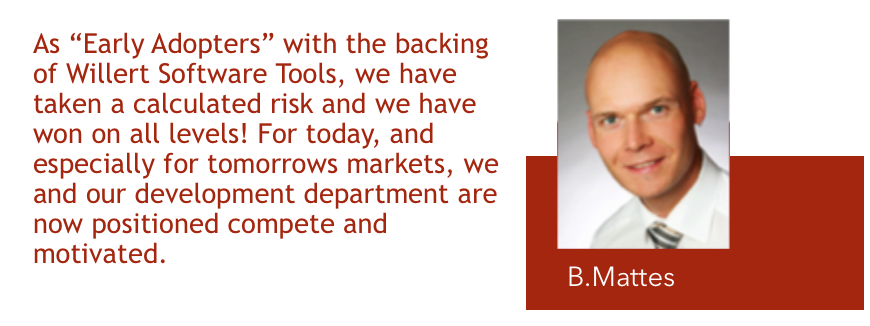
Inlay Bennie Mattes

DURING THE PROJECT

The project was carefully planned as pilot project to recognise the advantages of MDD during development. An investigation of tools to use was carried out, based on the requirements with respect to memory- and CPU resource usage and realtime behaviour, to determine how feasible the introduction of MDD would be with respect to memory usage, performance and real-time requirements.

The positive outcome of this investigation was convincing. The idea that restrictions due to software development in ANSI-C could be surpassed, was clearly valid. The development team of the pilot project defined the following goals:

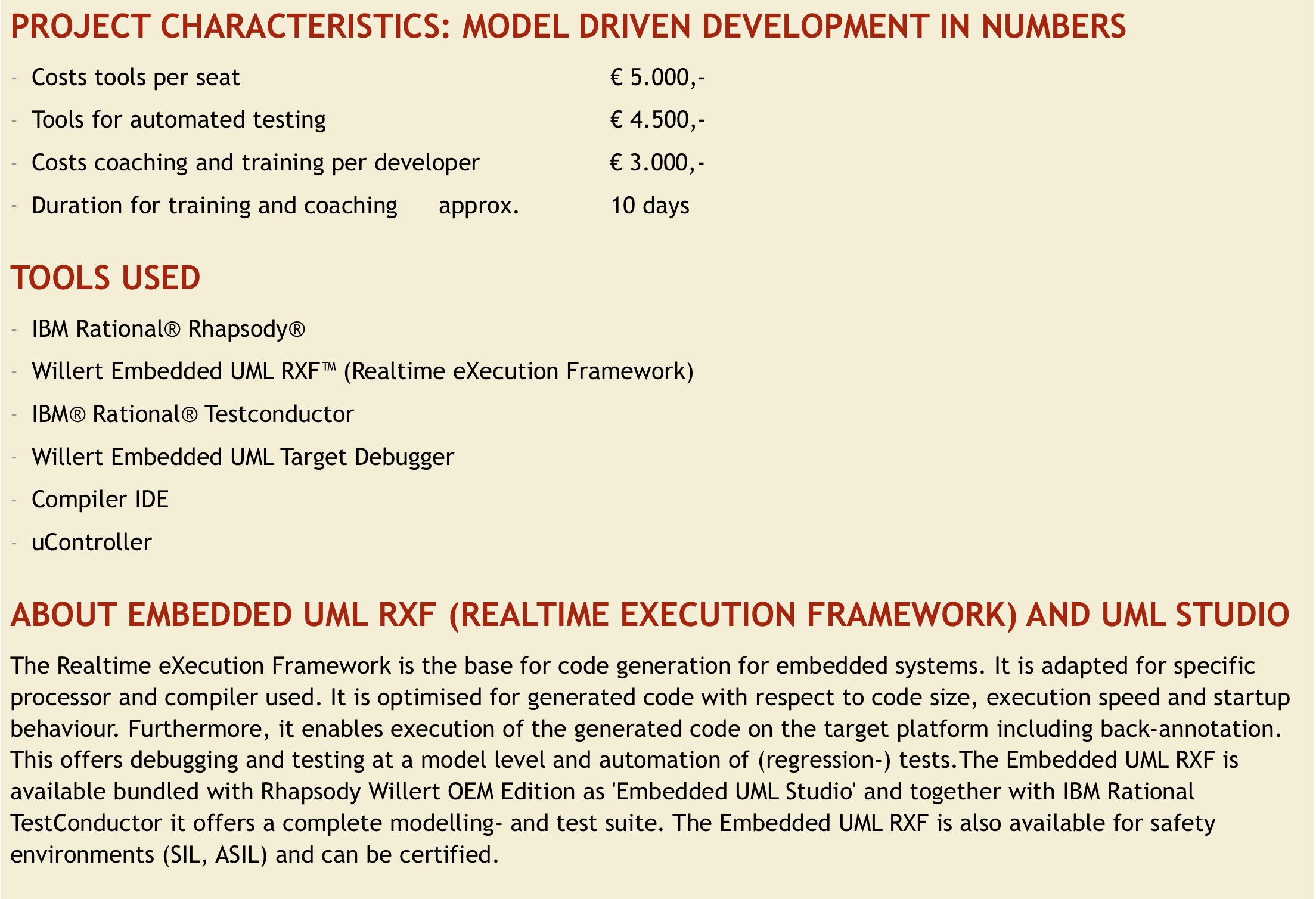
The Tools: UML as modelling language, modelling in IBM Rhapsody in C extended with the Realtime eXecution Framework (RXF) by Willert Software Tools (see infobox) made it possible to meet the specific technical requirements and use code generation for the limited memory- and CPU resources.

  1. Realistic project conditions: It should be possible to realise the project without extra time or manpower. The use of trainer and coach from Willert Software Tools helped to meet these conditions.
  2. Focus Quality Management: The effects of the use of MDD should be measurable and reproducible. The first project phase included training and coaching which assured a successful start and use of the tools. Next, well-defined training and coaching during development were the base for reaching planned schedule in time and costs plus quality and support the motivation within development team. The success of the first development proved the approach and selected tools to be the right choice.
  3. During the project the restrictions with respect to footprint and CPU resources formed the technical boundaries. The methods and know-how of modelling were extended within the development team which helped greatly. In close cooperation with the Willert trainers and coaches and multiple workshops, even in close to final project phases, further optimisation in model and RXF were realised. In this pilot project all requirements regarding memory- and CPU resource usage and realtime behaviour were met.
  4. In parallel the testing was tuned: unit tests, software in the loop and software integration were adapted to the modelling process and even automated. This was an extra effect which was not accounted for at forehand.

THE GAIN

First and most of all: a successful project and satisfied customer. At a functional level the project had realised what probably also could have been realised in the originally used development methods. But using MDD the road into the future with increasing demanding requirements is now open. Moreover, the quality aspect of the software engineering shows improved ease of maintenance, modifications and robustness. Apart from the functional result of this

pilot project, Marquardt now is capable of meeting steep requirements and specifically in reacting flexible on changes in requirements desired by the customer during the project. In addition, the steps needed in changing the development process and tasks within the team were mastered successfully. These changes were supported by the Willert trainer and coach. This resulted in a highly motivated team and guaranteed progress even in difficult times.

Most importantly is that the new know-how within the team and the investments in the new tools offer Marquardt a highly efficient and motivated team, ready for the future. This switch used by Marquardt in this project was acknowledged as an improvement of the software development.

THE FUTURE

Future projects will use the investments of this pilot project being the software tools, not-productive man-hours and consultancy, needed to introduce the new technology.

Traceability and maintenance of existing applications is much easier at the model level. The development process and applications therefore have become more defined and predictable. This will in its turn have positive impact on quality and time plus costs.

For the team members of the development team the switch to MDD means increasing competence and knowledge of modern software engineering.

The successful pilot project confirmed positively the decision taken to start using a new development environment and helped the customer in its success-story. This project proved Marquardt being an innovative company having a competent software development team which can cope with the ever-increasing demands of the automotive industry, ready for the future.

Inlay Marquardt Project

ABOUT MARQUARDT

Marquardt is an independent international and successful family owned company and leading manufacturer of electro-mechanic and electronic switches and -systems. Marquardt products are widely used by multiple car manufacturers. Marquardt also manufactures devices used in houses or for industrial appliances and is worldwide market leader in these areas.
http://www.marquardt.com

ABOUT WILLERT SOFTWARE TOOLS

The Willert Software Tools company specialises since 1992 in tools for Software Engineering with respect to realtime embedded systems. Willert has set its goal to offer technologies to enable customers to successfully develop software and support them in adapting the required tools. For this, Willert offers methods and tools plus training and coaching based on thorough knowledge of realtime embedded systems. Its customers include the automotive industry, aerospace, medical devices, public transport manufacturers, telecommunications, energy and infrastructural environment. Willert Software Tools has helped with numerous product specification, -development and Quality Assurance, for example vehicle control devices, coffee machines, frequency inverters, satellites, hearing instruments, door controls, fire alarms, röntgen devices, positioning systems and robotics.

Newer posts »

© 2026 Rhapsody TechBlog

Theme by Anders NorenUp ↑