BLOG about IBM Rhapsody. Contains technical information as well as more private travel stories.

Tag: Real-Time (Page 1 of 2)

🚀 Implementing DDS in IBM Rhapsody: Real-Time Systems Engineering for the Future

As embedded and distributed systems become increasingly complex, ensuring reliable, real-time communication is no longer optional—it’s essential. That’s where the integration of Data Distribution Service (DDS) into IBM Rhapsody changes the game.

At SodiusWillert, we’re enabling teams to build smarter, more connected systems by combining DDS with model-based systems engineering (MBSE). Here’s a breakdown of what DDS is, how it works with Rhapsody, and why it’s a major win for industries like aerospace, automotive, defense, and industrial IoT.


🧠 What is DDS?

Data Distribution Service (DDS) is a middleware standard defined by the Object Management Group (OMG), designed for scalable, real-time, and reliable data exchange in distributed systems. It uses a publish-subscribe communication model—perfect for:

  • Autonomous vehicles
  • Aerospace and defense systems
  • Industrial automation
  • Internet of Things (IoT) and cyber-physical systems

Key features of DDS:

  • ⚡ Low latency and deterministic communication
  • 🔁 Decentralized architecture (no single point of failure)
  • ✅ Built-in Quality of Service (QoS) management for reliability

💡 Why Combine DDS with IBM Rhapsody?

IBM Rhapsody is a powerful MBSE tool for designing and simulating embedded systems. Integrating DDS into Rhapsody brings multiple benefits:

1. Real-Time Simulation & Execution

Model systems in SysML or UML and simulate live DDS-based communication within Rhapsody. Perfect for systems where timing and data flow are critical.

2. Seamless Distributed Design

Define DDS publishers and subscribers directly in your Rhapsody models. Automatically generate DDS-compatible code for distributed execution.

3. Earlier Testing & Validation

Simulate DDS networks inside Rhapsody before deployment to reduce integration risk—vital for mission-critical domains.

4. Industry Standards Support

DDS is a core part of frameworks like AUTOSAR, ROS 2, and FACE. With DDS integration, Rhapsody projects stay compliant and future-proof.


🔧 How It Works

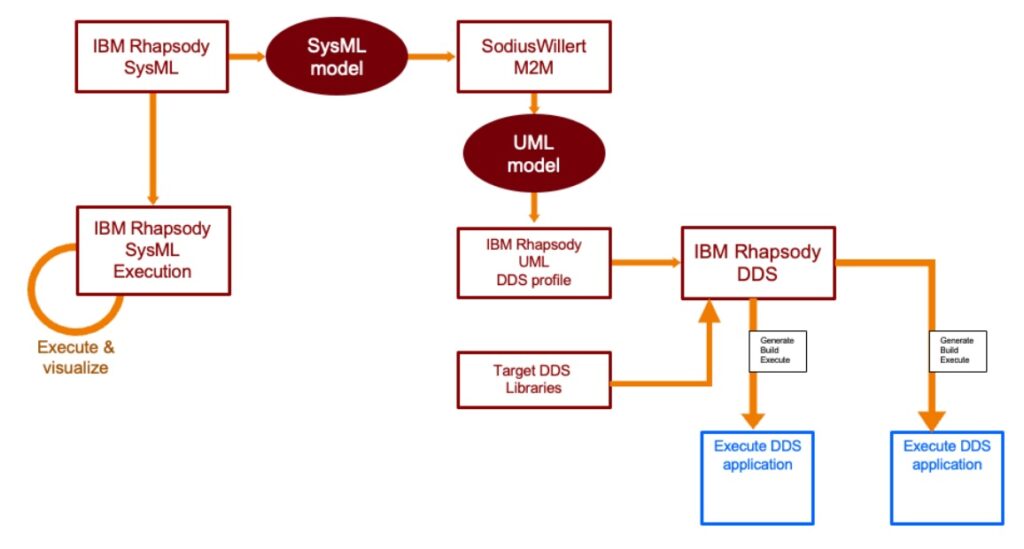
Using the SodiusWillert DDS integration for IBM Rhapsody, here’s how the workflow looks:

  1. Model your architecture in SysML or UML using IBM Rhapsody
  2. Use SodiusWillert M2M to transform SysML to UML
  3. Apply the DDS profile in Rhapsody
  4. Generate DDS-compliant source code
  5. Integrate with your target DDS libraries
  6. Build and execute your DDS applications
  7. Visualize results directly in Rhapsody

This approach enables a full MBSE cycle from modeling to real-time distributed execution.


🌍 Real-World Benefits

Whether you’re building autonomous vehicles, avionics systems, or industrial control software, DDS in Rhapsody provides:

  • 📉 Reduced development risk
  • 🧪 Testing before hardware is available
  • 🔁 Faster development cycles
  • 🛡️ Improved system robustness and reliability

🔎 Learn More

Want to dive deeper into DDS modeling with IBM Rhapsody? Need help setting up your DDS development environment?

👉 Contact us at SodiusWillert for a demo or expert advice.


Based on insights from a recent LinkedIn post by SodiusWillert Deutschland, this article highlights our commitment to advancing model-based engineering with real-time communication support.

Happy Distributing with Rhapsody!!

Walter van der Heiden email://walter@sodiuswillert.com

Stay Home

Introduction

I don’t want to say much about Corona, Lockdown, Virus, COVID-19, Social Distancing and related subjects, there are enough other places where you can read enough about that topic. I was personally quite busy with all kinds of things (moving to a new house but also not traveling…) so it took me a while to get back writing.

Rhapsody 9.0

Yes!It is there! the long awaited Rhapsody 9.0. To be precise… the name is no longer “IBM Rational Rhapsody” but “IBM Engineering Systems Design Rhapsody”. Whatever….

Here is a brief summary of important changes:

  • Windows 10 AppLocker Compliance
    The “Share” folder has been split up into “UserShare” which resides in the Rhapsody data folder and “Share” which is now in the (usually read-only) Rhapsody program files folder. You will find property files like SiteC++.prp in the “UserShare” folder now, while e.g. profiles and settings delivered with Rhapsody are in the Share folder.
  • Framework Compilation
    Rhapsody standard frameworks like the „oxf” do not come as ready-to-use libraries anymore. They are built when needed or via menu entry “Code” => “Build Framework“.
  • Dropped „Save As .rpy“ Support
    Attention: this is the first Rhapsody version that does not support to save in old Rhapsody format (.rpy) anymore.
  • Support for property help that comes with profiles
    For example our latest C++ RXF uses this mechanism and makes it possible to see properties for the RXF in Rhapsody including the context sensitive help.
  • MinGW Environment Support
  • IBM Product Renaming
    In most places „old product names“ have been adapted to match the IBM Engineering Lifecycle Management family product names.
  • Under-the-Hood Improvements
    There are important improvements internally, which are not directly visible to the customer. The toolchain used for Rhapsody development has been upgraded, also libraries Rhapsody relies on are updated. This is a big step that will be the prerequisite for future Rhapsody improvements, especially regarding the user interface.
  • And of course: Bugfixes
    Several problems reported by our customers and others have been addressed in that release, for details see IBM’s fix list.

Customers using the Embedded UML Studio (and a so-called ASL-license) can use our Download Portal to access Rhapsody 9.0: x86/x64.

Customers working with the RXF can check the support announcement for the RXF with Rhapsody 9.0 to see how they can easily upgrade.

RXF for C++ 7.11

And that’s not it…

We have just released the new version 7.11 of the Real-time eXecution Framework (RXF) for efficient UML code generation.
Those are the most important news:

  • Dynamic Memory Usage for Events
    The RXF usually works with statically pre-allocated memory blocks for optimal and deterministic memory management of UML events (asynchronous messages). With the new version it is also possible to explicitly allow the usage of dynamic memory allocation from the heap, if matching  static memory pools are not available or full. By default, it still uses statically allocated memory pools.
     
  • RXF Property Perspective and RXF Property Help in Rhapsody
    When using the RXF stereotype, you automatically get a „Willert RXF“ property perspective to see all relevant properties for framework configuration in a well organized way. You can select it instead of „All“/„Overridden“/etc. in the properties tab drop down list. Actually this came with an earlier version already, but since Rhapsody 9.0 and with the latest RXF release it is even more useful, as you can see the property description now right inside Rhapsody just like for any standard Rhapsody property (see screenshot above).
     
  • ActiveClassTable
    It is now easier to keep an overview of all the threads (active classes) configured in your model:
     
  • No Setup required, Relative Paths used
    There is no need to install a framework to a specific absolute directory anymore. You may move the RXF folder to another location. As long as the RXF profile is referenced correctly from your UML model, all tool paths will work. This also allows easier configuration management and maintenance of future project specific RXF updates using externals on your SCM. For details read the HTML documentation under Technology => Configuration-Management.
     
  • MISRA Improvements and a Bugfix
    Most MISRA improvements have already found it’s way into earlier RXF releases, but still some minors could be improved. And a bug was fixed where timeout handling could be unprotected when using critical sections instead of mutexes.

Our C++ RXF is generic, it means you do not need to select a specific environment when you download it, but it contains components for different RTOSes, targets etc, so you can
make the selection when you deploy your model into an IDE. Here is a list of what is contained:


RTOS

  • CMSIS (based on Keil-RTX)
  • CMSIS2
  • FreeRTOS
  • embOS
  • Linux
  • OORTX (our non-preemptive, highly efficient runtime system)
  • COORTX (non-preemptive, called periodically by your legacy software)
  • QNXNeutrino
  • ucOSII
  • Windows


Target Hardware

  • Any ARM Cortex via CMSIS layer
  • AURIX TriCore (HighTec)
  • Any target abstraction supported by an RTOS listed above
  • PC (Windows, Linux)

Compiler

There are no compiler dependencies. Any C++98 (ISO/IEC 14882:1998) compatible compiler shall work. On our continuous integration build server the following compilers are always tested:

  • Keil ARM V5
  • Keil ARM V6
  • Linux gcc
  • ARM Cross-gcc
  • Visual Studio 2017

IDE (Deployer Exporters)

  • Keil μVision 5
  • IAR Embedded Workbench 8
  • Green Hills Multi
  • Microsoft Visual Studio 2015/2017/2019
  • Directory Exporter, covering Eclipse based IDEs and makefile centric builds like:
  • TI’s Code Composer Studio
  • NXP’s CodeWarrior
  • Tasking VX
  • gnu make
  • CMAKE
  • SCons

Do you need something else to support your environment? Just contact us and we can give details about how it can be supported.

RXF V6 Patch for Rhapsody 9.0 Compatibility Available

Also customers of the RXF V6 can use it with Rhapsody 9.0, please read our support announcement for the RXF with Rhapsody 9.0.

Exciting News for our RXF C Customers

We expect to release a version 7 for the C language in the next months with huge improvements. It will also be generic (no dedicated release for each tool and target combination required anymore), will not require a Setup and will have a completely new and optimized approach for ports and interfaces code generation in C! We will keep you up to date.

That’s it! Happy modeling with Rhapsody!

Walter van der Heiden ( wvdheiden@sodiuswillert.com )

RXF Cert

Introduction

The RXF can be bought in a version that is certifiable. So that does not mean it is certified. It is certifiable. That means we have done all work that is done in a certification process, like writing down requirements, connecting them with model elements, creating tests, performing tests and caring about MISRA, coverage etc.

What is the RXF?

It is not an RTOS or an RTE or any other Operating System, also not a driver layer that will give you hardware control.
It is just the functionality that the UML offers that is not available in ‘C’ or ‘C++’. Much of that functionality is implemented by using an RTOS. the RXF is then a sort of Abstraction Layer that makes a unified RTOS API.

When you create an active Class in the UML you tell your audience that this class runs in its own thread. (Or Task or even process but that has some additional difficulties see this article.) This class then should have behaviour, described in either a state-machine or an activity diagram, as it is defined in the UML. There is no other “standard” mechanism, you have to build that yourself. (Remember, the UML is a language, nothing more)

When you use timers in your behaviour diagrams ( like tm(xxx) in a state-machine ) then you will have to use something that times. Either a hardware timer or if you use an RTOS you can use the tick time. But either way: there is no standard ‘C’ or ‘C++’ mechanism for that.

The RXF also takes care of sending and receiving asynchronous events that are used in state-charts.

Certified vs Certifiable

It is very difficult to certify a “half-product” like the RXF. You have to predict all possible uses and much of the functionality depends on the rest of the system. So at best it can be made certifiable. That means that all possible work for a certification is already done, many documents are already there. If you have never gone through a certification process, this is an excellent starting point. The use of modelling is more or less recommended by an increasing number of certification institutes ( They tend to be quite conservative and that is OK! ) so using Rhapsody and the RXF is a huge step forward for setting up your own process.

What is there in the RXF-Cert?

  • Bill of Material (BOM)
    Contains a directory of all documents and deliveries. With exact version numbers and MD5 hashes. Also describes the RXF-Cert system borders and its influences on software development and code generation.
  • RXF-Cert Architectural Model (RCM)
  • High Level Requirements and Specification (SPEC)
  • Requirement Traceability Table (RTT)
    Showing full coverage of requirements through system specifications down to module specifications / implementation and tests.
  • User Manual (UM)
    How to use the RXF in Rhapsody. Includes installation guide and detailed technical descriptions of the RXF-Cert.
  • Validation Plan (ValP) and Validation Report (ValR)
    Describes how we validate the RXF-Cert. Documents reviews of requirements, code and documentation. (Four-eye principle)
  • Test Documentation: Verification Plan (VerP) and Verification Report (VerR)
    • Test Concept and Test Process Description
    • Acceptance Test Specification and Results
    • System Test Specification and Results
    • Unit Test Specification and Results (Model Based using the TestConductor)
    • MISRA Conformance Report:
      how MISRA compliance is implemented and what is done to certify that violations are handled correctly
    • All Tests are part of the delivery and can be re-executed by the customer.
  • Software Safety Plan
    Describes the strategy of safe software development we have followed during development of the RXF-Cert. Explains traceability, document review guidelines and our personal competence.
  • Software Safety Manual
    How is the RXF-Cert intended to be used, what are the restrictions and safety application conditions. Also contains a description of all the functions of the RXF that can be directly called by the user.
  • Tool Manual (TM)
    Lists all tools used in RXF-Cert development including reason for usage, classification, statements for safety related usage and detailed version information.
  • Software Modification Procedure (SMP)
    How modifications and updates of the RXF-Cert are handled.
  • Final Delivery Report (FDR)
    Documents final checks that have been performed when delivering the RXF-Cert.

Vacation time

So. That is what the RXF-Cert is really doing. Literally man-years were invested in creating that. As said, it is a great start for someone who needs to certify his software, many of the pitfalls are already covered.

So. It’s August, it’s vacation time. For me, unfortunately, there is no beach or mountains,, I am moving from my old house to my new house. The latter is not finished so I have to stay in a holiday home for about 4 months. So a sort of vacation… Luckily there is internet there so I will keep writing, don’t worry!

Sunny modelling with Rhapsody and the RXF

Walter van der Heiden ( wvdheiden@willert.de )

Task Force Rhapsody

Introduction

This week (and last week) I am in what the Germans call: “Ruhrpott” (or “Revier”, “Kohlenpott” or just “Pott”.
“Ruhr” is the river that flows through this area, “Pott” is pot, like for cooking.
The area is known for its industry, for all the Coal mines and its really, really dense population. (More than 5 million people live there but when you add the other cities that are very close, like Düsseldorf and Köln, the population is way over 10 million in a very small area.

The area has a reputation of being very polluted but this is actually far from the truth. It was cleaned up decades ago and the green area’s that they had were nurtured and cultivated. The hotel is in the middle of a green area and nice and for all, quiet!
See the pictures and you’ll understand.

Tasks

This week a question came in how to setup tasks in Rhapsody. As usual the answer is: “it depends”…
First you have to consider your Framework. I cannot speak for all but when you use OO-RTX (A single thread RXF) you have no choice: everything runs in the main task. Scheduling between your objects is done based on “Cooperation”. When you have completed your State-machine actions you basically give back control.
Using a “while(1)” in a state-machine is the same as blocking all other objects.
So you need a full-fledged Framework using an RTOS underneath.
Then you can set a Class to “active” in the features of that Class (“General” Tab) This means that ALL Objects of this class will run in their own task (Thread would be a better expression see: Threads )
So if you instantiate that Class 10 times, you end up with 10 tasks. That might not be what you want.

Structured Class

If you make a Class active and then give this class a structure diagram you can guide the way they are assigned to a task. All classes instantiated inside an active structured class run in the same task.

That is nice but if you want to control where all statecharts run (and even change it on the fly) you just have to create your Objects “by Hand”. You just call the Class_Create function from the Object in which task you want it to run, the Create function has a Task parameter, call that with class->ric_reactive->myTask. 
Your Statemachine then runs in the correct task. Don’t forget the Class_startBehavior() function….

Here is a small Rhapsody Model with the different methods in it.

That’s it, happy modeling with Rhapsody

Walter van der Heiden ( wvdheiden@willert.de )

Pi-Day, STL & Memory

Introduction

Today is March 14. For Europeans this is nothing special but in the US, where they reverse month and day, this day is written as 3.14. Which is the first 3 numbers of Pi.

STL

For a customer I do some modeling to help them create a super reusable application. This project is done in C++. The more I use C++. the more I like it, it is so much easier to do stuff than in C where you have to write everything out.

But here are also caveats. I used the string class without really thinking. To find out later that this triggers the compiler to use the Standard Template Library. A very fine piece of C++ art that cost you memory. Lots of memory…

I compiled the application with the Keil/ARM compiler where I could read the map file afterwards to see where the memory had gone. The application was 12k, the STL took 180k…..

So… now I understood why Rhapsody has the OMString Class included….

OMString

The problem with OMString is that IBM did not include much documentation on the use of the Class. “Read the OMString.h file”….

Functions

  • GetAt(Nr)
    Gets the character at position <Nr>
  • SetAt(Nr, Char)
    Sets string position <Nr> to <Char>
  • Empty()
    Clears an OMString set the size to 0
  • GetBuffer()
    Converts the OMString to a char *
  • IsEmpty()
    Checks if the OMString is empty
  • getSize()
  • setSize()
  • resetSize()
    get or set the size of the OMString
  • getStr()
    returns the OMString
  • getDefaultBlock
  • GetBuffer
  • ReleaseBuffer
  • GetLength
    returns the length of the OMString

Operators

  • compare functions
    • <, <=, >, >=, ==, !=
      Compare two OMStrings or a string and a character array,
    • =
      Assignment, assigns a character, a char array or an OMString to another OMString
    • []
      access the OMString as an array
    • +, +=
      Add a char, char array or an OMString to another OMString


Constructors

You can construct an OMString with:

  • another OMString
  • An old fashioned character array
  • a character
  • a void.


So you can create and use an OMString very easy:

OMString    MyString (“Moin moin”);
MyString+=” Auch Moin”);

It uses way less memory than the STL and gives you a lot of freedom with Strings.

Yo! Happy PiDay! And keep on modeling with Rhapsody!

Walter van der Heiden (wvdheiden@willert.de)

Back in München

So. Sorry for the long break, it has been busy. Traveling soups up energy, the BLOG is the first to suffer.
I was in Munich during Oktoberfest, again like last year. I am not a big fan of large parties with hundreds of thousands of people. I like beer but I enjoy it more when it is quiet.
But I was invited by IBM and there were enough people I know so I went there. First speak with IBM about their products and then Friday night on the way to the “Schützenzelt” to drink some beers.
For the people who are not familiar with the Oktoberfest, it is an ancient tradition in Munich where people celebrate the harvest of the hop, which is used to make beer….
It is not in October, at least not completely, it starts in September.

It has become world famous and now there are many visitors from around the world.

So. At IBM discussing their products… Yes but the selling of their products… not the technical details, will do that at another congress, later this year.
This was held in the beautiful IoT Tower, on the 21st floor with a stunning view over Munich.

Back to Rhapsody

The Willert Support Department had some interesting cases last weeks, unfortunately not much to write about, there was a very hard to trace installation bug that did apparently influence only 1% of the people, difficult to track but IBM has found it and it is solved.
There is an iFix3 for the latest Rhapsody 8.3.1, see the download portal for the Release Notes.

The RXF

The RXF V7 is also becoming more and more updates. The actual version is V7.03, it now includes CMSIS1&2, OO-RTX, FreeRTOS, embOS, Windows, Linux, COO-RTX. In planning are QNX and Cygwin.
Examples are available for the Keil LPC1700 Board but also for the Infineon XMC4500relaxKit
The RXF-Cert is under construction for C++, so there is a lot going on in the Willert Lab!

So. Short but powerful!

Have fun modeling with Rhapsody!

Walter van der Heiden (wvdheiden@willert.de)

V7 – Released

License to thrill

The number 7 is a famous number, not in the least by James Bond who was, of course, “007”. He had a “License to Kill”. Our V7 has a “License to Thrill”.
That is what we hope it will do to you! OK, It took us a while, admitted, but the first release of our V7 RXF for ‘C++’ is now on our Willert Download Portal.
We have worked hard for it, had many Beta Releases and lots of changes to make the best RXF yet. A big thanks to everybody who worked on it but a special “Thank You” to Johannes who has really done a lot for this release!

What is changed?

  • Completely made with Rhapsody. So the RXF is a model, with everything a model needs to be a good model, Requirements, traceability, Sequence Diagrams, explanations etc.
  • Smaller and faster. (YES! although modelled and generated, the code is smaller and faster!)
  • All adaptations integrated in one version. You select RTOS, compiler, CPU etc via tags.
  • New Deployer, this one remembers a lot more of your stuff. (Is not completely finished yet but I’ll give the new features)
    • Creates direct links to the Rhapsody code in your IDE so round-tripping just works!
    • Able to create you own template models that you can select, they are then copied
    • stores its settings in the project
  • Latest Target Debugger
    • faster, will not degrade performance when many events are processed
    • new design, improved stability and usage
    • break-point editor
    • editor for event injection
    • export to Rhapsody
  • Easier to configure Memory Management

For the time being only in ‘C++’, ‘C’ will take a while. But with a decent compiler we recommend ‘C++’ anyway. Bob Dylan already sang it a long time ago: “The times they are changing”. And that is what happens. From ‘C’ only in 32Bit on 8 and 16Bit Targets to ‘C++’ on 64Bit on 16- and 32Bit Targets.

That was it for now. It’s hot here… almost too hot to work. Luckily we are getting used to it.

Have fun with Rhapsody!

Migrate Rhapsody Developer to EUSIII

What is the difference?

Rhapsody Developer is the “full” version of Rhapsody, EUSIII (Embedded UML Studio III) is the Willert version. The only difference is that EUSIII does not have Animation, all other features are there. Also EUSIII has the Willert RXF as additional Framework.

No Animation? Is that bad?

Not really. Animation will only work with Windows on a PC as target environment (Or Linux or another really powerful platform) otherwise it is not possible/practical to use it. EUSIII has an alternative built-in solution called “Embedded UML target Debugger” that does the same but without using additional resources.

RXF?

Yep. The Real-time eXecution Framework. The Willert Framework that allows you to generate Rhapsody code on even the smallest of targets without real-time violations or large use of resources. Comes with a built-in single-threaded RTOS or adapters for other RTOSes. Also included is the UML target Debugger that can write Sequence Diagrams and Timing Diagrams even from a small target environment.

Re-install?

Nope. Not necessary. You can keep using your existing installation. Since EUSIII is based on the Architect for Software you have to start that version.

  • Starting Rhapsody via a desktop icon. (Or via the start menu) Then you can open the properties of the shortcut and go to the tab “Shortcut” (Names are different in other languages) There you can add “-architect” to the “target” field. If it already says “-dev_ed” you have to remove that. You can add the -lang=C or -lang=C++ to start the correct language by default.
  • Starting Rhapsody by double-klick a Rhapsody Model. Now you have to look for the Rhapsody.ini file. This should be in the directory next to where your “Share” directory is. In that file there are 2 commands:
    DefaultEdition=Architect
    DefaultLanguage=c++

    You should change them that they say “Architect” and the correct language.

Install RXF

Not only does EUSIII come with the RXF, you really need it. Without an RXF the code generation will not work. So you must install one. It is not important which one but of course you should install one that you want to use. Installation is easy, just start the setup, answer the questions, check if there are no errors (When an error is given during installation it will NOT work!!!)
When you have purchased EUSIII (Or just an RXF) you have access to the Willert Download Portal where you can download your RXF adapters for the Language (C or C++) the Compiler (Keil, IAR, GreenHills, Visual Studio and many more) and the RTOS (CMSIS, FreeRTOS, OORTX, µCOS, Linux and many more) that you want to use.

License

You either have received a dongle (with a license file) or just a license file (Floating License) You just install that as usual with Rhapsody,

So that’s it. Happy Modeling with Embedded UML Studio III

Walter van der Heiden (wvdheiden@willert.de)

Yes we CAN! (part 1)

Introduction

What are we going to build? A CAN implementation. How? Well…. I’m not sure myself. I will just start and write down my experiences along the way. For sure we will use our standard Board for that, the Keil LPC1768 board and we will, in parallel, implement on a PC using a USB-CAN connection. We will use Rhapsody in ‘C’ for that. C++ would be too easy…. (It’s not… but Johannes is already working on that and I don’t want to interfere with that. )

What are we exactly going to build? Years ago I did build two small apps, a master and a slave app that were exchanging info via CAN. On the Master Board you could operate the Potentiometer and the values were send to the slave board where an LED was regulated.

This is the first step we are going to build. I would like to build a different app, namely one that can log CAN messages to a PC. That would involve a PC program as well to interpret the CAN messages and display them. I’m not sure how to do that but I think we will get ideas when we start using CAN.

Preparations

First let us do some model preparation. For the first steps we need 4 Rhapsody models and, of course, the IDE projects as well.

The Rhapsody projects need to be prepared, a lot of things can be done by using profiles but unfortunately not everything. Global properties must be set in every model. (There are tricks around that, I will spend a future BLOG entry to that tricks, I promise! )

So we create the following projects:

  • lpc17xx
    The CAN driver for the Keil board, mostly already there in CMSIS packs.
  • PC_sim
    The CAN driver for the PC, not sure how (yet) but let’s prepare for it.
  • master
    Communicates via CAN to the slave that will receive commands and executes them.
  • slave
    Gets commands from the master and executes them.

The best way to work with these models is to load them all in Rhapsody. This can be done by creating a Project List with “File”, “Insert project”.

The following profiles must be loaded:

  • Rpy_C_CMSIS_Keil5_ARM_MCB1700_TD_Profile (only Master, Slave & lpc17xx)
  • Rpy_C_Win_VS13_PC_TD_Profile (only Master, Slave & PC_sim
  • WST_Types, this implies some global properties to be set:

    General::Model::CommonTypes must be set to: WST_Types
    General::Model::DefaultType must be set to WST_Types::uint32_t
    *EDIT* – Not necessary anymore! Although the properties are “Model-level”, you can still set them in a profile. The Code Generation is done from the Component/Configuration and will therefore use the properties. Very cool. Not sure why the selection box of attributes and variables show the types but, hey, let’s not look a given horse in its mouth….

  • WSTProfile
  • WST_CG_Profile

It is convenient to include all profiles in a separate project in the beginning, you will have to change stuff often, it is better to have everything within reach.

Here is the profile that you can load to have C99 types AUTOMATICALLY! WST_Types

Set the following global properties to make working with Rhapsody easier:

  • Browser::Settings::ShowOrder to YES
    Lets you re-order elements in the Rhapsody browser.

  • Browser::Settings::ShowPredefinedPackage to NO
    Removes the Predefined Types Packages from the browser

  • Browser::Settings::ShowSourceArtifacts to YES
    Displays source-artifacts. Since we also set the Roundtripscheme to “advanced” there should be no source-artifacts.

Workflow

The idea is that we put all hardware dependant stuff in the lpc17xx and in the pc_sim models, we include these into the master and slave models to make the last ones completely hardware independent. When all is ready we start preparing the models for the implementation.

Structure:

  • CAN
    • Model
      • LPC17XX
      • Master
      • Slave
      • PCsim
      • profiles
    • Code
      • LPC17XX
      • Master
        • LPC17XX
        • PCsim
      • Slave
        • LPC17XX
        • PCsim
      • PCsim

This is a good working structure, maybe we do some fine-tuning later on.

LPC17xx Model

This will include the implementation of the hardware drivers for the MCB1700 Board. It needs some packages to store the work we do. We do reverse engineering to achieve most of that.

The next is the project where we store the generated code.

Keil Projects

In Keil we can also create a Project Space/Workspace to handle multiple projects. First create the projects themselves, Keil will not let you create an empty workspace…

First we create the empty project for the LPC17XX, select the correct CPU (NXP lpc1768) If this does not show up, you first have to install the pack from NXP. After you have done that, select the packs we need, RTOS and CAN. Don’t Worry! We can always select other packs when we need them!  You do not have to click all ticks right away…

We can copy these projects to the Master and Slave directory once we are happy with them. Or we wait until we are done, that’s probably better.


PCsim Model

This is the model that contains the same as the lpc17xx model but then runnable on a PC as simulation. It is important to have something that can run on a PC to make testing much easier.

The next is the project where the generated source code is stored and compiled.

Visual Studio 2013 Project

A Microsoft Visual Studio Project. I still use 2013, that is also supported “out-of-the-box” by Rhapsody, we also have a 2015 Adapter.


Master Model

The model that contains the Master Model, the model that serves as a master in the CAN network.

Slave Model

The Rhapsody model that acts as slave. There are also projects for the source code for both ARM and PC.


CAN we?

I’m not going to write a lot about CAN itself. There are enough pages on the web that explain what it is, that it was invented by Bosch, how the priority works etc. Try Wikipedia and you will as smart as you need to be for this in minutes.

How can we model a CAN communication? Well that is not too difficult (I think) but we should ask ourselves: What do we really want to model?
I think we should use as much driver technology that is already there. On the Keil Boards that is easy: the CMSIS Packs give us a lot. We need to include it in our model somehow and then build intelligence above it.


Prepare the LPC17xx model

We will use Rhapsody Reverse Engineering to prepare it. Since we only use the outcome of this we can do reverse engineering without any other preparation (RE changes a lot to your model and your Component/Configuration, since we do not build anything here we just leave it)
We first prepare the LPC17xx Keil Project to have the sources there for RE.

  • Open your Keil project
  • Open the Pack Installer
  • First install all packs needed ( Left Window, Boards, MCB1700 )
  • Then install Examples (Select MCB1700 in left window, then right window will show you CAN Example (amongst others)
  • You can find the Sources (or actually the includes) to use for Reverse Engineering in:
    • <Keil Install Dir>\ARM\PACK\ARM\CMSIS\<latest version>\CMSIS\Driver\Include\
  • Open the LPC17xx Rhapsody Model (In Rhapsody in ‘C’ please, will not work the same in ‘C++’.
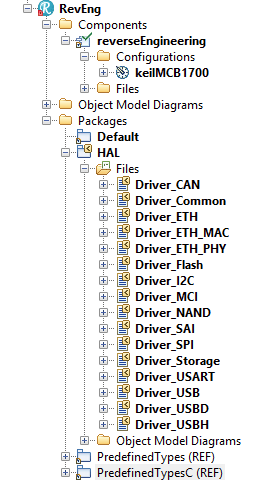
  • Rename the Component to “reverseEngineering” and the Configuration to “keilMCB1700”
  • Start “Tools”, “Reverse Engineering”
    • In the first screen select “model driven”, “logical modeling”
    • In the second screen enter the path for the include files, then select all files. (We only need CAN but why not create a complete model right away, costs nothing and might be convenient later on)
    • In the third screen, leave the top 2 fields (“ordinary model elements” and “replace existing packages” but change the 3rd to “single top level package”and name it “HAL”
    • The fourth screen is OK, press “Finish” to perform RE. The result will look like the picture on the right.
      • Screen Shot 2018-07-16 at 14.21.32

Now we can use this model in the other models to have a CAN driver included.

Just do an “Add to Model” in both the Master and the Slave Model and include the “HAL.sbs” file there (As a (REF) of course )

When you have done that you can select all HAL functions with the INtellivisor ( Use “select” )

In the next part we are going to implement a simple CAN send and receive function that just sends and receives generated messages.

from there on we are going to implement things like:

  • publisher subscriber, so you can subscribe to a certain kind of  CAN Messages with a callback function and that will program the CAN Acceptance Filter (if there is one)
  • define messages for sending a value and receiving the value.


That’s it, the rest follows soon in part 2!

Happy modeling with Rhapsody if you CAN!

Walter van der Heiden ( wvdheiden@willert.de)


PS

I just used a picture of Obama because he used the “Yes we Can” slogan in the 2008 elections and I found that a nice wordplay. Please do not assume i meant anything political with it, I never want to discuss anything even remotely political in this BLOG,
I do not want anything else than just technical discussions here.
I use other platforms to express my personal opinions.

W.

RXF Best Practice

Introduction

Today I will write about our RXF. I hear a lot of users that have issues and worse, there are a lot of users that do not speak about issues…. We find out indirectly that there was trouble.Most issues can be traced back to errors in the install procedure, take really good care that this is done properly.Also a big source of problems is the installation of a new version of the RXF. OK, this is not straight forward, I admit.Although the RXF has its own Macros for sending events, if you want to use the same model in an OXF environment, you better use the IBM macros.Assign the Memory Properties in the Component. Make new components if you want to experiment with these values.

Hints and Tips for installation

  • We are there to help you. Really. I know you are afraid that your friend Google might be insulted if you ask someone else for help, but really: he is not.
  • Install should run without errors!
    Yes. If install gives you an error, it’s serious. There is something wrong. You should not ignore it.
    • Install can tell you after entering a path for a compiler, RTOS or Rhapsody that it cannot find some file. Pressing “Yes” will much later expose errors that you cannot map on the install anymore!
    • READ!!! OK, OK… we do not always write clearly but you should be able to understand what the install program wants from you.
    • if you cannot read: ASK!
    • Check if the install path is not too long! (c:\user\thatsme\Install directory for tools\Rpy_CPP_embOS_IAR5_CM3_EFM32\Rpy_CPP_embOS_IAR5_CM3_EFM32\Rpy_CPP_embOS_IAR5_CM3_EFM32 is too long. Install will either give errors or just not copy everything. Sometimes without error message….
    • The version numbers of Compiler, RTOS and Rhapsody are not given in the install for nothing. That means that the RXF is tested with these specific versions. Installing the RXF using older or newer versions can work, but not necessarily…
    • Do not install the RXF under a “magic” windows directory like “c:\Program Files” or any language/bitsize variant. As already said in one of the first entries: Installing Rhapsody.
  • If, in spite of being careful, you have problems: tell us! Windows is a complex environment, that in combination with differences in hardware and interfering IT departments can cause nightmares.
  • If you want to use the Willert Software Tools Embedded UML Studio: You HAVE to install and RXF! Just install, you don’t have to use it.

Hints and Tips for re-install

  • We are still there to help you. Never mind your girl-friends Siri and Alexa, we are better, much better!
  • Regularly check http://download.willert.de for updates.
  • Speak with us when you want to use a new version of Rhapsody, Compiler or RTOS (Or even CPU)
  • There are different use-cases for re-install.
    • You have a new version of Rhapsody but want to use the same RXF
      • You still have to re-install the RXF…. It may seem to work but it is not integrated in your Rhapsody…. No problem, it is still working in your old Rhapsody, that is… if you install the RXF to the same path as where it was.
    • You have the same Rhapsody but a new RXF
      • Is more difficult. Best is to install the new RXF and load the profile in the existing model. You have to check which stereotypes are used in your model and manually re-assign them to the new profile. A good test is to try and delete a profile, if there are stereotypes used, Rhapsody will refuse to delete it.
      • The properties for the static memory blocks are the same… but the MetaClass changes… you have to re-assign them to the correct properties.

I hope this makes your life with Rhapsody a bit easier!

Walter van der Heiden ( wvdheiden@willert.de )

« Older posts

© 2026 Rhapsody TechBlog

Theme by Anders NorenUp ↑