BLOG about IBM Rhapsody. Contains technical information as well as more private travel stories.

Tag: Tools & Tech (Page 4 of 6)

Back to Work. Question of the Week: Windows or Linux

So. The nice and quite days after Christmas and New year are over. Back to work means: back to travel. A small one to start, yesterday evening I drove to Bückeburg, this week I’m in the office the complete week. Then we slowly increase the travel distance (Nantes, Bristol, Boston,…)

Introduction

Lately people ask me if they can use Rhapsody “native” under Linux.
Short answer: Please NO!
Long answer: No it is not really usable under Linux. It is simply the Windows version that runs under Linux because the graphic engine happens to work under Linux as well. A lot of features will not work (See list below)
This only makes sense if you have a compiler that runs under Linux (or your target environment of your Rhapsody Development is Linux)
If you really insist on doing your daily work under Linux then install VmWare and install Windows in a Virtual Machine. I have the same on my Mac.
Question: But VmWare is not free!
Answer: Grrr, i should have known…  Then take Virtual Box. or try Wine (I don’t know if it works but I expect it to)
At least you can create a shared drive where Rhapsody can generate (or in case of RXF, the deployer will deploy) the source code to.
Or you setup an rsync between the Windows VM and Linux.

Trust me, this is the best way to do it. The Linux version was never really developed as a native Linux application and therefore does not use any of the Linux advantages.
Walter Quote #1: It is always surprising to see how much money people are willing to invest to be able to use Linux for free.
Happy Modeling with Rhapsody (under Windows)
Walter van der Heiden (wvdheiden@willert.de)

Features not available in Linux version of Rational Rhapsody 8 releases

Abstract

Features listed in this document are not available in the Linux version of the IBM Rational Rhapsody version 8 releases.

Content

  • Android application development (feature completely removed in release 8.1.4 of Rhapsody)
  • Automatic Test Generation (ATG) add-on
  • Breakpoint synchronization is not supported in the Wind River VxWorks 6.9 and Wind River Workbench 3.3 integrations
  • C# application development (feature completely removed in release 8.1.4 of Rhapsody)
  • CORBA development
  • Configuration management SCC mode
  • Customizable code generation
  • Eclipse platform integration
  • Functional Mock-up Interface (FMI)
  • Generate support request
  • Helpers can be used, subject to the following limitations:
    • Helpers that are set up to be triggered by actions such as code generation will not work with RhapsodyCL on Linux.
    • When using Java helpers, the JRE used must be the one installed with Rational Rhapsody or a different IBM Java JRE. Also, the JRE cannot be within a ClearCase VOB.
    • Arguments cannot be passed to Java plugins.
  • Import from Rational Rose (feature completely removed in release 8.1.4 of Rhapsody)
  • Languages: Japanese, Korean, Simplified Chinese, Traditional Chinese
  • MathWorks Simulink integration limitations:
    • Managed Mode for Simulink
    • Plant Modeling (exporting a structured block to Simulink for simulation)
  • Microsoft VBA (feature completely removed in release 8.1.4 of Rhapsody)
  • Microsoft Visual Studio integration
  • NATO Architecture Framework (NAF) version of Unified Profile for DoDAF/MODAF (UPDM)
  • NI VeriStand (feature completely removed in release 8.2.1 of Rhapsody)
  • Oracle Java for plug-ins (JVM)
  • Parametric constraint evaluator
  • Rational Rhapsody apps cannot be developed in Linux with SWT libraries. (Note that you can develop Rational Rhapsody apps with Eclipse in Windows and use them for both Linux and Windows.)
  • Rational Rhapsody 64-bit application
  • Rational Team Concert integration
  • Rhapsody Model Manager (feature introduced in release 8.3 of Rhapsody)
  • Safety Critical Development in C
  • Siemens Teamcenter integration (feature completely removed in release 8.2.1 of Rhapsody)
  • SMXF (Simplified/reduced MicroC Framework for C)
  • Split diagrams during export
  • SXF (Simplified eXecution Framework for Safety Critical developers)
  • Target monitoring
  • TestConductor add-on limitations:
    • Cannot be used with Rhapsody in Ada
    • Does not work with RhapsodyCL. As an alternative, you can use the command line of rhapsody.exe with command line option -hiddenui.
    • Integration with Rational Quality Manager 4.0 not supported
    • AUTOSAR SWCs not supported
    • VxWorks 653 platform not supported
  • VxWorks 653 integration
  • Web-enabling a model (Webify)
  • Wizards that help create ProxyPorts
  • XMI Toolkit add-on for Rational Rhapsody is not compatible with RhapsodyCL

If it ain’t broke, don’t fix it….

Introduction

I’m not a fan of updates. A few years ago I always switched off my automatic updates. On a Mac that was possible and would hardly have other consequences.
Unfortunately, this is not the case anymore. Modern development methods like DevOps, Agile, Continuous Engineering and I_don’t_know_how_it_is_called are forcing you to keep your system up-to-date. Either Apps don’t work with the latest OS or an App requires a certain minimum version of the OS.
Many systems do not even allow you to wait with updates, even my beloved Mac starts whining and will update without asking.
Walter Quote #2: If it aint broke: Don’t fix it!

Rhapsody

The same applies to Rhapsody. Newer versions will have improvements, bug fixes and sometimes new options or features. Since 8.1.3, IBM will at least deliver so-called iFixes that enclose bug fixes for the most serious bugs. (Check our download portal or the IBM website to download the iFix for you Rhapsody version. You only need to install the highest number, it will contain all previous iFixes for that version.
Here is a list with all versions (and Build numbers) since 8.0.
8.2.1

9810341

5 june 2017

Rhapsody Version Build Number Release date
8.3.1

9835533

24 june 2018
8.3

9831308

4 dec 2017
8.2

9803403

1 dec 2016
8.1.5

9728113

25 april 2016
8.1.4

9641846

14 dec 2015
8.1.3

9499822

26 june 2015
8.1.2.1

9278208

20 feb 2015
8.1.2

8254044

5 dec 2014
8.1.1

8200000

5 sep 2014
8.1

8169320

2 jun 2014
8.0.6

7155987

28 feb 2014
8.0.5

7139044

5 dec 2013
8.0.4

6118532

3 sep 2013
8.0.3

6107223

14 jun 2013
8.0.2

5093211

21 mar 2013
8.0.1

5074847

27 nov 2012
8.0.0.1

5071232

8 nov 2012
8.0

5066837

21 sep 2012

De-install the old one?

You don’t have to. You can install multiple versions of Rhapsody in parallel. A few things to consider:

  • Install in the same way as the previous version (Same directory structure)
  • The last installed version is the default version that will start when you double-click a .rpy file.

Models

You don’t have to do anything to update your models. But…. As soon as you save a model it is updated and cannot be opened with older versions of Rhapsody anymore. (Not always, sometimes 2 consecutive versions use the same database version.)
You can, however, use “Save As” to save the model in an older version. You can do that 2 versions back. So not too much.
Here is a list with the Rhapsody Versions and how they can be “saved” back.

Rhapsody Version „Save As“
8.3 8.2.1, 8.2
8.2.1 8.2, 8.1.5
8.2 8.1.5, 8.1.3
8.1.5 8.1.3, 8.1.1
8.1.4 8.1.3, 8.1.1
8.1.3 8.1.1, 8.0.6
8.1.2 8.1.1, 8.0.6
8.1.1 8.0.6, 8.0.4
8.1.0 8.0.6, 8.0.4
8.0.6 8.0.4, 8.0.2
8.0.5 8.0.4, 8.0.2
8.0.4 8.0.2, 7.6.1
8.0.3 8.0.2, 7.6.1
8.0.2 7.6.1, 7.5.3
8.0.1 7.6.1, 7.5.3
8.0 7.6.1, 7.5.3
7.6.1 7.5.3, 7.4

Of course a new version of Rhapsody can have changes in Code Generation. Best is to install a new version, start the old version, generate code, start the new version, load the model, generate code (In a different directory!!) and compare the code. If it is the same, you’re good. If different, first compile, you might still be good. But if it doesn’t work, try to understand the consequences of the changed code.

You will have some “Settings” files in your browser that are named “CGCompatibilityPreX.Y”. These files include the changed properties.

RXF

You MUST re-install the RXF and then during install tell the RXF the right directory for the new version of Rhapsody. (It will usually detect it automatically)
You can load the older models if you do not install the RXF but it will not work.

Eclipse

If you use Eclipse you have to either re-install the Eclipse plugin (first de-install the old one and then re-install the new one!)
If you want to use 2 versions then you will have to install Eclipse twice (I have not found any other way to do it…) and install the Eclipse Plugins/Workflow for the newer Rhapsody version in the second Eclipse.

ReqXChanger

Easy to forget… If you use the ReqXChanger, you have chosen the rhapsody.jar that matches the Rhapsody Version you use to sync your requirements with.
You have to edit the configuration to allow for ReqXChanger to use the new version of Rhapsody!

Happy Upgrading (and modeling) with Rhapsody

Walter van der Heiden (wvdheiden@willert.de)

Happy New Year!

I wish everybody a “model” 2018! I had a little break during the christmas and new year holidays. Traveling is cool, but even a modeling traveler needs some rest once and a while.
But now we started a whole new year, 2018, and we have lots of plans to improve modeling in embedded.
IBM is also cooperating, they released Rhapsody 8.3, a brand new version with lots of changes!

AUTOSAR: migration of models to older versions of AUTOSAR

In release 8.3, for migration of AUTOSAR projects to an older version of AUTOSAR, additional target AUTOSAR versions have been added.

Code-centric mode: roundtripping changes to operation signatures

Prior to release 8.3, in code-centric mode, if you renamed an operation or modified its parameters and then roundtripped the code, the old operation was automatically removed and a new one was created in its place.

Beginning in this release, when roundtripping such changes, you have the option of retaining the existing operation and having it marked with a stereotype called MergeCandidate. After roundtripping, you can then go through these operation and merge them with the new operation that was created. The new operation body and declaration will then be copied to the existing operation, which will retain any other existing information such as dependencies. The second operation will be discarded. To enable this option, set the value of the property MarkMergeCandidateOperations to True.

Code-centric mode: support in 64-bit version of Rhapsody

You can now use code-centric mode in the 64-bit version of Rhapsody. However, code cannot be generated while in code-centric mode.

Configuration Management integration: renaming/deletion of Rhapsody units

Prior to release 8.3, if you renamed a Rhapsody element that was saved as a separate unit, the name of the file representing the unit would always keep its original name. Beginning in this release, if you configured Rhapsody to use the integration with Rational Team Concert (using the CMTool property), then when you rename a model element that is a unit, you will be asked whether you want to also change the name of the underlying file. This behavior can be controlled by the property RenameActivation.

Similarly, if you delete a unit, you will be asked whether you want to also delete the underlying file. The deletion behavior is controlled by the property DeleteActivation.

Modeling: “satisfy” stereotype in non-SysML projects

The “satisfy” stereotype, previously available only in SysML projects, can now be applied to dependencies in all Rhapsody projects.

Modeling: ownership of dependency between two other elements

Beginning in release 8.3, an element can be the owner of a dependency between two other elements. Among other uses, this makes it possible to create a dependency between two read-only model elements.

Modeling: selection of type for flowport

Now, when you try selecting a type for a flowport, the dialog remembers the last location used, allowing you quicker access to the relevant elements.


Rhapsody repository files: move to XML format

Beginning in release 8.3, the files used to save Rhapsody models are in XML format. To help differentiate between the new repository files and the repository files used in previous releases, the letter x has been added to the file extensions. For example, the main file for the project now uses the extension .rpyx instead of .rpy. Existing projects that are saved in version 8.3 of Rhapsody will be saved in the new format.

Statecharts: multi-line display of code for entry action, exit action, and internal transitions

Prior to release 8.3, in the graphical compartment used to display the code for a state’s entry action, exit action, and internal transitions, each of these items was allocated a single line, regardless of how long the code was.

Beginning in this release, there is an option to have the compartment display multiple lines of code when required. For individual states, this can be set in the Display Options dialog. If you want to set this as the default behavior in all your projects, you can add the following property to your site.prp file with a value of True: General::Graphics::SupportMultiLineCompartment.

Support for Red Hat Enterprise Linux 7.2

Rational Rhapsody can now be run on version 7.2 of Red Hat Enterprise Linux.

TestConductor/ATG: information about model elements not covered

In TestConductor and ATG, requirement coverage results now also include information about the model elements that are not covered.

TestConductor: testing of private/protected operations

Beginning in this release, TestConductor includes an option for testing private and protected operations by calling them directly. See the example and related documentation in the TestConductor Testing Cookbook.

TestConductor: user guide for assertion-based testing

The documentation for TestConductor now includes a new user guide (TestConductor_User_Guide.pdf) that deals only with C/C++ assertion-based testing mode. The existing user guide (RTC_User_Guide.pdf) now deals only with animation-based testing mode (Ada, Java, and C/C++).

User Interface: enhanced dialog for setting display options

Many element types now use a common tab-based dialog for setting display options.

User Interface: use of new combo box for filtering

A number of dialogs now use a new combo box that dynamically filters list elements as you type.

XMIToolkit: UML 2.4.1 namespace

XMIToolkit now recognizes the UML 2.4.1 namespace

XMIToolkit: activities with horizontal swimlanes

Now, when importing activities that contain horizontal swimlanes, the swimlanes are rotated so that they can be brought into Rhapsody.

In the next week we will test 8.3 ourselves and check compatibility with our RXF.

Happy modeling with Rhapsody in 2018!

Walter van der Heiden (wvdheiden@willert.de)

Bourbon Street Shortcuts

I have never been to New Orleans before, so for those who read my BLOG more often: I have added State #35 to the state-chart! And I really have to say: New Orleans is pretty cool, It has a flair that you hardly find anywhere else in the USA. I didn’t really know that in most of the US it is not allowed to drink alcohol in the streets openly. Hence the brown paper bags you see everywhere. As a European you don’t notice that, for us its normal that you just drink wherever you like. Not so in the USA but in Bourbon Street you can openly drink whatever you want. You can also walk around as you please, i saw people there that were “dressed” (or actually showed a lack of dressing) that I normally only see in the capital of my country. (For those that don’t know: I live in the real land of the free, the Netherlands)

That is cool but the coolest thing is the music. Literally every bar has a couple of musicians that play. Mostly Jazzy but also other kinds of music.Raz and I landed in a pub where the band was building up the stage. they told us the band would start in 45 minutes or an hour and that suited us, we wanted to speak anyway. But after some discussion (Raz and I do, luckily, not always share the same opinion) we looked around us and noticed that we were, by far the youngest people in the bar… I’m 56 so that tells you something. And yes, when the band started we soon figured out that this was definitely not our Jazz…

So we moved to another one where the band was already playing. That was much more OK.

Shortcuts

Rhapsody has a lot of keyboard shortcuts. They are described in the manual but unfortunately this is pretty hidden. there are a few websites where you can find more info on that, I will add some here.

Search (and find)

In Rhapsody 8.1.5, when you were in the Rhapsody editor (or in active code view) the CTRL-F command would give you a search dialog. This would search for the string that you typed in. After that F3 would give you the next search-hit.
This no longer works. the reason for that is that the Rhapsody developers have unified the search dialogs in Rhapsody. There were (historically grown…) four different searches in Rhapsody. None of them worked for 100% so Raz and his crew decided to clean that and make a search app that would not only search but also find…. This comes with a (temporary) price, the search lacks some “hidden” features that were previously there.
Screen Shot 2017-11-23 at 18.33.55.pngThe find-dialog in the editor has a field “Mark All”, that will put a red ball with a white cross before each line where the searched string occurs. Not a perfect solution but definitely workable.


2 Very useful ones…

The shortcuts that are hard to find in the documentation are the Shift and the Alt key. When you are in a Diagram, State-chart or Object Model Diagram or so, as soon as you draw an element inside another element (when this makes sense according to the UML of course) then Rhapsody notices the hierarchy and will treat the outer element as the container of the inner element. That also means that if you want to resize an element that has other elements inside it, resizing seems impossible without also resizing the content. Resizing is done by selecting the element and take one of the dots that surround the element and drag it.
Now try to press the “Alt”-key when dragging, you will see that the content of the element will stay intact. Now that is cool eh?

In a sequence diagram something similar happens. When you notice that you don’t have enough space in the middle of a sequence, shifting all elements down is pretty tiresome. This can also be done by clicking on the place where you want to make space and press the “Shift”-key while dragging down (or up if you want to close gaps!) This will take the entire content and moves it with your mouse.

I hope this will help you in your Rhapsody life! Have fun modeling with Rhapsody

Walter van der Heiden (wvdheiden@willert.de)


Even Paradise has Requirements

Just another day in Paradise

Just before flying back to Europe I spend a weekend at my Friend Arno’s place in Florida. The USA contains both paradise and hell. Florida is paradise, Las Vegas is hell. I hate Las Vegas. But I love Florida, especially South-West Florida. Weather is really nice there, nature is beautiful. You can see all kinds of plants and animals that we don’t have at home. Hence the title picture. Normally I buy photo’s, this one was taken by me.

The USA has it’s nice things, Unsweetened Ice-Tea, free Re-Fills, brilliant weather. It has its flaw-backs as well…. But not too much in Florida…

This morning I woke up early to have some time to take a cup of coffee with Arno, who has to work today, before leaving for the airport. When I got out to the terrace next to the pool I noticed that it was not too warm. My friend Arno and his wife were both freezing… they already live in Florida for a long time and think that 14º C is very very cold. My European body reacted totally different, i thought it was nice and almost warm… That was 7am, on 9am it was already way over 20º…. things were back to normal… Also paradise has its requirements…. no temperature under 70ºF….;-)

Requirements

Speaking about requirements…. How do you get requirements in Rhapsody? There are a number of ways to do so. It also depends on what Requirements management tool you are using.

  • Managing them in Rhapsody. You can do that but you will not like it that much. It is tiresome to handle requirements, there is not much overview and linking is a pain in the….. For a small program like a Stopwatch it is OK but anything bigger this is a no-go.
  • Use DOORS to manage your requirements. Wait… Doors is old? Well, that depends. There are a large number of companies out there that use Doors since years and have large databases full of requirements, and mostly a complete workflow around the Tool using scripts and much more. Since Doors is still supported and even developed (to some extent) by IBM it is not a bad choice. You can synchronize your Requirements from Doors to Rhapsody using GateWay (Which is actually a Tool called Reqtify and is being maintained by a french company called Dassault (Yes, the ones that bought NoMagic) It can sync your Requirements between Rhapsody and Doors and it is fully configurable so you can also use it for other tools then Doors and you can select how you sync the Doors information in Rhapsody. It is and add-on tool, you have to pay for it. A cheaper and also very nice way to sync your Requirements between Doors and Rhapsody is the Willert Software Tools ReqXChanger. It uses the ReqIF format to exchange Requirements, it is also configurable so you can determine the exact information that you want to sync. In the latest version it can also exchange diagrams between Doors and Rhapsody!
  • Use Doors Next (DNG) to manage your Requirements. This uses the Jazz Database to store Requirements and something called OSLC to sync the Requirements with other Tools. You would have to use Design Manager or the new Model Manager in Rhapsody to sync your Requirements with that. Design Manager and in lesser extent Model Manager need powerful hardware to run on. So if you are looking for a more “light-weight” solution, you can also consider our ReqXChanger, it is a low-price and low-performance using solution to exchange your requirements. You can still use it in a batch way (For instance in a nightly-build) to automatically keep Requirements and tracing information up-to-date.
  • Use non-IBM Tools (like Polarion) to manage your requirements. Syncing can still be done with ReqXChanger. This is a big advantage of the ReqXChanger, it is very flexible in where you can use it. If you change your Requirement Management Tool (Or even your modeling tool…. but we will not talk about that….) you can continue using the ReqXChanger. If you use another tool then the named one and you would like to sync with Rhapsody, feel free to contact me!

Kicked out of Paradise

So. It’s time to pack and leave paradise… Modeling is definitively nicer if you do it in the sun with a glass of Ice-Tea. But modeling beats text-based programming always. Even when it’s cold outside.

Happy Modeling (and requirements implementing) with Rhapsody!

Walter van der Heiden (wvdheiden@willert.de)

Time to Evaluate!

Getting nostalgic

In the days of Windows XP (Who’d ever thought I would say that I gladly wanted to go back to XP…) installations were easy. Your PC basically belonged to you and the OS would not interfere in anything you do.
How different is that now. Since Vista (may it burn in …..) we are plagued with an OS that tries to force its will upon us. And installing a complex environment like Rhapsody and a few add-ons becomes a nightmare.
We used to let people install everything during a one day training. Install took about 30 minutes and would work 99% of the time.
Now it takes hours and the success rate is 50% or so. Even with our own installer, install manual and physical presence of somebody that “knows what he is doing” it is just too difficult to get everything running reliably. Have I already mentioned that I hate Windows?

Brave new world…

At Willert we use Macs. Since 10 years, give or take, we have kicked out our Windows laptops and buy expensive Macs, just to prevent us from hiring multiple sysadmins to keep our stuff running.
Unfortunately, IBM, (a large Apple user itself ! ), does not deliver Rhapsody on a Mac. Yes there is an Eclipse plugin but that is just a “facade” plugin. It calls the Rhapsody DLL’s to do the real work. It won’t work on Linux or Mac OS. Duh…
So we use VmWare (we kicked out Parallels because they’ve become too greedy) to run Windows on our Macs. Works OK. So we are used to virtualize.
IBM has now taken this virtualization to a new level. You can have images that you can instantiate and distribute.
So after installing all tools and testing that they work correct, we can now let other people access it using Remote Desktop Connection. This will work from a Windows PC (It is built-in there) and from a Mac (download Microsoft Remote Desktop for free from the App-Store) And apparently even on a Linux Computer, you have to download a 3rd party tool there but it works.
Using RDC requires an internet connection but not an extremely fast one, it only transfers the screen using compression.

Provisioning an Image

Once an image is provisioned, you will receive data on how to access it:

  • IP address, mostly 169.x.y.z
  • Login name, mostly administrator
  • Password,8 character random generated

On a Windows PC

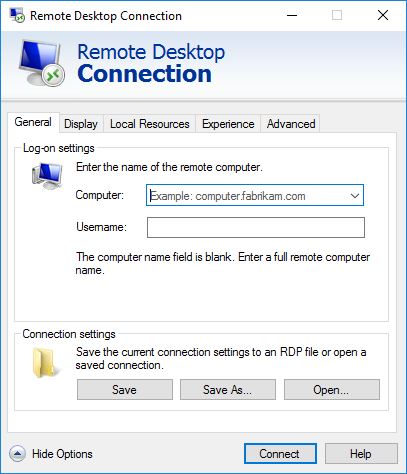
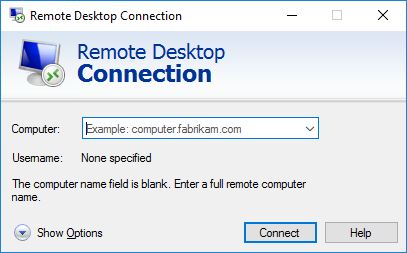
It is pretty easy on Windows, everything that you need is built-in. In the menu under “Windows accessories” you will find “Remote Desktop Connection”.

RDC1.JPG

This is how that looks. First you click on “Show Options”.

RDC2

After “Computer” you type in the given IP address, 169.x.y.z:3333 (Important, the 3333 is a port number and needs to be there.)
After “Username” you type “administrator” (Or the username that was given to you.
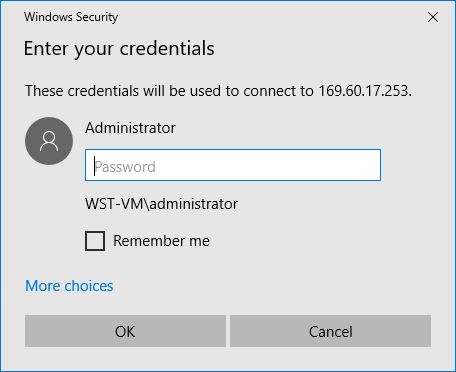
The password will be asked when you connect. As you see it is possible to store the login credentials on your PC. You might want to do that, it is easier to restart your image.
Click on Connect and RDC will now ask you for your password. Copy it from the data you have received.

rdc3

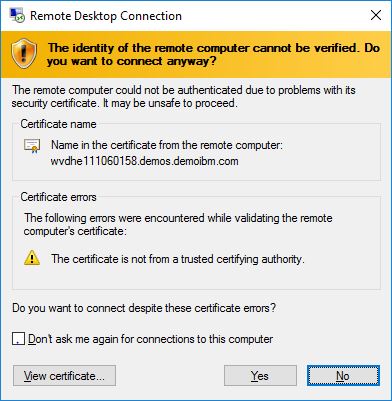
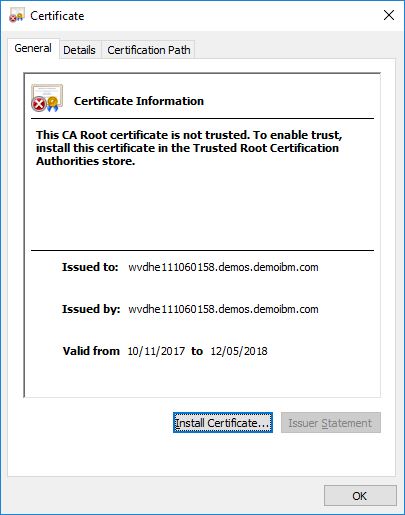
Then Windows gets suspicious about the certificate of the WebSite. It will display it. You have to tell Windows that it is OK, otherwise…. no go… so click on “View certificate”

rdc4

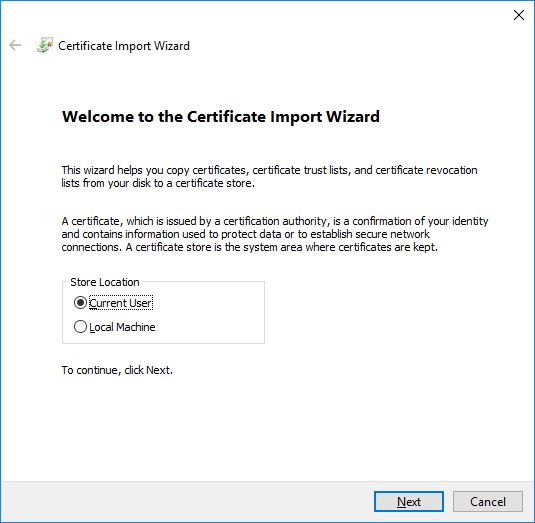
Then click on “Install Certificate”

rdc5

This is OK, click “Next”

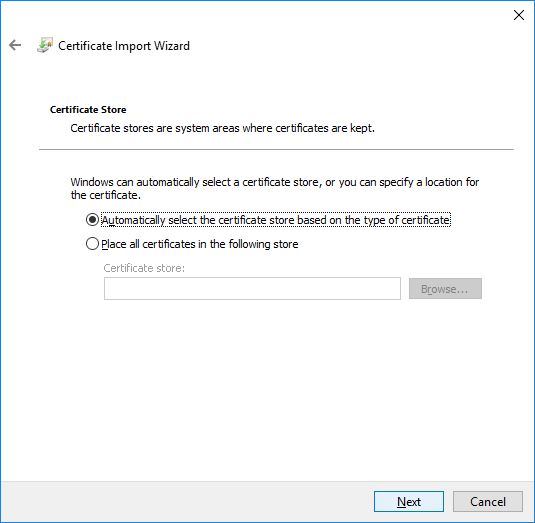
rdc6

Again click “Next”

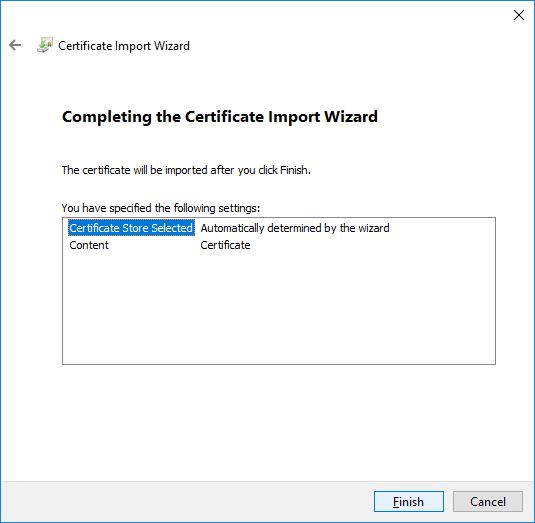
rdc7


And now on “Finished”.

rdc8

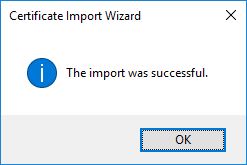
The Certificate is now installed, you only need to do this once.

rdc9

On a Mac

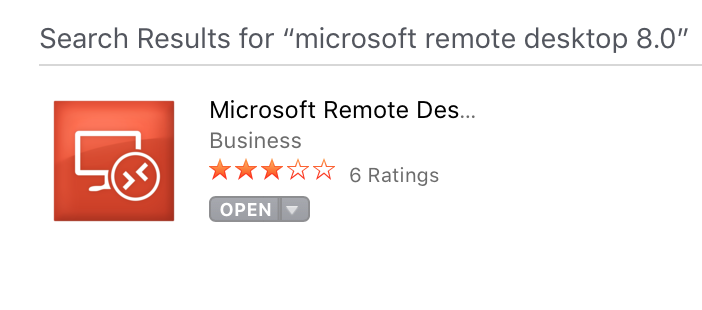
You first need to download and install the RDC App from the App store. App Store iconApp store RDC

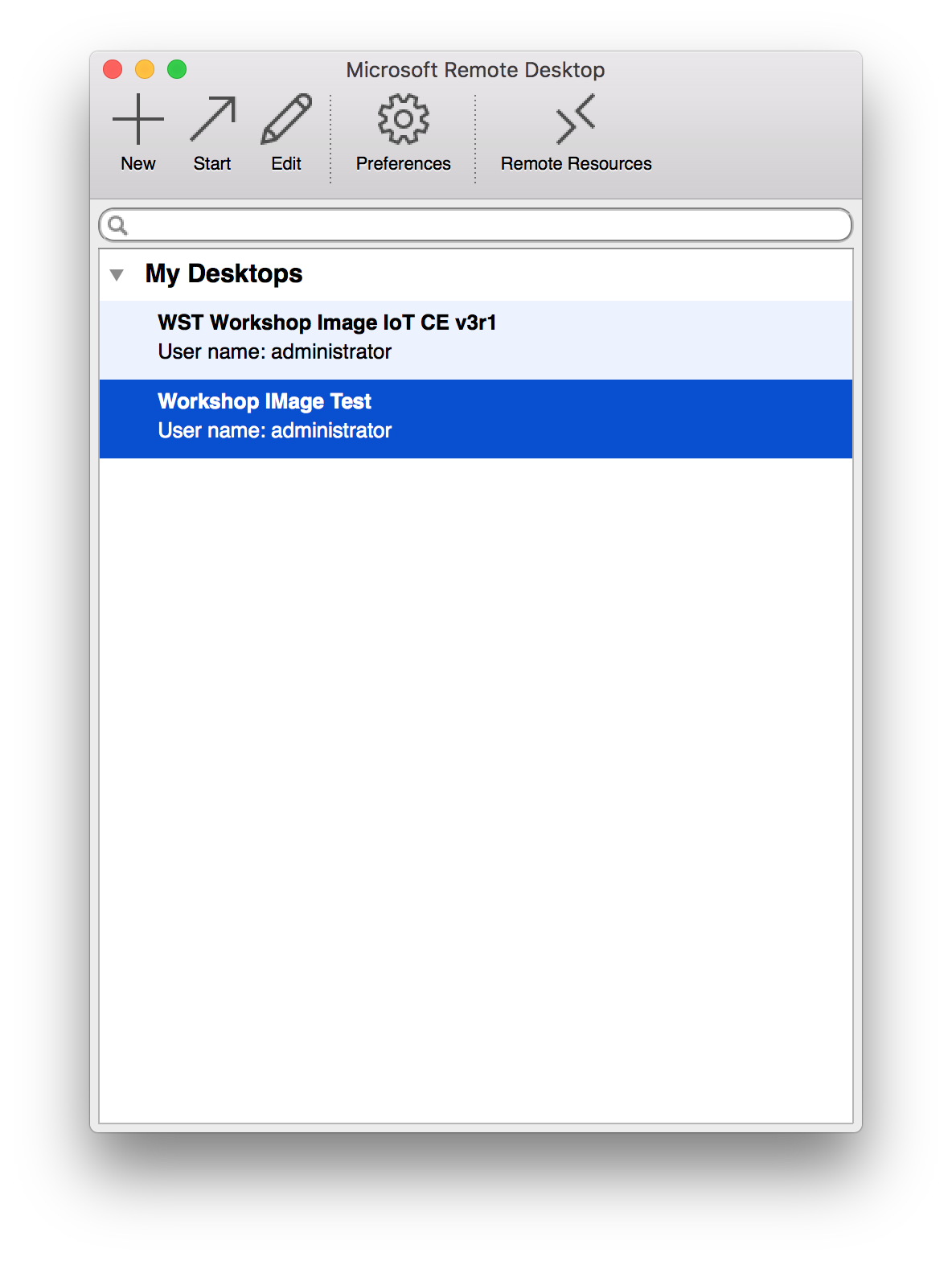
Click on “install” and then on “open”. Confirm that you trust Microsoft and RDC starts.Mac RDC1.png

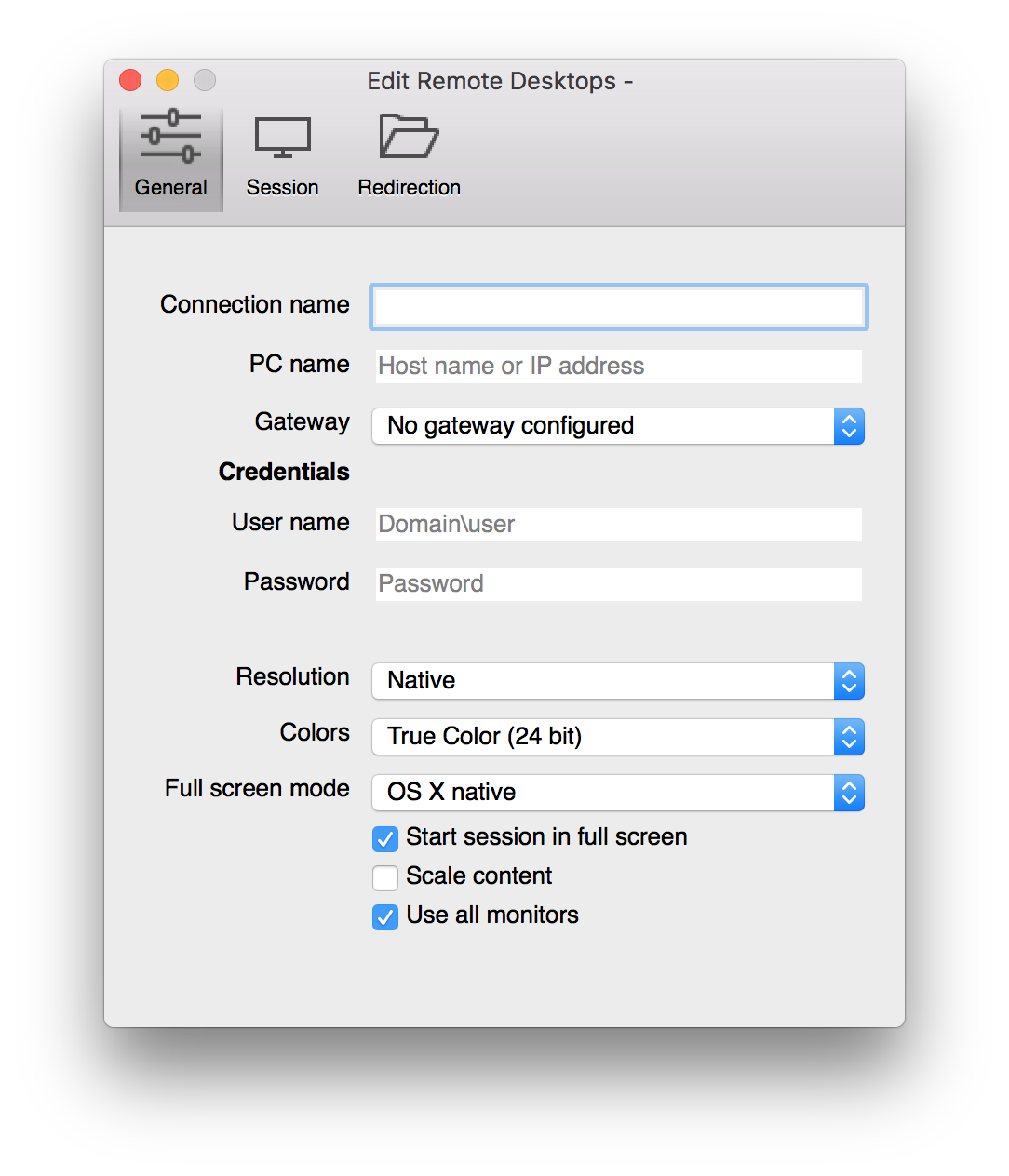
Click on “+” (“New”) and fill in the credentials you were given.MAC RDC2.png

  • Connection name, You can give your connection a logical name.
  • PC name, the IP address that you were given, i.e. 169.x.y.z:3333 (The 3333 is mandatory)
  • User name, the name given, mostly “administrator”
  • Password, what you were given
  • The rest can be changed if you like. Lower resolution and colors mean less data.

Now just close the window and press “Start” with your image selected.

And now?

Your image will be ready and started. Login is automatically, you can start using the tools that are installed in the image.

Images are valid for a certain period of time, I’m still trying out the facility so I can not say how long this is exactly.

So contact me when you want to try Rhapsody and our tools, I will provide you with an image.

Happy evaluating with Rhapsody!

Walter van der Heiden (wvdheiden@willert.de)


USA

Travel fun

This week I’m in the US, Detroit to be precise. Flew in last week on Friday. First to Fort Myers of course, my good friend Arno lives there and I always visit him when I’m in the US.

I always say: Florida is Paradise. Nothing better than drive around in a convertible in South-West Florida. Weather is always good (Well… if there is no hurricane….) and the life is generally good there.

But on sunday afternoon, we (Me and my son Robbert) had to leave paradise to go to Motown.

That was easier said then done, Delta had an airplane ready but apparently some important piece was missing and it was not allowed to fly without it. (They referred to the part as “cover” which sounded pretty innocent to me…) So they had to get a new part, it turned out they had one in Fort Lauderdale. Close enough (100 miles, 160km through the air) but somehow they could not really get an airplane ready to fly it over. They’d also sent a car and that finally arrived 4 hours after the original time of start….

Fixing the plane took 2 minutes and then we could board. We had planned to arrive in Detroit at 19h but it became 23:30. Not cool. The hotel was also almost 50km from the airport so after checking in and unpacking it was 1 o’clock. The alarm was set to 6… short night.

What are we going to do in Motown? Well… as usual I cannot give any names but I’m visiting a couple of automotive companies (Now that is a tough guess….) and on Thursday we have our engineering@scale Tech Day. In the GM Heritage center, that’s going to be fun.

Rhapsody Q&A

We had a Rhapsody Q&A Session on monday. In German. There were some interesting questions, I’ll try and copy some of the questions and answers.

Rhapsody Tips ‘n Tricks

Roundtrip?

Rhapsody has some default settings that are chosen, lets say, “unluckily”…. One of them is the setting for showing so-called SourceArtifacts. That is default set to “Hide” which leads to very confusing situations with people who just started using Rhapsody. The best way is to, when you start a new model, immediately select “View”, “Browser Display Options”, “Show Source Artifacts”. This will make your life easier. If you see Source Artifacts in your Browser and you didn’t change anything: Loose them! (Right click, delete from model)

Another good one is to set the “C_Roundtrip::General::RoundtripScheme” Property to “Basic” or “Advanced”. This will prevent Rhapsody to try to include your typing errors in a model. You can still edit the body of your operations and the Enter/Exit code of state-charts/actions. With Advanced you can even add operations and attributes in an editor.

Rhapsody performance

Rhapsody is slow when model are bigger. That was not a question but the actual finding of a user. How can I make Rhapsody faster, especially the loading of “larger” models?

  • You can do load on demand. If you call the “Open” dialog you seen on the far right a few fields that you can tick: “With/Without Subunits”, “restore Last Session” and “Load on Demand”. You can only load the base rpy file and load the rest when you need it (Right click, “Load…” or “Load with subunits”, speaks for itself) When you close the model, “Restore..” will open only the stuff you had already opened and “Load On Demand” should open only the stuff you are using, unfortunately it is not implemented 100% yet. But try it, it will save some time.
  • Using your model from an SSD drive will greatly improve user experience… Using your model on a network drive will drive you nuts.
  • Having many properties seem to slow down the loading also, apparently Rhapsody needs to build the property tree and that takes time when it has a lot of overrules.
  • If you can: divide your model into multiple sub-models that you load “by reference”

Larger Models

Divide your model into multiple models that you can include where needed. If you have a model that has a certain driver in there, you can copy that into another model (Open a new model, do “Add to Model”, locate the .rpy file, click on “As Unit” and “Copy Into Model”. Then select the package you want “Tick “Add Dependencies” as well) This way the model has new GUIDs and there will be no conflicts when you use the package.
Save and then you can open the original model, ditch the package you just copied and do “Ad To Model” again, this time adding the package from the new model “As Reference”.

You can no longer edit the package(But you shouldn’t either!!) You can, however, create a Workspace and load all the models you use into it. You can then switch projects without opening and closing Rhapsody. (“File”, “Insert Project”, “Existing Project”)

So. I hope we have enough time this week to explore Detroit (Motown) a little bit better. The Skyline at night looks good!

dreamstime_l_10513728

That’s it for now: Happy Modeling with Rhapsody!

Walter van der Heiden (wvdheiden@willert.de)


Divide and Conquer

Introduction

As I always tell the people who attend my UML Trainings: without using Classes and Objects to split up the work your application must do, it is impossible to handle todays complexity.

Programming used to be easy, in the early days of computers and the early days of embedded. The first boards had small controllers on them that had a few kilobytes of ROM memory and a few bytes of RAM.

Getting these to work from scratch involved a day of reading some stuff and applying power to the board, then your first blinking LED was reality. (and how cool it was..)

Later using 16-bit controllers, still with Kilobytes but now more than a few,  but using ‘C’ instead of Assembler, this was already complex. Could take a few days to get the first stuff running. (Not to forget that you had to learn ‘C’ as well…

With UML the initial effort increases again, you have to learn UML, ‘C’ (or ‘C++’ ) and you have to install a lot more stuff. But this is also doable and after the initial effort you’ll notice that things go faster.

The complexity, however, is still increasing and the only way to master it will be to re-use existing stuff. This is only possible if we have “designed for re-use”.


Modeling or Programming?

That is the question. The difference is not clear to people who use Rhapsody for the first time, it is, however, crucial for the way you use your models and how you do the implementation. So just breaking up in multiple Classes and Objects is no longer sufficient, you need to be able to divide your models in “Components” that can be re-used without having to look deeply into them to understand what they do.

Rhapsody supports a couple of ways to do that in your model. You can use (parts of) other models. In the menu you have “File”, “Add to Model”.

Then a menu pops up that lets you select a Rhapsody model (Or a file in a model, i.e. a Unit like a Package or a Component) You can also select “As unit (with a “copy” tick) or as reference.

  • As Reference, links the selected model element in the open model as a read-only reference. (Same GUIDs) You cannot edit the element in your Rhapsody model, you have to open the original model for that.
  • As Unit, links the selected model element in the open model as a writable reference. (Same GUIDs) You can edit the element in your Rhapsody model and it will then change the original model as well.
  • As Unit (with copy) copies the selected model element in the open model. (New GUIDs) You can change the element in your Rhapsody model but the original element will be left untouched.

GUIDs are the generated 128-bit ID’s that Rhapsody assigns to every Model element. Rhapsody uses the GUID to recognize model elements (It does NOT use the name for that!) So copying renews the GUIDs so there will be no name clashes with existing model elements.

Now try to model as independent as possible by using only unidirectional relations, eventually ports and interfaces. Use private attributes and operations when possible, at least describe the public interface as good as possible so re-use is easier while the re-user does not have to study the inside of your model.


Attention points.

  • Paths. If you use referenced model elements, be sure that they are in the right path on all computers of all project members… Otherwise check-in  and -out will be a torture. You have to manually adapt the paths in your model. It helps to use relative paths in your model

    General::Model::ReferenceUnitPath
    General::Model::PathInProjectList
    can be helpful there. You might also use an Environment variable to point to your working directory and sync that with your colleagues. (Like the OMROOT variable that Rhapsody uses to make it independent where your Rhapsody Share directory is)

  • Config Management. If you check in and out models and parts of models, it is easy to fetch a wrong version of a referenced model. Think about your CM structure!
  • Names. Don’t use default names like “default” for the package, etc. Use meaningful names that can be used in their projects without causing collisions.
  • Documentation. Is even more important when your model is re-used inside other models.

Tips and Tricks

  • As long as you make changes in your model _and_ in the referenced model, load both models in a project (Using “File”, “Insert Project”. You have to switch the active project to make changes but it will reduce time. Rhapsody saves the Workspace separately! (You can even edit it if you make changes to your paths)
  • Using Ports and Interfaces greatly improve the way you can use models in models.
  • There are more ways to create Interfaces, see my Techletter about using Interfaces.


Dividing up your models.

If you have made a model that represents the hardware you use in multiple projects, you can easily use that model in all projects that use the same hardware. The nice thing is that if you have your version system right (perhaps even with a check in the model..) and really defined your interfaces, then you can use different versions of the hardware without really worrying about you model.
Another advantage is that referenced model load faster.


That’s it! Happy modeling with Rhapsody!

Walter van der Heiden (wvdheiden@willert.de)

MISRA

Introduction

MISRA -Motor Industry Software Reliability Association. This is a committee that defines rules that ‘C’ (or ‘C++’) programmers need to follow to increase the safety and reliability of their code.
A customer asked me about Rhapsody and MISRA compliance, hence the BLOG entry…
There are multiple MISRA standards, for ‘C’ and ‘C++’. For ‘C’ there is 1998, 2004 and 2012, for ‘C++’ there is the 2008 standard.
Rhapsody has 2 profiles “out-of-the-box”, 1998 for ‘C’ and 2008 for ‘C++’. We (Willert) have created our own profile for MISRA ‘C’ 2004. It is delivered with our RXF Frameworks.


Is Rhapsody generated code MISRA compliant?

Yes and No. (In German they have the word: “Jein” which is a combination of Yes (Ja) and No (Nein). Beautiful word.)
First: there is no such thing as 100% MISRA compliant embedded code. It is almost impossible to write all code exactly as MISRA tells you, alone the code you need to control your hardware will violate multiple rules. The code that Rhapsody generates is created in a way that it is more or less compliant with some important rules.
If you load the MISRA profile, the generated code will contain comments to tell your checker tools that a rule is violated and why that is OK. But again: you have to check yourself and the MISRA part only applies to code that Rhapsody has generated by itself. The code that you type in yourself is as MISRA compliant as you want….

Restrictions

Code from relations with * multiplicity are not MISRA compliant, as is dynamic behaviour like instantiation at run-time and dynamic memory allocation.
Code for Ports in Rhapsody in ‘C’ is using recursion, code for interfaces uses pointer arithmetic. Both are not MISRA compliant and very difficult to prove right.


It is not compliant so it can not be used?

No, that is not how it works, Let me give you an example that I once learned from Günther Glöe from Tüv.
Suppose that you want to drive a nail into a wall. The only tool you have available is an old hammer that has a failure: the head is pretty loose and can fly of if used.
So… according to popular belief you have to refrain from using the hammer and drive the nail in the wall using your fist. I would personally not do that…. it hurts…
I would use the hammer but take precautions to minimize the risk of injuries and other collateral damage. I would remove objects from the vicinity of the place I want to drive the nail in the wall, warn all people in the neighbourhood to stay away and then carefully use the old hammer.
This is exactly what MISRA says: “Use with care”. If you have to violate a rule, then take care that you prevent this from causing disaster.


How To use Rhapsody and MISRA

  • Load the MISRA profile
  • check as soon as possible. If you wait with checking for MISRA, you will be flooded with error messages.
  • distinguish between mandatory and advisory rules. You should comply with the first and try to comply with the latter.
  • Document the violations as defined so that you can do a check run without warnings.
  • create documentation that documents all the decisions you took and the measurements you took to prevent problems


How to test for MISRA compliance

You can (and should…) test if your stuff is following the rules of MISRA by using a checker. Some compilers (a.o. Tasking and IAR) have checkers built-in.
We always use PC-Lint because it is pretty good and very cheap. Other static checkers offer a lot more comfort and more but are way more expensive.

PC-Lint
Compiler
Polyspace
Many more check: Wikipedia.

Virtual Open Space

What is that????

openspace

Open Space is a way to organize meetings and congresses invented by Harrison Owen.

Basically it is a meeting where there you define time/space slots and where all attendees can bring in topics. These topics are connected to a certain room and time, this is done on a board where everybody can see the topics and can apply to join the meeting on that topic.

The organizer will be in the designated room and time to start  the meeting, he.she will also take care that minutes are being made so that others that could not be present ( e.g. because there was another interesting topic in another room) can still read what was discussed afterwards. There is some more to it, when you want to read more:

Open Space on Wikipedia

We always use that for our own events and it is a very successful way to communicate with clients. The disadvantage, however, is that physical presence is required.

In the current time where we care about energy and environment, this is not what we want. So we invented “Virtual Open Space”, where we do an Open Space Meeting using modern technology.

We use doodle to find out what the topic is that people want to talk about, we then use WebEx to create a “virtual” room on the internet where people can speak with each other and, when necessary, share their screens with others.

Check out: Willert Open Space.

This weeks topic: UML debugging!

Happy Modeling with Rhapsody!

Walter van der Heiden (wvdheiden@willert.de)


« Older posts Newer posts »

© 2026 Rhapsody TechBlog

Theme by Anders NorenUp ↑