BLOG about IBM Rhapsody. Contains technical information as well as more private travel stories.

Tag: Tools & Tech (Page 3 of 6)

Switzerland

On the Road again

This week started with a flight to Switzerland. On Saturday night to be precise, my plane left Sunday morning at 7 from Schiphol, I cannot make that in time. So I slept in a hotel near the airport.

It turned out to be a “sporty” day, the hotel Shuttle brought me to Terminal 3 while I had to be in terminal 1…. also the first shuttle left the hotel at 6, drive took 15 minutes, all quite “sporty” to be in time.

But I made it with some running and I still had time to buy a present for my hosts.

Switzerland is a beautiful country, the flight brought me to Geneva, first time I’ve been there. From there the train took me to Neuchâtel, a really beautiful city next to the lake. The problem for us “other Europeans” is that Switzerland is expensive. Really expensive. The simplest things costs about 3 times what they cost in Germany. I always joke that when you want to have dinner you first have to raise your mortgage.
a bit exaggerated but with a slight truth in there.

But, as already said, the country is beautiful so I decided to enjoy it and not mind the costs.

Unfortunately it was not just fun and vacation… i had to work as well. But it was quite successful, that helps!

This weeks Rhapsody problem was mostly trouble with license keys. Mostly when everything works, it will continue to work. But before it works… and when it stops working…
After installing Rhapsody you should install the license. There are multiple ways to have a license, Authorised User or Floating (or Tokens), File or Dongle, EUSIII, Developer, Designer or Architect.

Authorised or Floating

A floating license is installed on a server. It can be used by multiple people though not at the same time. The license file will have a line that points to the server.

An authorised license can only be used by one person. You can, of course, change this person when a project ends or somebody quits but not multiple times a day.

You can have a dongle license but then you still have a license file, one with the dongle ID in there.

You should keep a document (Excel Sheet) with the names of the persons that use certain licenses. (In fact you have to according to the license agreement)

If you want to use Rhapsody in a continuous build environment you have to have a floating license.

The Rhapsody version is determined in the license file (and you have to start the right version of course! I have written a lot about starting the right version, try: (Un-)Installing and Configuring Rhapsody or Installing Rhapsody

The license file must be in a place where Rhapsody looks for it. this is determined by an Environment Variable: TELELOGIC_LICENSE_FILE. This points to the path where the license lives. (Only the path if the license file is called license.lic, otherwise the complete path.

To make things a bit more complicated, flex-lm also looks in the registry where it stores all previous paths where it found a license.
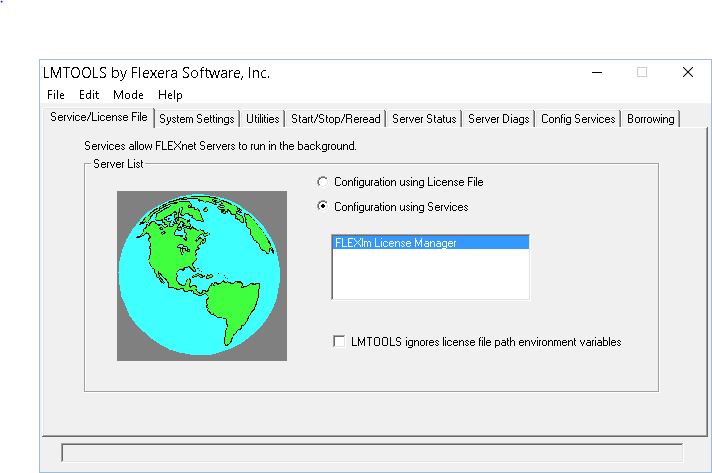
There is a neat program that you can use to check if the license is found and if it is correct, it is called lmtools. use that to check if your flex-lm is OK.

The pictures


That was it! Happy modeling with Rhapsody

Walter van der Heiden ( wvdheiden@willert.de )

Reverse Engineering for Dummies

How to import external sources to an Rhapsody Model

Sometimes it is necessary  to use data-types and/or functions defined in header files given by an other developer. In this case the best way is to import these header files as external files to the working model. For external files no code is generated.

In the following article two models are mentioned. A working model with whom the application is developed and an import model to perform Reverse Engineering.

1 – Initial import

To import external sources to a Rhapsody model Reverse Engineering can be used. In the following steps the import process is described.

    1. Open Rhapsody (depending on the language of the given source files choose Rhapsody in C or Rhapsody in C++)
    2. Create a new project (the import model).
    3. Open Tools > Reverse Engineering
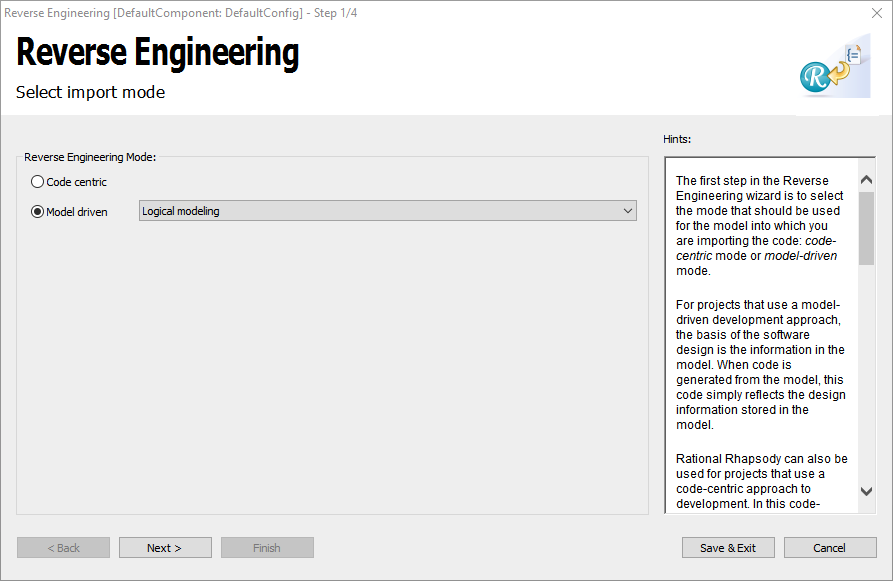
    4. Choose Logical Modelling

      image2018-9-10_15-46-7

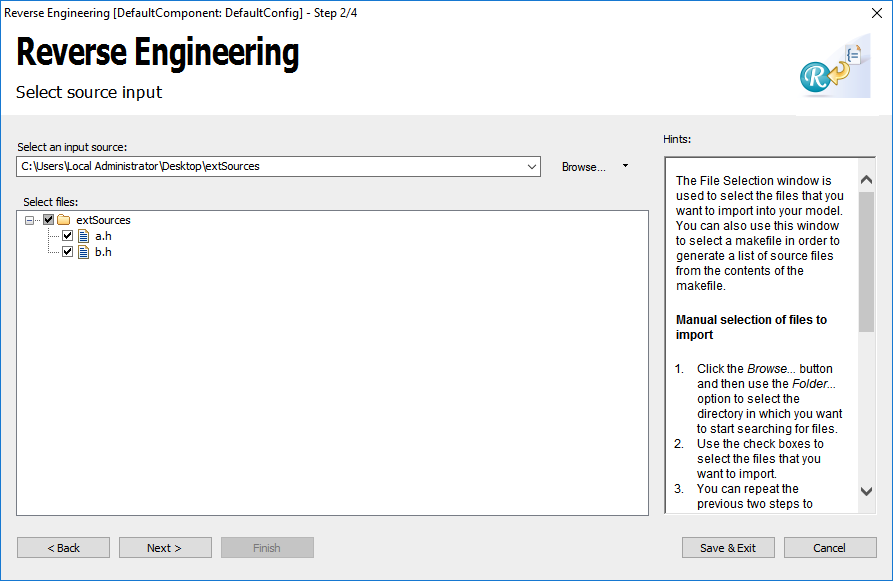
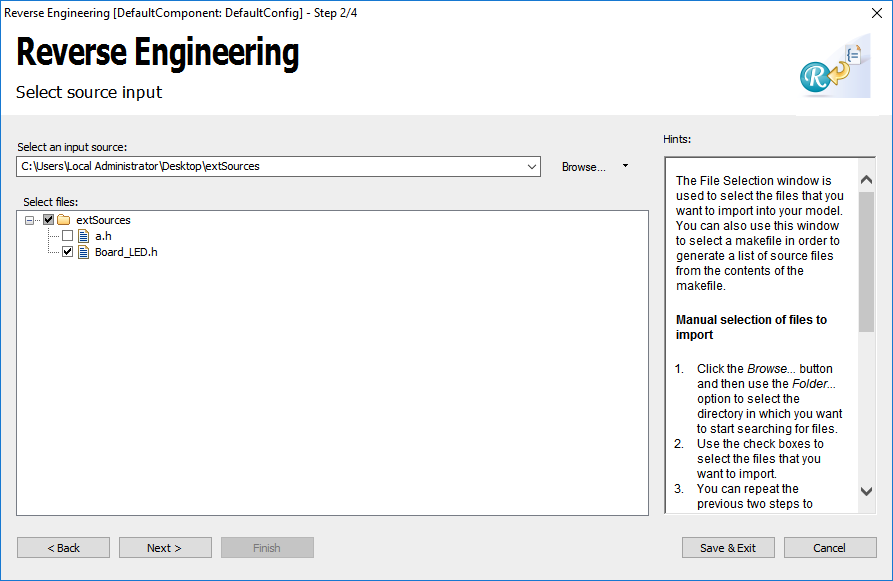
    5. Browse to file which have to be imported and select them.
      image2018-9-10_15-49-12
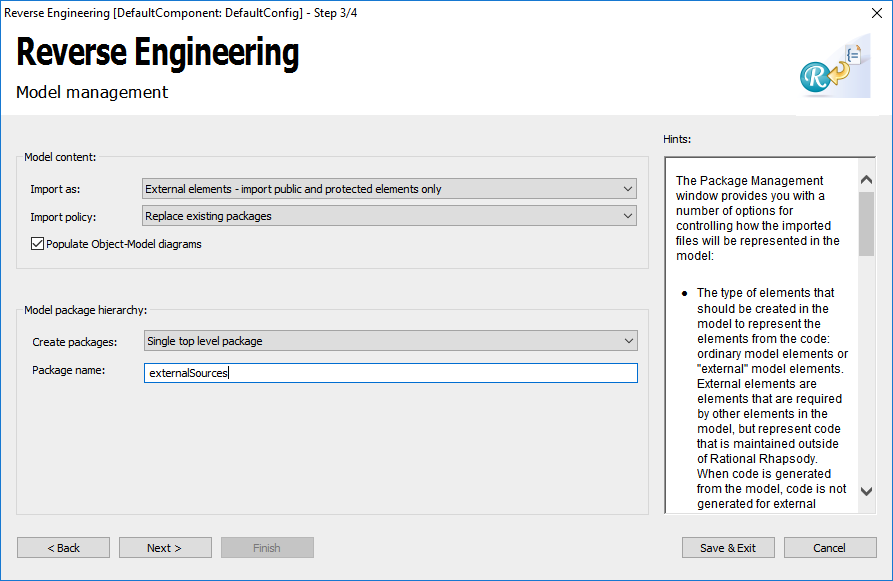
    6. Click Next and set External elements and Single top level package.
      image2018-9-10_15-52-38
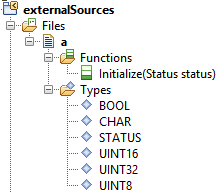
    7. Import files with Next  and Finish. After that you should get something like in the next figure

      image2018-9-10_16-1-0
      At the package icon the small yellow arrow shows that no code is generated for the content of this package.

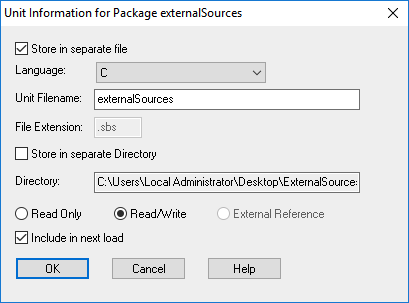
    8. (Optional) If the sources are in C and should be used in an C++ model (the working model) the language of the unit has to be changed to C++. With a right click of the package open the context menu and choose Unit > Edit Unit… and open the following window.
      image2018-9-10_16-6-26
      Switch the language to C++ and click OK.
    9. Close the import model and open the working model in which the sources should be used.
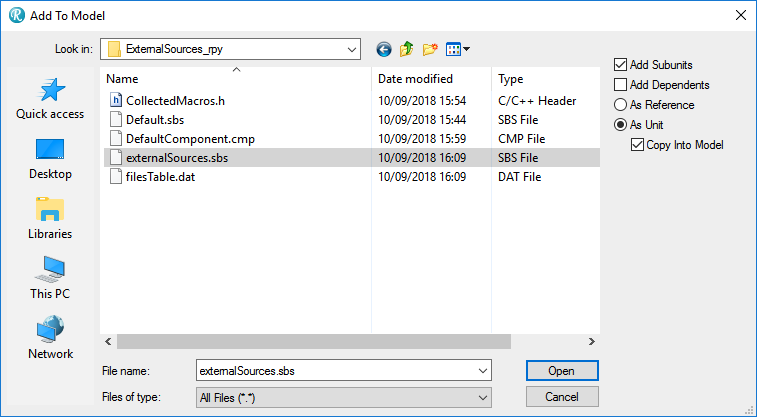
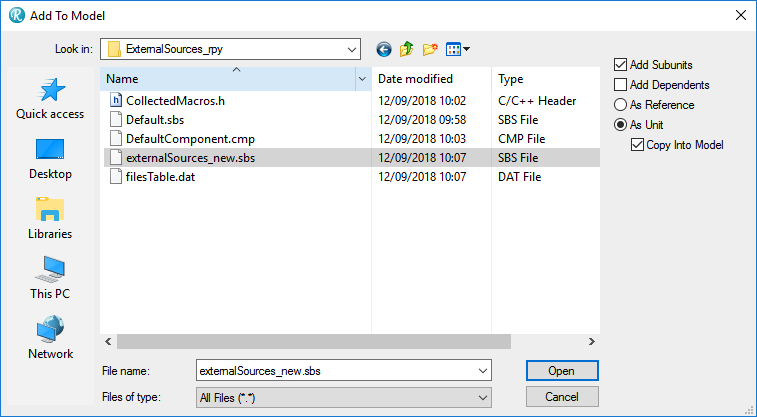
    10. Choose  File > Add to model… and browse to the created package.
      image2018-9-10_16-14-15
      As options choose As Unit and Copy Into Model.
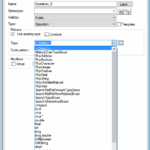
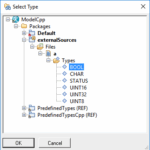
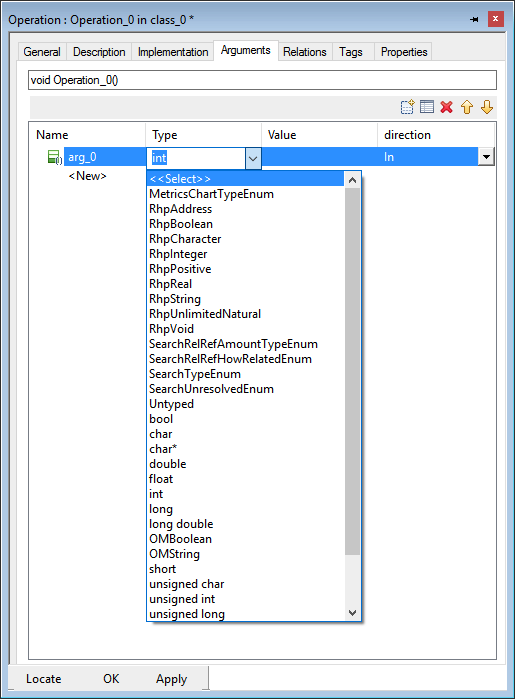
    11. Now the data-types and functions can be referenced in the working model. In the following picture some samples of usage are shown.

      Select return type

      or argument type

      image2018-9-10_16-23-9

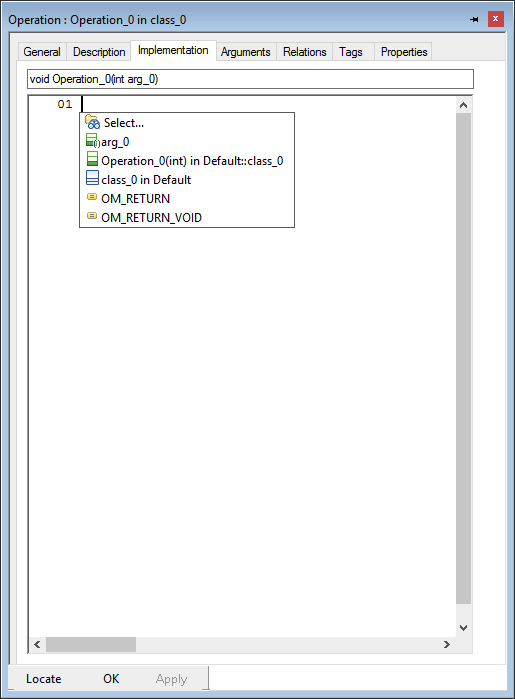
      or with the shortcut Ctrl + Space in the implementation.

image2018-9-10_16-24-40


Attention

When executed again, other GUID are assigned to the data types and functions. As a result, they are no longer recognised in the working model and must be reassigned.
If changes occur to the imported sources, they must be manually added to the imported package.
To prevent accidental overwriting, it is recommended to delete the import model used for reverse engineering after importing the package into the working model  


2 – Add additional header files

If new header files has to be imported to the externalSources package proceed as follows:

  1. Open Rhapsody (depending on the language of the given source files choose Rhapsody in C or Rhapsody in C++)
  2. Create a new project (the import model).
  3. Open Tools > Reverse Engineering
  4. Choose Logical Modelling

    image2018-9-10_15-46-7
  5. Browse to file which have to be imported and select them.

    image2018-9-12_9-59-0
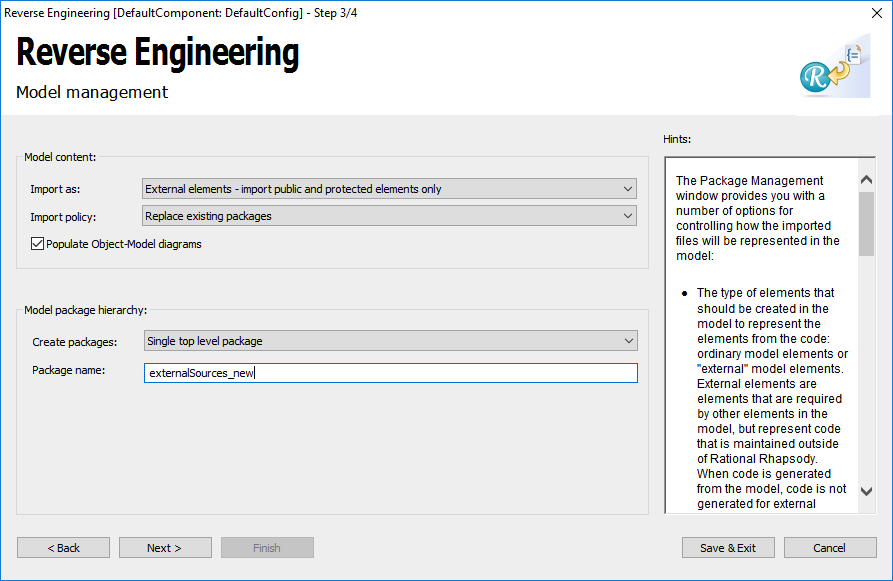
  6. Click Next and set External elements and Single top level package. Choose another package name (externalSources_new) than in the working model.

    image2018-9-12_10-2-12


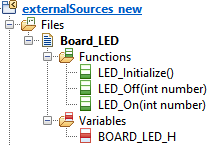
  7.  Import files with Next  and Finish. After that you should get something like in the next figure.
    image2018-9-12_10-3-44At the package icon the small yellow arrow shows that no code is generated for the content of this package.
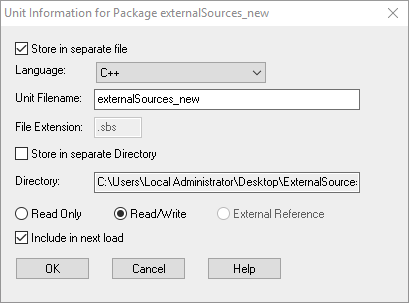
  8. (Optional) If the sources are in C and should be used in an C++ model (the working model) the language of the unit has to be changed to C++. With a right click of the package open the context menu and choose Unit > Edit Unit… and open the following window.
    image2018-9-12_10-5-34
    Switch the language to C++ and click OK.


  9. Close the import model and open the working model in which the sources should be used
  10. Choose  File > Add to model… and browse to the created package.
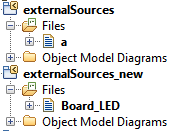
  11. Now the new file can be moved to the externalSources package. It is easier to handle only one external package.
    image2018-9-12_10-8-4
  12. After that you should get something like in the next figure.
    image2018-9-12_10-9-56
  13. Now the new file can be moved to the externalSources package. It is easier to handle only one external package.
  14. Following video shows step 9 to 13:
    [wpvideo aFGPYz13]


That was it! Thanks to Dennis Koelbel for creating this article and video!

Happy Modeling with Rhapsody!

Walter van der Heiden (wvdheiden@willert.de)

(Un-)Installing and Configuring Rhapsody

Uninstall Rhapsody

Uninstalling is easy, when you know what to do…

[wpvideo 6icZXjQk]

Installing Rhapsody

This video tells you what options you have to install Rhapsody. It gives a proposal for the best way to do it.

[wpvideo icJnAjFR]

Configuring Rhapsody

And when installed, you have to know how to start the correct version. This video helps!

[wpvideo Bk3M0Y63]

So… that’s it for today

Have fun with Rhapsody!

Walter van der Heiden (wvdheiden@willert.de)

Migrate Rhapsody Developer to EUSIII

What is the difference?

Rhapsody Developer is the “full” version of Rhapsody, EUSIII (Embedded UML Studio III) is the Willert version. The only difference is that EUSIII does not have Animation, all other features are there. Also EUSIII has the Willert RXF as additional Framework.

No Animation? Is that bad?

Not really. Animation will only work with Windows on a PC as target environment (Or Linux or another really powerful platform) otherwise it is not possible/practical to use it. EUSIII has an alternative built-in solution called “Embedded UML target Debugger” that does the same but without using additional resources.

RXF?

Yep. The Real-time eXecution Framework. The Willert Framework that allows you to generate Rhapsody code on even the smallest of targets without real-time violations or large use of resources. Comes with a built-in single-threaded RTOS or adapters for other RTOSes. Also included is the UML target Debugger that can write Sequence Diagrams and Timing Diagrams even from a small target environment.

Re-install?

Nope. Not necessary. You can keep using your existing installation. Since EUSIII is based on the Architect for Software you have to start that version.

  • Starting Rhapsody via a desktop icon. (Or via the start menu) Then you can open the properties of the shortcut and go to the tab “Shortcut” (Names are different in other languages) There you can add “-architect” to the “target” field. If it already says “-dev_ed” you have to remove that. You can add the -lang=C or -lang=C++ to start the correct language by default.
  • Starting Rhapsody by double-klick a Rhapsody Model. Now you have to look for the Rhapsody.ini file. This should be in the directory next to where your “Share” directory is. In that file there are 2 commands:
    DefaultEdition=Architect
    DefaultLanguage=c++

    You should change them that they say “Architect” and the correct language.

Install RXF

Not only does EUSIII come with the RXF, you really need it. Without an RXF the code generation will not work. So you must install one. It is not important which one but of course you should install one that you want to use. Installation is easy, just start the setup, answer the questions, check if there are no errors (When an error is given during installation it will NOT work!!!)
When you have purchased EUSIII (Or just an RXF) you have access to the Willert Download Portal where you can download your RXF adapters for the Language (C or C++) the Compiler (Keil, IAR, GreenHills, Visual Studio and many more) and the RTOS (CMSIS, FreeRTOS, OORTX, µCOS, Linux and many more) that you want to use.

License

You either have received a dongle (with a license file) or just a license file (Floating License) You just install that as usual with Rhapsody,

So that’s it. Happy Modeling with Embedded UML Studio III

Walter van der Heiden (wvdheiden@willert.de)

Florida 2: The Keys

The Keys

The Florida Keys are the small string of Islands that lie south of the Florida peninsula. They are connected to each other via a couple of bridges and a long highway.
I’ve been there before but that had to happen on one day and before the flight back so I had not much time to enjoy the beautiful scenery and the islands itself.
The attraction is of course Key West where you are very close to Cuba (90 miles, 145km)

distance-from-cuba-to-key-west-1

So this time we planned a bit longer visit and even an overnight stay. Getting a room was OK, apparently it was not the tourist season. Still it was quite busy on Duval Street that is the main attraction. Lots of cruise-ships stop at Key West, unloading lots of passengers. That is the main income of the islands.

The trip to the island is (for me…) the main attraction. We were driving there in a BMW 430i convertible. That was pretty cool.

Hemingway’s House (& cats)

One of the attractions of Key West is the house of Ernest Hemingway.

IMG_1123.jpg

It is now a museum (you have to pay for it… very undutch…) and shows the house in its original state. The walls are full with Hemingway memorabilia and explanations about his life.
I had heard of Hemingway of course but never read anything from him. I immediately started to read “The old man and the sea”.
The house is populated by many cats that are all descendants of Hemingway’s cat “Snow White” who had 6 toes on each foot. The cats there all (as far as i could see) have that too and is quite remarkable.

How to associate Rhapsody model files in the explorer with a specific Rhapsody version

After installing a new Rhapsody version, e.g. for testing purposes, you might still want to let the Windows Explorer open your .rpy or .rpyx Rhapsody model files with another Rhapsody version you are still using for production. This how-to briefly describes where to configure the file extension to application association.

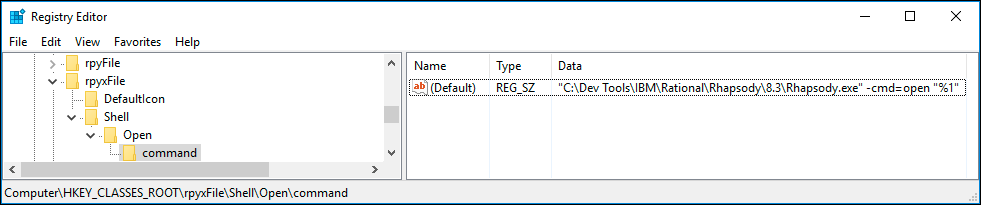
how to associate rpyx

Step-by-step guide

  1. Open the Windows Registry Editor (regedit.exe)
  2. Navigate to “HKEY_CLASSES_ROOT\.rpyx” (or “HKEY_CLASSES_ROOT\.rpy”)
  3. Make sure the value name “(Default)” contains the data “rpyxFile” (or “rpyFile”) (without quotes)
  4. Navigate to “HKEY_CLASSES_ROOT\rpyxFile\Shell\Open\command” (or “HKEY_CLASSES_ROOT\rpyFile\Shell\Open\command”)
  5. Modify the value named “(Default)” to contains the data (including quotes):
    <Full path to your desired Rhapsody version program path>\Rhapsody.exe” -cmd=open “%1”
    If you have a multi language installation but per default want to open Rhapsody in a specific language or edition, you can add additional arguments before “-cmd…”.
    Examples:

    1. Development Edition in C: -dev_ed -lang=c
    2. Architect for Software: -architect
  6. You might also want to check HKEY_CLASSES_ROOT\rpy[x]File\DefaultIcon

Thanks to Eike for writing this down!

Here some pictures of the keys.

That’s it! Happy modeling with Rhapsody!

Walter van der Heiden (wvdheiden@willert.de)

Moving Rhapsody

Kings Day

Today is Kings Day in the Netherlands. We celebrate that our King (“Willem Alexander” but we may call him “Willy:) has his birthday. That is quite a party over here, I can certainly recommend being in the Netherlands on that day (and the night before)

Koningsdag-Op-Vrijdag

Kings Day Party in the Netherlands

So everybody in the Netherlands has a day-off. Unfortunately I work in Germany… so I have to work. Therefore I have many other holidays that are unknown to the Dutch…

Willy en Familie.jpeg

Willy and family

Happy 51st Birthday, Willy!

How to move Rhapsody (or parts of it)

I’m sure it has happened to you and it did happen to me yesterday. I always install Rhapsody in “C:\Dev Tools” (Yes, with a space, we need to test that…)  but I mistyped (These characters get smaller every year….) and I typed: “C:\De Tools”.
The cowards way out is to de-install and then re-install.
I decided to try out if i could repair it…. As the Germans say: “Nur die Harten kommen in Garten” (Means something like: “Only the tough ones go to heaven”)

I just moved all files and then started thinking that I might have traces left in the registry. So i started…. not regedit. That is a bad tool, come on Microsoft… you can do better. If you dump a very bad idea known as “The Registry” on us, then give us something useful to work on it.
luckily there are better tools, I have the pro version of Registrar (there is a free version that works fine) where you can search and replace in the complete registry. And much more.

So I searched and replaced “c:\De tools” with “c:\DevTools” and it started to look better. Of course i had to repair the shortcuts and now I also “moved” the Rhapsody “Share” directory, Rhapsody was whining when I started it. I had to edit the Rhapsody.ini and the DiffMerge.ini files. Then it was OK. This did not really saved time but it was fun to do.

Splitting the Data Directory

What I forgot is that on our development systems we cannot use the convenient way of installing outside of the Windows “Program Files” directories and then “Install all files in one directory”. i did that but because we have to generate install and setup files from our development installation automatically we need to split the directories. So I had to move the “Data Directory”
If you already installed the Data separately it is easier, you only have to edit the Rhapsody.ini and the DiffMerge.ini (Even if you do not use the latter: edit it! If you ever want to use it it won’t work and you have no clue why!)

Moving the “Share” directory

Well… if you have everything Rhapsody in one directory it’s actually a bit more than just the “Share” dir. You also have to move:

  • Share
  • Samples
  • Sodius
  • Gateway,
    • NOT completely… just the “examples” subdirectory!!
  • Test Conductor
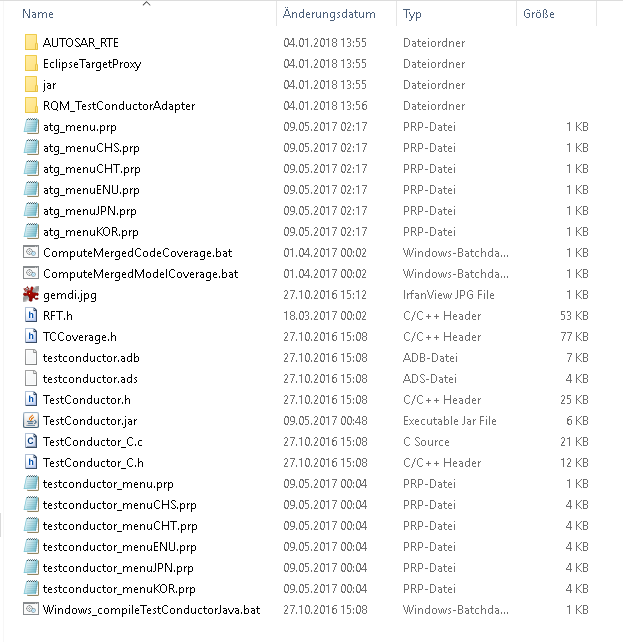
    • A bit more complicated….Screen Shot 2018-04-27 at 10.09.28.png
      This are the files that you have to move to the “Data” part.
  • DiffMerge.ini
    • Search and Replace all instances of the “old” directory
  • Rhapsody.ini
    • Search and Replace some of the instances of the “old” directory, if you had the paths splitted it is easy, if you want to split the installation by hand note this:
      • NOT!!! The paths under the “WelcomeWizard and the WelcomeScreen_Gateway!!! These need to be pointing to the “Program” directory!
      • NOT!! The JavaClassPath and the other Paths under JVM! They also need to point to the “Program” directory!
      • There is also an Entry: “WORKSPACE_ROOT”, you can make that point to a directory where you want to start new Projects by Default!
      • Other directories: check if they point to something that exists…

And then you are OK! At best use a decent editor (Notepad++ or so) and do Search and replace with confirmation.

It does not seem to affect anything but you can repair the Registry so that it seems that Rhapsody was really installed the way you have moved it now.
Just take care that you do not make any mistakes…

Having everything installed in one place is not really making things easy when moving and splitting up Rhapsody. With a decent Registry Editor you can do it quite quick, in case of Test Conductor I think that de-install and re-install (All add-ins can be re-installed! Just call the installer and press “Modify”!) is a lot faster than setting everything by hand.

Note: I installed 32Bit and 64Bit next to each other on one system. Perfectly possible, just rename the Data and program directories (I used 8.3 for 64Bit and 8.3-32 for 32Bit)

Happy Kingsday and have fun modeling with Rhapsody!

Walter van der Heiden (wvdheiden@willert.nl)

Development of Safety-critical Software

Content

This is also published TechLetter 6, written by Eike Römer. Translated by me and published on the Rhapsody BLOG to allow more people to read it.

The development of safety-critical software is often associated with a certification process. Experiences from the certification environment are presented together with possible work steps.

The procedure is based on the V-model. This Tech-letter covers requirements management, implementation, testing, and end-to-end traceability.

The presented experiences can be adapted to own projects.
Grph - Entwicklung sicherheitskritischer Software-290.png

Practical experience and possible work steps

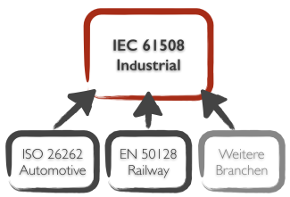
Creating software for embedded systems in safety-critical areas often requires certification as well. Standards such as IEC 61508 or industry-specific standards are intended to ensure functional safety for safety-critical application areas. In this Techletter practical experiences of the Willert Software Tools GmbH in the range of the software certification are presented.

Example RXF-Cert

Willert develops a so-called semi-finished product, that, being only a part of the software, is being built together with the application software of customers later to create a unit. This unit then must be certified as a whole.

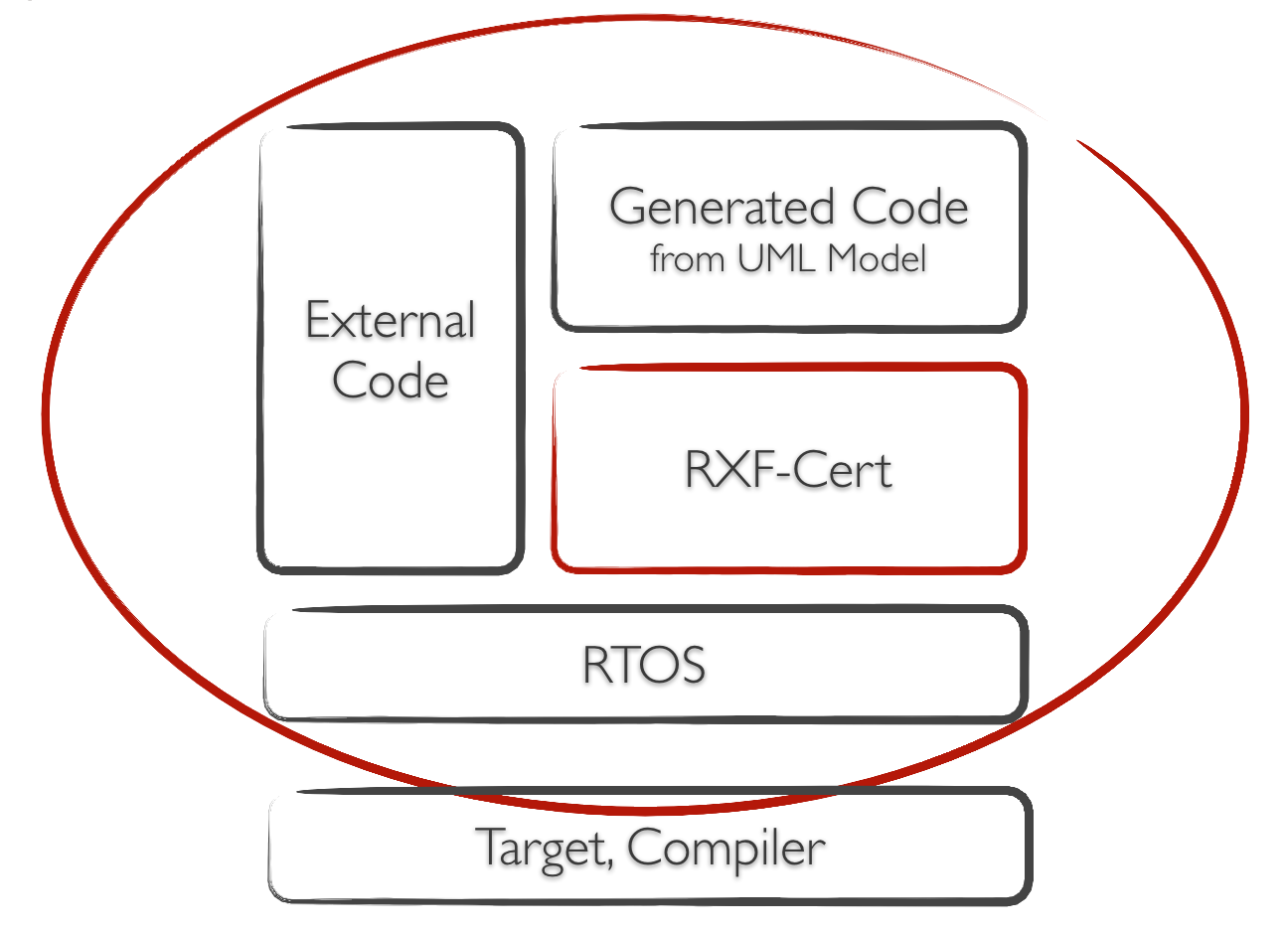
In the specific case, it is the “RXF-Cert” [1], a framework on which the code generator can be based on the UML tool IBM Rational Rhapsody [2] (see Figure 1). In addition to the framework source code and UML model, a “Certification package” is delivered consisting of documents and test suites that facilitate certification in the overall context.
Screen Shot 2018-04-03 at 16.43.06

Figure 1 – RXF-Cert as semi-product in the context of the customers application

Management of Requirements

Probably the most important part of the accompanying documents are the requirements. In order to manage their relationships, versions and status changes, many tools have become established in the market. Such tools are, for example, IBM Rational DOORS® [3] and Polarion [4]. Willert has chosen Polarion for his own use as part of the RXF-Cert project.
Screen Shot 2018-04-03 at 16.44.55

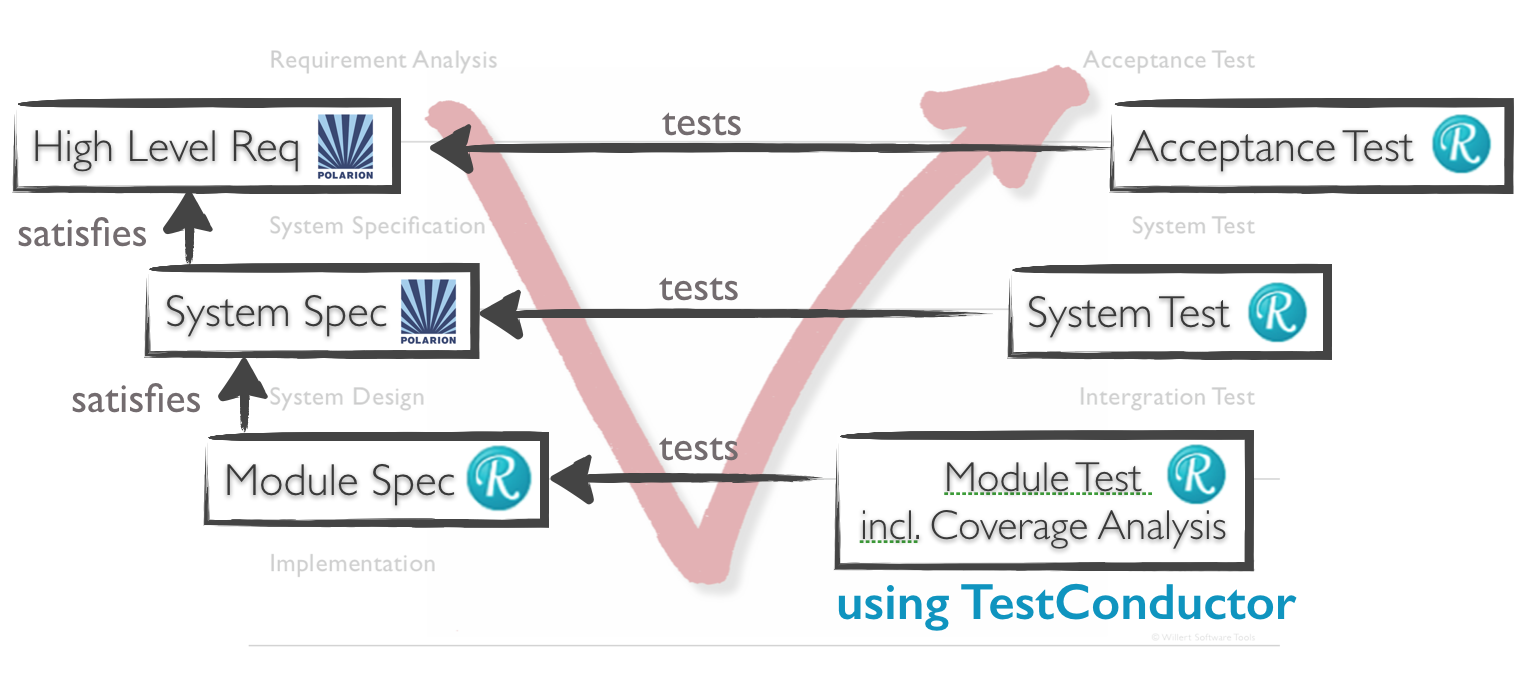
Figure 2 – Specifications and their links in the V-Model

The organization of the requirements has been made in the following levels (see Figure 2)::

  • Customer Requirements (Role of the Customer)
  • System-specification (Role of the SW-Architect)
  • (Software-)Module- and Operation-specification (Role of the developer).

The linking should be defined fixed from the lower level to the next highest level, as a “Satisfies” relationship.

A specification should always have one or more relationships with overlying specifications or requirements. Also links from the resulting software or the source code to the specifications are required here. This makes it clear which code section is used to implement which request (s).

The RXF-Cert comes with a Rhapsody UML model. In addition to the module specification and implementation with the associated code generation, this also contains visualizations of the architecture and of scenarios for more complex processes. In case of a certification diagrams bring the advantage that an auditor can more quickly grasp the construction and implementation of the software. Model elements should also have links to the specifications here.

To create representations for requests in UML tools, there are, for example, the IBM Rational Rhapsody Gateway tools [5] and the Willert ReqXChanger [6] tools. For the RXF-Cert the ReqXChanger, developed by Willert Software Tools, is used that connects e.g. Polarion via the standardized Requirements Interchange Format (ReqIF) and directly supports Rhapsody. Thus, representations for UML elements are also created in the requirements management tool and related to the associated requirements. The associated workflow is visualized later in the document in Figure 5


Ensuring functionality through Testing

Certification also requires proof that the functionality is being verified by testing. In a first RXF-Cert project, unit tests and code coverage analyzes were conducted on the basis of manually written C test cases and the gcov tool (from the gcc package) [7] in a test environment. Currently, the effort has been greatly reduced by using the model-based Test-tool BTC TestConductor [8]. In addition, these tests are also performed on the hardware of the target system instead of a PC environment. The results are returned to the test model from the target environment (see Figures 3 and 4).

The test case specification for the unit tests has been linked in the UML model with the implementations of the modules, so that also the test specifications from the model are mirrored in the requirements management tool and in conjunction with the specifications, herewith also a cover and Impact analysis up to the unit tests possible (see Figure 1).
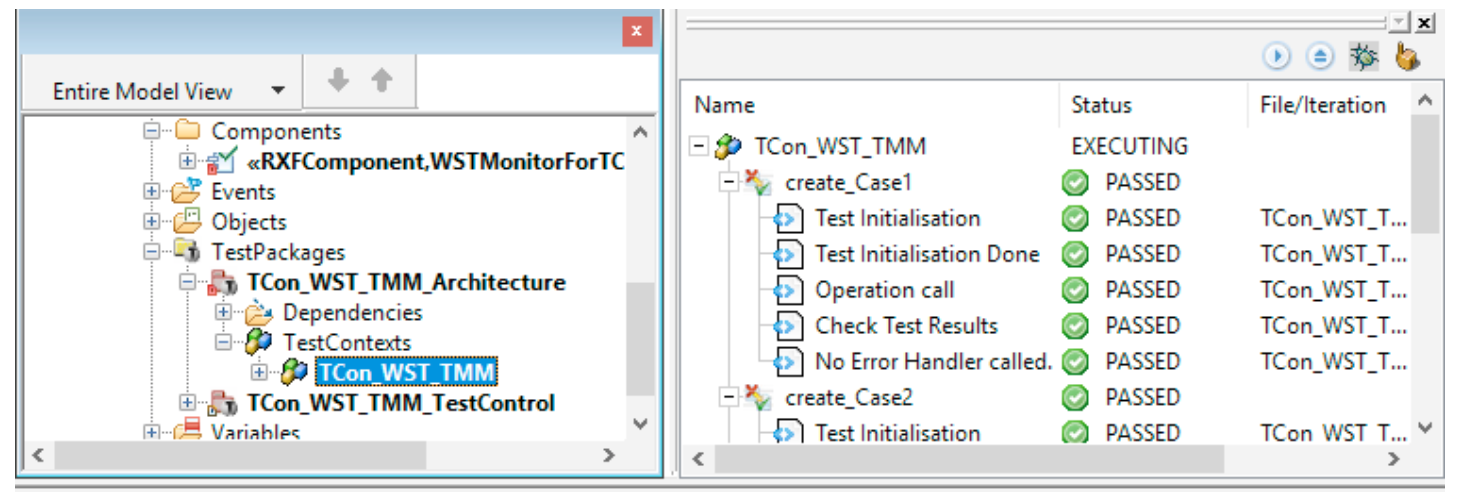
Test Conductor

Figure 3 – Test execution on the target with feedback of the test results into the test model.
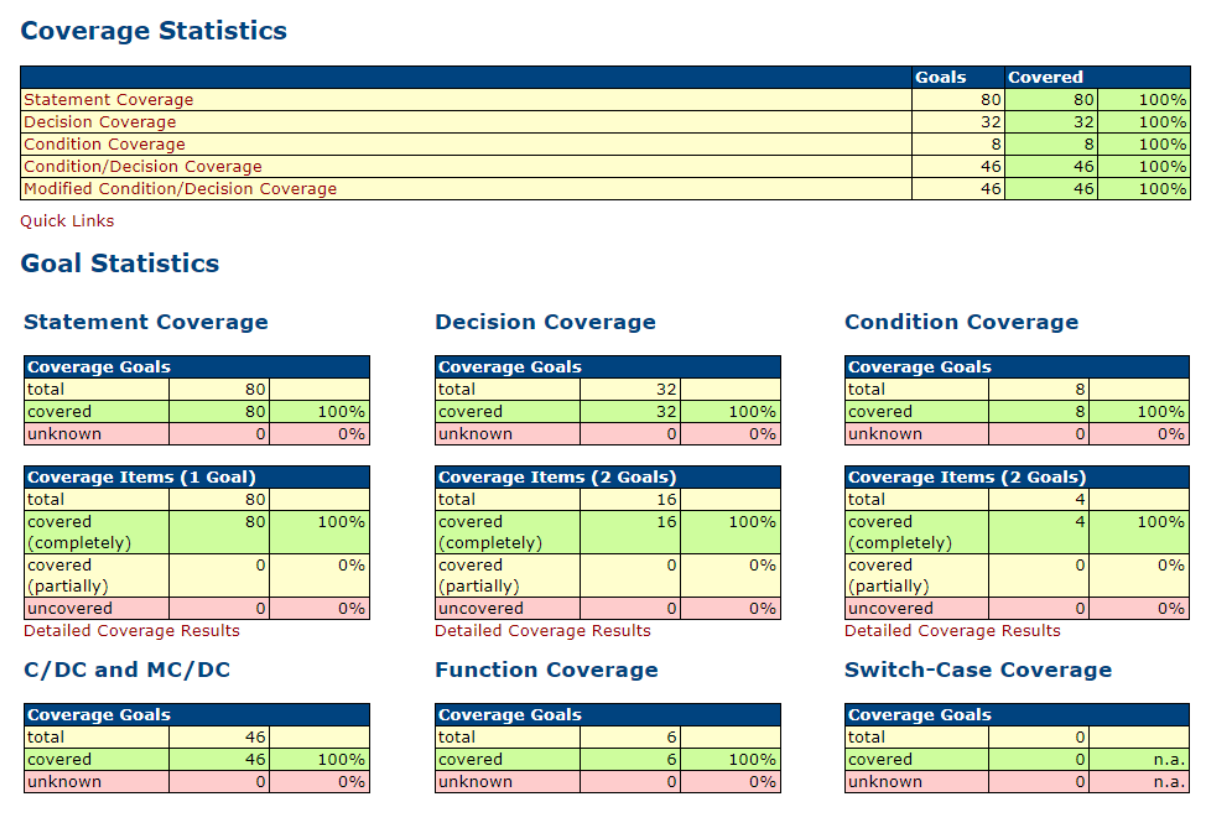
Coverage

Figure 4 – Results of the Code Coverage Analysis on the target environment

Cross-phase coverage and impact analysis

Coverage analyzes are important in order to determine, for example, whether all requirements have a test or whether all requirements are linked with software elements. In the approach presented above, coverage analyzes of the UML model can also be performed. From this documents can be generated that can be presented to an auditor.

Impact analyzes are necessary if, for example, requirements are changed during development. One goal is to be able to determine through all levels what needs to be adjusted as a requirement changes. The ReqXChanger can mark changed requests with stereotypes when retransferring requests to the UML tool (see Figure 6). For the certification process, it can be ensured that the software always takes into account the current state of the requirements.

Preparation of documents for certification
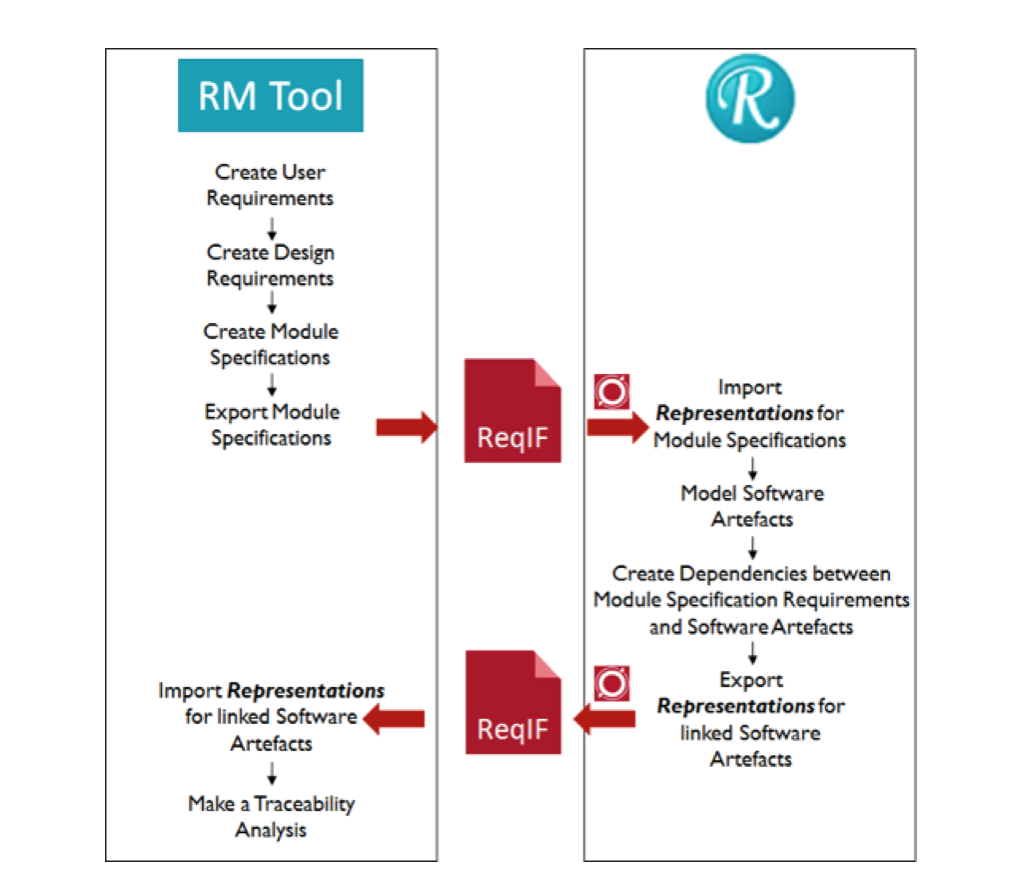
Traceability

Figure 5 – Exchange between UML Model und requirement Management
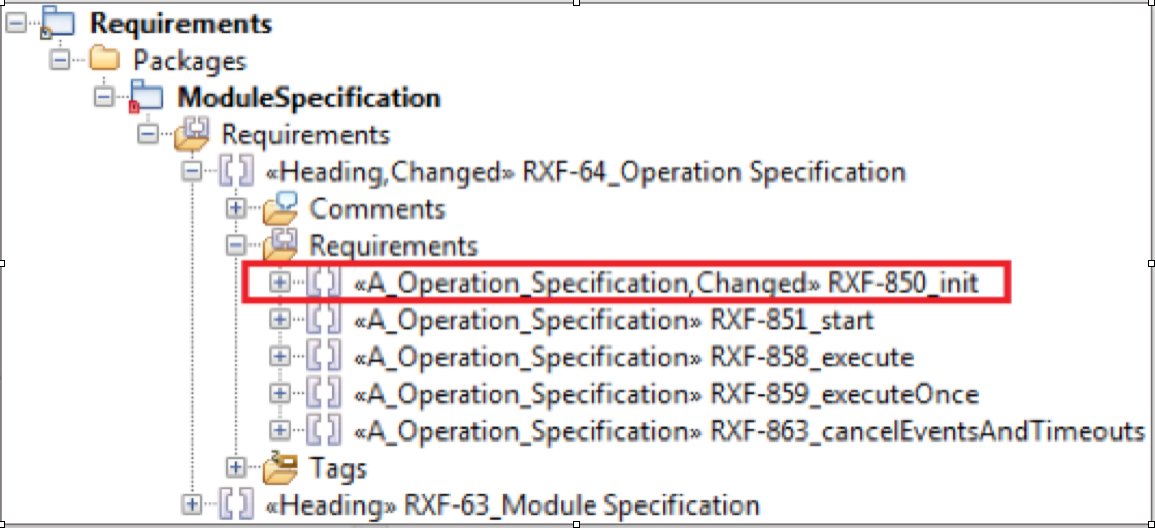
Impact Analysis

Figure 6 – Changed Requirement / Specification obtains Stereotype “Changed” in the model

Creating Certification Documents

From the standard it can be extracted which documentation components are expected. However, combining these into suitable documents and maintaining them involves some work. It therefore makes sense to create an overview document of all delivered goods. Here are source texts, documents and other artifacts of the delivery described and clearly identified including the consistent version numbers. The basics also include adding structure elements to each document, such as a table of contents with page references, a version history, and a cover page with the unique identifier and version. Likewise, a page number indicating the total number of pages on each page in order to be able to verify the completeness.

When recording the requirements, it should be noted from the outset that the corresponding documents must be created for certification. Printing the documents from our internal requirements management with Polarion in an appropriate form requires a lot of effort. The documents managed in Polarion itself can not be used to print the specifications if the links and thus the traceability should also be printed. It is not possible to filter only for specific link types or links to desired targets in the view. One of the consequences of this is that requirements list a relation to the IDs of their chapter headings (these have a hierarchical relationship in the document to each other). A certifier will now stumble upon references that he can not find because headings in the references show the Polarion internal ID, but the header itself does not display an ID. It is therefore strongly recommended that when selecting a tool it is taken into account that it can generate the documents accordingly or how to configure it accordingly. Also with Polarion it is possible via wiki or info pages to prepare the documents for printing accordingly.

Conducting (internal) Reviews

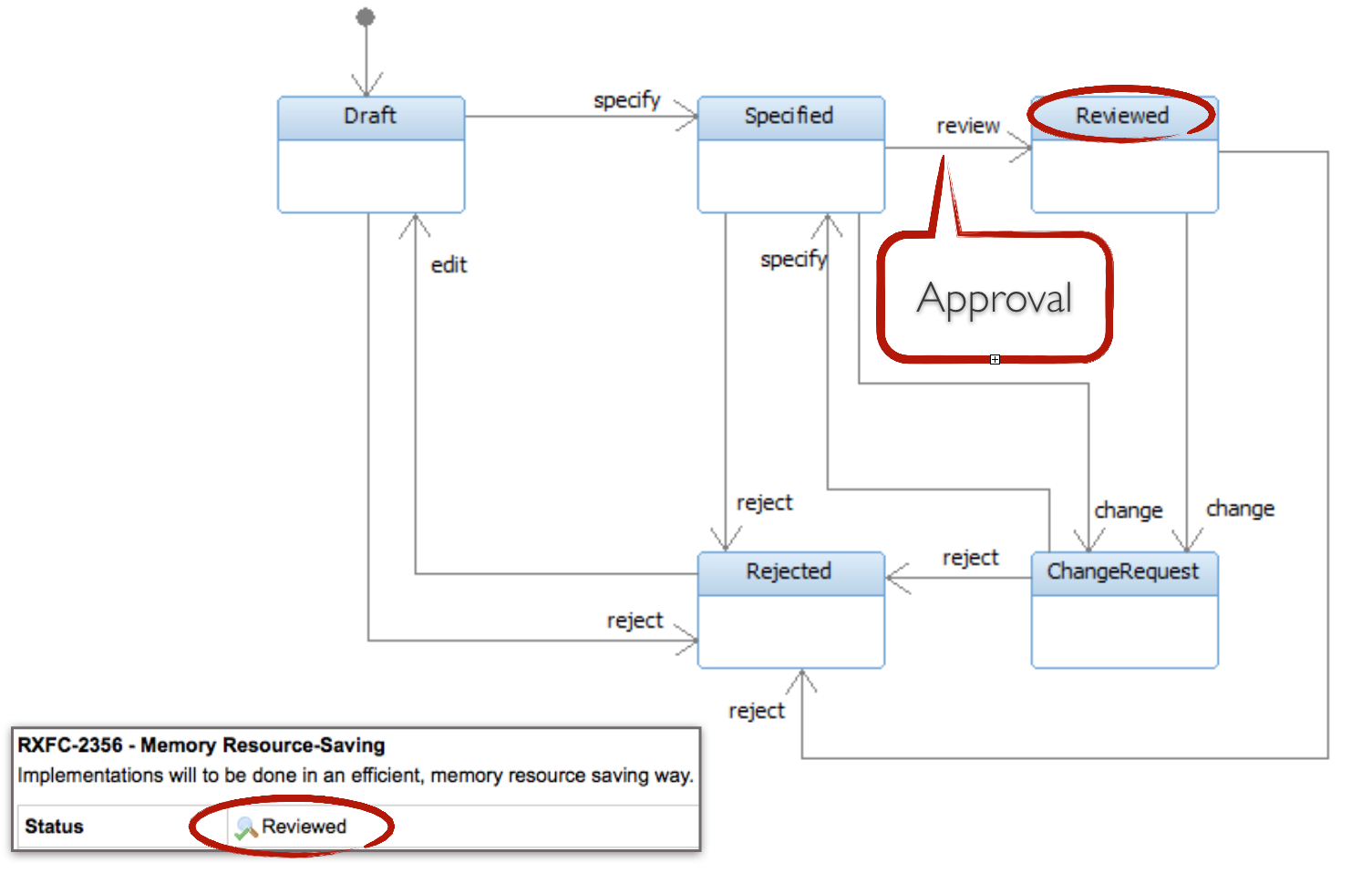
The review of the specification and elements of the software should be done in the requirements management tool. It is helpful to specify that for a “review attribute” (here: “status”) of work items (eg requirements) certain values ​​can only be set one after the other (see Figure 7).
Req Review.png

For the “Specify action”, Polarion has been configured to invite specified users to “approve” the work items. Here are two responsible persons. Only when these persons have both given their “Approval”, a status transition to “Reviewed” is possible. This fact is explained in the supplied validation plan and thus ensures the four-eyes principle in the review process.

Also reviews of models can be managed with this mechanism. In addition, the module specifications specify which SVN revision number (of a checked-in model unit) a review was carried out for. For new revisions, new reviews must be made accordingly.

At the code level, we have had good experience with the Crucible tool [9] and have created a PDF export plugin there that can be used to create code review reports suitable for certification.

Evaluation by a certification consultant

In order to assess the described status independently, we have obtained an evaluation of our procedure by an external certification consultant. This has brought many valuable experience. Among other things, we understood better what content and documents are required by the standard. For example, A security officer must be named in the company, who of course also lives up to his task, and there must be a corporate policy statement on the handling of software security in a “Safety Policy” document.

We have received a lot of positive feedback on the approach and process in development, as well as the approach to meeting the standard. For us in the consultation also the large difference in the standard, whether something is certified as software or as a tool (tool), clear. When you certify a tool, you only have to deal with about one-tenth of the IEC 61508 requirements than with a complete software certification. Nevertheless, we strive to classify our RXF-Cert as software in general. This must also be clearly documented and the user should be made aware of the field of application. If our RXF-Cert were e.g. Not only supporting the development of software, but also the systems engineering, would be added to several other requirements.

In conclusion, we still see the effort associated with certifying software as considerable – but it also shows for us that the requirements of the standard are absolutely meaningful. The development process becomes more sophisticated, the software quality can improve significantly and almost as a by-product the software becomes certifiable.

Passed certifications

The RXF-Cert has now been deployed in several functional safety software projects along with the customer applications. The areas Railway, Automotive and Space are represented. Some of these projects have already successfully passed the certification with the RXF-Cert package, others are currently or will only be in the project status in which the certification will be carried out in the near future. Thus, it has already been shown that the general procedure, meaningful use of tools and careful work steps described in this Techletter make it possible to plan and implement certification according to a standard based on IEC 61508.

Referenced Tools

[1] Willert RXF-Cert, Framework for modeling and code-generation of safety-critical Software:
https://www.willert.de/uml-rxf-cert

[2] IBM Rational Rhapsody, UML-Tool:
https://www.willert.de/rhapsody

[3] IBM Rational DOORS®, Requirements Management:
     https://www.willert.de/doors

[4] Siemens Polarion, Application Lifecycle Management:
https://www.willert.de/polarion/

[5] IBM Rational Rhapsody Gateway, Tool for the exchange and trace of Requirements:
https://www.willert.de/gateway

[6] Willert ReqXChanger, Tool for the exchange and trace of Requirements:
https://www.willert.de/reqxchanger

[7] gcov (from the gcc package), Open Source Tool for Code Coverage Analysis:
https://gcc.gnu.org/onlinedocs/gcc/Gcov.html

[8] IBM Rational TestConductor, Model-based Testing:
http://www.willert.de/testconductor/

[9] Atlassian Crucible, Code Review Tool:
https://de.atlassian.com/software/crucible


Happy Modeling with Rhapsody!

Walter van der Heiden (wvdheiden@willert.de)
Eike Römer (eroemer@willert.de)



RXF Best Practice

Introduction

Today I will write about our RXF. I hear a lot of users that have issues and worse, there are a lot of users that do not speak about issues…. We find out indirectly that there was trouble.Most issues can be traced back to errors in the install procedure, take really good care that this is done properly.Also a big source of problems is the installation of a new version of the RXF. OK, this is not straight forward, I admit.Although the RXF has its own Macros for sending events, if you want to use the same model in an OXF environment, you better use the IBM macros.Assign the Memory Properties in the Component. Make new components if you want to experiment with these values.

Hints and Tips for installation

  • We are there to help you. Really. I know you are afraid that your friend Google might be insulted if you ask someone else for help, but really: he is not.
  • Install should run without errors!
    Yes. If install gives you an error, it’s serious. There is something wrong. You should not ignore it.
    • Install can tell you after entering a path for a compiler, RTOS or Rhapsody that it cannot find some file. Pressing “Yes” will much later expose errors that you cannot map on the install anymore!
    • READ!!! OK, OK… we do not always write clearly but you should be able to understand what the install program wants from you.
    • if you cannot read: ASK!
    • Check if the install path is not too long! (c:\user\thatsme\Install directory for tools\Rpy_CPP_embOS_IAR5_CM3_EFM32\Rpy_CPP_embOS_IAR5_CM3_EFM32\Rpy_CPP_embOS_IAR5_CM3_EFM32 is too long. Install will either give errors or just not copy everything. Sometimes without error message….
    • The version numbers of Compiler, RTOS and Rhapsody are not given in the install for nothing. That means that the RXF is tested with these specific versions. Installing the RXF using older or newer versions can work, but not necessarily…
    • Do not install the RXF under a “magic” windows directory like “c:\Program Files” or any language/bitsize variant. As already said in one of the first entries: Installing Rhapsody.
  • If, in spite of being careful, you have problems: tell us! Windows is a complex environment, that in combination with differences in hardware and interfering IT departments can cause nightmares.
  • If you want to use the Willert Software Tools Embedded UML Studio: You HAVE to install and RXF! Just install, you don’t have to use it.

Hints and Tips for re-install

  • We are still there to help you. Never mind your girl-friends Siri and Alexa, we are better, much better!
  • Regularly check http://download.willert.de for updates.
  • Speak with us when you want to use a new version of Rhapsody, Compiler or RTOS (Or even CPU)
  • There are different use-cases for re-install.
    • You have a new version of Rhapsody but want to use the same RXF
      • You still have to re-install the RXF…. It may seem to work but it is not integrated in your Rhapsody…. No problem, it is still working in your old Rhapsody, that is… if you install the RXF to the same path as where it was.
    • You have the same Rhapsody but a new RXF
      • Is more difficult. Best is to install the new RXF and load the profile in the existing model. You have to check which stereotypes are used in your model and manually re-assign them to the new profile. A good test is to try and delete a profile, if there are stereotypes used, Rhapsody will refuse to delete it.
      • The properties for the static memory blocks are the same… but the MetaClass changes… you have to re-assign them to the correct properties.

I hope this makes your life with Rhapsody a bit easier!

Walter van der Heiden ( wvdheiden@willert.de )

Your license is safe in Switzerland. Very Safe…

Introduction

This week I’m in Switzerland. helping a customer to install and use Rhapsody and a lot of other tools. Switzerland is cool, very nice to travel to because of the beautiful landscape. Not nice to travel to because everything is soooo expensive… For the price of a  normal meal I can feed my entire family in Germany… This time I was lucky, finding a very nice and quiet hotel where the food was delicious and not even that expensive (Well not for Switzerland…) I was also lucky with picking up my rental car: a free upgrade… OK, not a Merc, but the BMW 420D X-Drive was a nice car. And the snow on the last day was a piece of cake with the 4-wheel drive and the winter tires.

Back to work

As I have written before, it is not easy to install all tools in a way that everything works. Careful planning is required here.

Willert RXF License

The RXF does not have a license. There are 2 types of customers: One that is willing to pay and one that will never pay for software. License mechanisms are only there to annoy the first type: People that have paid for software and are legally entitled to use it.
The second type tries to hack it and if that is not possible: they will use other software.
We at Willert have rather that people steal our software then that they buy it from our competitors.

IBM Rhapsody license

IBM uses the so-called Flexible License Manager (Flex-LM), in spite of the name it is a very inflexible piece of software. Many things can go wrong there. We literally spend hours to get the stuff running sometimes.

Steady or Floating?

There are many different license types for Rhapsody depending on how you use the software and what version you use.

  • AU – Authorized User
  • FL – Floating User

The difference between these 2 is that an AU License is for a named person. This has to be the same person, always! (You can, of course, move the license internally but not on an hourly basis)
An FL can be used by multiple persons that not even have to be on the same location just not on the same time. Theoretically, if you have sites all over the world, you can have 3 people working a full day with same license. IBM allows that, Telelogic had a special (more expensive) license for that.
NOTE: IBM requires you to have a list available with the licenses you use and the names of the actual user! They are entitled to check that. (This is one of the points in the license agreement that you have not read)

Server, Locally or Dongle?

Flex-LM works with a license file. There are parts built into the software that uses it to check the file and determine if you are allowed to start it.

  • Server, you have a server that is reachable for everyone in the company (Yes that can be an international server)
  • Locally Server, you have the Flex-LM server on your local machine
  • Locally license file, there is no Flex-LM server, Rhapsody will read and decode the license file itself. The license file uses your network cards MAC address as a “key”.
  • Locally Dongle, you have a license file that uses the Dongle “ID” as a “key”

For the Server (local or remote) you need to install the Flex-LM key Manager

Have I already told you that I hate Windows?

I do. Really. It is such a @#$%^&*( OS. The fact that you must distinguish between 32-Bit and 64-Bit is already a pain not to mention everything else.
So for the dongle driver you need to check if you have 32- or 64-Bit. Also it seems to be a bit of a problem when you have the latest Windows 10 version. (although it seems to be Windows Type, (Home, Pro, ultimate, etc) dependant.
You can download your driver here.

OK. I did all that. It doesn’t work. Now what?

First: Don’t get mad or sad, this is not abnormal… Here are some pointers where you can start to get stuff running:

  • As always: You can ask us. We help you.
  • You can ask google. You’ll be surprised what google knows when you type in your exact error message.
  • READ the error message. Flex-LM mostly says exactly what the problem is.
  • find your lmtools.exe program, it helps you finding what is wronglmtoolsMain
  • There is an environment variable TELELOGIC_LICENSE_FILE that points to license files or paths where license files are (The latter only finds “license.lic” files). Unfortunately this is not the only source for locations, there is also:
  • A Registry Entry: HKEY_CURRENT_USER\Software\FLEXlm License Manager also has a Field “TELELOGIC_LICENSE_FILE” that contains the path information. If you want to delete incorrect entries you have to do it here as well… Flex-LM updates this entry when you add new paths to the Environment Variable but does not delete any when you change the Env Var again…
  • Check the number of your Dongle (Do this also physically on the Dongle itself) in the lmtools tab: “System Setting” and in the license file.
  • Any change in your system, OS update or Rhapsody update can influence the working of your license. beware of that. So if your license does not work anymore, try to check if something happens to the OS or other software (Check logs files)
  • Do you have a new network card? Most licenses work with your MAC address. Sometimes you can change the MAC address of your network card. But you can ask for a new license, IBM will give you one (Not every week of course…)

So. I hope this helps a little bit!

Happy modeling with Rhapsody!

Walter van der Heiden (wvdheiden@willert.de)
 

Computer problems

Somehow my Schiphol flights are jinxed. Last year my Zürich flight was cancelled twice, once with snow, the other one while the flight control center wasn’t working. But I was not thinking about that in the train to Schiphol. Today I fly to Bristol, that is… when KLM, Schiphol or whoever is letting me…

It is snowing very lightly so the plane arrived late, but that’s OK… Dropping off my suitcase was real quick today (thanks SkyPriority ) I could even pass the really long line for the passport check (What??? Yep… Brexit, remember…) But I always carry my real passport with me so I could use the electronic line. 5 minutes instead of 1,5 hours… Cool. I thought…

But at the gate, where I met Robert who was flying in from Detroit, we were waiting and waiting and waiting… After a while the PA system explained that they had computer problems and that boarding might take a while. Oh great.

But it was faster than feared and we were in the bus pretty fast. Wait the bus??? Yep.. Since Brexit the UK travels via gate D6 in the basement, you have to go by bus to the place where they park the, relatively small, airplanes (Embraer 175/190) After entering the bus and driving a bit we were waiting before an airplane. And waiting… and waiting… until the electronic Bus voice told us that the bus was leaving…

And after a small drive we were being dropped off at the terminal. When all passengers were back they told us that the plane we saw was really there but they couldn’t find the crew….

I’m typing this while waiting for a crew. Hoping we still go, it would be very inconvenient when the flight would be cancelled now.
After almost 3 Hours (The time after which KLM would have to start pay….) they finally managed to get a crew and get us in the air.. Hey! Flying is fun. Always.

C or C++

Always the question. I don’t want to answer it now, I just want to give some tips and tricks. In Rhapsody, a model (a.rpy file) has a language. if you open the file with a text editor you can see that on the first line, it says “C” (or “C++” or “Java”) Now, all units, which are files basically, have this language indicator in them. There is also a “*”, that indicates a “don’t-care” what the language is. That is very useful for profiles that are more or less language independent (e.g. a “Styles” profile that contains stuff to influence the GUI )

So it is possible to switch parts of your model to another language, just right click on the unit, select “Edit Unit” and then you can select the language. Now there are some side-effects. You can change the language of a component but it can only contain packages and classes/objects of the same language in its scope. So that is why not all browser elements show up. Also… there is a way to make elements show up in both, the “*” method. You have to edit the .sbs files by hand but it works.

I already tried that for you and…. it works…;-) You can create a “C” package, include that in the scope of a “C” Component, close the model, edit the package file by hand to be the other language, open the model and…. you can include it in the other component. Then edit the package file to be “*” (after closing the model…) and you will see that you can generate 2 different languages from the same package.

32Bit or 64Bit

I think that Rhapsody 8.3 has a real good 64Bit version. If the issues with the new file format and extensions (and some other issues) are solved, we start to test our RXF and other tools for the use with 64Bit. That will solve some problems! Also 64Bit is a lot faster when handling large AUTOSAR Models!

IFix2

– IBM just released iFix2 for Rhapsody 8.3.

That’s it for today, happy Modeling with Rhapsody

Walter van der Heiden (wvdheiden@willert.de)
« Older posts Newer posts »

© 2026 Rhapsody TechBlog

Theme by Anders NorenUp ↑