BLOG about IBM Rhapsody. Contains technical information as well as more private travel stories.

Tag: Humor (Page 2 of 3)

Moving Rhapsody

Kings Day

Today is Kings Day in the Netherlands. We celebrate that our King (“Willem Alexander” but we may call him “Willy:) has his birthday. That is quite a party over here, I can certainly recommend being in the Netherlands on that day (and the night before)

Koningsdag-Op-Vrijdag

Kings Day Party in the Netherlands

So everybody in the Netherlands has a day-off. Unfortunately I work in Germany… so I have to work. Therefore I have many other holidays that are unknown to the Dutch…

Willy en Familie.jpeg

Willy and family

Happy 51st Birthday, Willy!

How to move Rhapsody (or parts of it)

I’m sure it has happened to you and it did happen to me yesterday. I always install Rhapsody in “C:\Dev Tools” (Yes, with a space, we need to test that…)  but I mistyped (These characters get smaller every year….) and I typed: “C:\De Tools”.
The cowards way out is to de-install and then re-install.
I decided to try out if i could repair it…. As the Germans say: “Nur die Harten kommen in Garten” (Means something like: “Only the tough ones go to heaven”)

I just moved all files and then started thinking that I might have traces left in the registry. So i started…. not regedit. That is a bad tool, come on Microsoft… you can do better. If you dump a very bad idea known as “The Registry” on us, then give us something useful to work on it.
luckily there are better tools, I have the pro version of Registrar (there is a free version that works fine) where you can search and replace in the complete registry. And much more.

So I searched and replaced “c:\De tools” with “c:\DevTools” and it started to look better. Of course i had to repair the shortcuts and now I also “moved” the Rhapsody “Share” directory, Rhapsody was whining when I started it. I had to edit the Rhapsody.ini and the DiffMerge.ini files. Then it was OK. This did not really saved time but it was fun to do.

Splitting the Data Directory

What I forgot is that on our development systems we cannot use the convenient way of installing outside of the Windows “Program Files” directories and then “Install all files in one directory”. i did that but because we have to generate install and setup files from our development installation automatically we need to split the directories. So I had to move the “Data Directory”
If you already installed the Data separately it is easier, you only have to edit the Rhapsody.ini and the DiffMerge.ini (Even if you do not use the latter: edit it! If you ever want to use it it won’t work and you have no clue why!)

Moving the “Share” directory

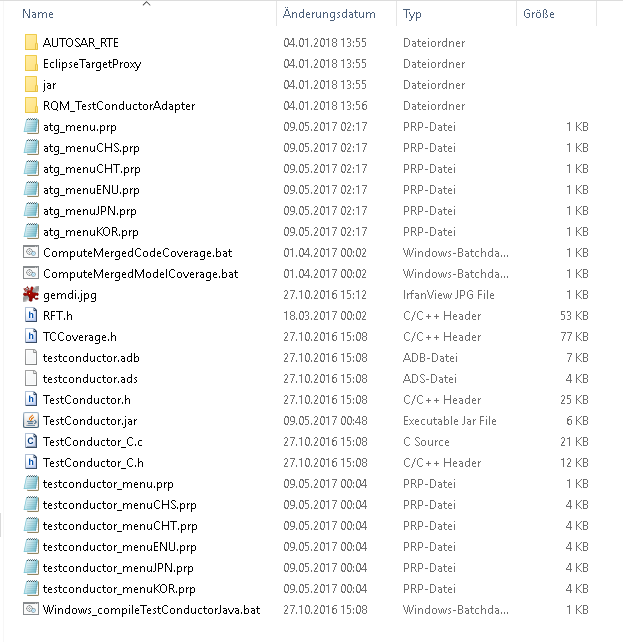
Well… if you have everything Rhapsody in one directory it’s actually a bit more than just the “Share” dir. You also have to move:

  • Share
  • Samples
  • Sodius
  • Gateway,
    • NOT completely… just the “examples” subdirectory!!
  • Test Conductor
    • A bit more complicated….Screen Shot 2018-04-27 at 10.09.28.png
      This are the files that you have to move to the “Data” part.
  • DiffMerge.ini
    • Search and Replace all instances of the “old” directory
  • Rhapsody.ini
    • Search and Replace some of the instances of the “old” directory, if you had the paths splitted it is easy, if you want to split the installation by hand note this:
      • NOT!!! The paths under the “WelcomeWizard and the WelcomeScreen_Gateway!!! These need to be pointing to the “Program” directory!
      • NOT!! The JavaClassPath and the other Paths under JVM! They also need to point to the “Program” directory!
      • There is also an Entry: “WORKSPACE_ROOT”, you can make that point to a directory where you want to start new Projects by Default!
      • Other directories: check if they point to something that exists…

And then you are OK! At best use a decent editor (Notepad++ or so) and do Search and replace with confirmation.

It does not seem to affect anything but you can repair the Registry so that it seems that Rhapsody was really installed the way you have moved it now.
Just take care that you do not make any mistakes…

Having everything installed in one place is not really making things easy when moving and splitting up Rhapsody. With a decent Registry Editor you can do it quite quick, in case of Test Conductor I think that de-install and re-install (All add-ins can be re-installed! Just call the installer and press “Modify”!) is a lot faster than setting everything by hand.

Note: I installed 32Bit and 64Bit next to each other on one system. Perfectly possible, just rename the Data and program directories (I used 8.3 for 64Bit and 8.3-32 for 32Bit)

Happy Kingsday and have fun modeling with Rhapsody!

Walter van der Heiden (wvdheiden@willert.nl)
Deploy back

Introduction

The title is a bit double today, i was deployed back from india to home and I will explain how you can deploy to your Rhapsody project and not lose the “roundtrip” feature!

Deploy back Rhapsody

The purpose is to deploy and leave all files exactly where Rhapsody has generated them so that you are still able to do roundtripping.
It is not completely straightforward but certainly doable.

Assuming that you have a directory c:\work. In that you have 2 directories, Model and Code. The structure is as follows:

  • c:\Work
    • \Model
      • \MyModel
        • \MyComponent
          • \MyConfiguration
            • “This is where Rhapsody generates your code”
    • \Code
      • “This is where the project file for the IDE is
      • “Generated Model”
      • “RXF”
  • RXF install
    • Tools
      • WSTDeployer
        • WSTDeployyer.properties

The trick is to map the “Generated Model” directory to the “MyConfiguration” Directory. Depending on the age of your deployer this is very easy, easy or just a bit of work….

In some deployers you can edit the name of the “Generated Model” directory in the dialog. If not than there is a deployer.ini file in the RXF installation directory, you can change the name of the “Generated Model” directory to the name of MyConfiguration.

Then move the project file (or the complete project if you have already content in it) to the MyComponent directory, start the Deployer Configuration (In Rhapsody under “Tools”) and select the just moved project file.

That’s it.

Deploy back the traveling modeler

Now that turned out to be a lot more difficult… The planning was to fly home on Sunday Evening. Or technically on monday morning, the flight from Delhi to Paris would leave at 00:15 Delhi Time, 19:45 CET ) I had a late flight (19:30-21:50)  from Hyderabad to Delhi and so less than 1,5 hours for my stop-over. From the trip to India I had learned that this was not nearly enough.
At first I thought, well lets just see what happens but since I did not book the flight as a complete flight, missing the plane from Delhi (to Paris) would not be an option.
So I checked the goindigo.in website and I found out I had been clever enough to book a flight with rebook and cancel options. Yeah….
So I rescheduled that flight to be early enough (16:00-18:25) That would be more than enough.
So I left the hotel exactly at 12:00 (CET: 7:30 Sunday )packed and paid. On my way home! I took a Uber to the airport, that was almost an hour drive ( and almost €8.- )

There I tried to figure out where I had to be. That is not too easy, the airport did not make announcements and I was pretty early so my flight did not yet show up on the monitors. But I could check in my luggage (I had booked the Fast Forward Option, a good idea in India…) quite fast. I did not have to stand in line.
So I was there hours too early but hee… better than 1 minute too late…. Spend some time shopping for home, drinking a Mango Lassi, eating something.
The plane left in time and flew on-time. My suitcase was in-time, the bus was easy to find and even waited for me so I was on the correct airport terminal early. checked in my suitcase within an hour of landing…. So it is possible.
But I seriously doubt if that is reproducible, So i did not mind being early. What I did mind is that just before boarding time, Air France started to make announcements about delays.

The plane was delayed. For more than an hour. Not cool, my connection in Paris was only 1:20…. not too long.
The plane left too late but promised to make up for lost time. It was an old Airbus 330. Also no USB chargers and very limited seating room for a continental flight..
On top of that the two ladies in front of me immediately reclined their seats the moment the “Fasten your Seatbelts” light went of. Sigh.

Next to me sat an old lady, very friendly but she only spoke French. i do speak a little French but not nearly as much as English or German… This was going to be a long flight.
Normally (I’m used to KLM) on long flights, you first get a drink, then dinner, with drinks and another drink or coffee after dinner. Then the lights go out and you can sleep (if you like) Air France pushed out drinks together with the food as fast as possible.
The ladies in front of me continued “sleeping” and did not eat. And refused to put her chair back. So I had about 30cm for my food. Thanks!
I managed to eat and drink that without accidents and noticed that there was not going to be anything more to drink or eat.
The ladies in front of me thought that this was the right time to change their minds and to order food and drinks. Thanks!
Chairs were kept in the sleep position, of course.
I got my earplugs and my face-mask and prepared to sleep. At take-off the family in the middle row, 2 rows before me already had trouble with their 3 kids but as soon as the lights went out the kids decided that it was time to start waking up the other passengers. Thanks!
The seats in the old A330 were clearly out-dated. So with a back that hurt, no sleep what so ever I ate my breakfast. The pilot had broken his promise and did not make up for the lost time so I would arrive an hour late in CDG, not really my favorite airport..
Flight attendants could not give much information, just that we landed on terminal 2F and that I had to go to 2E. Sounds close, but I know CDG, it is not close…
I gathered my luggage before the landing so I could run out of the plane fast, I even ignored the ladies in front of me and as soon as the plane was stopped I ran to the door. There I waited until it opened and I started my morning sport… I had less than 20 minutes but…. I made it! In spite of passport check and even a security check (WHY???) that cost me my water (grrr) I made it to the plane in time.
I crashed in my seat, luckily here there were some better tempered passengers, they had fun about me sweating and panting.
I didn’t care, I made it in time. I was pretty sure that my suit-case would not but I did not care. Air France would take care of that.

And then the pilot announced that we would have some delay because of the fog in the Netherlands… To make a long story short… that took 3,5 hours. Leaving the plane was not allowed (They would not let you in again…. many passengers with connecting flights left because they would not make their flights) so I stayed. There was water and a sandwich and finally we took off.
I arrived at Schiphol around . I thought: well there is a sunny side: My suitcase has made it now: not. CDG was not able to adapt. So I waited at the luggage belt for nothing. Then to KLM, report missing luggage, then the train home. I arrived home at 5:30pm, 32 hours after I left the hotel…


Happy modeling with Rhapsody!

Walter van der Heiden (wvdheiden@willert.de)


Hyderabad

Indian Traffic

My destination was Hyderabad this time. Never been there before but I have been to India before. I really like india, nice people, beautiful country. The country is big (certainly compared to the Netherlands…) and the amount of people is huge (1.3 Billion!)
The traffic is just amazing. In Europe we mostly drive on the right side of the road, in the UK they drive on the left side and in India they drive wherever there is place…

The first time i was in India I was picked up at the airport in Mumbai (Bombay) for a taxi-drive to Pune, a 160 kilometer drive that took almost 4 hours.
The first half hour I spent saying goodbye to my life. I was pretty sure I would not survive the drive. After a while, however, you figure out the (actually very simple) rules of driving in India.

  • What’s behind you is not important. It’s their problem, not yours.
  • Honk at least once a minute. (Otherwise your car will explode, I think)
  • use every free space on the road.
  • use all available room next to a road as well.
  • You have priority if you are there first.
  • don’t be aggressive or mad, the others know what they are doing.

That’s about it. The last one is important. Most drivers know pretty well what they are doing. “But India has the highest mortality rate in traffic” i hear you say. Yes true. But that happens only outside of the city. In the city you just cannot drive fast enough to die in an accident.
In the same way you can cross the very busy streets. Have confidence in the others, they will see you and decide which side they will pass you. So just cross the street and don’t hesitate.

Indian Food

The main reason I really like to go to india is the food. Indian food is really awesome. Spicy and very different from our european food. I found out that Hyderabad is famous for its Biryani and that they eat spicier than in the rest of India.
I don’t mind, i’m used to eating quite spicy.
In India they also eat in a special way: with the hand. Only the right hand, the other hand is used for “other purposes” (Do the math…) That is a bit difficult being a lefty but I managed. Yes I ate with my hands as well. When in Rome, do as the Romans.

Deployer

I learned that the system of “Generate Code, Generate RXF files, Deploy, switch to IDE, compile” is still difficult for people to understand.

if you follow the IBM way of creating an adapter for Rhapsody, you generate code in Rhapsody, that will also generate a makefile and you build from Rhapsody. As already said, we decided to do this differently because:

  • command-line length in Windows. Large Applications cannot be built like this
  • too many settings and extra files you need for embedded targets

So we use a different approach.

  • Generate
    Still generates Code from the Rhapsody model
  • Build
    Does not really build but generates the RXF include files that provide the static settings for e.g. the Memory Blocks etc.
  • Deploy
    Depending on the version of the RXF, we have called deploy in the “run” phase but now we call that mostly in the “Build” phase.
    It takes your Rhapsody generated sources (And the RXF includes _and_ the complete RXF and inserts them in a prepared IDE project.
  • Switch to your IDE
    Windows TAB, your IDE will probably show you that files have changed
  • Compile
    Use your IDE to compile. And Debug.

What you lose in this way is the roundtripping, unless… you select the Rhapsody Generated Source Directory as Home for your IDE Project.

Common misunderstandings/problems:

  • using Tools, <RXF> Deployer Configuration only configures the deployer. It does NOT deploy!
  • You have to prepare your IDE project. We deliver the “Getting Started” project (And a backup) that works. Your own project must include some things like “RXF” and “Generated Source” Folders. Check your Documentation.
  • If you have made changes to your IDE project: SAVE!!!! Deploy will use the IDE settings on the disk and will also overwrite your changes…
  • Clean up your old Rhapsody sources in Rhapsody (Code, Clear Redundant Source Files) to prevent them from being deployed.

I hope this helps you in understanding the RXF!

Back to India


OK, that’s it, have fun with Rhapsody and the RXF!

Walter van der Heiden (wvdheiden@willert.de)

Incredible India

Recently I visited India for a 10 days. In Hyderabad to be precise. So after arriving at home Friday night after a week of training in Bückeburg I had to unpack and re-pack my bags. Saturday morning early my KLM plane for Delhi would leave from Schiphol.
It was an old 747, I haven’t flown a 747 since a long time, i didn’t even know that they were still in use. But I saw a couple of them so KLM is still using them, On the inside you could clearly see that the 747 is a bit old. No USB chargers, I tried to operate the miniature inflight entertainment screen (That was not much larger than my iPhone) and just before i started to get annoyed because it wouldn’t accept my inputs I realized it wasn’t a touch-screen… The rest was also outdated but…. still OK. The plane left a bit before 13:00u (1pm) and would arrive 7,5 hours later in New Delhi. Too early to sleep, but I had a connecting flight with a long stop-over so I thought I could find some other time to sleep a bit.

I had an Economy plus seat, a bit more room and… luck because the middle seat stayed empty. You could choose between Indian food and Western food. Easy choice… for me. Nice detail: all the food on the flight was vegetarian! And very, very good… I tried a nap after the lunch but i was not tired enough. So after almost 8 hours we landed on Indira Gandhi International Airport in New Delhi.

I got out pretty early, just after the Business Class and I was in line for the customs early. Unfortunately, KLM had forgotten to supply us with the visa papers… so I had to go back and fill it in and then line up behind the rest of the plane… Took quite a while but in the end they let me in. I’ve been to India before, last time it took me 2 days at the embassy in The Hague to get a Visum, the online Visum is a huge improvement.

After that searching for my suitcase (I had a big case with Training Material) and after I finally found that I went to an exchange shop to change some euro’s into Rupees. A bit of cash money is always convenient. I brought some (Well.. actually a lot…) from my last visit but India decided to use new banknotes and make the old ones invalid. Thanks India!


I had 4,5 hours for my stopover so I was very relaxed, going to the last check at the customs, bought myself a SIM-card so I could use Mobile Data in India (My mobile plan covers much but it does not cover India…) and then I started searching for the place where I could check-in my luggage for the flight with IndiGo Airway… That turned out to be in the domestic terminal. And that was on an airport with the same name but that name was also used for an older airport on the other side of Delhi… So I had to cross the airport to the shuttle terminal and drag my stuff into an old bus together with 50 other people with too many suitcases and other luggage. I managed to get a ticket and waited for the bus in the most air polluted place I’ve ever been. Half an hour equaled 10 packs of cigarettes. Yikes.

Slowly however… time ran out. The bus came and had to drive almost an hour… after arriving only 40 minutes would be left. If you have ever been to an airport in India you know that is not nearly enough… Luckily a nice Indian gentleman next to me in the bus understood my problem and helped me out. He arranged 2 guys on the airport that took my suitcases and led me through some “secret” airport elevators and hallways. They spoke with a lady behind the counter and I was the first one in a long, long line… Costed me EUR 10,- Not “compliant” I’m afraid but saved a lot more… With 1 minute left I made it to the bus to the plane.

At the plane it was time for a surprise, it was an Airbus A320neo. Almost brand new (although I read today that some of them are grounded due to Pratt&Whitney engine trouble) It took off precisely in time at 5am and flew to Hyderabad in just over 2 hours. The flight was more or less OK but I learned one more thing: Indian pilots fly just as Indian taxi drivers drive….

After 2 hours we were in Hyderabad. We tried landing twice and twice it made a fly-over. (According to the pilot “a completely safe maneuver “) Yes please….
After circling for an hour the plane accelerated and the pilot told us we would fly to Chennai. Cool, I did not expect to ever go there and before you know… But information was scarce and I did not really know what to expect. Directly after the landing and parking all other passengers stood up and started moving to the door and shouting through each other. Some guy from IndiGo got in the plane and mastered the chaos. He let he passengers out that had to be in Chennai anyway. We waited for 2 hours in the burning sun. We got a lunch box with chips and (Yeah!!) water. After 2 hours we took off again and an hour later we landed in Hyderabad.

After a non successful search for the hotel shuttle I gave up and took a taxi to the hotel where I arrived 24 hours after leaving home.

OK… this is a Rhapsody BLOG….

I have some news on Rhapsody as well. Some of it was written by Eike Römer on our Download Portal. I copied it here.

  • The 8.3 Version is now OK to use from our point of view with restrictions:
    • only with iFix 2 (all available on our Download Portal)
    • Beware if you use it for existing projects! Either your Version history is lost (or retained with much effort) or you have to meticulously save in the old format.
    • for new projects it is OK
  • The 64Bit version is also free to use! read here how you can update the frameworks.


Rhapsody 8.3 with the RXF Frameworks

Our existing Realtime eXecution Frameworks (RXF) available on the Willert Download Portal (https://download.willert.de/) can be used together with Rhapsody 8.3 iFix 2. However, RXF versions that have been tested and released with an earlier Rhapsody version than 8.1.5 need the applied JDK workaround documented on: https://download.willert.de/rhapsody-8-1-5-support/

RXF-Cert is Rhapsody Version Specific

RXF-Cert frameworks (prepared for safety critical software development certification) are an exception, as they have been documented, tested and prepared for certification for one specific Rhapsody version. Please contact us and discuss the Rhapsody upgrade path for your specific certification environment if you want to migrate to Rhapsody 8.3 iFix 2.

Rhapsody 32- vs. 64-Bit

Until today we highly recommended only installing Rhapsody in the 32-bit edition. The main reason was a limitation in features like roundtripping, reverse engineering etc.

With Rhapsody 8.3 iFix 2 this has changed. You may now also work with the 64-bit edition of Rhapsody. However the Willert Installer (Setup.exe as part of an RXF release) needed to learn how to handle Rhapsody 64-bit installations. All RXF releases after 2018-03-13 can handle Rhapsody 64-bit installations out-of-the-box. For older RXF releases you need to replace the old Setup.exe with the one you can download here:

https://download.willert.de/downloads/setup_2018-03_64bit/


That was it! happy modeling with Rhapsody

Walter van der Heiden (wvdheiden@willert.de)


RXF Best Practice

Introduction

Today I will write about our RXF. I hear a lot of users that have issues and worse, there are a lot of users that do not speak about issues…. We find out indirectly that there was trouble.Most issues can be traced back to errors in the install procedure, take really good care that this is done properly.Also a big source of problems is the installation of a new version of the RXF. OK, this is not straight forward, I admit.Although the RXF has its own Macros for sending events, if you want to use the same model in an OXF environment, you better use the IBM macros.Assign the Memory Properties in the Component. Make new components if you want to experiment with these values.

Hints and Tips for installation

  • We are there to help you. Really. I know you are afraid that your friend Google might be insulted if you ask someone else for help, but really: he is not.
  • Install should run without errors!
    Yes. If install gives you an error, it’s serious. There is something wrong. You should not ignore it.
    • Install can tell you after entering a path for a compiler, RTOS or Rhapsody that it cannot find some file. Pressing “Yes” will much later expose errors that you cannot map on the install anymore!
    • READ!!! OK, OK… we do not always write clearly but you should be able to understand what the install program wants from you.
    • if you cannot read: ASK!
    • Check if the install path is not too long! (c:\user\thatsme\Install directory for tools\Rpy_CPP_embOS_IAR5_CM3_EFM32\Rpy_CPP_embOS_IAR5_CM3_EFM32\Rpy_CPP_embOS_IAR5_CM3_EFM32 is too long. Install will either give errors or just not copy everything. Sometimes without error message….
    • The version numbers of Compiler, RTOS and Rhapsody are not given in the install for nothing. That means that the RXF is tested with these specific versions. Installing the RXF using older or newer versions can work, but not necessarily…
    • Do not install the RXF under a “magic” windows directory like “c:\Program Files” or any language/bitsize variant. As already said in one of the first entries: Installing Rhapsody.
  • If, in spite of being careful, you have problems: tell us! Windows is a complex environment, that in combination with differences in hardware and interfering IT departments can cause nightmares.
  • If you want to use the Willert Software Tools Embedded UML Studio: You HAVE to install and RXF! Just install, you don’t have to use it.

Hints and Tips for re-install

  • We are still there to help you. Never mind your girl-friends Siri and Alexa, we are better, much better!
  • Regularly check http://download.willert.de for updates.
  • Speak with us when you want to use a new version of Rhapsody, Compiler or RTOS (Or even CPU)
  • There are different use-cases for re-install.
    • You have a new version of Rhapsody but want to use the same RXF
      • You still have to re-install the RXF…. It may seem to work but it is not integrated in your Rhapsody…. No problem, it is still working in your old Rhapsody, that is… if you install the RXF to the same path as where it was.
    • You have the same Rhapsody but a new RXF
      • Is more difficult. Best is to install the new RXF and load the profile in the existing model. You have to check which stereotypes are used in your model and manually re-assign them to the new profile. A good test is to try and delete a profile, if there are stereotypes used, Rhapsody will refuse to delete it.
      • The properties for the static memory blocks are the same… but the MetaClass changes… you have to re-assign them to the correct properties.

I hope this makes your life with Rhapsody a bit easier!

Walter van der Heiden ( wvdheiden@willert.de )

Your license is safe in Switzerland. Very Safe…

Introduction

This week I’m in Switzerland. helping a customer to install and use Rhapsody and a lot of other tools. Switzerland is cool, very nice to travel to because of the beautiful landscape. Not nice to travel to because everything is soooo expensive… For the price of a  normal meal I can feed my entire family in Germany… This time I was lucky, finding a very nice and quiet hotel where the food was delicious and not even that expensive (Well not for Switzerland…) I was also lucky with picking up my rental car: a free upgrade… OK, not a Merc, but the BMW 420D X-Drive was a nice car. And the snow on the last day was a piece of cake with the 4-wheel drive and the winter tires.

Back to work

As I have written before, it is not easy to install all tools in a way that everything works. Careful planning is required here.

Willert RXF License

The RXF does not have a license. There are 2 types of customers: One that is willing to pay and one that will never pay for software. License mechanisms are only there to annoy the first type: People that have paid for software and are legally entitled to use it.
The second type tries to hack it and if that is not possible: they will use other software.
We at Willert have rather that people steal our software then that they buy it from our competitors.

IBM Rhapsody license

IBM uses the so-called Flexible License Manager (Flex-LM), in spite of the name it is a very inflexible piece of software. Many things can go wrong there. We literally spend hours to get the stuff running sometimes.

Steady or Floating?

There are many different license types for Rhapsody depending on how you use the software and what version you use.

  • AU – Authorized User
  • FL – Floating User

The difference between these 2 is that an AU License is for a named person. This has to be the same person, always! (You can, of course, move the license internally but not on an hourly basis)
An FL can be used by multiple persons that not even have to be on the same location just not on the same time. Theoretically, if you have sites all over the world, you can have 3 people working a full day with same license. IBM allows that, Telelogic had a special (more expensive) license for that.
NOTE: IBM requires you to have a list available with the licenses you use and the names of the actual user! They are entitled to check that. (This is one of the points in the license agreement that you have not read)

Server, Locally or Dongle?

Flex-LM works with a license file. There are parts built into the software that uses it to check the file and determine if you are allowed to start it.

  • Server, you have a server that is reachable for everyone in the company (Yes that can be an international server)
  • Locally Server, you have the Flex-LM server on your local machine
  • Locally license file, there is no Flex-LM server, Rhapsody will read and decode the license file itself. The license file uses your network cards MAC address as a “key”.
  • Locally Dongle, you have a license file that uses the Dongle “ID” as a “key”

For the Server (local or remote) you need to install the Flex-LM key Manager

Have I already told you that I hate Windows?

I do. Really. It is such a @#$%^&*( OS. The fact that you must distinguish between 32-Bit and 64-Bit is already a pain not to mention everything else.
So for the dongle driver you need to check if you have 32- or 64-Bit. Also it seems to be a bit of a problem when you have the latest Windows 10 version. (although it seems to be Windows Type, (Home, Pro, ultimate, etc) dependant.
You can download your driver here.

OK. I did all that. It doesn’t work. Now what?

First: Don’t get mad or sad, this is not abnormal… Here are some pointers where you can start to get stuff running:

  • As always: You can ask us. We help you.
  • You can ask google. You’ll be surprised what google knows when you type in your exact error message.
  • READ the error message. Flex-LM mostly says exactly what the problem is.
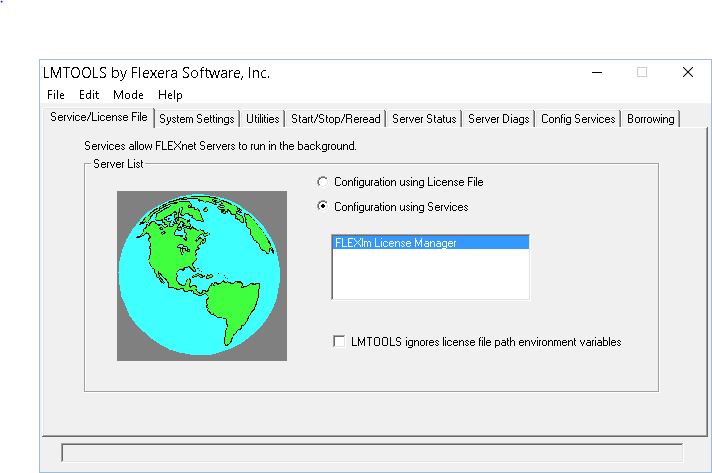
  • find your lmtools.exe program, it helps you finding what is wronglmtoolsMain
  • There is an environment variable TELELOGIC_LICENSE_FILE that points to license files or paths where license files are (The latter only finds “license.lic” files). Unfortunately this is not the only source for locations, there is also:
  • A Registry Entry: HKEY_CURRENT_USER\Software\FLEXlm License Manager also has a Field “TELELOGIC_LICENSE_FILE” that contains the path information. If you want to delete incorrect entries you have to do it here as well… Flex-LM updates this entry when you add new paths to the Environment Variable but does not delete any when you change the Env Var again…
  • Check the number of your Dongle (Do this also physically on the Dongle itself) in the lmtools tab: “System Setting” and in the license file.
  • Any change in your system, OS update or Rhapsody update can influence the working of your license. beware of that. So if your license does not work anymore, try to check if something happens to the OS or other software (Check logs files)
  • Do you have a new network card? Most licenses work with your MAC address. Sometimes you can change the MAC address of your network card. But you can ask for a new license, IBM will give you one (Not every week of course…)

So. I hope this helps a little bit!

Happy modeling with Rhapsody!

Walter van der Heiden (wvdheiden@willert.de)


Computer problems

Somehow my Schiphol flights are jinxed. Last year my Zürich flight was cancelled twice, once with snow, the other one while the flight control center wasn’t working. But I was not thinking about that in the train to Schiphol. Today I fly to Bristol, that is… when KLM, Schiphol or whoever is letting me…

It is snowing very lightly so the plane arrived late, but that’s OK… Dropping off my suitcase was real quick today (thanks SkyPriority ) I could even pass the really long line for the passport check (What??? Yep… Brexit, remember…) But I always carry my real passport with me so I could use the electronic line. 5 minutes instead of 1,5 hours… Cool. I thought…

But at the gate, where I met Robert who was flying in from Detroit, we were waiting and waiting and waiting… After a while the PA system explained that they had computer problems and that boarding might take a while. Oh great.

But it was faster than feared and we were in the bus pretty fast. Wait the bus??? Yep.. Since Brexit the UK travels via gate D6 in the basement, you have to go by bus to the place where they park the, relatively small, airplanes (Embraer 175/190) After entering the bus and driving a bit we were waiting before an airplane. And waiting… and waiting… until the electronic Bus voice told us that the bus was leaving…

And after a small drive we were being dropped off at the terminal. When all passengers were back they told us that the plane we saw was really there but they couldn’t find the crew….

I’m typing this while waiting for a crew. Hoping we still go, it would be very inconvenient when the flight would be cancelled now.
After almost 3 Hours (The time after which KLM would have to start pay….) they finally managed to get a crew and get us in the air.. Hey! Flying is fun. Always.

C or C++

Always the question. I don’t want to answer it now, I just want to give some tips and tricks. In Rhapsody, a model (a.rpy file) has a language. if you open the file with a text editor you can see that on the first line, it says “C” (or “C++” or “Java”) Now, all units, which are files basically, have this language indicator in them. There is also a “*”, that indicates a “don’t-care” what the language is. That is very useful for profiles that are more or less language independent (e.g. a “Styles” profile that contains stuff to influence the GUI )

So it is possible to switch parts of your model to another language, just right click on the unit, select “Edit Unit” and then you can select the language. Now there are some side-effects. You can change the language of a component but it can only contain packages and classes/objects of the same language in its scope. So that is why not all browser elements show up. Also… there is a way to make elements show up in both, the “*” method. You have to edit the .sbs files by hand but it works.

I already tried that for you and…. it works…;-) You can create a “C” package, include that in the scope of a “C” Component, close the model, edit the package file by hand to be the other language, open the model and…. you can include it in the other component. Then edit the package file to be “*” (after closing the model…) and you will see that you can generate 2 different languages from the same package.

32Bit or 64Bit

I think that Rhapsody 8.3 has a real good 64Bit version. If the issues with the new file format and extensions (and some other issues) are solved, we start to test our RXF and other tools for the use with 64Bit. That will solve some problems! Also 64Bit is a lot faster when handling large AUTOSAR Models!

IFix2

– IBM just released iFix2 for Rhapsody 8.3.

That’s it for today, happy Modeling with Rhapsody

Walter van der Heiden (wvdheiden@willert.de)

Back to Work. Question of the Week: Windows or Linux

So. The nice and quite days after Christmas and New year are over. Back to work means: back to travel. A small one to start, yesterday evening I drove to Bückeburg, this week I’m in the office the complete week. Then we slowly increase the travel distance (Nantes, Bristol, Boston,…)

Introduction

Lately people ask me if they can use Rhapsody “native” under Linux.
Short answer: Please NO!
Long answer: No it is not really usable under Linux. It is simply the Windows version that runs under Linux because the graphic engine happens to work under Linux as well. A lot of features will not work (See list below)
This only makes sense if you have a compiler that runs under Linux (or your target environment of your Rhapsody Development is Linux)
If you really insist on doing your daily work under Linux then install VmWare and install Windows in a Virtual Machine. I have the same on my Mac.
Question: But VmWare is not free!
Answer: Grrr, i should have known…  Then take Virtual Box. or try Wine (I don’t know if it works but I expect it to)
At least you can create a shared drive where Rhapsody can generate (or in case of RXF, the deployer will deploy) the source code to.
Or you setup an rsync between the Windows VM and Linux.

Trust me, this is the best way to do it. The Linux version was never really developed as a native Linux application and therefore does not use any of the Linux advantages.
Walter Quote #1: It is always surprising to see how much money people are willing to invest to be able to use Linux for free.
Happy Modeling with Rhapsody (under Windows)
Walter van der Heiden (wvdheiden@willert.de)

Features not available in Linux version of Rational Rhapsody 8 releases

Abstract

Features listed in this document are not available in the Linux version of the IBM Rational Rhapsody version 8 releases.

Content

  • Android application development (feature completely removed in release 8.1.4 of Rhapsody)
  • Automatic Test Generation (ATG) add-on
  • Breakpoint synchronization is not supported in the Wind River VxWorks 6.9 and Wind River Workbench 3.3 integrations
  • C# application development (feature completely removed in release 8.1.4 of Rhapsody)
  • CORBA development
  • Configuration management SCC mode
  • Customizable code generation
  • Eclipse platform integration
  • Functional Mock-up Interface (FMI)
  • Generate support request
  • Helpers can be used, subject to the following limitations:
    • Helpers that are set up to be triggered by actions such as code generation will not work with RhapsodyCL on Linux.
    • When using Java helpers, the JRE used must be the one installed with Rational Rhapsody or a different IBM Java JRE. Also, the JRE cannot be within a ClearCase VOB.
    • Arguments cannot be passed to Java plugins.
  • Import from Rational Rose (feature completely removed in release 8.1.4 of Rhapsody)
  • Languages: Japanese, Korean, Simplified Chinese, Traditional Chinese
  • MathWorks Simulink integration limitations:
    • Managed Mode for Simulink
    • Plant Modeling (exporting a structured block to Simulink for simulation)
  • Microsoft VBA (feature completely removed in release 8.1.4 of Rhapsody)
  • Microsoft Visual Studio integration
  • NATO Architecture Framework (NAF) version of Unified Profile for DoDAF/MODAF (UPDM)
  • NI VeriStand (feature completely removed in release 8.2.1 of Rhapsody)
  • Oracle Java for plug-ins (JVM)
  • Parametric constraint evaluator
  • Rational Rhapsody apps cannot be developed in Linux with SWT libraries. (Note that you can develop Rational Rhapsody apps with Eclipse in Windows and use them for both Linux and Windows.)
  • Rational Rhapsody 64-bit application
  • Rational Team Concert integration
  • Rhapsody Model Manager (feature introduced in release 8.3 of Rhapsody)
  • Safety Critical Development in C
  • Siemens Teamcenter integration (feature completely removed in release 8.2.1 of Rhapsody)
  • SMXF (Simplified/reduced MicroC Framework for C)
  • Split diagrams during export
  • SXF (Simplified eXecution Framework for Safety Critical developers)
  • Target monitoring
  • TestConductor add-on limitations:
    • Cannot be used with Rhapsody in Ada
    • Does not work with RhapsodyCL. As an alternative, you can use the command line of rhapsody.exe with command line option -hiddenui.
    • Integration with Rational Quality Manager 4.0 not supported
    • AUTOSAR SWCs not supported
    • VxWorks 653 platform not supported
  • VxWorks 653 integration
  • Web-enabling a model (Webify)
  • Wizards that help create ProxyPorts
  • XMI Toolkit add-on for Rational Rhapsody is not compatible with RhapsodyCL

If it ain’t broke, don’t fix it….

Introduction

I’m not a fan of updates. A few years ago I always switched off my automatic updates. On a Mac that was possible and would hardly have other consequences.
Unfortunately, this is not the case anymore. Modern development methods like DevOps, Agile, Continuous Engineering and I_don’t_know_how_it_is_called are forcing you to keep your system up-to-date. Either Apps don’t work with the latest OS or an App requires a certain minimum version of the OS.
Many systems do not even allow you to wait with updates, even my beloved Mac starts whining and will update without asking.
Walter Quote #2: If it aint broke: Don’t fix it!

Rhapsody

The same applies to Rhapsody. Newer versions will have improvements, bug fixes and sometimes new options or features. Since 8.1.3, IBM will at least deliver so-called iFixes that enclose bug fixes for the most serious bugs. (Check our download portal or the IBM website to download the iFix for you Rhapsody version. You only need to install the highest number, it will contain all previous iFixes for that version.
Here is a list with all versions (and Build numbers) since 8.0.
8.2.1

9810341

5 june 2017

Rhapsody Version Build Number Release date
8.3.1

9835533

24 june 2018
8.3

9831308

4 dec 2017
8.2

9803403

1 dec 2016
8.1.5

9728113

25 april 2016
8.1.4

9641846

14 dec 2015
8.1.3

9499822

26 june 2015
8.1.2.1

9278208

20 feb 2015
8.1.2

8254044

5 dec 2014
8.1.1

8200000

5 sep 2014
8.1

8169320

2 jun 2014
8.0.6

7155987

28 feb 2014
8.0.5

7139044

5 dec 2013
8.0.4

6118532

3 sep 2013
8.0.3

6107223

14 jun 2013
8.0.2

5093211

21 mar 2013
8.0.1

5074847

27 nov 2012
8.0.0.1

5071232

8 nov 2012
8.0

5066837

21 sep 2012

De-install the old one?

You don’t have to. You can install multiple versions of Rhapsody in parallel. A few things to consider:

  • Install in the same way as the previous version (Same directory structure)
  • The last installed version is the default version that will start when you double-click a .rpy file.

Models

You don’t have to do anything to update your models. But…. As soon as you save a model it is updated and cannot be opened with older versions of Rhapsody anymore. (Not always, sometimes 2 consecutive versions use the same database version.)
You can, however, use “Save As” to save the model in an older version. You can do that 2 versions back. So not too much.
Here is a list with the Rhapsody Versions and how they can be “saved” back.

Rhapsody Version „Save As“
8.3 8.2.1, 8.2
8.2.1 8.2, 8.1.5
8.2 8.1.5, 8.1.3
8.1.5 8.1.3, 8.1.1
8.1.4 8.1.3, 8.1.1
8.1.3 8.1.1, 8.0.6
8.1.2 8.1.1, 8.0.6
8.1.1 8.0.6, 8.0.4
8.1.0 8.0.6, 8.0.4
8.0.6 8.0.4, 8.0.2
8.0.5 8.0.4, 8.0.2
8.0.4 8.0.2, 7.6.1
8.0.3 8.0.2, 7.6.1
8.0.2 7.6.1, 7.5.3
8.0.1 7.6.1, 7.5.3
8.0 7.6.1, 7.5.3
7.6.1 7.5.3, 7.4

Of course a new version of Rhapsody can have changes in Code Generation. Best is to install a new version, start the old version, generate code, start the new version, load the model, generate code (In a different directory!!) and compare the code. If it is the same, you’re good. If different, first compile, you might still be good. But if it doesn’t work, try to understand the consequences of the changed code.

You will have some “Settings” files in your browser that are named “CGCompatibilityPreX.Y”. These files include the changed properties.

RXF

You MUST re-install the RXF and then during install tell the RXF the right directory for the new version of Rhapsody. (It will usually detect it automatically)
You can load the older models if you do not install the RXF but it will not work.

Eclipse

If you use Eclipse you have to either re-install the Eclipse plugin (first de-install the old one and then re-install the new one!)
If you want to use 2 versions then you will have to install Eclipse twice (I have not found any other way to do it…) and install the Eclipse Plugins/Workflow for the newer Rhapsody version in the second Eclipse.

ReqXChanger

Easy to forget… If you use the ReqXChanger, you have chosen the rhapsody.jar that matches the Rhapsody Version you use to sync your requirements with.
You have to edit the configuration to allow for ReqXChanger to use the new version of Rhapsody!

Happy Upgrading (and modeling) with Rhapsody

Walter van der Heiden (wvdheiden@willert.de)

Time to Evaluate!

Getting nostalgic

In the days of Windows XP (Who’d ever thought I would say that I gladly wanted to go back to XP…) installations were easy. Your PC basically belonged to you and the OS would not interfere in anything you do.
How different is that now. Since Vista (may it burn in …..) we are plagued with an OS that tries to force its will upon us. And installing a complex environment like Rhapsody and a few add-ons becomes a nightmare.
We used to let people install everything during a one day training. Install took about 30 minutes and would work 99% of the time.
Now it takes hours and the success rate is 50% or so. Even with our own installer, install manual and physical presence of somebody that “knows what he is doing” it is just too difficult to get everything running reliably. Have I already mentioned that I hate Windows?

Brave new world…

At Willert we use Macs. Since 10 years, give or take, we have kicked out our Windows laptops and buy expensive Macs, just to prevent us from hiring multiple sysadmins to keep our stuff running.
Unfortunately, IBM, (a large Apple user itself ! ), does not deliver Rhapsody on a Mac. Yes there is an Eclipse plugin but that is just a “facade” plugin. It calls the Rhapsody DLL’s to do the real work. It won’t work on Linux or Mac OS. Duh…
So we use VmWare (we kicked out Parallels because they’ve become too greedy) to run Windows on our Macs. Works OK. So we are used to virtualize.
IBM has now taken this virtualization to a new level. You can have images that you can instantiate and distribute.
So after installing all tools and testing that they work correct, we can now let other people access it using Remote Desktop Connection. This will work from a Windows PC (It is built-in there) and from a Mac (download Microsoft Remote Desktop for free from the App-Store) And apparently even on a Linux Computer, you have to download a 3rd party tool there but it works.
Using RDC requires an internet connection but not an extremely fast one, it only transfers the screen using compression.

Provisioning an Image

Once an image is provisioned, you will receive data on how to access it:

  • IP address, mostly 169.x.y.z
  • Login name, mostly administrator
  • Password,8 character random generated

On a Windows PC

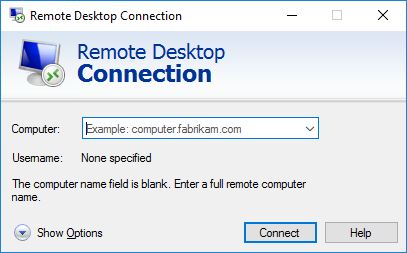
It is pretty easy on Windows, everything that you need is built-in. In the menu under “Windows accessories” you will find “Remote Desktop Connection”.

RDC1.JPG

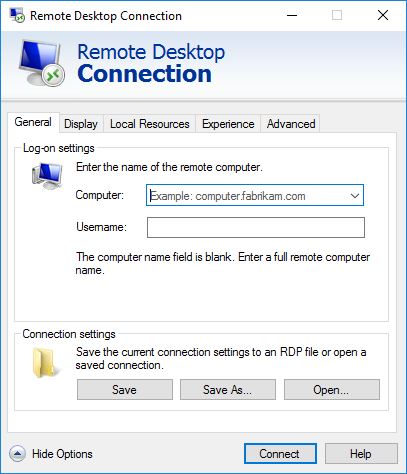
This is how that looks. First you click on “Show Options”.

RDC2

After “Computer” you type in the given IP address, 169.x.y.z:3333 (Important, the 3333 is a port number and needs to be there.)
After “Username” you type “administrator” (Or the username that was given to you.
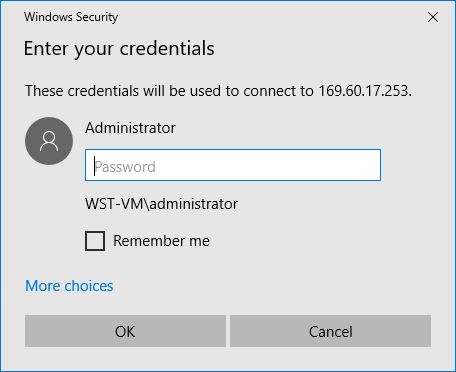
The password will be asked when you connect. As you see it is possible to store the login credentials on your PC. You might want to do that, it is easier to restart your image.
Click on Connect and RDC will now ask you for your password. Copy it from the data you have received.

rdc3

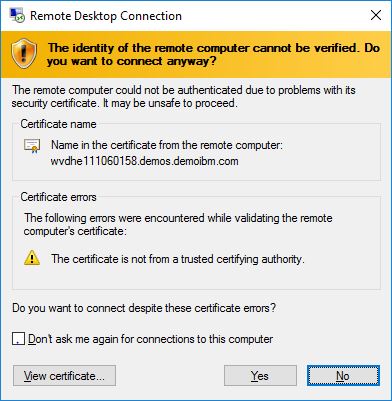
Then Windows gets suspicious about the certificate of the WebSite. It will display it. You have to tell Windows that it is OK, otherwise…. no go… so click on “View certificate”

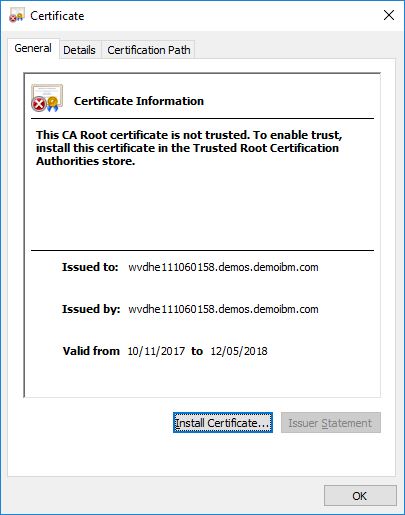
rdc4

Then click on “Install Certificate”

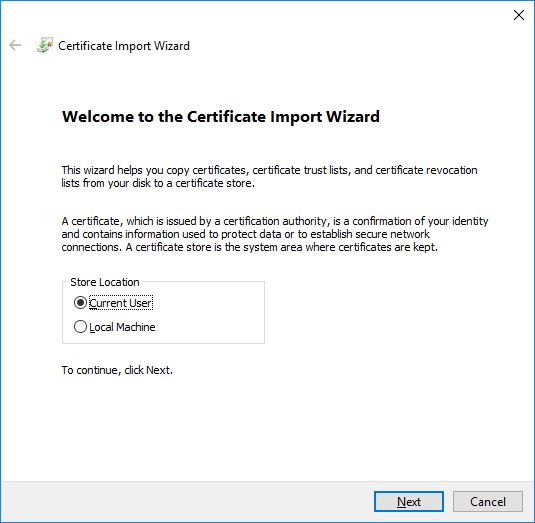
rdc5

This is OK, click “Next”

rdc6

Again click “Next”

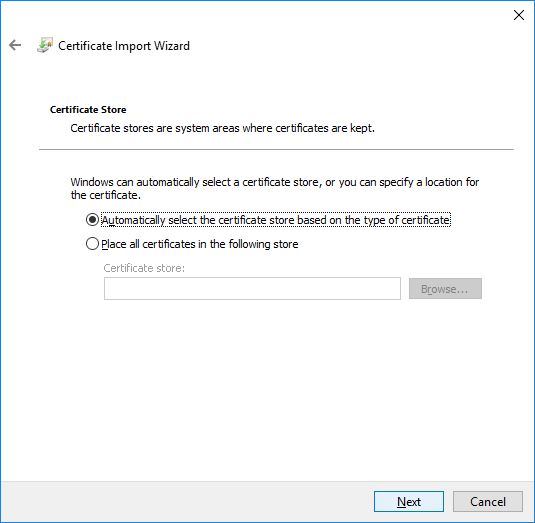
rdc7


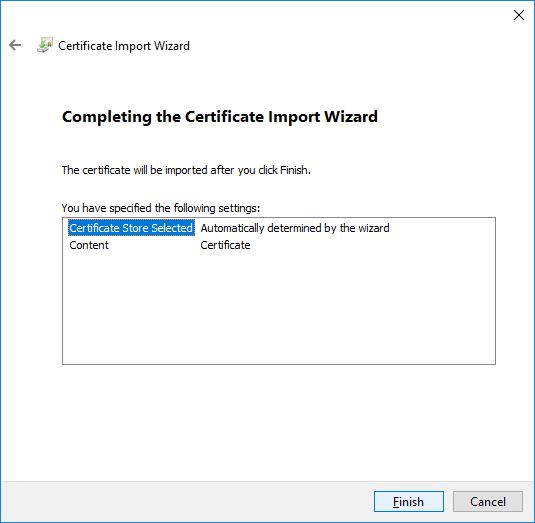
And now on “Finished”.

rdc8

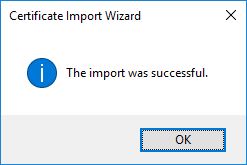
The Certificate is now installed, you only need to do this once.

rdc9

On a Mac

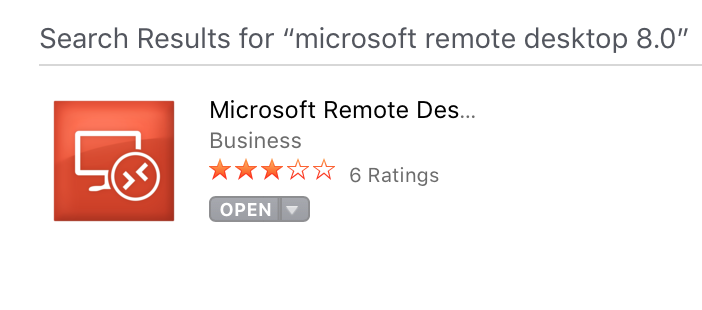
You first need to download and install the RDC App from the App store. App Store iconApp store RDC

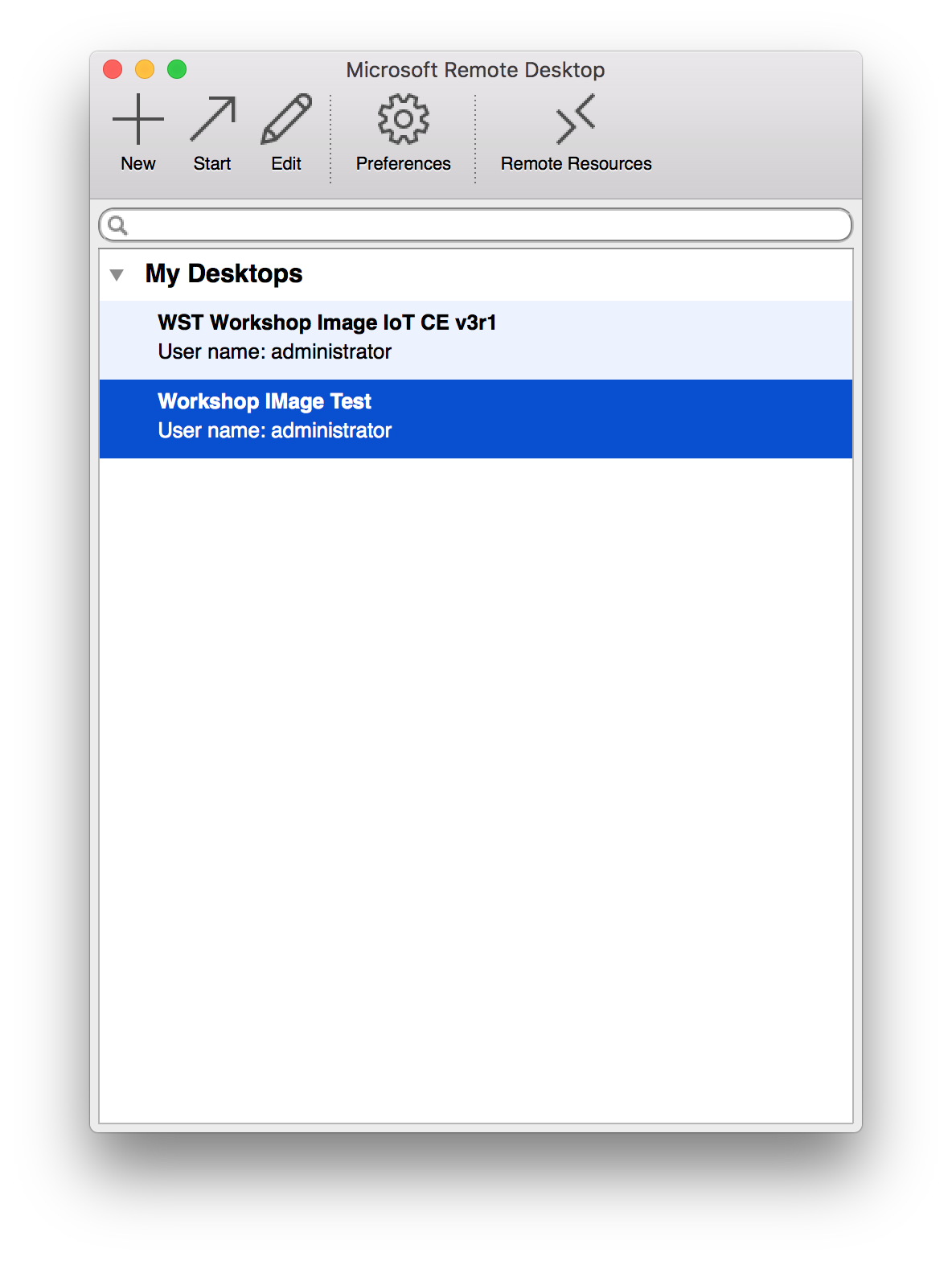
Click on “install” and then on “open”. Confirm that you trust Microsoft and RDC starts.Mac RDC1.png

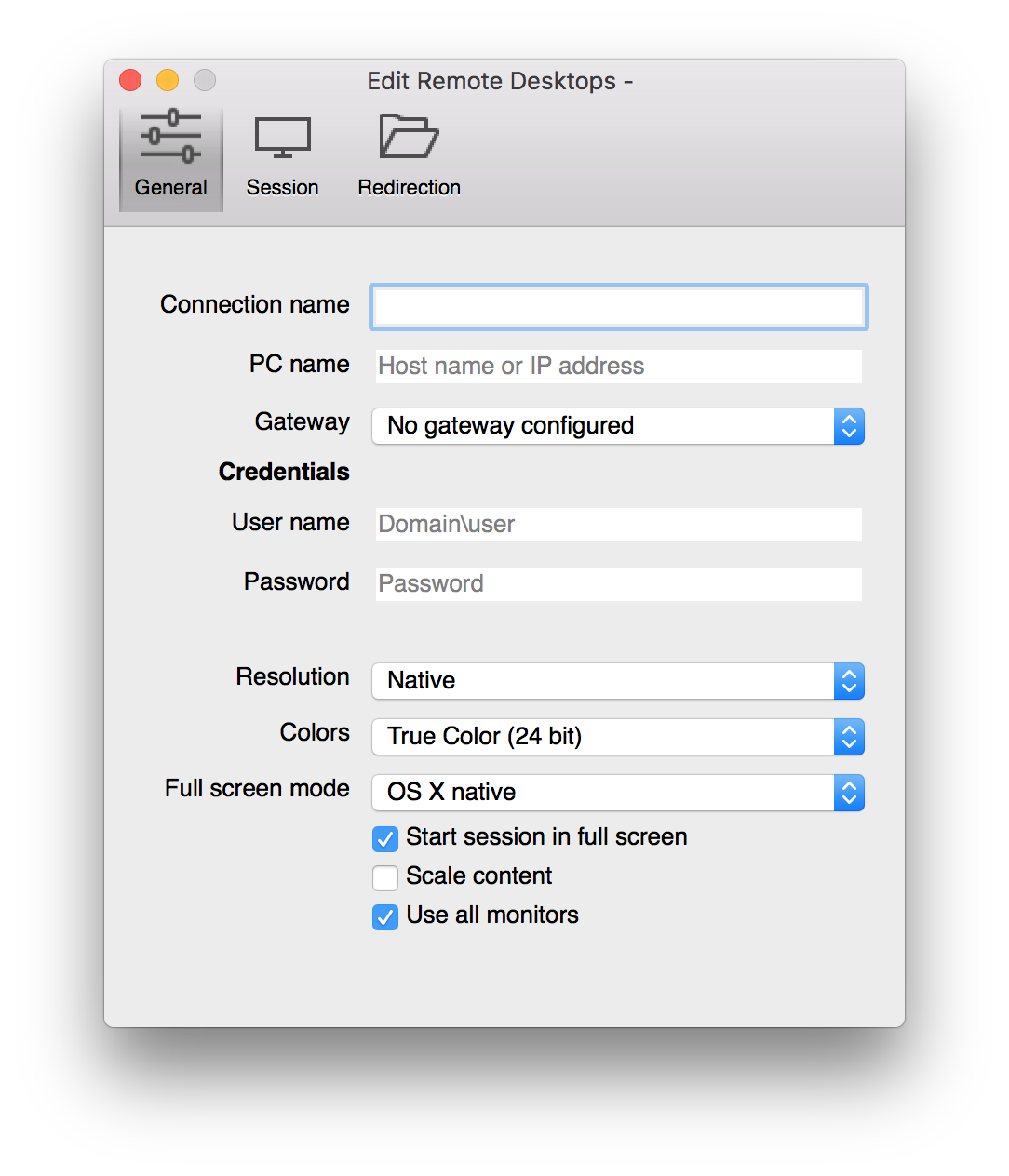
Click on “+” (“New”) and fill in the credentials you were given.MAC RDC2.png

  • Connection name, You can give your connection a logical name.
  • PC name, the IP address that you were given, i.e. 169.x.y.z:3333 (The 3333 is mandatory)
  • User name, the name given, mostly “administrator”
  • Password, what you were given
  • The rest can be changed if you like. Lower resolution and colors mean less data.

Now just close the window and press “Start” with your image selected.

And now?

Your image will be ready and started. Login is automatically, you can start using the tools that are installed in the image.

Images are valid for a certain period of time, I’m still trying out the facility so I can not say how long this is exactly.

So contact me when you want to try Rhapsody and our tools, I will provide you with an image.

Happy evaluating with Rhapsody!

Walter van der Heiden (wvdheiden@willert.de)


« Older posts Newer posts »

© 2026 Rhapsody TechBlog

Theme by Anders NorenUp ↑